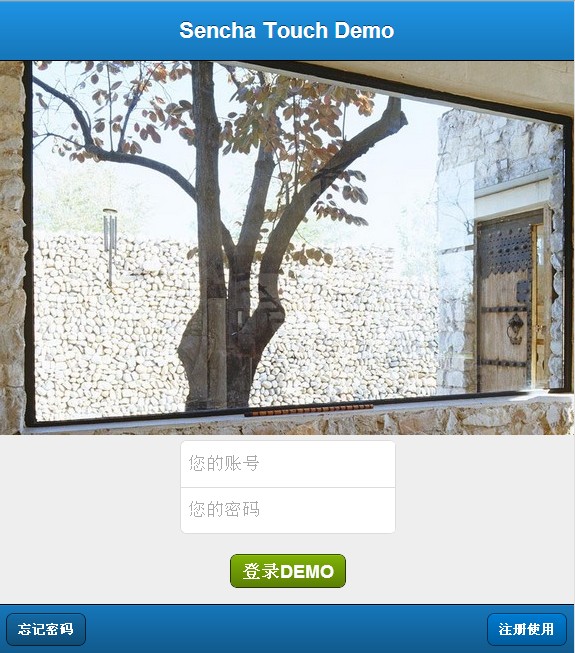
很多人都在群里问要一个好看的登录界面,我表示很无奈,哪有好看的,每个人的要求不一样,要好看的只有自己做。
下面是我自己整理的一个通用版的登录界面,稍做修改,很容易能变成你想要的界面,
不说废话,直接上代码:
Ext.define('App.view.login.LoginPanel', {
extend: 'Ext.form.Panel',
xtype: 'loginpanel',
requires: [
'Ext.field.Password'
],
config: {
id: 'content',
fullscreen: true,
scrollable:'vertical',
layout: {type: 'vbox', align: 'center'},
items:[{
xtype: 'container', //使用普通的Container容器即可
html: '<img src="resources/images/login.jpg" style="margin-top: 16px;" />' //直接设定html代码来显示图片,注意有16像素的顶部margin
},
{
xtype : 'fieldset',
items : [
{
xtype : 'textfield',
placeHolder: '您的账号',
required: true,
name: 'account'
},{
xtype: 'passwordfield',
name: 'password',
placeHolder: '您的密码',
required: true
}]
},
{
xtype: 'button',
text: '登录DEMO',
margin: '20 0 0 0',
ui: 'confirm', //绿色按钮
action: 'login'
},
{
id: 'status',
xtype: 'toolbar',
ui: 'light',
docked: 'top',
height: 60,
title: "Sencha Touch Demo"
},
{
xtype: 'toolbar',
docked: 'bottom',
ui: 'dark',
items: [{
xtype: 'button',
ui: 'drastic',
text: '忘记密码'
},
{ xtype: 'spacer'},
{
xtype: 'button',
ui: 'action',
text: '注册使用'
}]
}]
}
});
以后代码,复制即可运行哦....(代码很简单,不喜勿碰,也欢迎大家点评,指点意见)
下面是效果图: