zoukankan      html  css  js  c++  java
  • 文件上传(插件版)和下载

    这个方法可以上传图片,文档,视频,在方法里面进行了处理。  源码地址:https://github.com/SeaLee02/FunctionModule  UploadFiles/WebDemo/UpControl 文件夹下就是源码

    优点:无刷新页面可以上传你的文件,速度快。

    缺点:需要花时间去探索下。如果你能够理解这个方法,并掌握,能够根据需求自己更改,那就看不出有什么缺点。

    跟分页一样,如果你掌握,每个项目都可以用到。这个方法的上传是不用通过表单提交的,是利用插件来上传文件


    我们的显示效果:

    我们点击浏览就可以选择文件,选择完成后就会上传,这个过程不会刷新页面,如果文本框中出现了路径证明上传成功,失败就弹出提示。

    我们既然把文件已经上传成功了,最右边这个按钮是干嘛的呢?

    它可以来保存我们的数据到数据库中。

    这样会有一个问题,如果文件过大,是不让上传的。

    我们可以改一下配置文件

        <system.web>       <compilation debug="true" targetFramework="4.5.2" />       <httpRuntime executionTimeout="3600" maxRequestLength="1048576" requestValidationMode="2.0" />       <!--<httpRuntime targetFramework="4.5.2" />-->     </system.web>


    我们的排版:


     我们的JS
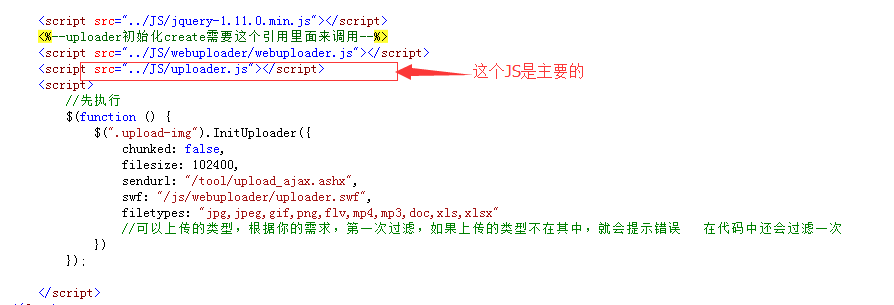
    一般处理程序:

    public void ProcessRequest(HttpContext context)
            {
                //取得处事类型
                string action = HttpContext.Current.Request.QueryString["action"];

                switch (action)
                {
                    case "EditorFile": //编辑器文件
                        EditorFile(context);
                        break;
                    case "ManagerFile": //管理文件
                        ManagerFile(context);
                        break;
                    default: //普通上传
                        UpLoadFile(context);
                        break;
                }
            }


    private void UpLoadFile(HttpContext context)
            {
                HttpPostedFile _upfile = context.Request.Files["Filedata"]; //得到上传的文件  里面的参数不能改,在JS里面定义好了
                bool _iswater = false; //默认不打水印
                bool _isthumbnail = false; //默认不生成缩略图

                if (_upfile == null)
                {
                    context.Response.Write("{"status": 0, "msg": "请选择要上传文件!"}");
                    return;
                }
                Upload upFiles = new Upload();
                string msg = upFiles.fileSaveAs(_upfile, _isthumbnail, _iswater);

                //返回成功信息
                context.Response.Write(msg);
                context.Response.End();
            }

    Upload类:


    /// <summary>

            /// 文件上传方法

            /// </summary>

            /// <param name="postedFile">上传的文件</param>

            /// <param name="isthumbnail">是否生成缩略图</param>

            /// <param name="iswater">是否带水印</param>

            /// <returns>上传后文件信息</returns>

            public string fileSaveAs(HttpPostedFile postedFile, bool isthumbnail, bool iswater)

            {

                //我们的一般会对上传的文件进行处理,比如:判断类型,改名字


                try

                {

                    //postedFile.FileName 得到的是不包含路径的名字,无法用Path类去获取名字

                    string fileExt = FileHelp.GetFileExt(postedFile.FileName); //得到扩展名

                    int fileSize = postedFile.ContentLength;//文件大小 字节单位

                    string FileName = postedFile.FileName.Substring(postedFile.FileName.LastIndexOf(@"") + 1).Replace("." + fileExt, "");//原文件

                    string randomCode = FileHelp.GetRamCode(); //随机数

                    string newFileName = randomCode + "." + fileExt; //新文件名

                    string newThumbnailFileName = "thumb_" + newFileName; //随机生成缩略图文件名

                    string uploadPath = GetUploadPath(); //上传相对路径

                    string NewFilePath = uploadPath.TrimStart('~') + newFileName;//上传后的路径


                    string newThumbnailPath = uploadPath + newThumbnailFileName;//缩略图路径

                    //绝对路径,需要判断项目中是否存在

                    string fullUpLoadPath = FileHelp.GetMapPath(uploadPath); //HttpContext.Current.Server.MapPath(uploadPath);


                    //检查文件扩展是否合法

                    if (!CheckFileExt(_fileExt:fileExt))

                    {

                        return "{"status": 0, "msg": "不允许上传" + fileExt + "类型的文件!"}";

                    }

                    //检查文件大小是否合法

                    if (!CheckFileSize(fileExt, fileSize))

                    {

                        return "{"status": 0, "msg": "文件超过限制的大小!"}";

                    }


                    //检查上传的物理路径是否存在,不存在则创建

                    if (!Directory.Exists(fullUpLoadPath))

                    {

                        Directory.CreateDirectory(fullUpLoadPath);

                    }

                    //保存的时候需要绝对路径

                    postedFile.SaveAs(fullUpLoadPath + newFileName);


                    if (IsVedio(fileExt.ToLower()))

                    {

                        string mpegfile = NewFilePath;

                        string flvfile = uploadPath + randomCode + ".mp4";

                        try

                        {

                            string Extension = CheckExtension(fileExt);

                            if (Extension == "ffmpeg")

                            {

                                ChangeFilePhy(mpegfile, flvfile);

                            }

                            else if (Extension == "mencoder")

                            {

                                MChangeFilePhy(mpegfile, flvfile);

                            }

                        }

                        catch

                        {


                        }


                        //处理完毕,返回JOSN格式的文件信息

                        return "{"status": 1, "msg": "上传文件成功!", "name": ""

                            + FileName + "", "path": "" + NewFilePath + "", "thumb": ""

                            + newThumbnailPath + "", "size": " + fileSize + ", "ext": "" + "flv" + ""}";

                    }

                    else

                    {

                        return "{"status":1,"msg":"上传文件成功!","name":"" + FileName

                       + "","path":"" + NewFilePath + "","thumb":"" + newThumbnailPath

                       + "","size":"" + fileSize + "","ext":"" + fileExt + ""}";

                    }  

                }

                catch

                {

                    return "{"status": 0, "msg": "上传过程中发生意外错误!"}";

                }

            }

    有一些方法这里我没有给出。

    保存数据到数据库

    protected void lbSave_Click(object sender, EventArgs e)
            {
                FunctionDemo.BLL.Files filesBLL = new FunctionDemo.BLL.Files();
                FunctionDemo.Model.Files filesModel = new FunctionDemo.Model.Files();
                filesModel.FileName = txtTitle.Value.Trim();
                filesModel.FilePath = txtFileUrl.Text.Trim();
                filesModel.FileSize = (int.Parse(txtFileSize.Value.Trim()) / 1024) + "K";
                filesModel.UpdateTime = DateTime.Now;
                int i = txtFileUrl.Text.Trim().LastIndexOf(".") + 1;
                string Name = txtFileUrl.Text.Trim().Substring(i);
                tool.Upload up = new tool.Upload();
                if (up.IsImage(Name.ToLower()))
                {
                    filesModel.FileType = 0;
                }
                else
                {
                    filesModel.FileType = 1;
                }
                if (filesBLL.Add(filesModel)>0)
                {
                    Page.ClientScript.RegisterStartupScript(Page.ClientScript.GetType(), "myscript", "<script> alert('上传成功');</script>");
                    txtTitle.Value = "";
                    txtFileUrl.Text = "";
                    txtFileSize.Value = "";
                    return;
                }
                else
                {
                    Page.ClientScript.RegisterStartupScript(Page.ClientScript.GetType(), "myscript", "<script> alert('上传失败');</script>");
                }
            }


    上传完成了,保存好了

    我们再来看看下载,显示数据

    <div class="list">
                <asp:Repeater ID="DemoRepeater" runat="server" OnItemCommand="DemoRepeater_ItemCommand">
                    <HeaderTemplate>
                        <table cellpadding="0" cellspacing="0">
                            <tr>
                                <th>
                                    <input type="checkbox" onclick="checkAll(this);"></th>
                                <th width="40">排序</th>
                                <th>名称</th>
                                <th>上传时间</th>
                                <th>大小</th>
                                <th width="160">操作</th>
                            </tr>
                    </HeaderTemplate>
                    <ItemTemplate>
                        <tr>
                            <td>
                                <asp:CheckBox ID="chkId" CssClass="checkall" runat="server" Style="vertical-align: middle;" />
                                <asp:HiddenField ID="hidFilePath" Value='<%#Eval("FilePath")%>' runat="server" />
                            </td>
                            <td><%= RowIndex++ %></td>
                            <td><%# Eval("FileName") %></td>
                            <td><%# Eval("UpdateTime")%></td>
                            <td><%# Eval("FileSize") %></td>
                            <td>
                                <%--如果是Word,视屏可以直接给路径,图片则不能--%>
                                <%--  <a href='..<%#Eval("FilePath") %>' class="button b">下载</a>--%>
                                <asp:LinkButton ID="lbDownload" CssClass="button b" CommandName="download" CommandArgument='<%#Eval("FilePath") %>' runat="server">下载</asp:LinkButton>
                                <a class="button c" href='javascript:void(0);' onclick='showDiv("m1","<%# Eval("FilePath") %>")'>查看</a>
                      //想查看视频,把m1改成m2即可
                            </td>
                    </ItemTemplate>
                    <FooterTemplate>
                        </table> 
                    </FooterTemplate>
                </asp:Repeater>
            </div>


    我们先来看看测试下载,


    /// <summary>

            ///测试下载

            /// </summary>

            /// <param name="sender"></param>

            /// <param name="e"></param>

            protected void lb_DownLoad_Click(object sender, EventArgs e)

            {

                //以文件下载

                string fileName = Server.MapPath("/files/登入模块.doc");

                //FileInfo fn = new FileInfo(fileName);

                //Response.Clear();         

                //Response.ClearContent();

                //Response.ClearHeaders();

                //Response.AppendHeader("Content-Disposition", "attachment;filename="+HttpUtility.UrlEncode(fn.Name,System.Text.Encoding.UTF8));

                //Response.AppendHeader("Content-Length",fileName.Length.ToString());

                //Response.WriteFile(fileName);

                //Response.Flush();

                //Response.End();


                //以二进制字符下载

                FileStream fs = new FileStream(fileName, FileMode.Open);        

                byte[] buff = new byte[fs.Length];

                fs.Read(buff, 0, buff.Length);

                fs.Close();

                Response.AppendHeader("Content-Disposition", "attachment;filename=" + HttpUtility.UrlEncode("登入模块.doc", System.Text.Encoding.UTF8));

                Response.BinaryWrite(buff);

                Response.Flush();

                Response.End();


            }

    利用HttpResponse类来下载,测试下载成功了,我们再来看看普通下载


    /// <summary>

            /// 普通下载

            /// </summary>

            /// <param name="source"></param>

            /// <param name="e"></param>


            protected void DemoRepeater_ItemCommand(object source, RepeaterCommandEventArgs e)

            {

                if (e.CommandName== "download")

                {

                    string filePath = e.CommandArgument.ToString();//路径

                    try

                    {

                        string FullFileName = Server.MapPath(filePath);//需要下载的文件名

                        FileInfo DownLoadFile = new FileInfo(FullFileName);

                        if (DownLoadFile.Exists)

                        {

                            Response.Clear();

                            Response.ClearHeaders();

                            Response.Buffer = false;

                            Response.ContentType = "application/octet-stream";//二进制流(常见下载)

                            //添加头部,做什么处理 如果下载的出现乱码就编下码

                            Response.AppendHeader("Content-Disposition", "attachment;filename=" + DownLoadFile.Name);// HttpUtility.UrlEncode(DownLoadFile.Name,System.Text.Encoding.ASCII));

                           //HttpUtility.UrlEncode(DownloadFile.Name, System.Text.Encoding.GetEncoding("utf-8"))

                             Response.AppendHeader("Content-Length", DownLoadFile.Length.ToString());

                            Response.WriteFile(DownLoadFile.FullName);

                            Response.Flush();

                            Response.End();

                        }

                        else

                        {


                        }

                    }

                    catch

                    {


                    }

                }

            }


    还有一种则是以解压的形式下载文件

    先的引用一个dll文件

    ZipFile类才会调用


    /// <summary>

            /// 解压形式的下载

            /// </summary>

            /// <param name="sender"></param>

            /// <param name="e"></param>

            protected void lb_YS_Click(object sender, EventArgs e)

            {

                Response.Clear();

                Response.ContentType = "application/zip";//压缩类型

                string fileName = DateTime.Now.ToString("yyyyMMddHHmmss");

                Response.AppendHeader("Content-Disposition","filename="+fileName+".zip");

                using (ZipFile zf=new ZipFile(System.Text.Encoding.Default)) //默认给个编码,不然会出现乱码

                {

                    foreach (RepeaterItem item in DemoRepeater.Items)

                    {

                        CheckBox cbID = item.FindControl("chkId") as CheckBox;

                        //这是强势转化,如果确定类型可以这么用,不确实就上面的方法

                        HiddenField hidFilePath = (HiddenField)item.FindControl("hidFilePath");


                        if (cbID.Checked)

                        {

                            // 同一个zip下面不能有两个相同名字的文件夹 这里的文件名可以给个动态的

                            //zf.AddDirectoryByName("测试文件夹");//添加文件夹

                            if (!zf.EntryFileNames.Contains(hidFilePath.Value.Split('/')[hidFilePath.Value.Split('/').Length - 1].Trim()))

                            {

                                zf.AddFile(Server.MapPath(hidFilePath.Value), "");

                                //第一个参数是路径,需要在项目中找到的路劲,第二个参数是文件夹,没有就给个""

                                //zf.AddFile(Server.MapPath(hidFilePath.Value), "测试文件夹");

                            }

                        }

                    }

                    zf.Save(Response.OutputStream);

                }

                Response.End();

            }

        }

     源码里面可以查看图片,而视频把m1改成m2,后台查询数据,改成2。显示Word,PPT,Exel这些下次在分享如何在网站中实现在先查看修改文档。

    效果:
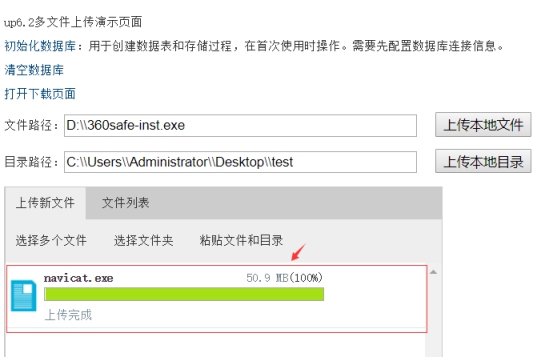
     

    文件上传至存储目录:D:Navicat Premium 12 avicat.exe

    文件通过插件上传后任意下载。

    DEMO下载地址:https://dwz.cn/fgXtRtnu 

  • 相关阅读:
    洛谷 P1226 【模板】快速幂||取余运算 题解
    洛谷 P2678 跳石头 题解
    洛谷 P2615 神奇的幻方 题解
    洛谷 P1083 借教室 题解
    洛谷 P1076 寻宝 题解
    洛谷 UVA10298 Power Strings 题解
    洛谷 P3375 【模板】KMP字符串匹配 题解
    Kafka Shell基本命令
    Mybatis与Hibernate的详细对比
    MyBatis简介
  • 原文地址:https://www.cnblogs.com/xproer/p/10775930.html
Copyright © 2011-2022 走看看