首先:
安装vuex
npm install vuex -S需要有两个组件(HelloWord.vue 和 HelloDemo.vue)[组件自定义]
注册路由
注册store
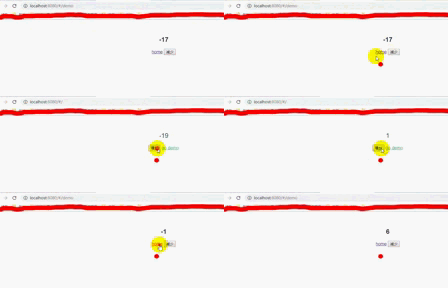
测试
一、需要有两个路由
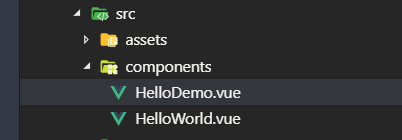
HelloWorld.vue如下
- <template>
- <div class="hello">
- <h2>{{this.$store.state.count}}</h2>
- <button @click="inc">增加</button>
- <router-link to="/demo">go demo</router-link>
- </div>
- </template>
-
- <script>
- export default {
- name: 'HelloWorld',
- methods:{
- inc:function(){
- this.$store.commit('inc')
- }
- }
- }
- </script>
HelloDemo.vue如下
- <template>
- <div>
- <h2>{{this.$store.state.count}}</h2>
- <router-link to="/">home</router-link>
- <button @click="deinc">减少</button>
- </div>
- </template>
-
- <script>
- export default {
- name:'HelloDemo',
- methods:{
- deinc:function(){
- this.$store.commit('deinc')
- }
- }
- }
- </script>
二、注册路由
打开router-->index.js
- import Vue from 'vue'
- import Router from 'vue-router'
- //分别引入两个组件
- import HelloWorld from '@/components/HelloWorld'
- import HelloDemo from '@/components/HelloDemo'
-
- Vue.use(Router)
-
- export default new Router({
- //配置路由参数
- routes: [
- {
- path: '/',
- name: 'HelloWorld',
- component: HelloWorld
- },
- {
- path: '/demo',
- name: 'HelloDemo',
- component: HelloDemo
- }
- ]
- })
三、注册Store
打开main.js
- import Vue from 'vue'
- import App from './App'
- import router from './router'
- import Vuex from 'vuex' //引入Vuex
-
- Vue.use(Vuex)//使用Vuex
-
- //定义store
- const store = new Vuex.Store({
- //定义数据
- state:{
- count:0
- },
- //定义方法
- mutations:{
- inc(){
- this.state.count++
- },
- deinc(){
- this.state.count--
- }
- }
- })
-
- Vue.config.productionTip = false
-
- new Vue({
- el: '#app',
- router,
- store,//将store注册在vue实例中
- components: { App },
- template: '<App/>'
- })
四、测试