binding可能是初学Javascript的人最不关心的函数,当你意识到需要『保持this在其他函数中的上下文』,实际上你需要的是Function.prototype.bind()。
你第一次碰到问题的时候,你可能倾向于把this赋值给一个变量,你就可以在上下文改变的时候,也可以使用。许多人选择self,_this或者context来命名。这些都不会被用到,这样做也没什么问题,但是这里有更好的办法,专门解决这个问题。
我愿意为作用域做任何事,但我不会that = this
— Jake Archibald (@jaffathecake) February 20, 2013
我们真正在寻求解决的问题是什么?
看看这段代码,把上下文赋值给一个变量:
var myObj = {

    specialFunction: function () {

    },

    anotherSpecialFunction: function () {

    },

    getAsyncData: function (cb) {
        cb();
    },

    render: function () {
        var that = this;
        this.getAsyncData(function () {
            that.specialFunction();
            that.anotherSpecialFunction();
        });
    }
};

myObj.render();
如果上面直接用this.specialFunction(),结果是一个错误信息:
Uncaught TypeError: Object [object global] has no method 'specialFunction'
当回调的时候,我们需要保持myObj的上下文引用。使用that.specialFunction(),让我们用that的上下文且正确执行函数。然而,用Function.prototype.bind()可以简化一些。
重写例子:
render: function () {

    this.getAsyncData(function () {

        this.specialFunction();

        this.anotherSpecialFunction();

    }.bind(this));

}
我们刚做了什么?
.bind()就是创建了一个新函数,当我们呼叫时,把他的this赋值。所以我们可以传递我们的上下文,this(指向myObj),传递进.bind()函数。当回调执行的时候,this指向myObj。
如果我们对Function.prototype.bind()的内部实现有兴致,请看下面的例子:
Function.prototype.bind = function (scope) {
    var fn = this;
    return function () {
        return fn.apply(scope);
    };
}
一个简单的例子:
var foo = {
    x: 3
}

var bar = function(){
    console.log(this.x);
}

bar(); // undefined

var boundFunc = bar.bind(foo);

boundFunc(); // 3
浏览器兼容性
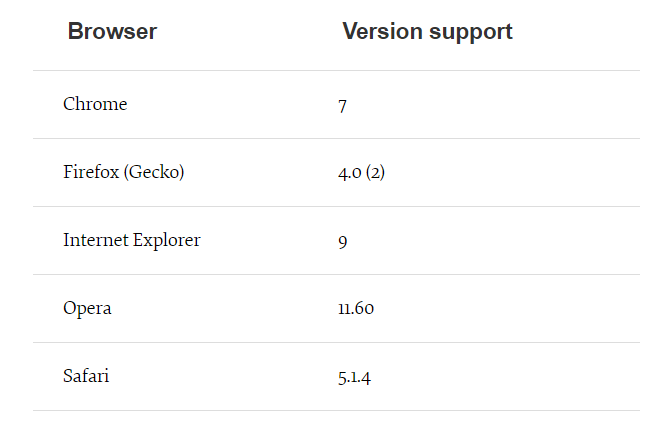
如你所见,不幸的是,不支持ie8以下(啥也不说了)。
简单版的polyfill:
Function.prototype.bind = Function.prototype.bind || function(context) {
  var that = this;
  return function() {
    return that.apply(context, arguments);
  }
}
说实话,基本可以满足多数的场景需求了。bind 方法返回的还是一个方法(经典闭包),很巧妙地用 apply 改变(绑定)了 this 指向。但是毫无疑问这样简单的实现是有问题的。
首先,该方法只支持传入一个参数,为方法需要绑定的 this 指向,原生的 bind 方法可以传入多个参数;
对比MDN官网polyfill, "简单版" 没有考虑 bind 返回函数被 new 操作的情况。如果不是被 new 操作,那就简单了,和 "简单版" 是一样一样的。
MDN为那些原生不支持.bind()的浏览器提供的官方版解决:
if (!Function.prototype.bind) {
 Function.prototype.bind = function(oThis) {
   if (typeof this !== 'function') {
     // closest thing possible to the ECMAScript 5
     // internal IsCallable function
     throw new TypeError('Function.prototype.bind - what is trying to be bound is not callable');
   }

   var aArgs   = Array.prototype.slice.call(arguments, 1),
       fToBind = this,
       fNOP    = function() {},
       fBound  = function() {
         // this instanceof fNOP === true时,说明返回的fBound被当做new的构造函数调用
         return fToBind.apply(this instanceof fNOP
                ? this
                : oThis,
                // 获取调用时(fBound)的传参.bind 返回的函数入参往往是这么传递的
                aArgs.concat(Array.prototype.slice.call(arguments)));
       };

   // 维护原型关系
   if (this.prototype) {
     // Function.prototype doesn't have a prototype property
     fNOP.prototype = this.prototype;
   }
   // 下行的代码使fBound.prototype是fNOP的实例,因此
   // 返回的fBound若作为new的构造函数,new生成的新对象作为this传入fBound,新对象的__proto__就是fNOP的实例
   fBound.prototype = new fNOP();

   return fBound;
 };
}
使用方式
学习东西时候,我发现有效的方式不是认真的去学习概念,而是去看怎么使用到现在的工作中。如果顺利的话,下面某些例子可以被用到你的代码中解决你面对的问题。
点击事件处理
其中一个用处是追踪点击(点击后执行一个动作),需要我们在一个对象中储存信息:
var logger = {
    x: 0,
    updateCount: function(){
        this.x++;
        console.log(this.x);
    }
}
我们写click事件处理,然后呼叫logger中的updateCount():
document.querySelector('button').addEventListener('click',logger.updateCount);
但我们造了一个不必要的匿名函数,保持this的正确指向。
简化一下:
document.querySelector('button').addEventListener('click', logger.updateCount.bind(logger));
刚才我们用了.bind()创造一个新函数然后把作用域绑定到logger对象上。
时间间隔函数
如果你以前用过模板引擎(handlebars)或者MV*框架,那你应该意识到一个问题的发生,当你呼叫渲染模板,立刻想进入新的DOM节点。
假设我们尝试实例一个jQuery插件:
var myView = {

    template: '/* a template string containing our <select /> */',

    $el: $('#content'),

    afterRender: function () {
        this.$el.find('select').myPlugin();
    },

    render: function () {
        this.$el.html(this.template());
        this.afterRender();
    }
}

myView.render();
你会发现这可用,但并不总是可用的。这就是问题所在。这就像是老鼠赛跑:不管发生什么,第一个到达获得胜利。有时候是render,有时候是插件的实例(instantiation)。
目前,一个不为人知,我们可以用小hack---setTimeout()。
需要重写一下,一旦Dom节点出现,我们就可以安全的实例我们的JQuery插件。
//

   afterRender: function () {
       this.$el.find('select').myPlugin();
   },

   render: function () {
       this.$el.html(this.template());
       setTimeout(this.afterRender, 0);
   }

//
可是,我们会看到.afterRender()没有被找到。
咋办?把我们.bind()加进去:
//

    afterRender: function () {
        this.$el.find('select').myPlugin();
    },

    render: function () {
        this.$el.html(this.template());
        setTimeout(this.afterRender.bind(this), 0);
    }

//
现在afterRender()可以在正确的上下文中执行了。
整合事件绑定和QUERYSELECTORALL
DOM API一个重大提高就是querySelector,querySelectorAll和classList API等等。
然而,并没有原生添加事件到多个节点(nodeList)的方式。所以,我们最终偷窃了forEach函数,来自Array.prototype,如下:
Array.prototype.forEach.call(document.querySelectorAll('.klasses'), function(el){
    el.addEventListener('click', someFunction);
});
更好一点,用.bind():
var unboundForEach = Array.prototype.forEach,
    forEach = Function.prototype.call.bind(unboundForEach);

forEach(document.querySelectorAll('.klasses'), function (el) {
    el.addEventListener('click', someFunction);
});
现在我们有了小巧的方法来循环多个dom节点。