用vue实现一个简单的网页桌面时钟,主要包括时钟显示、计时、暂停、重置等几个功能。
效果图如下,页面刚进来的时候是一个时钟,时钟上显示的时、分、秒为当前实际时间,点击计时器按钮后,页面变成一个计时器,并且计时器按钮被暂停与重置两个按钮替代,分别对计时器进行暂停和重置,若点击时钟按钮会切换回时钟界面。

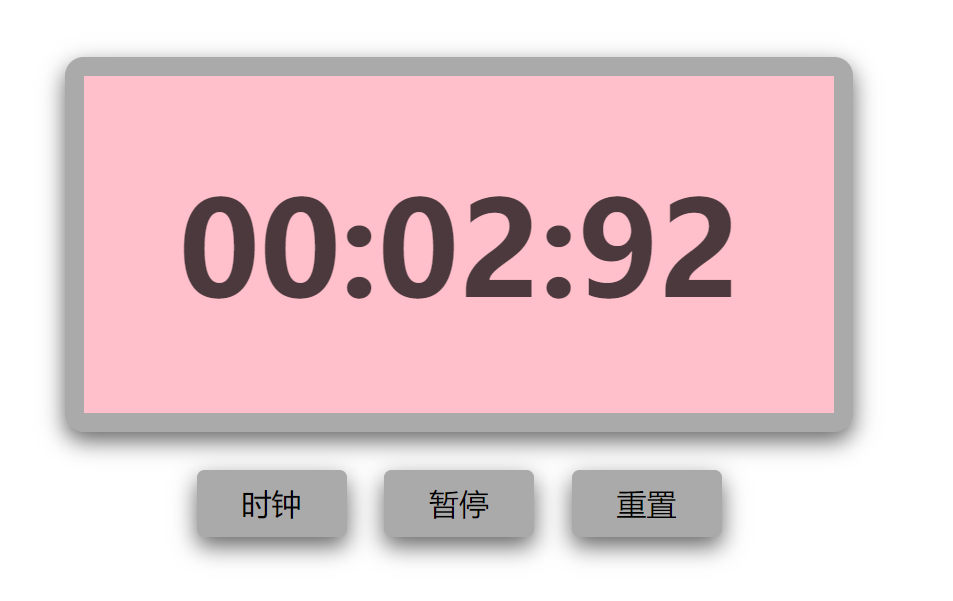
代码如下:
<!DOCTYPE html>
<html>
<head>
    <meta charset="utf-8">
    <title>时钟</title>
    <style type="text/css">
        .clock {
             400px;
            height: 180px;
            line-height: 180px;
            border: 10px solid #aaa;
            border-radius: 10px;
            margin: 120px auto;
            background: pink;
            text-align: center;
            position: relative;
            box-shadow: 0px 5px 20px rgba(0,0,0,.6);
        }
        .clock .text {
            font-size: 70px;
            font-weight: bold;
            color: rgba(0,0,0,.7);
        }
        .clock .btn {
            position: absolute;
            /*top: -66px;*/
            bottom: -66px;
            border: none;
            outline: none;
             80px;
            height: 36px;
            border-radius: 4px;
            font-size: 16px;
            background: #aaa;
            cursor: pointer;
            box-shadow: 0px 5px 20px rgba(0,0,0,.6);
        }
        .clock .btn:hover {
            opacity: 0.8;
        }
        .clock .btn-clock {
            left: 110px;
        }
        .clock .btn-clock.to-left {
            left: 60px;
        }
        .clock .btn-timer {
            right: 110px;
        }
        .clock .btn-suspend {
            right: 160px;
        }
        .clock .btn-reset {
            right: 60px;
        }
    </style>
    <script src="https://cdn.jsdelivr.net/npm/vue/dist/vue.js"></script>
</head>
<body>
    <div id="app">
        <div class="clock">
            <span class="text" v-if="index == 0">
                {{ hour }}:{{ min }}:{{ sec }}
            </span>
            <span class="text" v-else>
                {{ min }}:{{ sec }}:{{ msec }}
            </span>
            <button class="btn btn-clock" @click="selectClock" :class="{'to-left': index != 0}">时钟</button>
            <button class="btn btn-timer" @click="selectTimer" v-if="index == 0">
                <span>计时器</span>
            </button>
            <button class="btn btn-suspend" @click="suspendTimer" v-if="index > 0">
                <span v-if="index == 1">暂停</span>
                <span v-if="index == 2">开始</span>
            </button>
            <button class="btn btn-reset" @click="resetTimer" v-if="index == 1 || index == 2">
                <span>重置</span>
            </button>
        </div>
    </div>
    <script type="text/javascript">
        var app = new Vue({
            el: '#app',
            data: {
                index: 0,   // 0表示时钟页面,1表示计时器计时状态,2表示计时器暂停状态
                hour: '00',  // 页面显示的数值
                min: '00',
                sec: '00',
                msec: '00',
                h: 0,       // 临时保存的数值
                m: 0,
                s: 0,
                ms: 0,
                timer: null,
                date: null
            },
            // 监视器
            watch: {
                index(newValue, oldValue) {
                    clearInterval(this.timer);
                    this.timer = null;
                    this.date = null;
                    // 从时钟页面click过来 或 从计时器页面click过来
                    if (oldValue == 0 || newValue == 0) {   // index等于2时数据保留
                        this.hour = '00';
                        this.min = '00';
                        this.sec = '00';
                        this.msec = '00';
                        this.h = 0;
                        this.m = 0;
                        this.s = 0;
                        this.ms = 0;
                    }
                    this.autoMove();
                }
            },
            methods: {
                // 自动计时
                autoMove() {
                    if (this.index == 0) {
                        this.timer = setInterval(res => {
                            this.date = new Date();
                            this.h = this.date.getHours();
                            this.m = this.date.getMinutes();
                            this.s = this.date.getSeconds();
                            this.hour = this.h > 9 ? this.h : '0' + this.h;
                            this.min = this.m > 9 ?  this.m : '0' + this.m;
                            this.sec = this.s > 9 ? this.s : '0' + this.s;
                        }, 1000);
                    } else if (this.index == 1){
                        this.timer = setInterval(res => {
                            this.ms ++;
                            if (this.ms == 100) {
                                this.s ++;
                                this.ms = 0;
                            }
                            if (this.s == 60) {
                                this.m ++;
                                this.s = 0;
                            }
                            this.msec = this.ms > 9 ? this.ms : '0' + this.ms;
                            this.min = this.m > 9 ?  this.m : '0' + this.m;
                            this.sec = this.s > 9 ? this.s : '0' + this.s;
                        }, 10);
                    }
                },
                // 选择时钟
                selectClock() {
                    this.index = 0;
                },
                // 选择计时器
                selectTimer() {
                    this.index = 1;
                },
                // 开始、暂停计时器
                suspendTimer() {
                    if (this.index == 1) {
                        this.index = 2;
                    } else if (this.index == 2) {
                        this.index = 1;
                    }
                },
                // 重置计时器
                resetTimer() {
                    this.index = 0;
                    setTimeout(res => {
                        this.index = 1;
                    }, 1);
                }
            },
            mounted() {
                this.autoMove();
            }
        })
    </script>
</body>
</html>