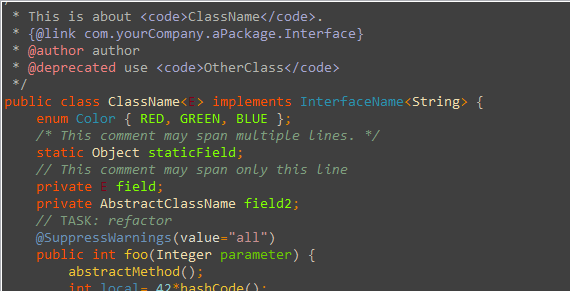
Eclipse背景颜色修改:
操作界面默认颜色为白色。对于我们长期使用电脑编程的人来说,白色很刺激我们的眼睛,所以我经常会改变workspace的背景色,使眼睛舒服一些。设置方法如下:
1、打开window->Preference,弹出Preference面板
2、展开General标签,选中Editors选项,展开。
3、选中 Test Editors,右边出现Test Editors面板。 面板中有这样一个选项:Appearance color options; 其中是各种板块颜色的设置,其中有一项是background color,根据自己的喜好选择颜色。
4、 选中background color,勾掉System Default,点击'color',弹出颜色选择面板,选择喜好的颜色,单击确定。
5、返回Test Editors,单击Apply即可。展开Test Editors,还有其他选项,比如对错误提示的颜色样式,如果你对此感兴趣也可尝试更改一下。
背景颜色向你推荐:色调:85。饱和度:1 2 3。亮度:2 0 5
文档都不再是刺眼的白底黑字,而是非常柔和的豆沙绿色,这个色调是眼科专家配置的,长时间使用会很有效的缓解眼睛疲劳保护眼睛。
改变背景颜色
windows->Preferences->General->Editor->Text Editors
右边选择Appearance color options
选Background color 选择背景颜色
选Current line highlight 来改变 当前选中行 的颜色
配色方案详细following:
Eclipse字体大小调整:
窗口(Window)-首选项(Preferences)-常规(General)-外观(Appearence)-颜色与字体(Colors And Fonts),在右边的对话框里选择Java - Java Editor Text Font,点击出现的修改(Change)按钮,可以设置显示在在主窗体中程序的字体大小,设置完之后点击右下角的应用(Apply),最后点击确定(OK)即可。
xml的字体大小调整:
window--preferences--General--appearance--colors and fonts--Basic-- "Text font "
然后点change,可以设置字体的大小
eclipse 改变颜色,背景
一款看上去十分舒服的代码配色,会让Coding过程变得惬意,让编写效率提升不少。而Eclipse默认的代码配色实在丑陋,除了关键字为褐色加粗、字符串为蓝色外,其余颜色均为黑色。在这样的配色中,最难分辨的就是局部变量和类型的私有字段(其他好歹可以通过大小写规则来判断,如果代码编写够规范的话)。而且过于单调的颜色,不容易刺激视觉神经乃至中枢神经,会增加疲劳感,带来困意。
为了改变这一现状,我们必须对Eclipse的代码配色进行更改。
我的代码颜色
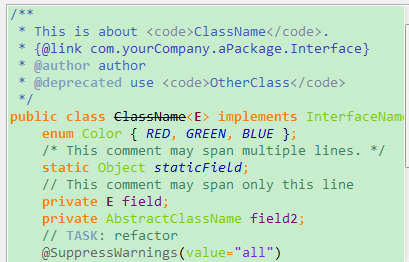
改变字体颜色
windows->Preferences->Java->Editor->Syntax Coloring
右边选择Java 然后可以自由选择颜色了
Annotations(注释): 107, 147, 186 浅蓝色
Deprecated members(不建议使用的成员): 0, 0, 0
Fields(字段): 128, 0, 128 紫色
KeyWord 'return'(关键字'return'): 255, 0, 0 红色
Keyword excluding 'return'(除了关键字以外的return): 255, 128 ,0 橙色
Local variable declarations(局部变量声明): 128, 128, 128 灰色
Method declarations(方法声明): 255, 128, 64 橙色
Method(方法): 0, 48, 96 暗浅蓝色
Operators and brackets(运算符与方括号): 255, 128, 0 橙色
Others(其他): 96 153, 0 深绿色
Static fields(静态字段): 33, 0, 189 深蓝色
Static Method invocations(静态方法调用): 77, 166 255 天蓝色
Strings(字符串): 132, 26, 238 中天蓝色
Type variables(类型变量): 128, 0, 25 红罗色
改变背景颜色(黑底背景的设置)
windows->Preferences->General->Editor->Text Editors
右边选择Appearance color options
选Background color 选择背景颜色 背景配色:160,0,59
选Current line highlight 来改变 当前选中行 的颜色
配色方案详细following:
Annotations(注释): 107, 147, 186
Deprecated members(不建议使用的成员): 0, 0, 0
Fields(字段):128,255,0 绿色
KeyWord 'return'(关键字'return'): 255, 0, 0 红色
Keyword excluding 'return'(除了关键字以外的return): 255,80, 0 深深橘色
Local variable declarations(局部变量声明): 70,140,179 深蓝色
Method declarations(方法声明): 247,197,39 淡橘色
Method(方法): 241,196,54 深淡橘色
Operators and brackets(运算符与方括号): 255, 128, 0 深橘色
Others(其他): 126, 202, 0 淡绿色
Static fields(静态字段): 128,255,0 绿色
Static Method invocations(静态方法调用): 77, 166 255
Strings(字符串): 89,196,196 墨蓝色
Type variables(类型变量): 222, 0, 25 红色