README:
How to use it:
    There is a file with username and password named 'username.txt' in directory 'login'.
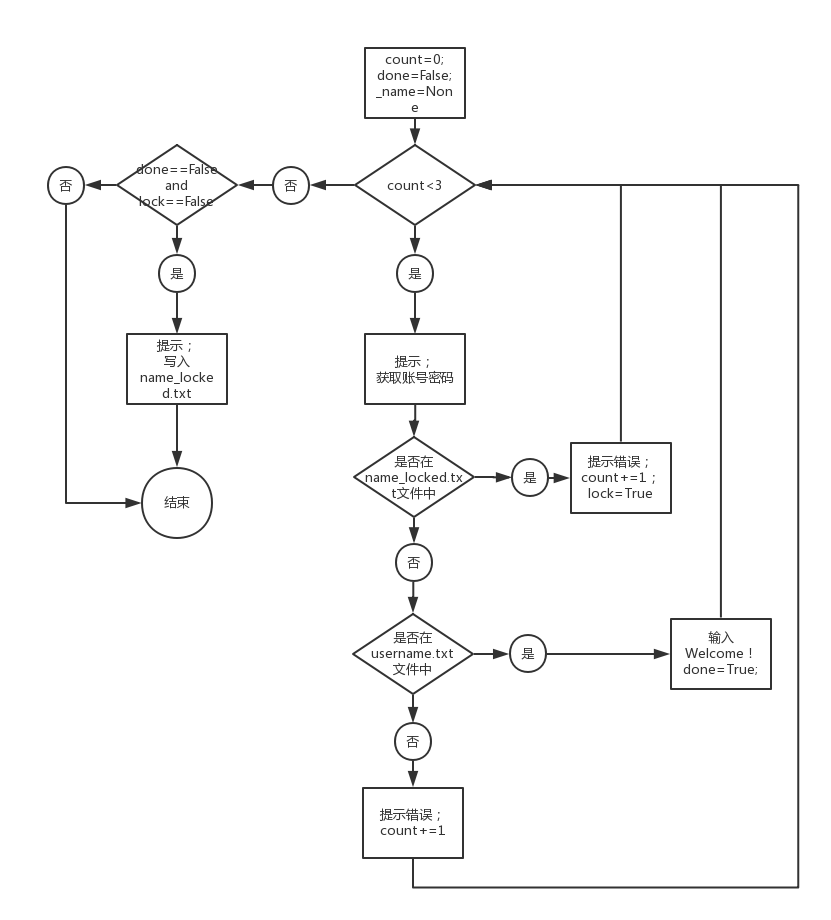
    When user inputs username and password, the program will verify it. If they are wrong, user can try again.
    Remember user only have three chances, then the wrong username will be writen in the file named 'name_locked.txt'.
    If the username user inputs is in 'name_locked.txt', user has no chance to try again!
 1 # Author:Zhang Yide
 2 # coding:utf-8
 3
 4 count = 0
 5 done = False
 6 lock = False
 7 _name = None
 8
 9 while count < 3:
10     _name = input('Please input username:')
11     _password = input('Please input password:')
12     _namepw = _name + ': ' + _password + '
'
13
14     #判断_namepw是否在name_locked.txt中
15     f_lock = open('name_locked.txt')
16     for line in f_lock.readlines():
17         if line == _name + '
':
18             print('{name} has been locked!'.format(name=_name))
19             f_lock.close()
20             lock = True
21             f_lock.close()
22             break
23         else:
24             continue
25
26     # 判断_namepw是否在username.txt中
27     f_username = open('username.txt')
28     for line in f_username.readlines():
29         if line == _namepw:
30             print('Welcome {name}!'.format(name=_name))
31             done = True
32             f_username.close()
33             break
34         else:
35             continue
36
37     #如果不在username.txt文件中,提示错误。
38     if done == False and lock == False:
39         print('Username or password is wrong! Try again!')
40         count += 1
41         f_username.close()
42     else:
43         break
44 #现已被锁定且之前未被锁定,则写入lock.txt.
45 if done == False and lock ==False :
46     print('The username {name} has been locked'.format(name=_name))
47     with open('name_locked.txt', 'a') as f_lock:
48         f_lock.write('{name}
'.format(name = _name))
49 else:
50     pass