写这篇记录的原因是因为我之前在Spring Boot项目中通过MyBatis连接DB2返回的结果中存在一些字段,
这些字段的元素中缺少了一些符号,所以我现在通过在自己的电脑上通过MyBatis连接DB2和MySQL,
来重现之前碰到的情况。
为了方便分析起见,我这里新建一个test表,并插入一些数据。以下是相关的SQL语句:
drop table test;
create table test (
    id int,
    name varchar(20),
    memo character(50)
);
insert into test (id, name, memo) values (1, 'zifeiy', '床前(明月)光');
insert into test (id, name, memo) values (2, '王()小明', '春眠!@#$%^&**()不觉()《》晓');
然后通过如下SQL语句可以看到返回结果:
SELECT * FROM test
DB2中返回的结果:

MySQL中返回的结果:
mysql> select * from test;
+------+------------+-------------------------------+
| id   | name       | memo                          |
+------+------------+-------------------------------+
|    1 | zifeiy     | 床前(明月)光                |
|    2 | 王()小明 | 春眠!@#$%^&**()不觉()《》晓 |
+------+------------+-------------------------------+
接下来我们开始编写一个简单的Spring Boot项目,来重现我们之前遇到的问题。
首先去 https://start.spring.io/ 生成一个名为 spring-test 的 spring boot 项目。
以下时application.properties的配置,其中包括连接DB2的信息和连接MySQL的信息。
这里默认连接DB2,而将MySQL连接的属性注释掉了,在连接MySQL的时候需将DB2的连接信息注释掉,
而将MySQL的连接信息取消掉注释。
# DB Configuration for DB2
spring.datasource.url=jdbc:db2://localhost:50000/SAMPLE
spring.datasource.username=zifeiy
spring.datasource.password=password
spring.datasource.driver-class-name=com.ibm.db2.jcc.DB2Driver

## DB Configuration for MySQL
#spring.datasource.driverClassName=com.mysql.cj.jdbc.Driver
#spring.datasource.url=jdbc:mysql://localhost:3306/zifeiydb?serverTimezone=UTC&useUnicode=true&characterEncoding=UTF-8
#spring.datasource.username=root
#spring.datasource.password=password

# logging
logging.level.com.anbank.tplusone=debug
现在回到我们的 spring-test 项目,他的目录结构大概是这个样子的:
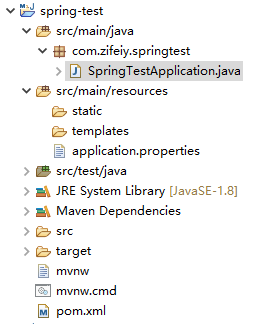
新建名为Test的Java Bean:
package com.zifeiy.springtest.po;

public class Test {
	private int id;
	private String name;
	private String memo;

	// getters & setters
	public int getId() {
		return id;
	}
	public void setId(int id) {
		this.id = id;
	}
	public String getName() {
		return name;
	}
	public void setName(String name) {
		this.name = name;
	}
	public String getMemo() {
		return memo;
	}
	public void setMemo(String memo) {
		this.memo = memo;
	}

}
新建Mapper:
package com.zifeiy.springtest.mapper;

import java.util.List;

import org.apache.ibatis.annotations.Mapper;
import org.apache.ibatis.annotations.Select;

import com.zifeiy.springtest.po.Test;

@Mapper
public interface TestMapper {

	@Select("select * from test")
	List<Test> select();
}
新建Serivce接口及其实现:
TestService.java:
package com.zifeiy.springtest.service;

import java.util.List;

import com.zifeiy.springtest.po.Test;

public interface TestService {

	List<Test> select();
}
TestServiceImpl.java:
package com.zifeiy.springtest.service.impl;

import java.util.List;

import org.springframework.beans.factory.annotation.Autowired;
import org.springframework.stereotype.Service;
import org.springframework.transaction.annotation.Transactional;

import com.zifeiy.springtest.mapper.TestMapper;
import com.zifeiy.springtest.po.Test;
import com.zifeiy.springtest.service.TestService;

@Service
@Transactional
public class TestServiceImpl implements TestService {

	@Autowired
	private TestMapper testMapper;

	@Override
	public List<Test> select() {
		return this.testMapper.select();
	}

}
新建Controller:
package com.zifeiy.springtest.controller;

import java.util.List;

import org.springframework.beans.factory.annotation.Autowired;
import org.springframework.web.bind.annotation.RequestMapping;
import org.springframework.web.bind.annotation.RestController;

import com.zifeiy.springtest.po.Test;
import com.zifeiy.springtest.service.TestService;

@RestController
@RequestMapping("/")
public class TestController {

	@Autowired
	private TestService testService;

	@RequestMapping("/test")
	public List<Test> select() {
		return this.testService.select();
	}

}
然后运行 SpringTestApplication.java 程序,并登陆 http://localhost:8080/test 查看结果如下:
[{"id":1,"name":"zifeiy","memo":"床前(明月)光 "},{"id":2,"name":"王()小明","memo":"春眠!@#$%^&**()不觉()《》晓 "}]
说明在 DB2 Express-C 11 中使用MySQL没有什么问题。
修改 application.properties 文件,使其指向MySQL连接,再次运行。
结果类似,只不过MySQL里面Character类型后面空着的那些空格没有显示出来:
[{"id":1,"name":"zifeiy","memo":"床前(明月)光"},{"id":2,"name":"王()小明","memo":"春眠!@#$%^&**()不觉()《》晓"}]
说明在 MySQL 5.7 中使用MyBatis也灭有什么问题。
想到生产环境和测试环境中使用的是 DB2 9,所以测试一下在 DB2 9 中是否出现这种情况,修改 applications.properties 中的连接信息到测试数据库。
然后结果是这样的:
[{"id":1,"name":"zifeiy","memo":"床前(明月)光 "},{"id":2,"name":"王()小明","memo":"春眠!@#$%^&**()不觉()《》晓 "}]
发现好像没有什么问题。
小结:暂时不能重现之前碰到的问题。后续如果发现问题将在此随笔中继续添加内容。