Triton 搭建 ensemble 过程记录
本文记录 Triton ensemble 搭建的过程,在 Triton 这个特性叫做 ensemble,但是这个特性叫做 pipeline 更为常见,后面就叫 pipeline 吧。首先要说明的是,本文中的例子只是为了试试看 Triton pipeline 这个特性,我认为搭建出的 pipeline 不一定就是高效的。
先来说说本文将要搭建什么样的 pipeline。本文将使用 resnet50 来进行图片分类,分类的类别保持不变。在对图片进行分类之前,一般都需要有一个预处理的过程。因此,这篇文章将搭建的 pipeline 很简单,就先进行预处理,然后分类。预处理采用 DALI 来处理,resnet50 使用 Pytorch 导出。
本文使用的模型配置文件,已经放在了 Github 上面:https://github.com/zzk0/triton
Pytorch 搭建 resnet50
Pytorch 导出 resnet50 模型
非常简单的一个代码片段,于是我们得到了一个 torchscript 模型。
import torch
import torchvision.models as models

resnet50 = models.resnet50(pretrained=True)
resnet50.eval()
image = torch.randn(1, 3, 244, 244)
resnet50_traced = torch.jit.trace(resnet50, image)
resnet50(image)
resnet50_traced.save('model.pt')
Pytorch 模型配置
我们将文件按照如下方式进行组织,其中 config.pbtxt 是模型配置文件,labels.txt 是 resnet50 训练时候的分类类别,里面有一千个类。另外还需要注意的是,labels.txt 里面的写法,就是一个字符串一个类别就好了。
.
├── 1
│   └── model.pt
├── config.pbtxt
├── labels.txt
config.pbtxt 的写法,通过指定 label_filename 来设定标签文件,输出有 1000 维。
name: "resnet50_pytorch"
platform: "pytorch_libtorch"
max_batch_size: 128
input [
  {
    name: "INPUT__0"
    data_type: TYPE_FP32
    dims: [ 3, -1, -1 ]
  }
]
output [
  {
    name: "OUTPUT__0"
    data_type: TYPE_FP32
    dims: [ 1000 ]
    label_filename: "labels.txt"
  }
]
instance_group [
  {
    count: 1
    kind: KIND_GPU
  }
]
客户端
将模型放到 Triton 的模型仓库之后,启动服务器。之后我们使用下面的脚本进行请求。在这个客户端里,我们先自己做预处理,后续我们将会把预处理的操作放置到服务端。
如果我们想要获取分类的结果,我们可以设置 class_count=k,表示获取 TopK 分类预测结果。如果没有设置这个选项,那么将会得到一个 1000 维的向量。
import numpy as np
import tritonclient.http as httpclient
import torch
from PIL import Image


if __name__ == '__main__':
    triton_client = httpclient.InferenceServerClient(url='172.17.0.2:8000')

    image = Image.open('../resources/images/cat.jpg')

    image = image.resize((224, 224), Image.ANTIALIAS)
    image = np.asarray(image)
    image = image / 255
    image = np.expand_dims(image, axis=0)
    image = np.transpose(image, axes=[0, 3, 1, 2])
    image = image.astype(np.float32)

    inputs = []
    inputs.append(httpclient.InferInput('INPUT__0', image.shape, "FP32"))
    inputs[0].set_data_from_numpy(image, binary_data=False)
    outputs = []
    outputs.append(httpclient.InferRequestedOutput('OUTPUT__0', binary_data=False, class_count=1))

    results = triton_client.infer('resnet50_pytorch', inputs=inputs, outputs=outputs)
    output_data0 = results.as_numpy('OUTPUT__0')
    print(output_data0.shape)
    print(output_data0)
DALI
接下来,我们将客户端预处理的操作放到了服务端上。这里必须要指出的是,这么做只是为了搭建 pipeline,并不是为了性能。你想,图片没有预处理之前,是不是很大,通过网络传输到服务端的开销可能盖过了服务端预处理的收益。
导出 DALI 预处理 pipeline
通过下面的脚序列化 pipeline。
import nvidia.dali as dali
import nvidia.dali.fn as fn

@dali.pipeline_def(batch_size=128, num_threads=4, device_id=0)
def pipeline():
    images = fn.external_source(device='cpu', name='DALI_INPUT_0')
    images = fn.resize(images, resize_x=224, resize_y=224)
    images = fn.transpose(images, perm=[2, 0, 1])
    images = images / 255
    return images


pipeline().serialize(filename='./1/model.dali')
DALI 模型配置
我们将文件按照如下方式组织。
.
├── 1
│   └── model.dali
├── config.pbtxt
模型配置如下。需要注意一个问题:模型实例化的时候,如果没有设置设备,Triton 会在每个设备上初始化一个,接着会发生 core dump。目前猜想的原因是,序列化保存的 pipeline 保存了 device_id=0 这个信息,然后在我的服务器上的第二张卡上初始化模型实例的时候,会出错。后续仔细分析看看,提个 issue 或 pr。
配置好之后,放到模型仓库,然后使用 Github 中对应的脚本做请求试试看,这里就不啰嗦了。
name: "resnet50_dali"
backend: "dali"
max_batch_size: 128
input [
  {
    name: "DALI_INPUT_0"
    data_type: TYPE_FP32
    dims: [ -1, -1, 3 ]
  }
]

output [
  {
    name: "DALI_OUTPUT_0"
    data_type: TYPE_FP32
    dims: [ 3, 224, 224 ]
  }
]
instance_group [
  {
    count: 1
    kind: KIND_GPU
    gpus: [ 0 ]
  }
]
搭建 pipeline
模型配置
pipeline 的配置方法也挺简单的,只不过个人觉得手写 protobuf 不太顺手,用户体验不太好。
下面说几个要注意的点:一,ensemble 的 key 是 platform,不是 backend。二,model_version 设为数字,而不是字符串。三,ensemble_scheduling 的输入输出 key 都是对应模型的输入输出名字。
name: "resnet50_ensemble"
platform: "ensemble"
max_batch_size: 128
input [
  {
    name: "ENSEMBLE_INPUT_0"
    data_type: TYPE_FP32
    dims: [ -1, -1, 3 ]
  }
]
output [
  {
    name: "ENSEMBLE_OUTPUT_0"
    data_type: TYPE_FP32
    dims: [ 1000 ]
  }
]
ensemble_scheduling {
  step [
    {
      model_name: "resnet50_dali"
      model_version: 1
      input_map: {
        key: "DALI_INPUT_0"
        value: "ENSEMBLE_INPUT_0"
      }
      output_map: {
        key: "DALI_OUTPUT_0"
        value: "preprocessed_image"
      }
    },
    {
      model_name: "resnet50_pytorch"
      model_version: 1
      input_map: {
        key: "INPUT__0"
        value: "preprocessed_image"
      }
      output_map: {
        key: "OUTPUT__0"
        value: "ENSEMBLE_OUTPUT_0"
      }
    }
  ]
}
客户端请求
虽然在客户端避开预处理,但是不能完全避开。比如我们一定需要设置好输入的 shape,否则 Triton 就是不认你这个请求,所以还是自己手动加一个维度。此外,输入要设置成 float32 类型。于是我们避开了 resize 等预处理操作。
请求的时候,你会发现,即使 pipeline 没有设置 label_filename,我们仍然可以获取分类的结果。这里我猜测 Triton 的内部实现可能是,输入的 Shape 会进行检查,输出的 Shape 就不理了(这个不是看 Backend 是否检查嘛。
import numpy as np
import tritonclient.http as httpclient
import torch
from PIL import Image


if __name__ == '__main__':
    triton_client = httpclient.InferenceServerClient(url='172.17.0.2:8000')

    image = Image.open('../resources/images/cat.jpg')
    image = np.asarray(image)
    image = np.expand_dims(image, axis=0)
    image = image.astype(np.float32)

    inputs = []
    inputs.append(httpclient.InferInput('ENSEMBLE_INPUT_0', image.shape, "FP32"))
    inputs[0].set_data_from_numpy(image, binary_data=False)
    outputs = []
    outputs.append(httpclient.InferRequestedOutput('ENSEMBLE_OUTPUT_0', binary_data=False, class_count=1))

    results = triton_client.infer('resnet50_ensemble', inputs=inputs, outputs=outputs)
    output_data0 = results.as_numpy('ENSEMBLE_OUTPUT_0')
    print(output_data0.shape)
    print(output_data0)
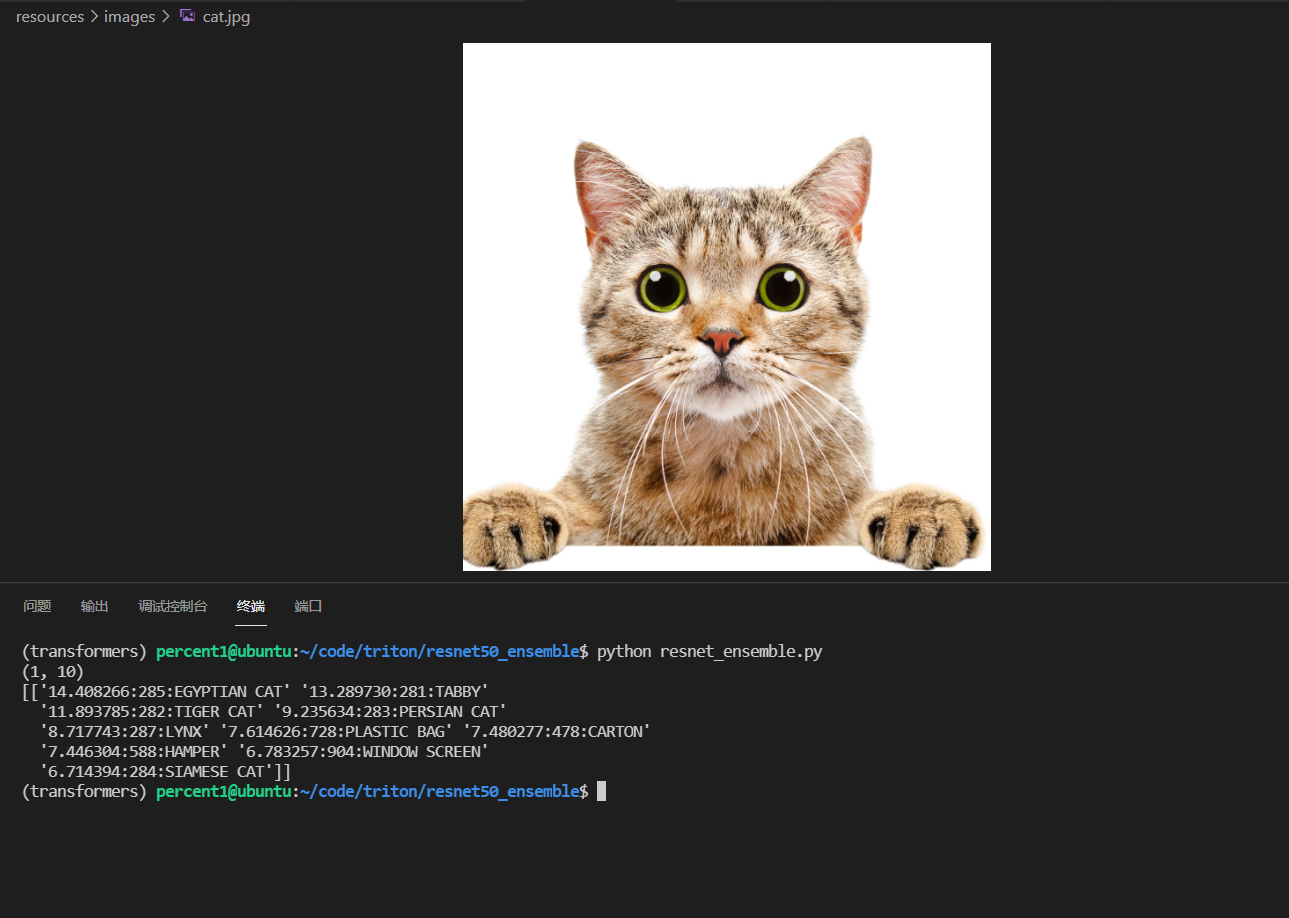
至此,我们就可以使用一张没有预处理过的照片,然后直接发送给 Triton,Triton 帮你做预处理,然后d对处理的结果做分类。不过,我现在对 pipeline 的原理还不是很清楚,比如有个问题:pipeline 的模型和模型之间,是否会发生额外的内存复制开销呢?这个要深入源码看一看了。
附上自己的请求结果。