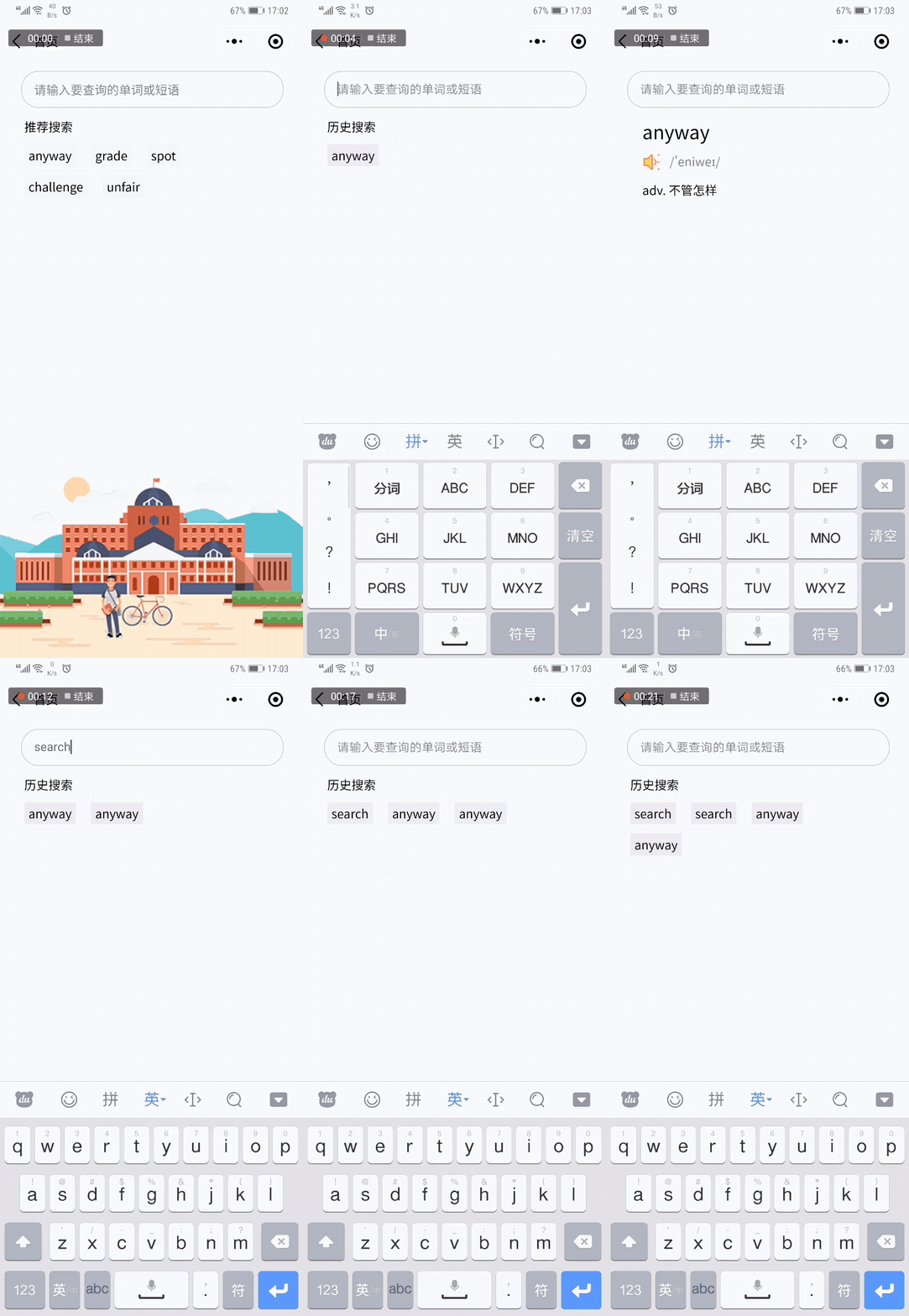
内容包含单词短语搜索释义、搜索历史、推荐搜索、音频播放、随机抽取方法
效果如图
话不多说,先上代码
1、HTML
<input name="text" type='text' class="text" bindinput="getText" value="{{inputValue}}" bindconfirm="toSearch" placeholder='请输入要查询的单词或短语' bindfocus="historyList" />
<!-- 推荐搜索 -->
<view class="history" hidden='{{!hidden}}'>
  <view class="historyTitle">{{historyList == '' ? '推荐搜索' : '历史搜索'}}</view>
  <block wx:if="{{historyList == ''}}" wx:key="{{randomList}}" wx:for="{{randomList}}">
    <view class="historyList" data-key="{{item}}" bindtap="historySearch">{{item}}</view>
  </block>
  <block wx:if="{{historyList !== ''}}" wx:key="{{historyList}}" wx:for="{{historyList}}" wx:if="{{ index < 5 }}">
    <view class="historyList" data-key="{{item}}" bindtap="historySearch">{{item}}</view>
  </block>
</view>
2、js
onShow: function () {
    const that = this
    wx.getStorage({
      key: 'historyList',
      success: function(res) {
        console.log('缓存获取成功')
        that.setData({
          historyList: res.data
        })
      },
      fail: function () {
        console.log('缓存获取失败')
        that.setData({
          //本地的一组单词数据
          randomList: util.getRandom(that.data.randomWord, 5)
        })
      }
    })

  },
  //获取焦点时展示搜索记录
  historyList: function () {
    this.setData({
      hidden: true,
      inputValue: ''
    })
  },
  //历史列表点击搜索方法
  historySearch: function (e) {
    const that = this
    const text = e.currentTarget.dataset.key
    console.log(text)
    that.setData({
      text: text
    }, ()=> {
      that.toSearch()
    })
  },
  //获取单词释义
  toSearch: function () {
    const word = this.data.text
    const that = this
    //直接入栈即可,使用let返回的是长度值报错
    that.data.historyList.unshift(word)
    console.log("word-->" + word)
    //扇贝API获取单词释义
    wx.request({
      url: 'https://api.shanbay.com/bdc/search/?word=' + word,
      data: {},
      method: 'GET',
      success: function (res) {
        console.log("单词释义-->" + res.data)
        that.setData({
          content: res.data,
          hidden: false,
          historyList: that.data.historyList
        })
      },
      fail: function () {
        wx.showModal({
          title: '',
          content: '网络错误',
          showCancel: false,
          success: function (res) {

          }
        })
      }
    })
  },
  //播放音频
  playAudio: function () {
    const innerAudioContext = wx.createInnerAudioContext()
    innerAudioContext.autoplay = true
    innerAudioContext.src = this.data.content.data.audio_addresses.us[0]
    innerAudioContext.onPlay(() => {
      console.log('开始播放')
    })
    //循环播放bug 需播放完后销毁音频
    innerAudioContext.onStop(() => {
      innerAudioContext.destroy()
    })
    //播放错误时输出错误,销毁音频重新播放
    innerAudioContext.onError((res) => {
      console.log(res.errMsg)
      console.log(res.errCode)
      innerAudioContext.destroy()
    })
  },
  //获取表单数据
  getText: function (e) {
    this.setData({
      text: e.detail.value,
      hidden: true
    })
  },
  //清空表单数据
  clearInput: function () {
    this.setData({
      typeValue: '',
      text: ''
    })
  },
  //设置搜索缓存
  searchStorage: function () {
    const that = this
    console.log('退出页面')
    wx.setStorage({
      key: 'historyList',
      data: that.data.historyList,
      success: function () {
        console.log('缓存成功')
      }
    })
  },
  onHide: function () {
    this.searchStorage()
  },
  onUnload: function () {
    this.searchStorage()
  }
3、util.js中的随机抽取方法
//随机抽取单词
const getRandom = function (arr, count) {
  let shuffled = arr.slice(0), i = arr.length, min = i - count, temp, index;
  while (i-- > min) {
    index = Math.floor((i + 1) * Math.random());
    temp = shuffled[index];
    shuffled[index] = shuffled[i];
    shuffled[i] = temp;
  }
  return shuffled.slice(min);
}
原理:通过setStorage和getStorage方法来讲搜索记录保存至本地并读取显示,与推荐搜索交替进行<br>
单词搜索为扇贝API,商用需自行解决API收费问题
<br>
<br>
作者:zzppff
Github链接:https://github.com/zzppff/zzppff-miniprogram
原创方法,商业转载请联系作者获得授权,非商业转载请注明出处。