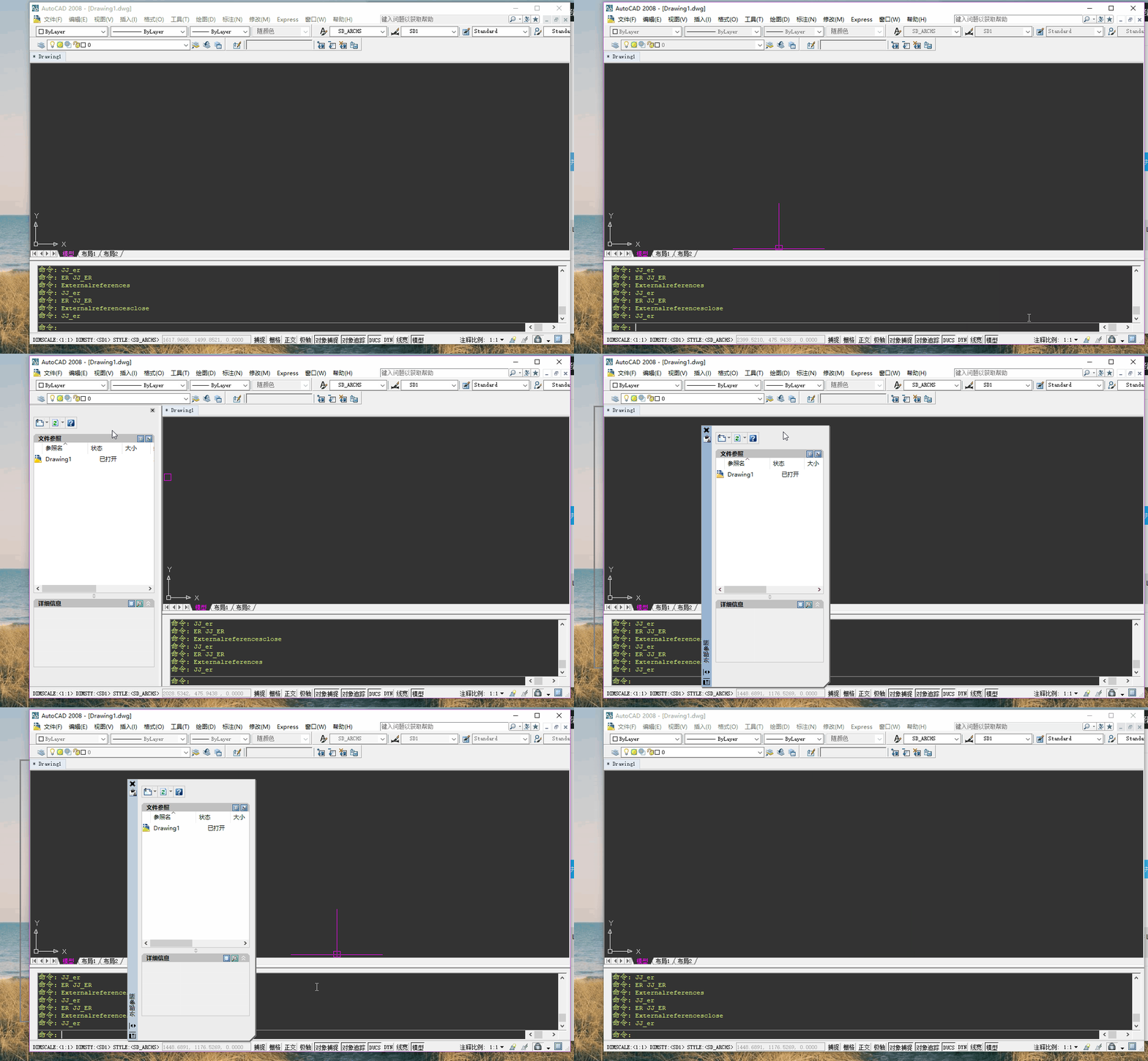
首先我要判断是否已经打开了参照面板.
然而cad自己没有相关的系统变量.这时我就需要利用到win32api来判断程序是否打开了参照面板了.
首先学习的是 从.NET平台调用Win32 API 这篇文章很好的说明了c#如何调用win32api,以及大家可能遇到的各种问题.
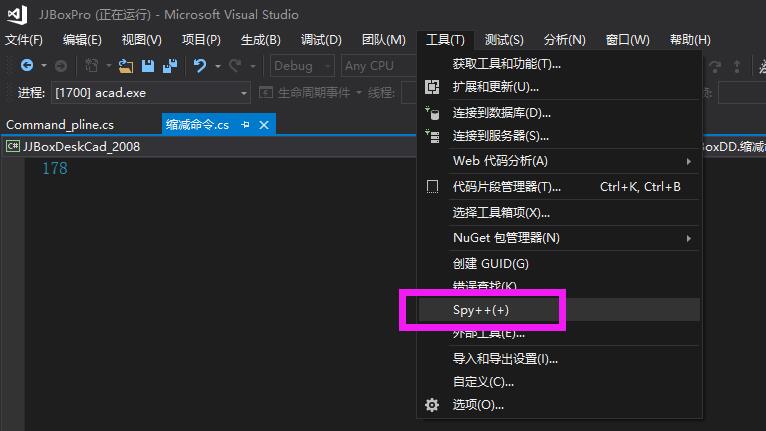
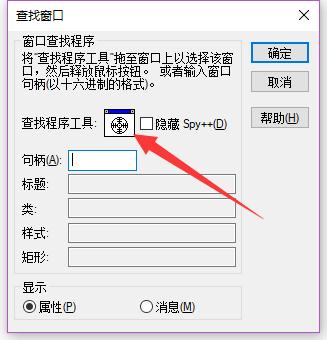
其次,我们要用到spy++这个工具来看windowns窗口的句柄,
注意这个工具若没有的话,要在控制面板上面选择vs,然后安装c++的相关内容,不然只安装net是没有的....
还有就是工具--导入和导出设置--重置所有设置--Visual C++,选择C++工程的环境!!
然后就可以利用spy++查找的拖拽来拖到cad窗口上....
然后我直接贴一下整个功能的代码:
win32api:


#if !HC2019
#else
using GrxCAD.DatabaseServices;
using GrxCAD.EditorInput;
using GrxCAD.Geometry;
using GrxCAD.ApplicationServices;
using GrxCAD.Runtime;
#endif
using System;
using System.Collections;
using System.Collections.Generic;
using System.Drawing;
using System.Drawing.Printing;
using System.Runtime.InteropServices;
using System.Text;

namespace JingJingBoxDD
{
    public class LocalPrinter
    {
        /// <summary>
        /// 系统所有打印机名称(默认将在第一)
        /// </summary>
        public static string[] GetLocalPrinters()
        {
            var fPrinters = new List<string>();
            try
            {
                PrintDocument fPrintDocument = new PrintDocument();
                string s = fPrintDocument.PrinterSettings.PrinterName;//默认打印机
                if (s != null)
                {
                    //默认打印机始终出现在列表的第一项
                    fPrinters.Add(s);
                }
                foreach (string fPrinterName in PrinterSettings.InstalledPrinters)
                {
                    if (!fPrinters.Contains(fPrinterName))
                    {
                        fPrinters.Add(fPrinterName);
                    }
                }
            }
            catch
            { }
            return fPrinters.ToArray();
        }
    }

    public partial class Win32api
    {
        /// <summary>
        /// 设置默认打印机
        /// </summary>
        /// <param name="Name"></param>
        /// <returns></returns>
        [DllImport("winspool.drv")]
        public static extern bool SetDefaultPrinter(string Name);
    }

    public partial class Win32api
    {
        // https://blog.csdn.net/bcbobo21cn/article/details/50930221

        public delegate bool WNDENUMPROC(IntPtr hwnd, int lParam);

        /// <summary>
        /// 置前窗口
        /// </summary>
        /// <param name="hwnd"></param>
        /// <returns></returns>
        [DllImport("user32.dll", CharSet = CharSet.Auto)]
        public static extern bool SetForegroundWindow(IntPtr hwnd);

        /// <summary>
        /// 枚举窗口
        /// </summary>
        /// <param name="lpEnumFunc"></param>
        /// <param name="lParam"></param>
        /// <returns></returns>
        [DllImport("user32.dll", CharSet = CharSet.Auto)]
        public static extern bool EnumWindows(WNDENUMPROC lpEnumFunc, int lParam);

        /// <summary>
        /// 获取窗口Text
        /// </summary>
        /// <param name="hwnd"></param>
        /// <param name="lpString"></param>
        /// <param name="nMaxCount"></param>
        /// <returns></returns>
        [DllImport("user32.dll", CharSet = CharSet.Auto)]
        public static extern int GetWindowText(IntPtr hwnd, [MarshalAs(UnmanagedType.LPWStr)]StringBuilder lpString, int nMaxCount);

        /// <summary>
        /// 获取窗口类名
        /// </summary>
        /// <param name="hwnd"></param>
        /// <param name="lpString"></param>
        /// <param name="nMaxCount"></param>
        /// <returns></returns>
        [DllImport("user32.dll", CharSet = CharSet.Auto)]
        public static extern int GetClassName(IntPtr hwnd, [MarshalAs(UnmanagedType.LPWStr)]StringBuilder lpString, int nMaxCount);

        /// <summary>
        /// 窗口隐藏
        /// </summary>
        /// <param name="hwnd">窗口句柄</param>
        /// <returns></returns>
        [DllImport("user32.dll", CharSet = CharSet.Auto)]
        public static extern bool IsWindowVisible(IntPtr hwnd);

        /// <summary>
        /// 查找子窗口
        /// </summary>
        /// <param name="hwnd"></param>
        /// <param name="hwndChildAfter"></param>
        /// <param name="lpszClass"></param>
        /// <param name="lpszWindow"></param>
        /// <returns></returns>
        [DllImport("user32.dll", SetLastError = true, CharSet = CharSet.Auto)]
        public static extern IntPtr FindWindowEx(IntPtr hwnd, uint hwndChildAfter, string lpszClass, string lpszWindow);

        ///https://jingyan.baidu.com/article/c45ad29cd5fb58051653e278.html
        /// <summary>
        /// 发送消息
        /// </summary>
        /// <returns></returns>
        [DllImport("user32.dll", SetLastError = true, CharSet = CharSet.Auto)]
        public static extern int SendMessage(IntPtr hwnd, int wMsg, IntPtr wParam, IntPtr lParam);

        /// <summary>
        /// 发送消息
        /// </summary>
        /// <returns></returns>
        [DllImport("user32.dll", SetLastError = true, CharSet = CharSet.Auto)]
        public static extern int SendMessage(IntPtr hwnd, int wMsg, IntPtr wParam, ref Rectangle lParam);

        /// <summary>
        /// 关闭文件夹
        /// </summary>
        /// <param name="hwnd"></param>
        public static void QuitToolbar(IntPtr hwnd)
        {
            // https://docs.microsoft.com/zh-cn/windows/desktop/winmsg/wm-close
            const int WM_CLOSE = 0x0010;
            SendMessage(hwnd, WM_CLOSE, IntPtr.Zero, IntPtr.Zero);
        }

        //窗口样式
        public struct WindowInfo
        {
            public IntPtr hwnd;
            public string windowName;
            public string className;
        }

        /// <summary>
        /// 枚举所有桌面窗口
        /// </summary>
        /// <returns></returns>
        public static WindowInfo[] GetAllDesktopWindows()
        {
            //用来保存窗口对象 列表
            var wndList = new List<WindowInfo>();
            //枚举所有桌面窗口
            EnumWindows(delegate (IntPtr hWnd, int lParam)
            {
                WindowInfo wnd = new WindowInfo();
                StringBuilder sb = new StringBuilder(256);
                wnd.hwnd = hWnd;//句柄
                GetWindowText(hWnd, sb, sb.Capacity); //获取窗口名称
                wnd.windowName = sb.ToString();
                GetClassName(hWnd, sb, sb.Capacity);//获取窗口类
                wnd.className = sb.ToString();
                wndList.Add(wnd);//添加到列表中
                return true;
            }, 0);
            return wndList.ToArray();
        }
    }

    public struct InternetExplorer
    {
        public IntPtr HWND { get; set; }//句柄
        public string LocationURL { get; set; }//文件夹路径
        public void Quit()//关闭文件夹
        {
            Win32api.QuitToolbar(HWND);
        }
    }

    /// <summary>
    /// 遍历桌面资源管理器
    /// </summary>
    public class ShellWindows : IEnumerable
    {
        private readonly ArrayList list;
        public IEnumerator GetEnumerator()
        {
            return (list as IEnumerable).GetEnumerator();
        }

        /// <summary>
        /// 获取桌面所有文件夹的路径
        /// </summary>
        /// <returns></returns>
        public ShellWindows()
        {
            var allDesktopWindows = Win32api.GetAllDesktopWindows();
            var lst = new List<InternetExplorer>();
            foreach (var item in allDesktopWindows)
            {
                if (item.className == "CabinetWClass")
                {
                    string a = item.windowName;
                    var fi = Win32api.FindWindowEx(item.hwnd, 0, "WorkerW", null);
                    if (fi != IntPtr.Zero)
                    {
                        fi = Win32api.FindWindowEx(fi, 0, "ReBarWindow32", null);
                        if (fi != IntPtr.Zero)
                        {
                            fi = Win32api.FindWindowEx(fi, 0, "Address Band Root", null);
                            if (fi != IntPtr.Zero)
                            {
                                fi = Win32api.FindWindowEx(fi, 0, "msctls_progress32", null);
                                if (fi != IntPtr.Zero)
                                {
                                    fi = Win32api.FindWindowEx(fi, 0, "Breadcrumb Parent", null);
                                    if (fi != IntPtr.Zero)
                                    {
                                        fi = Win32api.FindWindowEx(fi, 0, "ToolbarWindow32", null);//资源管理器
                                        //知识:toolbar上的按钮没有handler,要用发送通知信息
                                        if (fi != IntPtr.Zero)
                                        {
                                            StringBuilder sb = new StringBuilder(256);
                                            //获取窗口名称-路径地址
                                            Win32api.GetWindowText(fi, sb, sb.Capacity);
                                            string path = sb.ToString();
                                            path = path.Substring(4, path.Length - 4);//4表示"地址: "长度

                                            InternetExplorer ie = new InternetExplorer
                                            {
                                                HWND = item.hwnd,
                                                LocationURL = path
                                            };
                                            lst.Add(ie);
                                        }
                                    }
                                }
                            }
                        }

                    }
                }
            }
            list = new ArrayList(lst);
        }
    }

}
主函数:
    public class 开关参照面板
    {
        private static bool Chongfu = false;
        private const string commandname = "JJ_er";
        //重复执行er可以关闭和打开参照面板
        [CommandMethod(commandname, CommandFlags.Session)]//发送同步命令  CommandFlags.Modal |
        public static void JJ_er()
        {
            if (Chongfu)
            {
                Chongfu = false;
                return;
            }
            var ed = Application.DocumentManager.MdiActiveDocument.Editor;
            var regexAcad = new Regex("AutoCAD");//正则
            var regexGcad = new Regex("浩辰");//正则
            try
            {
                bool sendClose = true;
                const string canzhao = "外部参照";
                var wndList = new List<WinApi.WindowInfo>();
                WinApi.GetAllDesktopWindows(wndList);
                IntPtr open = IntPtr.Zero;
#if HC2019
                foreach (var item in wndList)
                {
                    if (item.windowName.Contains("浩辰"))
                    {
                        var fi = WinApi.FindWindowEx(item.hwnd, 0, null, canzhao);//"外部参照"子窗口
                        if (fi != IntPtr.Zero)//显示
                        {
                            if (WinApi.IsWindowVisible(fi))
                            {
                                open = fi;
                                break;
                            }
                        }
                    }
                }
#else
                foreach (var item in wndList)
                {
                    if (regexAcad.IsMatch(item.windowName))
                    {
                        var fi = WinApi.FindWindowEx(item.hwnd, 0, null, "特性");//用过ctrl+1这里会变为"特性"子窗口
                        if (fi == IntPtr.Zero)
                        {
                            fi = WinApi.FindWindowEx(item.hwnd, 0, null, canzhao);//"外部参照"子窗口
                        }
                        if (fi == IntPtr.Zero)
                        {
                            fi = WinApi.FindWindowEx(item.hwnd, 0, null, "块编写选项板");
                        }
                        if (fi != IntPtr.Zero)
                        {
                            fi = WinApi.FindWindowEx(fi, 0, null, canzhao);//找到"特性"或"外部参照"下的"外部参照"子子窗口
                            if (fi != IntPtr.Zero)
                            {
                                open = fi;
                                break;
                            }
                        }
                    }
                    else if (item.windowName == canzhao)
                    {
                        open = item.hwnd;
                        break;
                    }
                }
#endif
                if (open != IntPtr.Zero)//判断窗口如果打开了,显示
                {
                    if (WinApi.IsWindowVisible(open))//可见
                    {
                        sendClose = true;
                    }
                    else
                    {
                        sendClose = false;
                    }
                }
                else
                {
                    foreach (var item in wndList)
                    {
                        if (item.windowName.Contains(canzhao))
                        {
                            open = item.hwnd;
                            break;
                        }
                    }
                    if (open != IntPtr.Zero)
                    {
                        //当浩辰的参照面板拖拉出来,然后放回索引箭头靠边,在这里判断
                        if (WinApi.IsWindowVisible(open))//可见
                        {
                            sendClose = true;
                        }
                        else
                        {
                            sendClose = false;
                        }
                    }
                    else
                    {
                        sendClose = false;
                    }
                }
                if (sendClose)
                {
                    SendExternalreferences("Externalreferencesclose");//关闭面板
                }
                else
                {
                    SendExternalreferences("Externalreferences");//打开面板
                }

                Chongfu = true;
                //发送自己,实现空格
                SendToCad.SendCommand(commandname);
            }
            catch (System.Exception e)
            {
                throw e;
            }
        }

        /// <summary>
        /// 开关参照面板
        /// </summary>
        /// <param name="command">Externalreferences或Externalreferencesclose</param>
        private static void SendExternalreferences(string command)
        {
            SendToCad.SendCommand(command);//先发送打开

            //如果此时的状态已退出编辑参照,但是程序会提示并阻止时
            //"** 编辑参照时不允许使用 EXTERNALREFERENCES 命令 **"
            //可能是cad长事务出错了,这个方法可以解开这种问题
            var blockName = CadSystem.Getvar("refeditname");//是否有在位编辑
            if (blockName == "")
            {
                string last = CadSystem.Getvar("lastprompt"); //再获取最后一行命令
                Regex re = new Regex("编辑参照时不允许使用");
                if (re.IsMatch(last))
                {
                    SendToCad.SendCommand("_qsave");
                    SendToCad.SendCommand("_u");
                    SendToCad.SendCommand(command);//最后再次发送打开
                }
            }
        }
    }