在一些公司的项目中,为了避免刷注册量等,大多数人会采取绘制本地图片验证码来减少这些操作。
这样注册时,不仅需要判断手机验证码,还要判断一次本地的图片验证码。
首先展示下效果图:
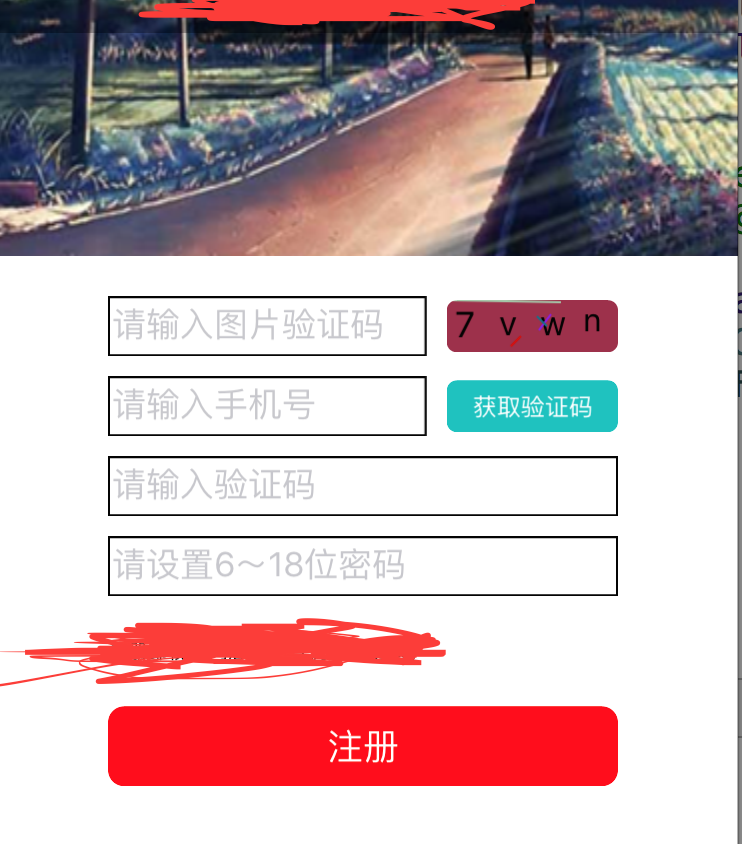
点击获取手机验证码时或者填写完基本信息点击注册按钮时,都会判断图片验证码是否正确,不正确的话晃动验证码,改变图片内容。
其实图案内容和那几个线都是绘制出来的,图案内容,线的长度,背景颜色,线的颜色都是随机变化的。
实现绘制验证码的方法是:
#import <UIKit/UIKit.h>
@interface CaptchaView : UIView
@property (nonatomic, retain) NSArray *changeArray; //字符素材数组
@property (nonatomic, retain) NSMutableString *changeString; //验证码的字符串
-(void)changeCaptcha;
- (void)drawRect:(CGRect)rect;
@end
在.h文件中首先定义几个实例变量以及方法;
.m文件实现方法:
#import "CaptchaView.h"
#define kRandomColor [UIColor colorWithRed:arc4random() % 256 / 256.0 green:arc4random() % 256 / 256.0 blue:arc4random() % 256 / 256.0 alpha:1.0];
#define kLineCount 4
#define kLineWidth 1.0
#define kCharCount 4
#define kFontSize [UIFont systemFontOfSize:arc4random() % 5 + 15]
@implementation CaptchaView
@synthesize changeString,changeArray;
- (instancetype)initWithFrame:(CGRect)frame
{
if (self = [super initWithFrame:frame]) {
self.layer.cornerRadius = 5.0; //设置layer圆角半径
self.layer.masksToBounds = YES; //隐藏边界
self.backgroundColor = kRandomColor;
//显示一个随机验证码
[self changeCaptcha];
}
return self;
}
#pragma mark 更换验证码,得到更换的验证码的字符串
-(void)changeCaptcha
{
//<一>从字符数组中随机抽取相应数量的字符,组成验证码字符串
//数组中存放的是全部可选的字符,可以是字母,也可以是中文
self.changeArray = [[NSArray alloc] initWithObjects:@"0",@"1",@"2",@"3",@"4",@"5",@"6",@"7",@"8",@"9",@"a",@"b",@"c",@"d",@"e",@"f",@"g",@"h",@"i",@"j",@"k",@"l",@"m",@"n",@"o",@"p",@"q",@"r",@"s",@"t",@"u",@"v",@"w",@"x",@"y",@"z",nil];
//如果能确定最大需要的容量,使用initWithCapacity:来设置,好处是当元素个数不超过容量时,添加元素不需要重新分配内存
NSMutableString *getStr = [[NSMutableString alloc] initWithCapacity:kCharCount];
self.changeString = [[NSMutableString alloc] initWithCapacity:kCharCount];
//随机从数组中选取需要个数的字符,然后拼接为一个字符串
for(int i = 0; i < kCharCount; i++)
{
NSInteger index = arc4random() % ([self.changeArray count] - 1);
getStr = [self.changeArray objectAtIndex:index];
self.changeString = (NSMutableString *)[self.changeString stringByAppendingString:getStr];
}
//<2>从网络获取字符串,然后把得到的字符串在本地绘制出来(网络获取步骤在这省略)
// self.changeString = [NSMutableString stringWithString:@"杰瑞教育"];
}
#pragma mark 点击view时调用,因为当前类自身就是UIView,点击更换验证码可以直接写到这个方法中,不用再额外添加手势
-(void)touchesBegan:(NSSet *)touches withEvent:(UIEvent *)event
{
//点击界面,切换验证码
[self changeCaptcha];
//setNeedsDisplay调用drawRect方法来实现view的绘制
[self setNeedsDisplay];
}
#pragma mark 绘制界面(1.UIView初始化后自动调用; 2.调用setNeedsDisplay方法时会自动调用)
- (void)drawRect:(CGRect)rect {
// 重写父类方法,首先要调用父类的方法
[super drawRect:rect];
//设置随机背景颜色
self.backgroundColor = kRandomColor;
//获得要显示验证码字符串,根据长度,计算每个字符显示的大概位置
NSString *text = [NSString stringWithFormat:@"%@",self.changeString];
CGSize cSize = [@"S" sizeWithAttributes:@{NSFontAttributeName:[UIFont systemFontOfSize:20]}];
int width = rect.size.width / text.length - cSize.width;
int height = rect.size.height - cSize.height;
CGPoint point;
//依次绘制每一个字符,可以设置显示的每个字符的字体大小、颜色、样式等
float pX, pY;
for (int i = 0; i < text.length; i++)
{
pX = arc4random() % width + rect.size.width / text.length * i;
pY = arc4random() % height;
point = CGPointMake(pX, pY);
unichar c = [text characterAtIndex:i];
NSString *textC = [NSString stringWithFormat:@"%C", c];
[textC drawAtPoint:point withAttributes:@{NSFontAttributeName:kFontSize}];
}
//调用drawRect:之前,系统会向栈中压入一个CGContextRef,调用UIGraphicsGetCurrentContext()会取栈顶的CGContextRef
CGContextRef context = UIGraphicsGetCurrentContext();
//设置画线宽度
CGContextSetLineWidth(context, kLineWidth);
//绘制干扰的彩色直线
for(int i = 0; i < kLineCount; i++)
{
//设置线的随机颜色
UIColor *color = kRandomColor;
CGContextSetStrokeColorWithColor(context, [color CGColor]);
//设置线的起点
pX = arc4random() % (int)rect.size.width;
pY = arc4random() % (int)rect.size.height;
CGContextMoveToPoint(context, pX, pY);
//设置线终点
pX = arc4random() % (int)rect.size.width;
pY = arc4random() % (int)rect.size.height;
CGContextAddLineToPoint(context, pX, pY);
//画线
CGContextStrokePath(context);
}
}