Sentinel的介绍 · alibaba/Sentinel Wiki (github.com)
随着微服务的流行,服务和服务之间的稳定性变得越来越重要。Sentinel 以流量为切入点,从流量控制、熔断降级、系统负载保护等多个维度保护服务的稳定性。
Sentinel 具有以下特征:
丰富的应用场景:Sentinel 承接了阿里巴巴近 10 年的双十一大促流量的核心场景,例如秒杀(即突发流量控制在系统容量可以承受的范围)、消息削峰填谷、集群流量控制、实时熔断下游不可用应用等。
完备的实时监控:Sentinel 同时提供实时的监控功能。您可以在控制台中看到接入应用的单台机器秒级数据,甚至 500 台以下规模的集群的汇总运行情况。
广泛的开源生态:Sentinel 提供开箱即用的与其它开源框架/库的整合模块,例如与 Spring Cloud、Apache Dubbo、gRPC、Quarkus 的整合。您只需要引入相应的依赖并进行简单的配置即可快速地接入 Sentinel。同时 Sentinel 提供 Java/Go/C++ 等多语言的原生实现。
完善的 SPI 扩展机制:Sentinel 提供简单易用、完善的 SPI 扩展接口。您可以通过实现扩展接口来快速地定制逻辑。例如定制规则管理、适配动态数据源等。
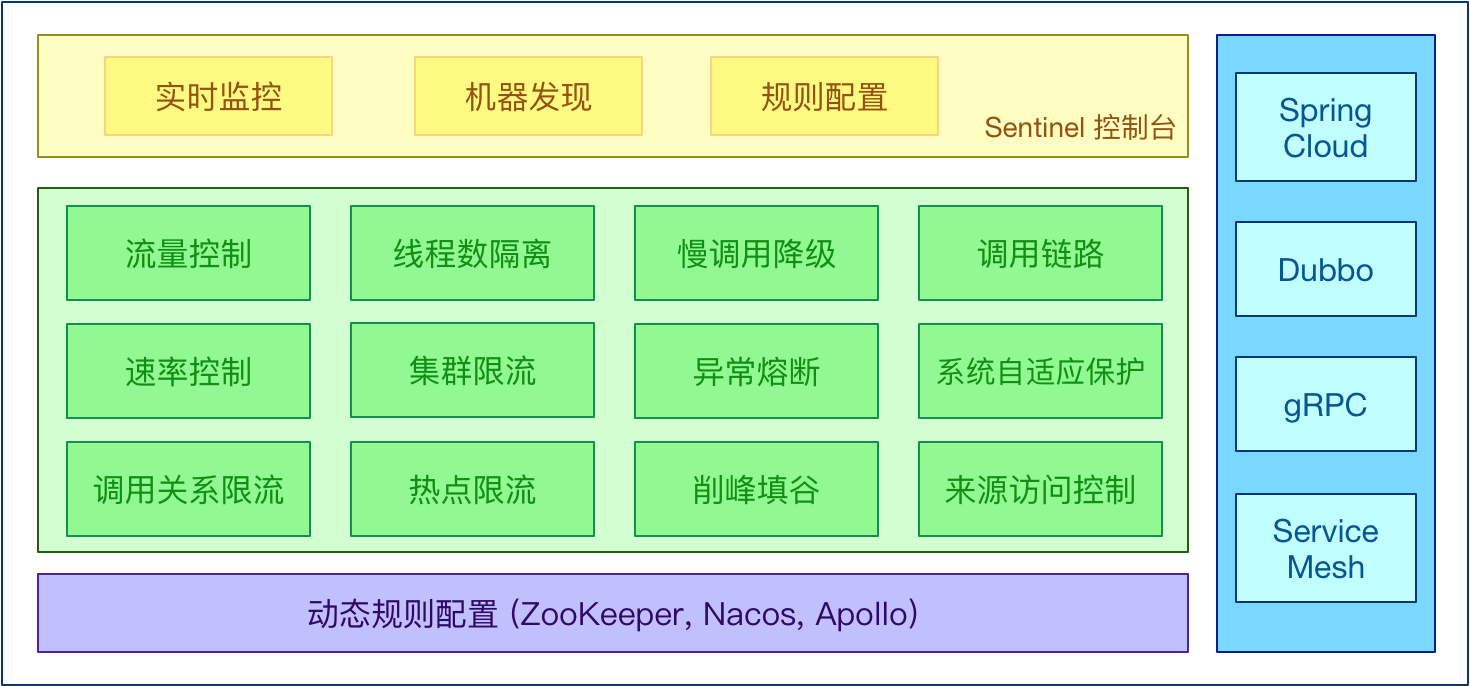
Sentinel 分为两个部分:
核心库(Java 客户端)不依赖任何框架/库,能够运行于所有 Java 运行时环境,同时对 Dubbo / Spring Cloud 等框架也有较好的支持。
控制台(Dashboard)基于 Spring Boot 开发,打包后可以直接运行,不需要额外的 Tomcat 等应用容器。
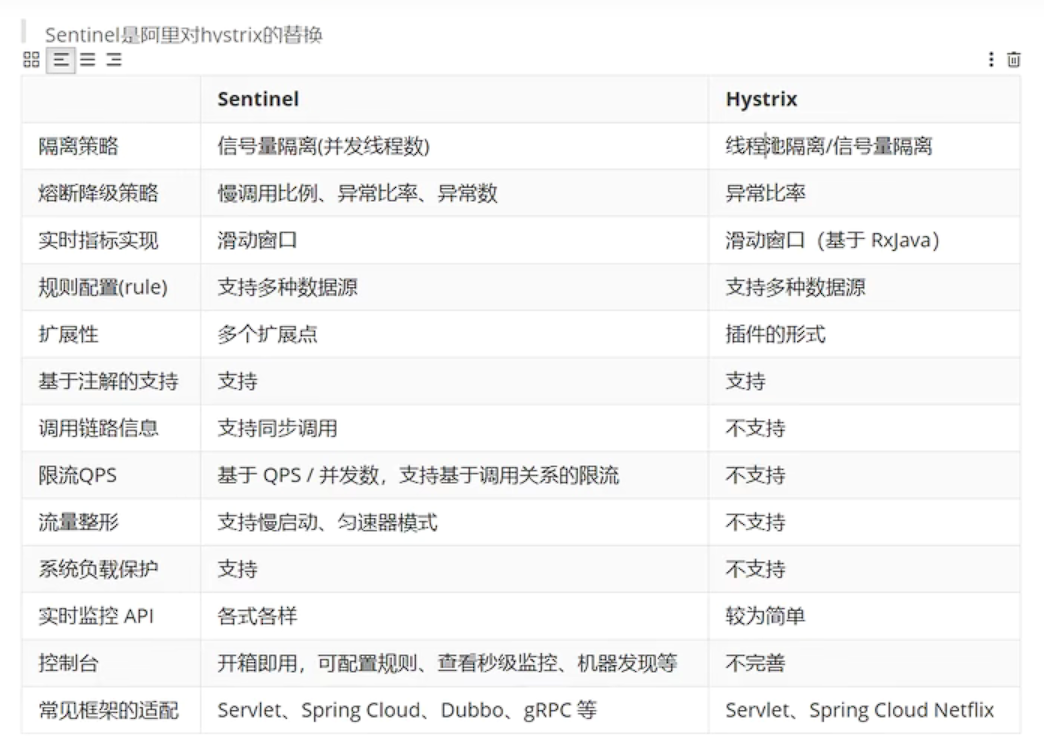
Sentinel与Hystrix的对比:
#接口概览
http://localhost:8720/api

#获取资源的metrics信息
http://localhost:8720/cnode?id=/jifen/{jifenId}

#获取榴莲控规则接口
http://localhost:8720/getRules?type=flow

#设置规则接口
http://localhost:8720/setRules
Sentinel控制台的下载地址:Releases · alibaba/Sentinel (github.com)
本文使用1.8.0版本
下载jar包,可以使用spring boot的方式启动:
java -jar sentinel-dashboard-1.8.0.jar --server.port=8888
代码演示:
首先在cloud-order模块的pom文件,添加sentinel的引用:
<dependency>
  <groupId>com.alibaba.cloud</groupId>
  <artifactId>spring-cloud-starter-alibaba-sentinel</artifactId>
</dependency>
然后修改配置文件:
spring:
  application:
    name: cloud-order #服务名称,必须唯一
  cloud:
    nacos:
      discovery:
        server-addr: localhost:8848 #指定nacos服务地址
        username: nacos
        password: nacos
        # namespace: public
        # group: DEFAULT_GROUP
    sentinel:
      transport:
        port: 8719
        dashboard: localhost:8888
      eager: true
server:
  port: 9900

ribbon:
  eager-load:
    enabled: true #开启饥饿加载,默认是懒加载
    clients:
      - cloud-jifen
      - cloud-goods

feign:
  client:
    config:
      cloud-jifen:
        connect-timeout: 1000 #单位毫秒
        read-timeout: 1000
      default:
        connect-timeout: 1000
        read-timeout: 1000
打开Sentinel的8888端口控制台,输入
用户:sentinel
密码:sentinel
进行登录。

启动Nacos,和之前编写的服务。
手动对某一个服务进行请求,例如使用postman请求地址:localhost:9900/feign/find
则可以在Sentinel控制台看到“簇点链路”: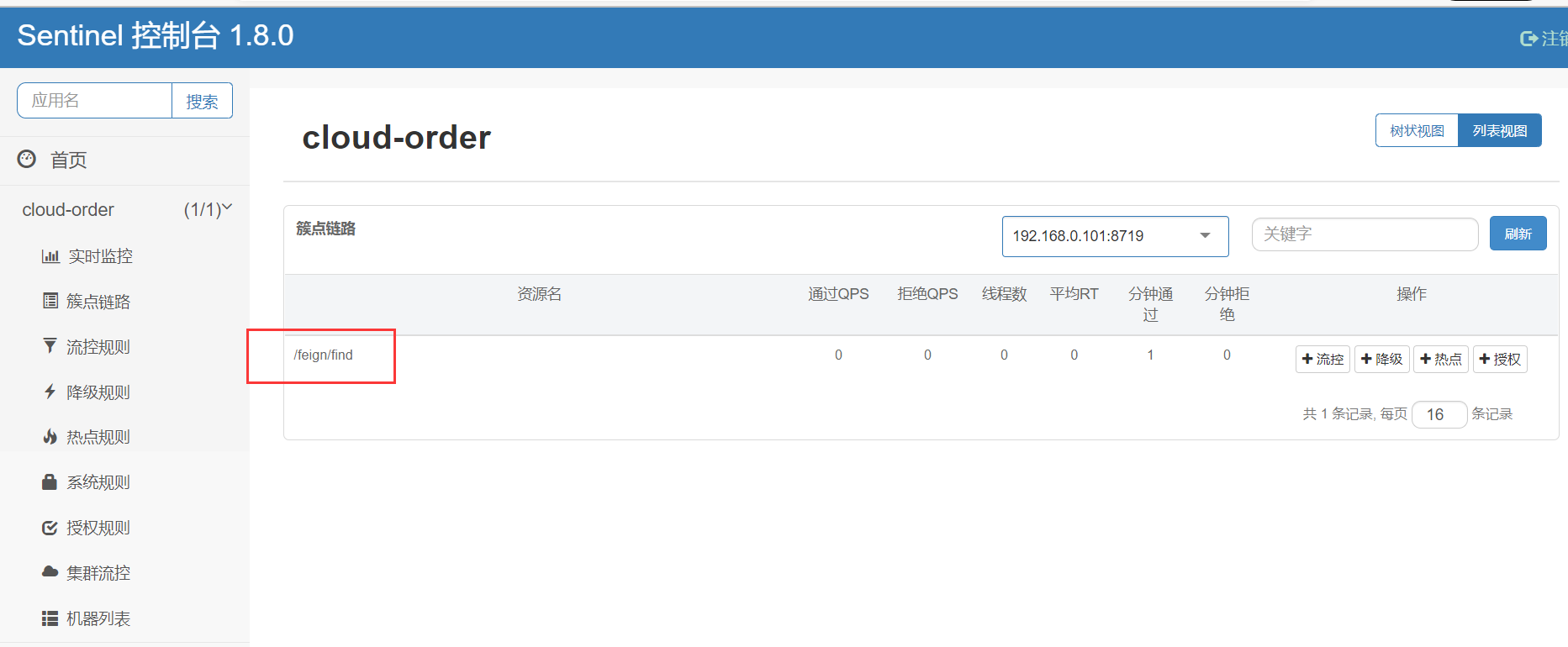
接下来可以通过:流控、降级、热点、授权等项目,对这个服务进行控制。