一、构建MySQL服务器
目标:
本案例要求熟悉MySQL官方安装包的使用,快速构建一台数据库服务器:
- 安装MySQL-server、MySQl-client软件包
- 修改数据库用户root的密码
- 确认MySQL服务程序运行、root可控
方案:
本课程将使用64位的RHEL 7操作系统,MySQL数据库的版本是5.7.17。
访问http://dev.mysql.com/downloads/mysql/,找到MySQL Community Server下载页面,平台选择“Red Hat Enterprise Linux 7 / Oracle Linux”,然后选择64位的bundle整合包下载,如下图所示。
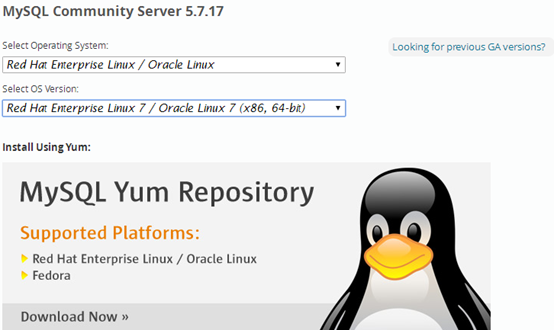
注意:下载MySQL软件时需要以Oracle网站账户登录,如果没有请根据页面提示先注册一个(免费) 。
步骤:
步骤一:准备工作
1)卸载系统自带的mariadb-server、mariadb软件包(如果有的话)
[root@dbsvr1 ~]# yum -y remove mariadb-server mariadb
Setting up Remove Process
No Match for argument: mariadb-server
rhel7dvd | 3.9 kB 00:00 ...
Package(s) mariadb-server available, but not installed.
No Match for argument: mariadb
Package(s) mariadb available, but not installed.
No Packages marked for removal
2)清理/etc/my.cnf配置文件
此配置文件由RHEL自带的mariadb-libs库提供:
[root@dbsvr1 ~]# rpm -qf /etc/my.cnf
mariadb-libs-5.5.35-3.el7.x86_64
大量的系统软件包都需要用到mariadb-libs库,因此不建议直接卸载此软件包。最好是安装新的MySQL数据库软件时,采用 -U 升级的方式来进行替换。
配置文件/etc/my.cnf若不需要使用,可以直接删除。或者保险起见,也可以将其改名备份:
[root@dbsvr1 ~]# mv /etc/my.cnf /etc/my.cnf.old
步骤二:安装mysql-community-client、mysql-community-server软件包
1)释放bundle整合包
[root@dbsvr1 ~]# cd /var/ftp/pub/
[root@dbsvr1 pub]# tar xvf mysql-5.7.17-1.el7.x86_64.rpm-bundle.tar
mysql-community-client-5.7.17-1.el7.x86_64.rpm
//MySQL 数据库客户端应用程序和工具
mysql-community-common-5.7.17-1.el7.x86_64.rpm
//MySQL 数据库和客户端库共享文件
mysql-community-devel-5.7.17-1.el7.x86_64.rpm
//MySQL 数据库客户端应用程序的库和头文件
mysql-community-embedded-5.7.17-1.el7.x86_64.rpm
//MySQL嵌入式函数库
mysql-community-embedded-compat-5.7.17-1.el7.x86_64.rpm
//MySQL嵌入式兼容函数库
mysql-community-embedded-devel-5.7.17-1.el7.x86_64.rpm
//头文件和库文件作为Mysql的嵌入式库文件
mysql-community-libs-5.7.17-1.el7.x86_64.rpm
//MySQL 数据库客户端应用程序的共享库
mysql-community-libs-compat-5.7.17-1.el7.x86_64.rpm
//MySQL 5.6.31 数据库客户端应用程序的共享兼容库
mysql-community-minimal-debuginfo-5.7.17-1.el7.x86_64.rpm
//mysql最小安装包的调试信息
mysql-community-server-5.7.17-1.el7.x86_64.rpm
//非常快速和可靠的 SQL 数据库服务器
mysql-community-server-minimal-5.7.17-1.el7.x86_64.rpm
//非常快速和可靠的 SQL 数据库服务器(最小化安装)
mysql-community-test-5.7.17-1.el7.x86_64.rpm
//MySQL 数据库服务器的测试套件
2)安装MySQL数据库
在bundle的整合包中,并不是所有的rpm包都会用到,将一些重复的删除。
安装mysql时可能会缺少某些依赖包,需提前单独安装
[root@dbsvr1 pub]#yum -y install perl-Data-Dumper perl-JSON perl-Time-HiRes
[root@dbsvr1 pub]# rpm -Uvh mysql-community-*.rpm
准备中... ################################# [100%]
正在升级/安装...
1:mysql-community-common-5.7.17-1.e################################# [ 9%]
2:mysql-community-libs-5.7.17-1.el7################################# [ 18%]
3:mysql-community-client-5.7.17-1.e################################# [ 27%]
4:mysql-community-server-5.7.17-1.e################################# [ 36%]
5:mysql-community-devel-5.7.17-1.el################################# [ 45%]
6:mysql-community-embedded-5.7.17-1################################# [ 55%]
7:mysql-community-embedded-devel-5.################################# [ 64%]
8:mysql-community-test-5.7.17-1.el7################################# [ 73%]
9:mysql-community-libs-compat-5.7.1################################# [ 82%]
10:mysql-community-minimal-debuginfo################################# [ 91%]
正在清理/删除...
11:mariadb-libs-1:5.5.35-3.el7 ################################# [100%]
[root@dbsvr1 pub]#systemctl start mysqld.service
安装过程中会尝试做一些检测,然后完成基本的初始化任务,期间会给出相关的提示。比如由于MySQL 5.7对TIMESTAMP时间戳的处理不同于之前的版本,会给出警告和提示出解决办法(使用 --explicit_defaults_for_timestamp选项):
2017-04-04T15:59:07.324470Z 0 [Warning] TIMESTAMP with implicit DEFAULT value is deprecated. Please use --explicit_defaults_for_timestamp server option (see documentation for more details).
MySQL 5.7默认采用的存储引擎不再是MyISAM,而是InnoDB。初始化时若相关的文件不存在,会自动创建并设置相关参数:
2017-04-04T15:59:09.075698Z 0 [Warning] InnoDB: New log files created, LSN=45790
2017-04-04T15:59:09.381634Z 0 [Warning] InnoDB: Creating foreign key constraint system tables.
2017-04-04T15:59:09.579733Z 0 [Warning] No existing UUID has been found, so we assume that this is the first time that this server has been started. Generating a new UUID: a3973917-194f-11e7-a75b-52540018542e.
2017-04-04T15:59:09.703759Z 0 [Warning] Gtid table is not ready to be used. Table 'mysql.gtid_executed' cannot be opened.
2017-04-04T15:59:09.711439Z 1 [Note] A temporary password is generated for root@localhost: ;%7SDdD)quOI
2017-04-04T15:59:29.758102Z 1 [ERROR] Failed to open the bootstrap file /tmp/install-validate-password-plugin.xqy7Ay.sql
2017-04-04T15:59:29.758122Z 1 [ERROR] 1105 Bootstrap file error, return code (0). Nearest query: 'LSE SET @sys.tmp.table_exists.SQL = CONCAT('SELECT COUNT(*) FROM `', in_db, '`.`', in_table, '`'); PREPARE stmt_select FROM @sys.tmp.table_exists.SQL; IF (NOT v_error) THEN DEALLOCATE PREPARE stmt_select; SET out_exists = 'TEMPORARY'; END IF; END IF; END;
'
2017-04-04T15:59:29.758336Z 0 [ERROR] Aborting
2017-04-04T15:59:33.078575Z 0 [Warning] TIMESTAMP with implicit DEFAULT value is deprecated. Please use --explicit_defaults_for_timestamp server option (see documentation for more details).
2017-04-04T15:59:33.092082Z 0 [Note] /usr/sbin/mysqld (mysqld 5.7.17) starting as process 3326 ...
2017-04-04T15:59:33.095074Z 0 [Note] InnoDB: PUNCH HOLE support available
2017-04-04T15:59:33.095104Z 0 [Note] InnoDB: Mutexes and rw_locks use GCC atomic builtins
2017-04-04T15:59:33.095109Z 0 [Note] InnoDB: Uses event mutexes
2017-04-04T15:59:33.095112Z 0 [Note] InnoDB: GCC builtin __atomic_thread_fence() is used for memory barrier
2017-04-04T15:59:33.095115Z 0 [Note] InnoDB: Compressed tables use zlib 1.2.3
2017-04-04T15:59:33.095120Z 0 [Note] InnoDB: Using Linux native AIO
2017-04-04T15:59:33.095340Z 0 [Note] InnoDB: Number of pools: 1
2017-04-04T15:59:33.095428Z 0 [Note] InnoDB: Not using CPU crc32 instructions
2017-04-04T15:59:33.096904Z 0 [Note] InnoDB: Initializing buffer pool, total size = 128M, instances = 1, chunk size = 128M
2017-04-04T15:59:33.106888Z 0 [Note] InnoDB: Completed initialization of buffer pool
2017-04-04T15:59:33.108711Z 0 [Note] InnoDB: If the mysqld execution user is authorized, page cleaner thread priority can be changed. See the man page of setpriority().
2017-04-04T15:59:33.120189Z 0 [Note] InnoDB: Highest supported file format is Barracuda.
2017-04-04T15:59:33.454908Z 0 [Note] InnoDB: Creating shared tablespace for temporary tables
2017-04-04T15:59:33.455034Z 0 [Note] InnoDB: Setting file './ibtmp1' size to 12 MB. Physically writing the file full; Please wait ...
2017-04-04T15:59:34.057704Z 0 [Note] InnoDB: File './ibtmp1' size is now 12 MB.
2017-04-04T15:59:34.058603Z 0 [Note] InnoDB: 96 redo rollback segment(s) found. 96 redo rollback segment(s) are active.
2017-04-04T15:59:34.058615Z 0 [Note] InnoDB: 32 non-redo rollback segment(s) are active.
2017-04-04T15:59:34.063078Z 0 [Note] InnoDB: Waiting for purge to start
2017-04-04T15:59:34.113304Z 0 [Note] InnoDB: 5.7.17 started; log sequence number 2536157
2017-04-04T15:59:34.113841Z 0 [Note] InnoDB: Loading buffer pool(s) from /var/lib/mysql/ib_buffer_pool
2017-04-04T15:59:34.114310Z 0 [Note] Plugin 'FEDERATED' is disabled.
2017-04-04T15:59:34.118690Z 0 [Note] Found ca.pem, server-cert.pem and server-key.pem in data directory. Trying to enable SSL support using them.
2017-04-04T15:59:34.118921Z 0 [Warning] CA certificate ca.pem is self signed.
2017-04-04T15:59:34.119582Z 0 [Note] InnoDB: Buffer pool(s) load completed at 170404 23:59:34
2017-04-04T15:59:34.237643Z 0 [Note] Server hostname (bind-address): '*'; port: 3306
2017-04-04T15:59:34.241687Z 0 [Note] IPv6 is available.
2017-04-04T15:59:34.241727Z 0 [Note] - '::' resolves to '::';
2017-04-04T15:59:34.241753Z 0 [Note] Server socket created on IP: '::'.
2017-04-04T15:59:34.313591Z 0 [Note] Event Scheduler: Loaded 0 events
2017-04-04T15:59:34.313686Z 0 [Note] Executing 'SELECT * FROM INFORMATION_SCHEMA.TABLES;' to get a list of tables using the deprecated partition engine. You may use the startup option '--disable-partition-engine-check' to skip this check.
2017-04-04T15:59:34.313693Z 0 [Note] Beginning of list of non-natively partitioned tables
2017-04-04T15:59:34.322126Z 0 [Note] End of list of non-natively partitioned tables
2017-04-04T15:59:34.322261Z 0 [Note] /usr/sbin/mysqld: ready for connections.
Version: '5.7.17' socket: '/var/lib/mysql/mysql.sock' port: 3306 MySQL Community Server (GPL)
关于MySQL数据库的管理员账号root,其密码也不再是空,而是安装时随机生成一个,这种处理方式一定程度上增强了MySQl服务器的安全性。随机生成的密码字串可以从保存到mysql日志文件中找到:
[root@dbsvr1 pub]#grep 'temporary password' /var/log/mysqld.log
2017-04-04T15:59:09.711439Z 1 [Note] A temporary password is generated for root@localhost: ;%7SDdD)quOI
3)确认安装后的服务单元文件、服务状态
查看服务单元文件
[root@dbsvr1 pub]# ls -lh /usr/lib/systemd/system/mysqld.service
-rw-r--r--. 1 root root 1.6K 11月 29 04:30 /usr/lib/systemd/system/mysqld.service
mysql服务的自启状态为enabled:
[root@dbsvr1 ~]# # systemctl is-enabled mysqld.service
enabled
步骤三:查看Mysql服务的运行状态
服务器进程为mysqld,监听的默认端口为TCP 3306:
[root@dbsvr1 pub]# netstat -antpu | grep mysql
tcp6 0 0 :::3306 :::* LISTEN 3913/mysqld
查看Mysql服务的状态
[root@dbsvr1 pub]#systemctl is-active mysqld.service
active
[root@dbsvr1 pub]#systemctl status mysqld.service
mysqld.service - MySQL Server
Loaded: loaded (/usr/lib/systemd/system/mysqld.service; enabled)
Active: active (running) since 日 2017-04-23 08:56:24 CST; 1s ago
Docs: man:mysqld(8)
http://dev.mysql.com/doc/refman/en/using-systemd.html
Process: 13753 ExecStart=/usr/sbin/mysqld --daemonize --pid-file=/var/run/mysqld/mysqld.pid $MYSQLD_OPTS (code=exited, status=0/SUCCESS)
Process: 13732 ExecStartPre=/usr/bin/mysqld_pre_systemd (code=exited, status=0/SUCCESS)
Main PID: 13757 (mysqld)
CGroup: /system.slice/mysqld.service
└─13757 /usr/sbin/mysqld --daemonize --pid-file=/var/run/mysqld/mysqld.pid
数据库的默认存放位置为 /var/lib/mysql:
[root@dbsvr1 pub]# ls /var/lib/mysql
auto.cnf client-cert.pem ibdata1 ibtmp1 mysql.sock.lock public_key.pem sys
ca-key.pem client-key.pem ib_logfile0 mysql performance_schema server-cert.pem
ca.pem ib_buffer_pool ib_logfile1 mysql.sock private_key.pem server-key.pem
步骤四:连接MySQL服务器,修改密码
查看随机生成的root管理密码
[root@dbsvr1 pub]#grep 'temporary password' /var/log/mysqld.log
2017-04-01T18:10:42.948679Z 1 [Note] A temporary password is generated for root@localhost: GWphBZ_g+1& //密码为GWphBZ_g+1&
2)使用客户端命令mysql连接到MySQL服务器
提示验证时,填入前一步获得的随机密码,验证成功后即可进入“mysql> ”环境:
[root@dbsvr1 pub]# mysql -u root -p
Welcome to the MySQL monitor. Commands end with ; or g.
Your MySQL connection id is 14
Server version: 5.7.17
Copyright (c) 2000, 2016, Oracle and/or its affiliates. All rights reserved.
Oracle is a registered trademark of Oracle Corporation and/or its
affiliates. Other names may be trademarks of their respective
owners.
Type 'help;' or 'h' for help. Type 'c' to clear the current input statement.
mysql> //登录成功后,进入SQL操作环境
用该密码登录到服务端后,必须马上修改密码,不然会报如下错误:
mysql> show databases;
ERROR 1820 (HY000): You must reset your password using ALTER USER statement before executing this statement.
3)执行SET PASSWORD命令修改密码
这个其实与validate_password_policy的值有关,默认为1,所以刚开始设置的密码必须符合长度,且必须含有数 字,小写或大写字母,特殊字符。如果我们不希望密码设置的那么复杂,需要修改两个全局参数:validate_password_policy与 validate_password_length。validate_password_length默认值为8,最小值为4,如果你显性指定 validate_password_length的值小于4,尽管不会报错,但validate_password_length的值将设为4。 //设置密码长度是密码最小长度值,设置的密码不得小于最小值
可参考下列指令:
mysql>set global validate_password_policy=0;
mysql>set global validate_password_length=4;
mysql> SET PASSWORD FOR 'root'@'localhost'=PASSWORD('1234567');
Query OK, 0 rows affected, 1 warning (0.00 sec)
上述操作的结果是——更改数据库用户root从本机访问时的密码,设为1234567。
退出“mysql> ”环境,重新登录验证,必须采用新的密码才能登入:
mysql> exit //退出 mysql> 环境
Bye
[root@dbsvr1 ~]# mysql -u root –p //重新登录
Enter password: //输入新设置的密码
Welcome to the MySQL monitor. Commands end with ; or g.
Your MySQL connection id is 15
Server version: 5.7.17 MySQL Community Server (GPL)
Copyright (c) 2000, 2016, Oracle and/or its affiliates. All rights reserved.
Oracle is a registered trademark of Oracle Corporation and/or its
affiliates. Other names may be trademarks of their respective
owners.
Type 'help;' or 'h' for help. Type 'c' to clear the current input statement.
mysql> mysql> show databases;
+--------------------+
| Database |
+--------------------+
| information_schema |
| mysql |
| performance_schema |
| sys |
+--------------------+
4 rows in set (0.07 sec)
二、 数据库基本管理
目标:
本案例要求熟悉MySQL的连接及数据库表的增删改查等基本管理操作,主要完成以下几个方便的操作:
使用mysql命令连接数据库
练习查看/删除/创建库的相关操作
练习查看/删除/创建表的相关操作,表数据参考如表-1所示内容

步骤:
步骤一:使用mysql命令连接数据库
连接MySQL服务器时,最基本的用法是通过 -u 选项指定用户名、-p指定密码。密码可以写在命令行(如果不写,则出现交互,要求用户输入),当然基于安全考虑一般不推荐这么做:
[root@dbsvr1 ~]# mysql -uroot -p123456 //紧挨着选项,不要空格
mysql: [Warning] Using a password on the command line interface can be insecure.
Welcome to the MySQL monitor. Commands end with ; or g.
Your MySQL connection id is 16
Server version: 5.7.17 MySQL Community Server (GPL)
Copyright (c) 2000, 2016, Oracle and/or its affiliates. All rights reserved.
Oracle is a registered trademark of Oracle Corporation and/or its
affiliates. Other names may be trademarks of their respective
owners.
Type 'help;' or 'h' for help. Type 'c' to clear the current input statement.
mysql> exit //退出已登录的mysql> 环境
Bye
默认情况下,msyql命令会连接本机的MySQL服务。但在需要的时候,可以通过 -h 选项指定远程主机;如果端口不是3306,还可以通过大写的 -P 选项指定:
[root@dbsvr1 ~]# mysql -u root -p -h 127.0.0.1 -P 3306
Enter password:
Welcome to the MySQL monitor. Commands end with ; or g.
Your MySQL connection id is 17
Server version: 5.7.17 MySQL Community Server (GPL)
Copyright (c) 2000, 2016, Oracle and/or its affiliates. All rights reserved.
Oracle is a registered trademark of Oracle Corporation and/or its
affiliates. Other names may be trademarks of their respective
owners.
Type 'help;' or 'h' for help. Type 'c' to clear the current input statement.
mysql> exit //退出已登录的mysql> 环境
Bye
连接其他主机的MySQL服务,有一个前提条件——对方已经添加了此用户从此客户机访问的数据库授权,授权操作方法会在后续课程学习。
步骤二:练习查看/删除/创建库的相关操作
以root用户登入“mysql> ”环境后,可以执行各种MySQL指令、SQL指令。基本的用法事项如下:
- 操作指令不区分大小写(库名/表名、密码、变量值等除外)。
- 每条SQL指令以 ; 结束或分隔。
- 不支持 Tab 键自动补齐。
- c 可废弃当前编写错的操作指令。
1)查看现有的库
mysql> SHOW DATABASES;
+--------------------+
| Database |
+--------------------+
| information_schema | //信息概要库
| mysql | //授权库
| performance_schema | //性能结构库
| sys | //系统元数据库
+--------------------+
4 rows in set (0.15 sec)
2)切换/使用指定的库
切换到sys库:
mysql> USE sys;
Database changed
mysql> SELECT DATABASE(); //确认当前所在的库
+------------+
| DATABASE() |
+------------+
| sys |
+------------+
1 row in set (0.00 sec)
切换到mysql库:
mysql> USE mysql;
Reading table information for completion of table and column names
You can turn off this feature to get a quicker startup with -A
Database changed
mysql> SELECT DATABASE(); //确认当前所在的库
+------------+
| DATABASE() |
+------------+
| mysql |
+------------+
1 row in set (0.00 sec)
3)创建新的库
新建名为mydb的库,确认结果:
mysql> CREATE DATABASE mydb;
Query OK, 1 row affected (0.00 sec)
mysql> SHOW DATABASES;
+--------------------+
| Database |
+--------------------+
| information_schema |
| mydb | //新建的mydb库
| mysql |
| performance_schema |
| sys |
+--------------------+
5 rows in set (0.00 sec)
新建名为newdb的库,确认结果:
mysql> CREATE DATABASE newdb;
Query OK, 1 row affected (0.00 sec)
mysql> SHOW DATABASES;
+--------------------+
| Database |
+--------------------+
| information_schema |
| mydb | //新建的mydb库
| mysql |
| newdb | //新建的newdb库
| performance_schema |
| sys |
+--------------------+
6 rows in set (0.00 sec)
新建数据库以后,会为每个数据库建立同名文件夹,可从命令行确认:
[root@dbsvr1 ~]# ls -l /var/lib/mysql/{my,new}db/
/var/lib/mysql/mydb/:
总用量 4
-rw-r-----. 1 mysql mysql 65 4月 2 03:14 db.opt
/var/lib/mysql/newdb/:
总用量 4
-rw-r-----. 1 mysql mysql 65 4月 2 03:15 db.opt
4)删除指定的库
删除名为newdb的库:
mysql> DROP DATABASE newdb;
Query OK, 0 rows affected (0.04 sec)
mysql> SHOW DATABASES; //确认删除结果,已无newdb表
+--------------------+
| Database |
+--------------------+
| information_schema |
| mydb |
| mysql |
| performance_schema |
| sys |
+--------------------+
5 rows in set (0.00 sec)
步骤三:练习查看/删除/创建表的相关操作
1)查看指定的库里有哪些表
查看mysql库里有哪些表:
mysql> USE mysql;
Reading table information for completion of table and column names
You can turn off this feature to get a quicker startup with -A
Database changed
mysql> SHOW TABLES;
+---------------------------+
| Tables_in_mysql |
+---------------------------+
| columns_priv |
| db |
| engine_cost |
| event |
| func |
| general_log |
| gtid_executed |
| help_category |
| help_keyword |
| help_relation |
| help_topic |
| innodb_index_stats |
| innodb_table_stats |
| ndb_binlog_index |
| plugin |
| proc |
| procs_priv |
| proxies_priv |
| server_cost |
| servers |
| slave_master_info |
| slave_relay_log_info |
| slave_worker_info |
| slow_log |
| tables_priv |
| time_zone |
| time_zone_leap_second |
| time_zone_name |
| time_zone_transition |
| time_zone_transition_type |
| user | //存放数据库用户的表
+---------------------------+
31 rows in set (0.00 sec)
2)查看指定表的字段结构
当前库为mysql,查看columns_priv表的结构,以列表形式展现:
mysql> DESCRIBE columns_privG //末尾不用分号
*************************** 1. row ***************************
Field: Host
Type: char(60)
Null: NO
Key: PRI
Default:
Extra:
*************************** 2. row ***************************
Field: Db
Type: char(64)
Null: NO
Key: PRI
Default:
Extra:
*************************** 3. row ***************************
Field: User
Type: char(32)
Null: NO
Key: PRI
Default:
Extra:
*************************** 4. row ***************************
Field: Table_name
Type: char(64)
Null: NO
Key: PRI
Default:
Extra:
*************************** 5. row ***************************
Field: Column_name
Type: char(64)
Null: NO
Key: PRI
Default:
Extra:
*************************** 6. row ***************************
Field: Timestamp
Type: timestamp
Null: NO
Key:
Default: CURRENT_TIMESTAMP
Extra: on update CURRENT_TIMESTAMP
*************************** 7. row ***************************
Field: Column_priv
Type: set('Select','Insert','Update','References')
Null: NO
Key:
Default:
Extra:
7 rows in set (0.01 sec)
查看columns_priv表的结构,以表格形式展现:
mysql> DESCRIBE columns_priv; //末尾需要有分号
+-------------+----------------------------------------------+------+-----+-------------------+-----------------------------+
| Field | Type | Null | Key | Default | Extra |
+-------------+----------------------------------------------+------+-----+-------------------+-----------------------------+
| Host | char(60) | NO | PRI | | |
| Db | char(64) | NO | PRI | | |
| User | char(32) | NO | PRI | | |
| Table_name | char(64) | NO | PRI | | |
| Column_name | char(64) | NO | PRI | | |
| Timestamp | timestamp | NO | | CURRENT_TIMESTAMP | on update CURRENT_TIMESTAMP |
| Column_priv | set('Select','Insert','Update','References') | NO | | | |
+-------------+----------------------------------------------+------+-----+-------------------+-----------------------------+
7 rows in set (0.00 sec)
上述操作中,DESCRIBE可缩写为DESC;另外,当引用非当前库中的表时,可以用“库名.表名”的形式。比如,切换为mysql库再执行“DESCRIBE columns_priv;”,与以下操作的效果是相同的:
mysql> DESC mysql.columns_priv;
+-------------+----------------------------------------------+------+-----+-------------------+-----------------------------+
| Field | Type | Null | Key | Default | Extra |
+-------------+----------------------------------------------+------+-----+-------------------+-----------------------------+
| Host | char(60) | NO | PRI | | |
| Db | char(64) | NO | PRI | | |
| User | char(16) | NO | PRI | | |
| Table_name | char(64) | NO | PRI | | |
| Column_name | char(64) | NO | PRI | | |
| Timestamp | timestamp | NO | | CURRENT_TIMESTAMP | on update CURRENT_TIMESTAMP |
| Column_priv | set('Select','Insert','Update','References') | NO | | | |
+-------------+----------------------------------------------+------+-----+-------------------+-----------------------------+
7 rows in set (0.00 sec)
3)在test库中创建一个名为pwlist的表
包括name、password两列,其中name列作为主键。两个字段值均不允许为空,其中密码列赋予默认空值,相关操作如下所述。
切换到mydb库:
mysql> USE mydb;
Database changed
新建pwlist表:
mysql> CREATE TABLE pwlist(
-> name CHAR(16) NOT NULL,
-> password CHAR(48) DEFAULT '',
-> PRIMARY KEY(name)
-> );
Query OK, 0 rows affected (0.38 sec)
确认新创建的表:
mysql> SHOW TABLES;
+----------------+
| Tables_in_mydb |
+----------------+
| pwlist | //新建的pwlist表
+----------------+
1 rows in set (0.01 sec)
查看pwlist表的字段结构:
mysql> DESC pwlist;
+----------+----------+------+-----+---------+-------+
| Field | Type | Null | Key | Default | Extra |
+----------+----------+------+-----+---------+-------+
| name | char(16) | NO | PRI | NULL | |
| password | char(48) | YES | | | |
+----------+----------+------+-----+---------+-------+
2 rows in set (0.01 sec)
4)删除指定的表
删除当前库中的pwlist表:
mysql> DROP TABLE pwlist;
Query OK, 0 rows affected (0.01 sec)
确认删除结果:
mysql> SHOW TABLES;
Empty set (0.00 sec)
5)在mydb库中创建一个学员表
表格结构及数据内容如表-1所示。
在MySQL表内存储中文数据时,需要更改字符集(默认为latin1不支持中文),以便MySQL支持存储中文数据记录;比如,可以在创建库或表的时候,手动添加“DEFAULT CHARSET=utf8”来更改字符集。
根据上述表格结构,创建支持中文的student表:
mysql> CREATE TABLE mydb.student(
-> 学号 char(9) NOT NULL,
-> 姓名 varchar(4) NOT NULL,
-> 性别 enum('男','女') NOT NULL,
-> 手机号 char(11) DEFAULT '',
-> 通信地址 varchar(64),
-> PRIMARY KEY(学号)
-> ) DEFAULT CHARSET=utf8; //手工指定字符集,采用utf8
Query OK, 0 rows affected (0.31sec)
查看student表的字段结构:
mysql> DESC mydb.student;
+--------------+-------------------+------+-----+---------+-------+
| Field | Type | Null | Key | Default | Extra |
+--------------+-------------------+------+-----+---------+-------+
| 学号 | char(9) | NO | PRI | NULL | |
| 姓名 | varchar(4) | NO | | NULL | |
| 性别 | enum('男','女') | NO | | NULL | |
| 手机号 | char(11) | YES | | | |
| 通信地址 | varchar(64) | YES | | NULL | |
+--------------+-------------------+------+-----+---------+-------+
5 rows in set (0.04 sec)
查看student表的实际创建指令:
mysql> SHOW CREATE TABLE mydb.student;
+---------+--------------------------------------------------------------------------------------------------------------------------------+
| Table | Create Table |
+---------+---------------------------------------------------------------------------------------------------------------------------------+
| student | CREATE TABLE `student` (
`学号` char(9) NOT NULL,
`姓名` varchar(4) NOT NULL,
`性别` enum('男','女') NOT NULL,
`手机号` char(11) DEFAULT '',
`通信地址` varchar(64) DEFAULT NULL,
PRIMARY KEY (`学号`)
) ENGINE=InnoDB DEFAULT CHARSET=utf8 |
+---------+---------------------------------------------------------------------------------------------------------------------------------+
1 row in set (0.00 sec)
注意:若要修改MySQL服务的默认字符集,可以更改服务器的my.cnf配置文件,添加character_set_server=utf8 配置,然后重启数据库服务。
[root@dbsvr1 ~]# vim /etc/my.cnf //修改运行服务配置
[mysqld]
.. ..
character_set_server=utf8
[root@dbsvr1 ~]# systemctl restart mysqld //重启服务
.. ..
[root@dbsvr1 ~]# mysql –u root -p
Enter password:
.. ..
mysql> SHOW VARIABLES LIKE 'character%'; //确认更改结果
+--------------------------+----------------------------+
| Variable_name | Value |
+--------------------------+----------------------------+
| character_set_client | utf8 |
| character_set_connection | utf8 |
| character_set_database | utf8 |
| character_set_filesystem | binary |
| character_set_results | utf8 |
| character_set_server | utf8 |
| character_set_system | utf8 |
| character_sets_dir | /usr/share/mysql/charsets/ |
+--------------------------+----------------------------+
8 rows in set (0.03 sec)
三、MySQL 数据类型
目标:
本案例要求熟悉MySQL的字段数据类型、时间函数的使用,完成以下任务操作:
- 在home库里创建famliy表,表结构、字段类型自定义
- 练习各种时间函数的使用
步骤:
步骤一:创建home库、family表
1)新建home库,并切换到home库
mysql> CREATE DATABASE home;
Query OK, 1 row affected (0.00 sec)
mysql> USE home;
Database changed
2)新建family表
假定family表用来记录每个家庭成员的姓名(name)、性别(gender)、出生日期(birth)、职业(job)、与户主关系(relation)。
mysql> CREATE TABLE family(
-> name varchar(16) NOT NULL,
-> gender enum('male','femal') DEFAULT 'male',
-> birth date NOT NULL,
-> job varchar(16) DEFAULT '',
-> relation varchar(24) NOT NULL,
-> PRIMARY KEY(name)
-> );
Query OK, 0 rows affected (0.61sec)
查看family表的字段结构:
mysql> DESC family;
+----------+----------------------+------+-----+---------+-------+
| Field | Type | Null | Key | Default | Extra |
+----------+----------------------+------+-----+---------+-------+
| name | varchar(16) | NO | PRI | NULL | |
| gender | enum('male','femal') | YES | | male | |
| birth | date | NO | | NULL | |
| job | varchar(16) | YES | | | |
| relation | varchar(24) | NO | | NULL | |
+----------+----------------------+------+-----+---------+-------+
5 rows in set (0.00 sec)
步骤二:练习各种时间函数的使用
1)使用now()查看当前的日期和时间
mysql> SELECT now();
+---------------------+
| now() |
+---------------------+
| 2017-04-02 04:02:42 |
+---------------------+
1 row in set (0.00 sec)
2)使用sysdate()查看系统日期和时间
mysql> SELECT sysdate();
+---------------------+
| sysdate() |
+---------------------+
| 2017-04-02 04:03:21 |
+---------------------+
1 row in set (0.00 sec)
3)使用curdate()获得当前的日期,不含时间
mysql> SELECT curdate();
+------------+
| curdate() |
+------------+
| 2017-04-02 |
+------------+
1 row in set (0.00 sec)
4)使用curtime()获得当前的时间,不含日期
mysql> SELECT curtime();
+-----------+
| curtime() |
+-----------+
| 04:04:55 |
+-----------+
1 row in set (0.00 sec)
5)分别获取当前日期时间中的年份、月份、日
mysql> SELECT year(now()),month(now()),day(now());
+-------------+--------------+------------+
| year(now()) | month(now()) | day(now()) |
+-------------+--------------+------------+
| 2017 | 4 | 2 |
+-------------+--------------+------------+
1 row in set (0.00 sec)
6)获取系统日期时间中的月份、日
mysql> SELECT month(sysdate()),day(sysdate());
+------------------+----------------+
| month(sysdate()) | day(sysdate()) |
+------------------+----------------+
| 4 | 2 |
+------------------+----------------+
1 row in set (0.00 sec)
7)获取系统日期时间中的时刻
mysql> SELECT time(sysdate());
+-----------------+
| time(sysdate()) |
+-----------------+
| 04:06:08 |
+-----------------+
1 row in set (0.00 sec)
四、表结构的调整
目标:
本案例要求熟悉MySQL库中表的字段修改,主要练习以下操作:
- 添加字段
- 修改字段名
- 修改字段类型
- 删除字段
步骤:
步骤一:添加字段
在home中创建tea6表
mysql> CREATE TABLE home.tea6(id int(4) PRIMARY KEY,
-> name varchar(4) NOT NULL,
-> age int(2) NOT NULL
-> );
Query OK, 0 rows affected (0.34 sec)
为tea6表添加一个address字段
添加前:
mysql> DESC tea6;
+-------+------------+------+-----+---------+-------+
| Field | Type | Null | Key | Default | Extra |
+-------+------------+------+-----+---------+-------+
| id | int(4) | NO | PRI | NULL | |
| name | varchar(4) | NO | | NULL | |
| age | int(2) | NO | | NULL | |
+-------+------------+------+-----+---------+-------+
3 rows in set (0.00 sec)
添加address字段:
mysql> ALTER TABLE tea6 ADD address varchar(48);
Query OK, 0 rows affected (0.84 sec)
Records: 0 Duplicates: 0 Warnings: 0
添加后(默认作为最后一个字段):
mysql> DESC tea6;
+---------+-------------+------+-----+---------+-------+
| Field | Type | Null | Key | Default | Extra |
+---------+-------------+------+-----+---------+-------+
| id | int(4) | NO | PRI | NULL | |
| name | varchar(4) | NO | | NULL | |
| age | int(2) | NO | | NULL | |
| address | varchar(48) | YES | | NULL | |
+---------+-------------+------+-----+---------+-------+
4 rows in set (0.00 sec)
3)在tea6表的age列之后添加一个gender字段
添加操作:
mysql> ALTER TABLE tea6 ADD gender enum('boy','girl') AFTER age;
Query OK, 0 rows affected (0.59 sec)
Records: 0 Duplicates: 0 Warnings: 0
确认添加结果:
mysql> DESC tea6;
+---------+--------------------+------+-----+---------+-------+
| Field | Type | Null | Key | Default | Extra |
+---------+--------------------+------+-----+---------+-------+
| id | int(4) | NO | PRI | NULL | |
| name | varchar(4) | NO | | NULL | |
| age | int(2) | NO | | NULL | |
| gender | enum('boy','girl') | YES | | NULL | |
| address | varchar(48) | YES | | NULL | |
+---------+--------------------+------+-----+---------+-------+
5 rows in set (0.00 sec)
步骤二:修改字段名和字段类型
将tea6表的gender字段改名为sex,并添加非空约束
修改操作:
mysql> ALTER TABLE tea6 CHANGE gender
-> sex enum('boy','girl') NOT NULL;
Query OK, 0 rows affected (0.08 sec)
Records: 0 Duplicates: 0 Warnings: 0
确认修改结果:
mysql> DESC tea6;
+---------+--------------------+------+-----+---------+-------+
| Field | Type | Null | Key | Default | Extra |
+---------+--------------------+------+-----+---------+-------+
| id | int(4) | NO | PRI | NULL | |
| name | varchar(4) | NO | | NULL | |
| age | int(2) | NO | | NULL | |
| sex | enum('boy','girl') | NO | | NULL | |
| address | varchar(48) | YES | | NULL | |
+---------+--------------------+------+-----+---------+-------+
5 rows in set (0.00 sec)
步骤三:删除字段
删除tea6表中名为sex的字段:
mysql> ALTER TABLE tea6 DROP sex; //删除操作
Query OK, 0 rows affected (0.52 sec)
Records: 0 Duplicates: 0 Warnings: 0
mysql> DESC tea6; //确认删除结果
+---------+-------------+------+-----+---------+-------+
| Field | Type | Null | Key | Default | Extra |
+---------+-------------+------+-----+---------+-------+
| id | int(4) | NO | PRI | NULL | |
| name | varchar(4) | NO | | NULL | |
| age | int(2) | NO | | NULL | |
| address | varchar(48) | YES | | NULL | |
+---------+-------------+------+-----+---------+-------+
4 rows in set (0.00 sec)
附加:
MySQL密码强度审计插件:validate_password的使用说明
相信很多人在日常工作中,都会遇到设置用户、密码之类的问题,很多人使用keepass来生成和保存密码;但是,很多人为了易于记忆,会选择相对简答的密码,这样,在安全性方面,会存在非常严重的安全隐患。
在mysql 5.6对密码的强度进行了加强,推出了validate_password 插件。支持密码的强度要求。
此插件要求版本:5.6.6 以上版本
安装方式:
1.安装插件:(默认安装了插件后,强度插件就启用了,关闭,需要在配置文件假如相关关闭参数)
mysql>INSTALL PLUGIN validate_password SONAME 'validate_password.so';
2.配置文件添加部分参数:
[mysqld]
plugin-load=validate_password.so
validate_password_policy=2
validate-password=FORCE_PLUS_PERMANENT
3.以上处理后,就可以测试了:
mysql> SET PASSWORD = PASSWORD('abc');
ERROR 1819 (HY000): Your password does not satisfy the current policy requirements
mysql> SET PASSWORD = '*0D3CED9BEC10A777AEC23CCC353A8C08A633045E';
Query OK, 0 rows affected (0.01 sec)
4.相关说明:
(1).相关选项:
validate-password=ON/OFF/FORCE/FORCE_PLUS_PERMANENT: 决定是否使用该插件(及强制/永久强制使用)。
validate_password_dictionary_file:插件用于验证密码强度的字典文件路径。
validate_password_length:密码最小长度。
validate_password_mixed_case_count:密码至少要包含的小写字母个数和大写字母个数。
validate_password_number_count:密码至少要包含的数字个数。
validate_password_policy:密码强度检查等级,0/LOW、1/MEDIUM、2/STRONG。
validate_password_special_char_count:密码至少要包含的特殊字符数。
其中,关于validate_password_policy-密码强度检查等级:
0/LOW:只检查长度。
1/MEDIUM:检查长度、数字、大小写、特殊字符。
2/STRONG:检查长度、数字、大小写、特殊字符字典文件。
(2).插件的安装启用:
插件对应的库对象文件需在配置选项plugin_dir指定的目录中。
可使用--plugin-load=validate_password.so,在server启动时载入插件,或者将plugin-load=validate_password.so写入配置文件。
也可以通过如下语句在server运行时载入插件(会注册进mysql.plugins表)
mysql> INSTALL PLUGIN validate_password SONAME 'validate_password.so';
(3).为阻止该插件在运行时被删除可在配置文件中添加:
[mysqld]
plugin-load=validate_password.so
validate-password=FORCE_PLUS_PERMANENT
约束条件:not null 表示不允许空值
null(空值)、"null"(非空)、""(非空)、" "(非空)、NULL(非空)
枚举类型:set("read","run","movie","sing") default "read,run": 这种枚举类型值可以多选; enum("boy","girl") default "boy":这种枚举类型值只能单选。
数据库初学总结:
一、安装mysql包并起服务:
前提准备:
# yum -y remove mariadb-server mariadb //卸载系统自带的数据库
# rpm -qf /etc/my.cnf //清理配置文件
1> 安装依赖包:perl-Data-Dumper、perl-JSON
# yum -y install perl-Data-Dumper perl-JSON
2> 将需要安装的包解压到指定位置
# mkdir /opt/Database1
# tar -xf mysql-5.7.17-1.el7.x86_64.rpm-bundle.tar -C /opt/Database1/ //将包解压缩到指定位置
3> 命令cd进入指定包位置,删掉不用的包
# cd /opt/Database1/
# rm -rf mysql-community-server-minimal-5.7.17-1.el7.x86_64.rpm //删掉最小化安装包
4> 将要用到的所有的rpm包安装
# rpm -Uvh mysql-community-*.rpm //升级方式安装目录下的一系列rpm包
5> 启动mysqld服务设置为开机自启动
# systemctl start mysqld
# systemctl enable mysqld
# netstat -antup|grep 3306 //查看端口状态,是否启动
二、基本的mysql操作
1> 更改数据库登陆密码
# grep 'password' /var/log/mysqld.log //可以查看数据库默认的密码 7ekt7,Yif;Ws
2018-01-17T04:30:06.339970Z 1 [Note] A temporary password is generated for root@localhost: 7ekt7,Yif;Ws
# mysql -u root -p'7ekt7,Yif;Ws'
mysql> set global validate_password_policy=0;
mysql> set global validate_password_length=6;
mysql> alter user root@"localhost" identified by "123456";
mysql> quit
# vim /etc/my.cnf //修改mysql主配置文件
4 [mysqld]
5 validate_password_policy=0 //密码强度检查等级,0表示最低
6 validate_password_length=6 //密码最小长度是6位,默认是8位,最低可设置为4位
# systemctl stop mysqld.service
# systemctl start mysqld.service
或者:
# systemctl restart mysqld.service
2> 基本的操作:
# mysql -u root -p'123456' //-p后面紧跟密码,最好加引号,引号可以屏蔽特殊符号
mysql> show databases; //查看数据库,命令行后面必须加分号结束
mysql> use mysql; //选择想要的库
mysql> select database(); //查看当前数据库
mysql> show tables; //查看当前数据库里的数据表
mysql> create database db1; //创建数据库,创建数据表前要先创建库
mysql> create table db1.t2( //创建数据表,注意数据表里面至少有一条目录才行
-> name char(16),
-> home float(8,2),
-> phone tinyint(1),
-> id smallint(1),
-> country float(6,2)
-> );
mysql> drop table db1.t2; //删掉数据表
mysql> create table stuinfo( //创建数据表头,设置了默认值的话,后面插入内容,没有该值会自动补充会
-> name char(16) not null,
-> age tinyint(1) unsigned not null default 20,
-> sex enum("boy","girl","other") not null default boy,
-> birthday date not null default 19900101,
-> love set("read","game","animal") not null default "read",
-> mail varchar(30) not null default "18318888868@163.com",
-> phone char(50) not null default "xiaomi",
-> phoneprice tinyint(1) not null default 100
-> );
mysql> insert into stuinfo values("tom","18","boy","19950808","game","15286822708@163.com","huawei","80");
//可以直接插入值,默认是按照表头对应顺序往后填充,必须每项都填满,否则报错不匹配
mysql> insert into stuinfo(name,sex) values("jim","boy");
//也可以插入指定值到指定字段,有些没有设定默认值的,插入时必须指定默认值
mysql> desc stuinfo; //查看数据表stuinfo的字段
mysql> alter table stuinfo add home char(50) not null default "tianjing"; //数据表添加字段
mysql> alter table stuinfo drop home; //数据表删除字段
mysql> alter table stuinfo rename to stu; //数据表改名字
mysql> alter table stuinfo modify love set("read","game","hiking") not null default "read,game,hiking";
//修改表字段信息,枚举类型:set("a","b","c") 可以多选;enum("a","b","c")只能单选。
mysql> alter table stuinfo modify sex set("boy","girl") not null default "boy";
//修改表字段信息,枚举类型:set("a","b","c") 可以多选;enum("a","b","c")只能单选。
mysql> alter table stuinfo modify love set('read','game','hiking') after name;
//挪动字段位置,需要挪动的字段类型信息也要跟上;
mysql> alter table student change love favourite set('read','game','hiking');
//给数据字段改名字
mysql> update stuinfo set age=22 where name="lucy"; //注意这个stuinfo表前面不用加table,加了反而语法错误;
mysql> delete from stuinfo where name="lucy"; //删除数据表中的某个记录
mysql> drop table t1; //删掉整个数据表,这里是用相对路径,可以绝对路径
Mysql 数据库可参看这个网站:http://www.runoob.com/mysql/mysql-tutorial.html
Mysql基本操作格式:
1> 创建数据库&删除数据库
create database 库名; //创建数据库
drop database 库名; //删除数据库
2> 创建数据表
create table 库名.表名(
字段名 类型(宽度) 约束条件,
字段名 类型(宽度) 约束条件,
.....
);
3> 查看表结构
desc 库名.表名;
4> 查看表记录信息
select * from 库名.表名;
5> 插入表记录信息
insert into 库.表 values("字符1","字符2",...,"字符n"); //这种方式向表里插入的值要和表中所有字段一一匹配,否则报错
insert into 库.表(字段名1,字段名2,...,字段名n) values("字符1","字符2",...,"字符n"); //这种方式可以向表里指定的n个字段插入值,其他字段值为表格默认值
6> 更改表记录信息
update 库.表 set 字段名=“值“ where 约束条件;
7> 删除表记录信息
delete from 库.表; //这种方式是删除表记录所有记录
delete from 库.表 where 约束条件; //这种方式删除表记录中特定条件的记录
8> 修改表结构
格式:alter table 库.表 执行动作;
添加新字段 :
add 字段名 类型(宽度);
add 字段名 类型(宽度) 约束条件;
add 字段名 类型(宽度) 约束条件 first;
add 字段名 类型(宽度) 约束条件 after 字段名;
add 字段名 类型(宽度),add 字段名 类型(宽度);
删除已有字段 :
drop 字段名;
drop 字段名,drop 字段名;
修改字段类型: (修改的类型与字段已存储的数据冲突,则不允许修改)
modify 字段名 类型(宽度) 约束条件;
修改字段名 :
change 源字段名 新字段名 类型(宽度) 约束条件;
修改表名:
alter table 源表名 rename 新表名;