项目用到了rest+dubbo的架构,使得服务可以在一个点死掉之后用其它点的服务来代替响应。
这里先实现一个最简单的dubbo消费者与提供者。官网说明:http://dubbo.io/
首先需要解决的是dubbo的各种依赖,最简单的实现方法即将github上dubbo项目在本地maven install一遍,所需要的各种相关依赖就到本地库中了。但是貌似dubbo项目已经没更新了。
最基本的我们需要一个zookeeper,这个主要是用来调度各种服务,管理注册中心,对zookeeper的稳定性有比较高的要求。我们写两个最简单的工程,来模拟Provider和Consume。
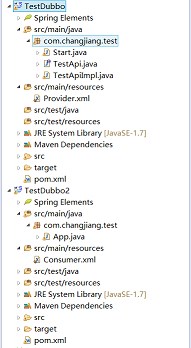
其中,TestDubbo用来提供服务,是Provider。而TestDubbo2用来消费服务,是Consumer。嗯,随便取的工程名。
在Provider中需要一个配置文件,将所提供的服务,以及zk注册中心的地址,以及Dubbo的服务在哪个端口暴露出来。其中有接口TestApi以及它的实
现TestApiImpl,以及一个启动项Start。
而之后的消费者工程,只需要配置好Consumer.xml文件,而后将其加载启动即可调用到Provider所发布的服务。
pom中需要依赖dubbo,zk相关的依赖。由于引入了父工程中的某些版本,所以此处有些版本需要读者自行添加。服务提供者的Start采用最原始
的ClassPathXmlApplicationContext来加载配置文件,加载之后start(),为了让提供者保持这个状态,可以加一行System.in.read();同理适用于服
务消费者。
准备工作完成后,启动zk,启动服务提供者,再启动服务消费者,消费者使用该接口,打印出(TestApiImpl中的实现即打印一行字符,以检验提
供与消费的效果)对应的字符就算OK。在其对应的可视化工具dubbo-admin中可以观察到更多详细的信息。(下个小节介绍)。
        <dependency>
            <groupId>com.alibaba</groupId>
            <artifactId>dubbo</artifactId>
            <version>2.8.4</version>
        </dependency>
        <dependency>
            <groupId>org.apache.zookeeper</groupId>
            <artifactId>zookeeper</artifactId>
            <version>3.4.6</version>
        </dependency>
        <dependency>
            <groupId>org.apache.zookeeper</groupId>
            <artifactId>zookeeper</artifactId>
        </dependency>
        <dependency>
            <groupId>com.101tec</groupId>
            <artifactId>zkclient</artifactId>
        </dependency>

        <dependency>
            <groupId>com.github.sgroschupf</groupId>
            <artifactId>zkclient</artifactId>
            <version>0.1</version>
        </dependency>
        <dependency>
            <groupId>org.springframework</groupId>
            <artifactId>spring-context</artifactId>
        </dependency>
        <dependency>
            <groupId>org.javassist</groupId>
            <artifactId>javassist</artifactId>
            <version>3.15.0-GA</version>
        </dependency>
Provider.xml:
<?xml version="1.0" encoding="UTF-8"?>
<beans xmlns="http://www.springframework.org/schema/beans"
    xmlns:xsi="http://www.w3.org/2001/XMLSchema-instance" xmlns:dubbo="http://code.alibabatech.com/schema/dubbo"
    xsi:schemaLocation="http://www.springframework.org/schema/beans
        http://www.springframework.org/schema/beans/spring-beans.xsd
        http://code.alibabatech.com/schema/dubbo
        http://code.alibabatech.com/schema/dubbo/dubbo.xsd
        ">

    <!-- 具体的实现bean -->
    <bean id="testApiImpl" class="com.changjiang.test.TestApiImpl" />

    <!-- 提供方应用信息,用于计算依赖关系 -->
    <dubbo:application name="xixi_provider" />

    <!-- 使用multicast广播注册中心暴露服务地址 <dubbo:registry address="multicast://224.5.6.7:1234"
        /> -->

    <!-- 使用zookeeper注册中心暴露服务地址 -->
    <dubbo:registry address="zookeeper://127.0.0.1:2181" />

    <!-- 用dubbo协议在20880端口暴露服务 -->
    <dubbo:protocol name="dubbo" port="20880" />

    <!-- 声明需要暴露的服务接口 -->
    <dubbo:service interface="com.changjiang.test.TestApi"
        ref="testApiImpl" />

</beans>
Consumer.xml:
<?xml version="1.0" encoding="UTF-8"?>
<beans xmlns="http://www.springframework.org/schema/beans"
    xmlns:xsi="http://www.w3.org/2001/XMLSchema-instance" xmlns:dubbo="http://code.alibabatech.com/schema/dubbo"
    xsi:schemaLocation="http://www.springframework.org/schema/beans
        http://www.springframework.org/schema/beans/spring-beans.xsd
        http://code.alibabatech.com/schema/dubbo
        http://code.alibabatech.com/schema/dubbo/dubbo.xsd
        ">

    <!-- 消费方应用名,用于计算依赖关系,不是匹配条件,不要与提供方一样 -->
    <dubbo:application name="hehe_consumer" />

    <!-- 使用zookeeper注册中心暴露服务地址 -->
    <!-- <dubbo:registry address="multicast://224.5.6.7:1234" /> -->
    <dubbo:registry address="zookeeper://127.0.0.1:2181" />

    <!-- 生成远程服务代理,可以像使用本地bean一样使用demoService -->
    <dubbo:reference id="testApiImpl" interface="com.changjiang.test.TestApi" />


</beans>
在Consumer中加载了Consumer.xml之后,直接调用Provider提供的服务,而后直接使用接口,可以检测提供-注册-消费是否成功。
public class App {
    public static void main(String[] args) throws IOException {
        ClassPathXmlApplicationContext ac = new ClassPathXmlApplicationContext(new String[] { "Consumer.xml" });
        ac.start();
        TestApi ta = (TestApi) ac.getBean("testApiImpl");
        ta.hello();
        System.in.read();
    }
}
运行结果(没有添加log4j.properties)

=================>
另一种启动方式,在src/main/resources目录下设置dubbo.properties文件
dubbo.spring.config=classpath*:spring/*.xml
而后将Provider.xml放到指定目录src/main/resources/spring下
启动时只需要在Main中:
public class App {
    public static void main(String[] args) {
        /**
         * 模拟启动
         */
//        ClassPathXmlApplicationContext ac = new ClassPathXmlApplicationContext(new String[] { "spring/Provider.xml" });
//        ac.start();
//        try {
//            System.in.read();
//        } catch (IOException e) {
//            // TODO Auto-generated catch block
//            e.printStackTrace();
//        }
        /**
         * main启动
         */
        String[] ars = {};
        com.alibaba.dubbo.container.Main.main(ars);
    }
}