参考:https://zh-hans.reactjs.org/docs/react-component.html
常见的生命周期函数如下:
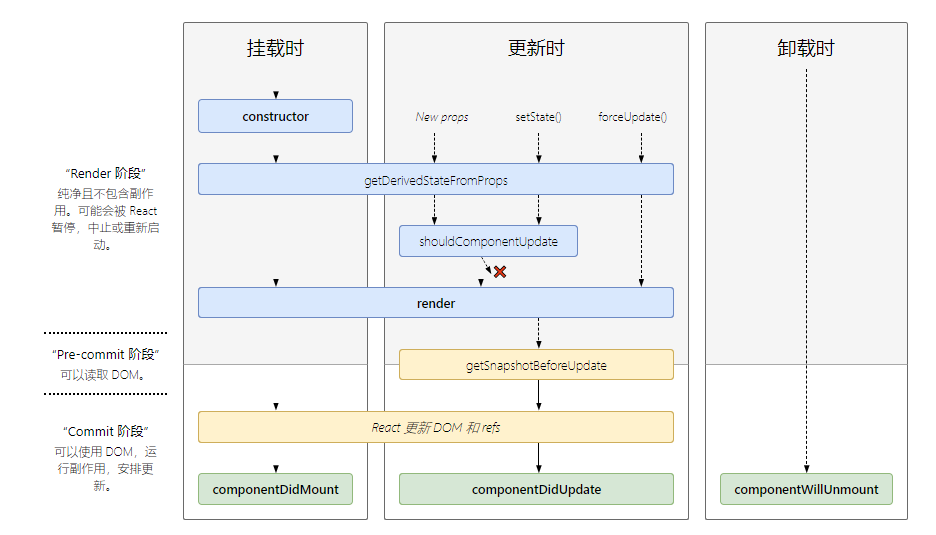
- Component存在的问题:
- 父组件重新render,子组件也会跟着重新render,即使数据没有发生改变;
- 当前组件setState(),会执行render(),即使state没有发生改变。
- 解决上述问题:
- 重写shouldComponentUpdate()生命周期勾子。
- 改用PureComponent声明组件。
- shouldComponentUpdate()默认返回true,会重新render(); 改写为false,则不会重新render()。
shouldComponentUpdate (nextProps, nextState) {
    // 父组件传进来m1属性,自身state中有m2属性
    if (this.props.m1 === nextProps.m1 && this.state.m2 === nextState.m2) {
        return false;
    } else {
        return true;
    }
}
当使用类声明组件(class ... extends ...)时, React.PureComponent自身内部重写了shouldComponentUpdate钩子,不需要再手动添加了。
- PureComponent的基本原理
- 重写实现shouldComponentUpdate()
- 对新/旧state和新/旧props中的数据进行浅比较,如果都没有发生改变,返回false;否则,返回true.
- 如果内部shouldComponentUpdate返回false, 则不调用render();否则,重新render().
- 如果不初始化 state 或不进行方法绑定,则不需要为 React 组件实现构造函数constructor().
- 在
constructor()函数中不要调用setState()方法。 - 避免将 props 的值复制给 state。
constructor(props) {
  super(props);
  // 不要在这里调用 this.setState()
  this.state = { counter: 0 };
  this.handleClick = this.handleClick.bind(this);
}
-
componentDidMount()网络请求获取数据。 -
componentDidUpdate(prevProps, prevState, snapshot)在更新后会被立即调用。首次渲染不会执行此方法。 -
如果组件实现了getSnapshotBeforeUpdate()生命周期(不常用),则它的返回值将作为componentDidUpdate()的第三个参数 “snapshot” 参数传递。否则此参数将为 undefined。
componentDidUpdate(prevProps) {
  // 典型用法(不要忘记比较 props):
  if (this.props.userID !== prevProps.userID) {
    this.fetchData(this.props.userID);
  }
}
componentWillUnmount()会在组件卸载及销毁之前直接调用。在此方法中执行必要的清理操作,例如,清除 timer,取消网络请求或清除在componentDidMount()中创建的订阅。