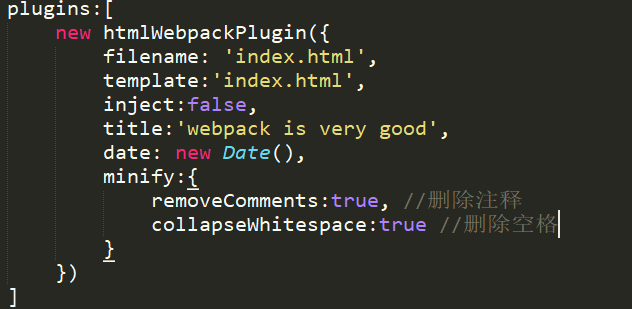
title: 用来生成页面的 title 元素
filename: 输出的 HTML 文件名,默认是 index.html, 也可以直接配置带有子目录。
template: 模板文件路径,支持加载器,比如 html!./index.html
inject: true | 'head' | 'body' | false  ,注入所有的资源到特定的 template 或者 templateContent 中,如果设置为 true 或者 body,所有的 javascript 资源将被放置到 body 元素的底部,'head' 将放置到 head 元素中。
favicon: 添加特定的 favicon 路径到输出的 HTML 文件中。
minify: {} | false , 传递 html-minifier 选项给 minify 输出
hash: true | false, 如果为 true, 将添加一个唯一的 webpack 编译 hash 到所有包含的脚本和 CSS 文件,对于解除 cache 很有用。
cache: true | false,如果为 true, 这是默认值,仅仅在文件修改之后才会发布文件。
showErrors: true | false, 如果为 true, 这是默认值,错误信息会写入到 HTML 页面中
chunks: 允许只添加某些块 (比如,仅仅 unit test 块)
chunksSortMode: 允许控制块在添加到页面之前的排序方式,支持的值:'none' | 'default' | {function}-default:'auto'
excludeChunks: 允许跳过某些块,(比如,跳过单元测试的块)
应用: