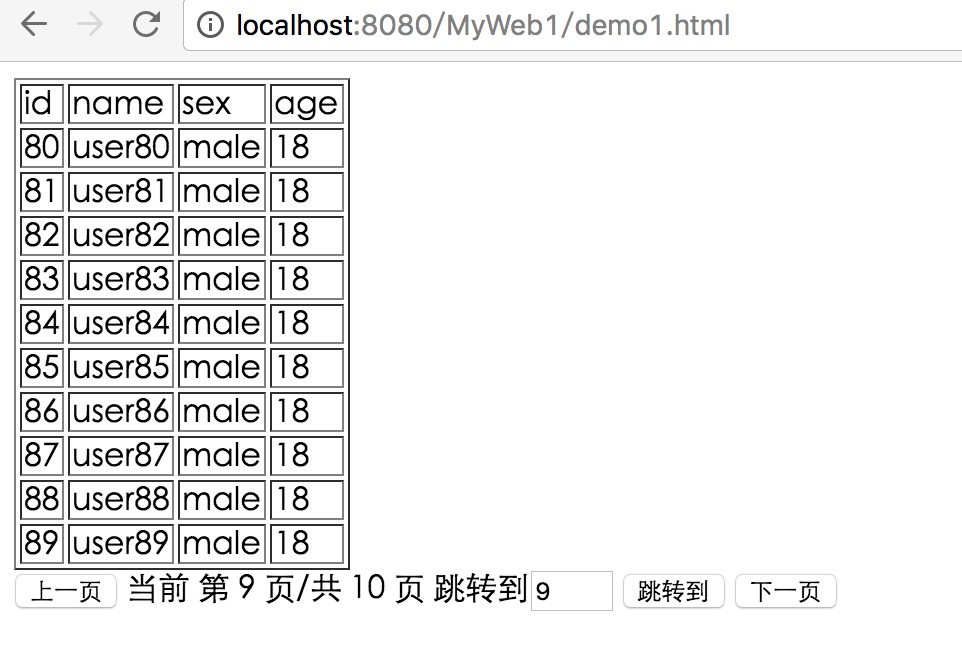
按照上次的分页逻辑,分页查询的业务大概需要几个“零件”:1.当前页;2.总页数;3.跳转页。后端需要处理的是:按照传送过来请求的页码返回相应地数据,并且接受初始化参数的请求:总页码、第一页的数据。
使用ajax请求可以很轻易地和服务器交互,所需要的数据格式是json。json的好处是可以把大量的数据格式化成一条字符串,由前后端的程序进行解析并呈现内容。我把查询到的数据装入list,并用struts自带的工具转换成为json返回客户端。
前端程序如下:
<!DOCTYPE html>
<html>
<head>
<meta charset="UTF-8">
<title>Insert title here</title>
<script type="text/javascript" src="js/jquery.min.js"></script>
<script type="text/javascript" src="js/pager.js"></script>
</head>
<body>

    <div >
        <table id="content" border="1">

        </table>
    </div>
    <div id="guide">
        <!-- 只输入数字的输入框 -->
        <button id="prePage" type="button">上一页</button> 当前 第 <span id="current"></span> 页/共 <span id="total"></span> 页  跳转到<input id="jumpPage" size="5" type="text" onkeyup='this.value=this.value.replace(/D/gi,"")'/> <button id="jumpBtn">跳转到</button>  <button id="nextPage" type="button">下一页</button>
    </div>
</body>
</html>
/*
 * To change this license header, choose License Headers in Project Properties.
 * To change this template file, choose Tools | Templates
 * and open the template in the editor.
 */
var totalPage;
var currentPage;
var userlist;
//初始化请求--将当前页和总页面初始化 和 list
$(document).ready(function(){

    $.get('Init','',function(results){
        $.each(results, function(key, val) {
             if(key === "current")
                 currentPage = results[key];
             else if(key === "total")
                 totalPage = results[key];
             else if(key == "list"){
                userlist=val;
             }
        });
        currentPage = parseInt(currentPage);
        totalPage = parseInt(totalPage);
        $("#current").text(currentPage);
        $("#total").text(totalPage);
        getUser(userlist);

        //console.log(currentPage);
        //console.log(totalPage);
    });
});

//上一页
$(document).ready(function(){
    $('#prePage').click(function(){
        if(currentPage == 1)
            alert("已至首页");
        else{
            currentPage = currentPage-1;
            var need=currentPage;

            $.get('Pager','need='+need,function(result){
                userlist = result['userList'];
                getUser(userlist);
                $('#current').text(need);
            });
            }
    });
});
//下一页
$(document).ready(function(){
    $('#nextPage').click(function(){
        if(currentPage == totalPage)
            alert("已至尾页");
        else{
            currentPage = currentPage+1;
            var need=currentPage;

            $.get('Pager','need='+need,function(result){
                userlist = result['userList'];
                getUser(userlist);
                //console.log(need);
                $('#current').text(need);
            });
        }
    });

});
//跳转页
$(document).ready(function(){
    $('#jumpBtn').click(function(){
        var toPage = $('#jumpPage').val();
        if(toPage != ""){
            toPage = parseInt(toPage);
            if(toPage <= totalPage && toPage >=1)
                $.get('Pager','need='+toPage,function(result){
                    userlist = result['userList'];
                    getUser(userlist);
                    //console.log(need);
                    $('#current').text(toPage);
                });
            else {
                alert("跳转页不合法!");
            }
        }
    });
});
//遍历list并生成table
function getUser(list){
    //先清空再添加
    var table = $('#content');
    table.html("");
    var thead = $("<tr></tr>");
    thead.appendTo(table);
    var tagName = $("<td>id</td>");
    tagName.appendTo(thead);
    tagName = $("<td>name</td>");
    tagName.appendTo(thead);
    tagName = $("<td>sex</td>");
    tagName.appendTo(thead);
    tagName = $("<td>age</td>");
    tagName.appendTo(thead);

    for(var k in list){
        var tr=$("<tr></tr>");
        tr.appendTo(table);
        var person = new Object();
        var td;

        person.id=userlist[k]['id'];
        person.name=userlist[k]['name'];
        person.sex=userlist[k]['sex'];
        person.age=userlist[k]['age'];

        td=$("<td>"+person.id+"</td>");
        td.appendTo(tr);
        td=$("<td>"+person.name+"</td>");
        td.appendTo(tr);
        td=$("<td>"+person.sex+"</td>");
        td.appendTo(tr);
        td=$("<td>"+person.age+"</td>");
        td.appendTo(tr);
        //console.log(person);
    }
}
后端逻辑为:
package ActionPackage;

import java.util.HashMap;
import java.util.List;

import javax.servlet.http.HttpServletRequest;

import org.apache.struts2.ServletActionContext;

import com.opensymphony.xwork2.ActionSupport;

import model.test_u;
import pagetest.PageService;


public class PageAction extends ActionSupport{
    private HashMap<String,Object> dataMap;
    private List<test_u> userList;
    public List<test_u> getUserList() {
        return userList;
    }
    public void setUserList(List<test_u> userList) {
        this.userList = userList;
    }
    private int size=10;
    public String Pager(){
        HttpServletRequest request = ServletActionContext.getRequest();
        int need = Integer.parseInt(request.getParameter("need"));
        System.out.println("need = "+need);
        PageService ps = new PageService();
        userList = ps.selectLimit((need-1)*size, size);
        return SUCCESS;
    }
    public String Init(){
        System.out.println("访问了!");
        PageService ps = new PageService();
        int total = ps.getConut()/10;
//        HttpServletResponse response = ServletActionContext.getResponse();
        dataMap = new HashMap<String,Object>();
        dataMap.put("current", 1);
        dataMap.put("total", total);
        List list = ps.selectLimit(1, size);
        dataMap.put("list", list);
//        String jsonString="{"current":1,"totle":12}";
//        try {
//            response.getWriter().print(jsonString);
//        } catch (IOException e) {
//            // TODO Auto-generated catch block
//            e.printStackTrace();
//        }
        return SUCCESS;
    }

    public HashMap<String, Object> getDataMap() {
        return dataMap;
    }
    public void setDataMap(HashMap<String, Object> dataMap) {
        this.dataMap = dataMap;
    }
}
模型层与DAO层与service层如上篇分页一样。
        <action name="Pager" class="ActionPackage.PageAction" method="Pager">
                <result type="json">
                <!-- 这里指定将被Struts2序列化的属性,该属性在action中必须有对应的getter方法 -->
                <param name="root1">userList</param>
            </result>
        </action>
        <action name="Init" class="ActionPackage.PageAction" method="Init">
             <result type="json">
                <!-- 这里指定将被Struts2序列化的属性,该属性在action中必须有对应的getter方法 -->
                <param name="root">dataMap</param>
            </result>
        </action>
主要难题:json对象的解析。因为前端代码不是很熟悉,查了很多资料,传回来的数据是Object Object类型的,其实用for循环加上k,v访问就ok了。最后记录动态表格生成的代码。
    var table = $('#content');
    table.html("");
    var thead = $("<tr></tr>");
    thead.appendTo(table);
    var tagName = $("<td>id</td>");
    tagName.appendTo(thead);
    tagName = $("<td>name</td>");
    tagName.appendTo(thead);
    tagName = $("<td>sex</td>");
    tagName.appendTo(thead);
    tagName = $("<td>age</td>");
    tagName.appendTo(thead);
效果图: