通过props 及 $emit在父子组件通讯,对应频繁更新状态考虑使用vuex
store.js
export default {
  // 存储状态值
  state: {
    count: 0
  },
  // 状态值的改变方法,操作状态值
  // 提交mutations是更改Vuex状态的唯一方法
  mutations: {
    // 修改state,第一个参数就是state
    increment(state) {
      state.count++
    }
  }
}
....
父组件.vue


<template>
  <div>
    <child :message="changeMsg" @chageMsg="prent"></child>
    <input type="button" value="父传子" @click="changeMsga">

    <p>父组件文字:{{fromchildMsg1}}</p>

    <p>count:{{ $store.state.count }}</p>
    <input type="button" value="父组件按钮Count++" @click="parentEvent">
  </div>

</template>
<script>
  import child from '@/components/Home2'
  export default {
    data: function () {
      return {
        changeMsg: '1111111',
        childMsg: '',
        fromchildMsg1: ''
      }
    },
    methods: {
      parentEvent: function () {
        this.$store.commit('increment');
      },
      changeMsga: function () {
        this.changeMsg = '公司'
      },
      prent: function (msg) {
        this.fromchildMsg1 = msg;
      }
    },
    components: {
      child
    }
  }

</script>
<style scoped>

</style>
子组件.vue
<template>
  <div>
    获取值:<span>{{message}}</span><br>
    <input type="button" value="子组件" @click="submitValue">
    <p>count:{{ $store.state.count }}</p>
    <input type="button" value="子组件按钮Count++" @click="childEvent">
  </div>
</template>
<script>
  export default {
    data: function () {
      return {

      }
    },
    props:['message'],
    methods: {
      childEvent: function(){
        this.$store.commit('increment')
      },
      submitValue: function(){
         this.$emit("chageMsg",'222222222222222');
      }
    }
  }

</script>
<style scoped>

</style>
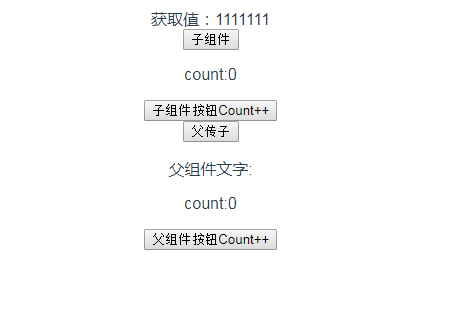
初始化会看到,比较low的页面
父子组件传值,箭头
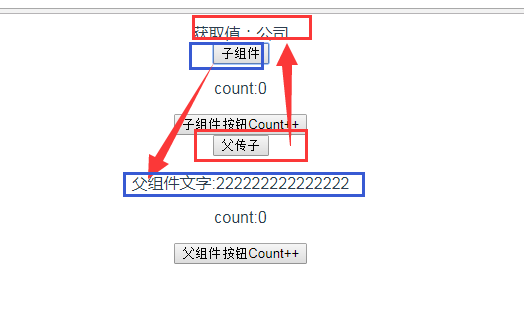
父子组件状态更改 ,点击 (父子组件按钮)会,发现 父子组件数组都在+1.

针对刷新,状态信息无,可以使用本地缓存localstorage