Ubuntu 14.04.1为例,设置步骤如下:
一. 生成密钥的公钥和私钥
-
# ssh-keygen -t rsa
-
Generating public/private rsa key pair.
Enter file in which to save the key (/root/.ssh/id_rsa):
Created directory '/root/.ssh'.
Enter passphrase (empty for no passphrase): #输入密码
Enter same passphrase again: #输入密码
Your identification has been saved in /root/.ssh/id_rsa.
Your public key has been saved in /root/.ssh/id_rsa.pub.
The key fingerprint is:
1c:37:a8:a3:65:a2:4a:89:ab:46:30:ad:54:d1:40:eb root@iZ28vo50eu5Z
二. 将生成的私钥(id_rsa)下载到本地的windows机器上,并把公钥导入到.ssh/authorized_keys 文件中去
# cd /root/.ssh/
-
#cat id_rsa.pub > authorized_keys
三. 设置sshd 服务器服务,打开以下设置:
-
RSAAuthentication yes
-
PubkeyAuthentication yes
-
AuthorizedKeysFile /root/.ssh/authorized_keys
-
修改以下设置:
-
ChallengeResponseAuthentication no
-
PasswordAuthentication no
-
UsePAM no
四. 重启ssh服务
-
#service ssh restart
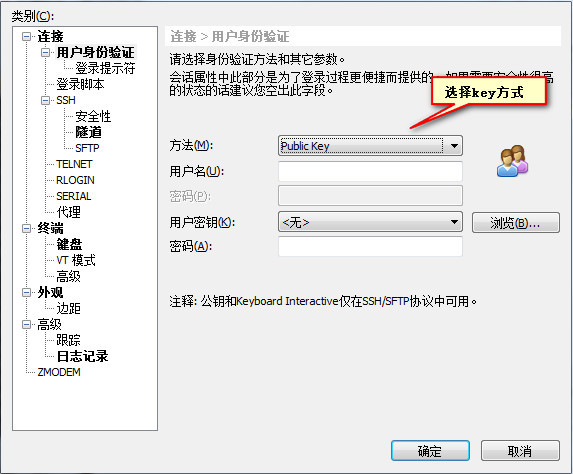
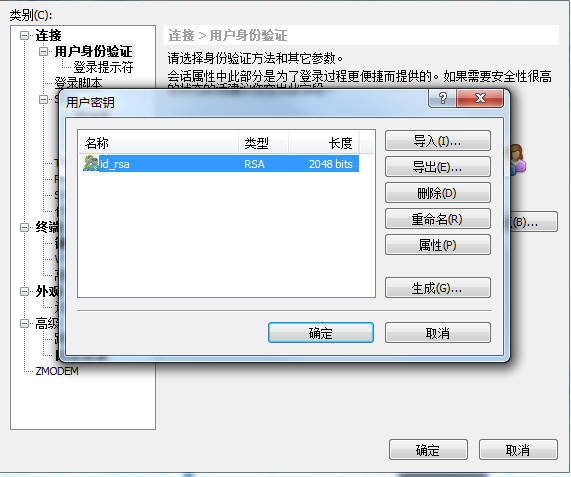
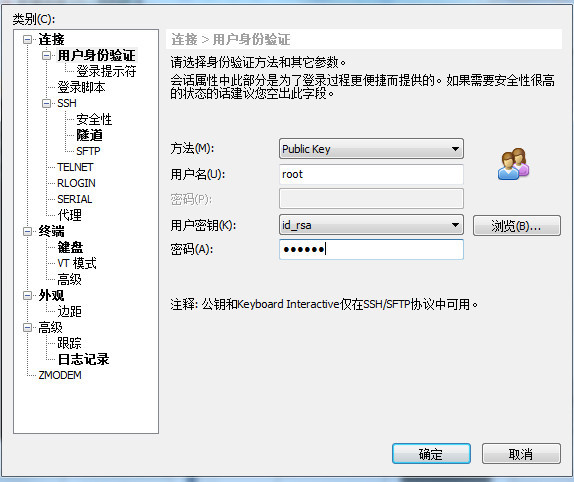
五. 导入私钥到远程工具中,比如xshell。
新建连接,点击左边用户身份验证:
http://help.aliyun.com/knowledge_detail/6502152.html?spm=5176.7114037.1996646101.29.mSdCu4&pos=15