u-boot支持下列NAND ECC算法:
1.S/W ECC(Hamming code),软件ECC校验。
2.H/W ECC(Hamming code,BCH8)。
BCH Flash OOB Layout
For any ECC scheme we need to add some extra data while writing so as to detect and correct (if possible) the errors introduced by the NAND part. In case of BCH scheme some bytes are needed to store the ECC related info.
The section of NAND memory where addition info like ECC data is stored is referred to as Out Of Band or OOB section.
The first 2 bytes are used for Bad block marker – 0xFFFF => Good block
The next ‘N’ bytes is used for BCH bytes
N = B * <Number of 512-byte sectors in a page>
>>B = 8 bytes per 512 byte sector in BCH4
>>B = 14 bytes per 512 byte sector in BCH8
>>B = 26 bytes per 512 byte sector in BCH16
So for a 2k page-size NAND flash with 64-byte OOB size, we will use BCH8. This will consume 2 + (14*4) = 58 bytes out of 64 bytes available.
The NAND flash part used in EVM does not have enough spare area to support BCH16.

To select ECC algorithm for NAND:
U-Boot# nandecc [sw | hw <hw_type>]
Usage:
sw - Set software ECC for NAND.
hw <hw_type> - Set hardware ECC for NAND <hw_type> - 0 for Hamming code, 1 for bch4, 2 for bch8, 3 for bch16
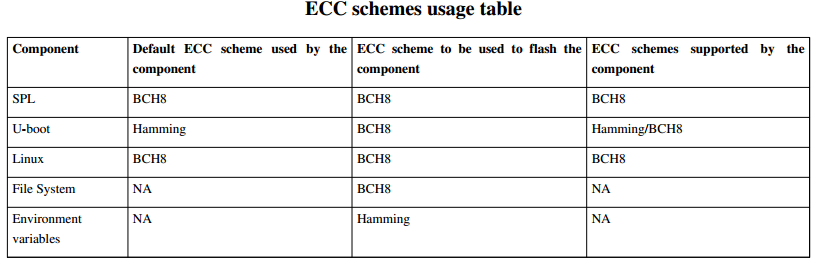
Currently we support only Software, Hamming Code and BCH8. We do not support BCH4 and BCH16.
注:am335x采用NandFlash:K9F2G08UOC,此flash特性:
page: 2K=2048 bytes
oob: 64 bytes
block: 128K = 64page
从目前u-boot命令可知,u-boot在烧写nandflash时,MLO、U-boot、Linux、Rootfs都采用了BCH8(nandecc hw 2),而EVM和Log采用了Hamming(nandecc hw 0)。yaffs2文件系统本身占用oob空间28字节(实际25字节),而oob空间共64字节,显然不能采用BCH8(空间不足)。yaffs2中oob布局为:2bytes + 28bytes tags + 16ECC(根据好的yaffs镜像推测)。具体如何实现需找到源码后进一步确认。
参考:AM335x U-Boot User's Guide
http://blog.csdn.net/pengrui18/article/details/18326275
http://read.pudn.com/downloads128/sourcecode/embed/541512/yaffs2/utils/mkyaffs2image.c__.htm