用池来管理Connection,这可以重复使用Connection。有了池,所有我们就不用自己来创建Connection,而是通过取来获取Connection对象。当使用完Connection后,调用Connection的close()方法也不会真的关闭Connection,而是把Connection"归还"给池。池就可以在利用这个Connection对象了,便于管理连接,达到资源与时间的平衡。
一、连接池原理图
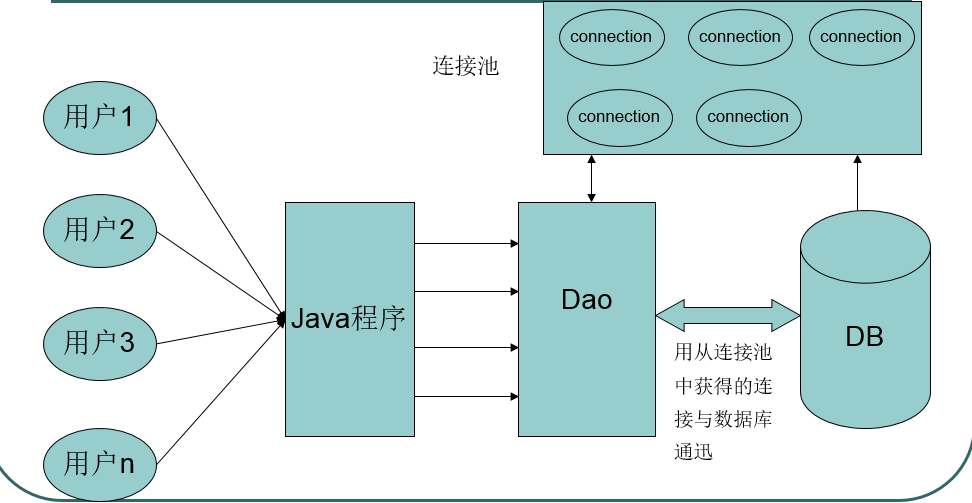
1、池中有,则从池中拿;
2、池中没有,就先等待,等待超时后,则新创建connection;
3、如果这个连接是原本就在池中的,那么用完之后,就放回池中;
3、如果这个连接是新创建的,那么用完之后,就直接销毁;
二、连接池的配置
1、池参数(所有池参数都有默认值):
- 初始大小:10个;
- 最小空闲连接数:3个;
- 增量:一次创建的最小单位(5个);
- 最大空闲连接数:12个;
- 最大连接数:20个;
- 最大的等待时间:1000毫秒。
2、四大连接参数
连接池也是使用四大连接参数来完成创建连接对象。
3、实现的接口
连接池必须实现:javax.sql.DataSource接口。
连接池返回的Connection对象,它的close()方法与众不同,调用它的close()不是关闭,而是把连接归还给池。
三、常用连接池
(一)DBCP
1、DBCP
DBCP(DataBase connection pool),数据库连接池。是 apache 上的一个 java 连接池项目,也是 tomcat 使用的连接池组件。单独使用dbcp需要2个包:commons-dbcp.jar,commons-pool.jar由于建立数据库连接是一个非常耗时耗资源的行为,所以通过连接池预先同数据库建立一些连接,放在内存中,应用程序需要建立数据库连接时直接到连接池中申请一个就行,用完后再放回去。
2、核心API:BasicDataSource、BasicDataSourceFactory
3、依赖的jar包:commons-dbcp-1.4.jar、commons-pool-1.5.6.jar、mysql-connector-java-5.1.44-bin.jar(数据库驱动,根据连接的数据库提供);
4、DBCP连接池配置文件(dbcpconfig.properties):
配置文件需放在src的根目录下
#连接设置
driverClassName=com.mysql.jdbc.Driver
url=jdbc:mysql://localhost:3306/mydb1
username=root
password=

#<!-- 初始化连接 -->
initialSize=5

#最大连接数量
maxActive=50

#<!-- 超时等待时间以毫秒为单位 60000毫秒/1000等于60秒 -->
maxWait=60000

#JDBC驱动建立连接时附带的连接属性属性的格式必须为这样:[属性名=property;]
#注意:"user" 与 "password" 两个属性会被明确地传递,因此这里不需要包含他们。
connectionProperties=useUnicode=true;characterEncoding=utf8

#指定由连接池所创建的连接的自动提交(auto-commit)状态。
defaultAutoCommit=true

#driver default 指定由连接池所创建的连接的只读(read-only)状态。
#如果没有设置该值,则“setReadOnly”方法将不被调用。(某些驱动并不支持只读模式,如:Informix)
defaultReadOnly=

#driver default 指定由连接池所创建的连接的事务级别(TransactionIsolation)。
#可用值为下列之一:(详情可见javadoc。)NONE,READ_UNCOMMITTED, READ_COMMITTED, REPEATABLE_READ, SERIALIZABLE
defaultTransactionIsolation=REPEATABLE_READ

#<!-- 最大空闲连接 -->
maxIdle=20

#<!-- 最小空闲连接 -->
minIdle=5
5、DBCP连接池示例:
 1 import org.apache.commons.dbcp.BasicDataSourceFactory;
 2 import javax.sql.DataSource;
 3 import java.io.InputStream;
 4 import java.sql.Connection;
 5 import java.sql.ResultSet;
 6 import java.sql.SQLException;
 7 import java.sql.Statement;
 8 import java.util.Properties;
 9
10 public class DBCPUtils02 {
11     private static DataSource dataSource;
12     static {
13         Properties properties = new Properties ();
14         //使用类加载将文件转换成流
15         //获取类加载器对象:当前类名.class.getClassLoader();
16         ClassLoader classLoader = DBCPUtils02.class.getClassLoader ();
17         //调用classLoader的getResourceAsStream()方法,将资源文件转换成流
18         InputStream inStream = classLoader.getResourceAsStream ("dbcpconfig.properties");
19         //1.创建连接池对象
20         try {
21             //使用properties将文件转换成的流加载进来
22             properties.load (inStream);
23             //使用连接池工厂创建连接池
24             dataSource = BasicDataSourceFactory.createDataSource (properties);
25         } catch (Exception e) {
26             e.printStackTrace ();
27         }
28     }
29
30     // 从DBCP连接池中获取连接
31     public static Connection getConnection() throws SQLException {
32         return dataSource.getConnection ();
33     }
34
35     //释放资源
36     public static void close(ResultSet resultSet, Statement statement, Connection conn)  {
37        if (resultSet != null){
38            try {
39                resultSet.close ();
40            } catch (SQLException e) {
41                e.printStackTrace ();
42            }
43        }
44        if (statement != null){
45            try {
46                statement.close ();
47            } catch (SQLException e) {
48                e.printStackTrace ();
49            }
50        }
51        if (conn != null) {
52            try {
53                conn.close ();
54            } catch (SQLException e) {
55                e.printStackTrace ();
56            }
57        }
58     }
59 }
(二) C3P0连接池
C3P0是一个开源的JDBC连接池,它实现了数据源和JNDI绑定,支持JDBC3规范和JDBC2的标准扩展。目前使用它的开源项目有Hibernate,Spring等。
1、C3P0的核心类:CombopooledDataSource。
2、相关jar包下载链接:https://sourceforge.net/projects/c3p0/files/latest/download?source=files
3、依赖包:c3p0-0.9.5.2.jar 和mchange-commons-java-0.2.11.jar包、mysql-connector-java-5.1.44-bin.jar(针对MySQL数据库)
4、c3p0也可以指定配置文件,而配置文件可以是properties,也可以是xml的,当然xml高级一些,但是c3p0的配置文件名必须为“c3p0-config.xml”,并放在类的路径下(src下)。
 1 <?xml version="1.0" encoding="utf-8"?>
 2 <c3p0-config>
 3     <!--默认配置信息-->
 4     <default-config>
 5         <!--连接四大参数配置-->
 6         <property name="droverClass">com.mysql.jdbc.Driver</property>
 7         <property name="jdbcUrl">jdbc:mysql://localhost:3306/mydb1</property>
 8         <property name="user">root</property>
 9         <property name="password"></property>
10         <!--池参数配置-->
11         <property name="acquireIncrement">3</property>
12         <property name="initialPoolSize">10</property>
13         <property name="minPoolSize">2</property>
14         <property name="maxPoolSize">10</property>
15     </default-config>
16     <!-- 专门为oracle提供的配置信息 -->
17     <named-config name="oracle-config">
18         <!--连接四大参数配置-->
19         <property name="droverClass">oracle.jdbc.driver.OracleDriver</property>
20         <property name="jdbcUrl">jdbc:oracle:thin:@地址:端口:ORCL</property>
21         <property name="user">root</property>
22         <property name="password"></property>
23         <!--池参数配置-->
24         <property name="acquireIncrement">3</property>
25         <property name="initialPoolSize">10</property>
26         <property name="minPoolSize">2</property>
27         <property name="maxPoolSize">10</property>
28     </named-config>
29 </c3p0-config>
5、C3P0 使用示例:
 1 import com.mchange.v2.c3p0.ComboPooledDataSource;
 2 import java.sql.Connection;
 3 import java.sql.ResultSet;
 4 import java.sql.SQLException;
 5 import java.sql.Statement;
 6
 7 /**
 8  * Created by kong on 12/12/2017.
 9  */
10
11 public class C3P0Utils02 {
12     private static ComboPooledDataSource dataSource;
13     static {
14         //创建连接池对象
15         dataSource = new ComboPooledDataSource ();
16     }
17     //获取连接
18     public static Connection getConnection() throws SQLException {
19         return dataSource.getConnection ();
20     }
21     //释放资源
22     public static void close(ResultSet resultSet, Statement statement,Connection connection) throws SQLException {
23         if (resultSet != null){
24             resultSet.close ();
25         }
26         if (statement != null){
27             statement.close ();
28         }
29         if (connection != null){
30             connection.close ();
31         }
32     }
33 }
(三) Druid 连接池
Druid首先是一个数据库连接池。Druid是目前最好的数据库连接池,在功能、性能、扩展性方面,都超过其他数据库连接池,包括DBCP、C3P0、BoneCP、Proxool、JBoss DataSource。Druid已经在阿里巴巴部署了超过600个应用,经过一年多生产环境大规模部署的严苛考验。
1、核心类:DruidDataSourceFactory
2、依赖包:druid-1.1.0.jar、mysql-connector-java-5.1.44-bin.jar
3、配置文件:druidconfig.properties 放置于src下
url=jdbc:mysql://localhost:3306/mydb1
driverClassName=com.mysql.jdbc.Driver
username=root
password=
filters=stat
maxActive=20
initialSize=1
maxWait=60000
minIdle=10
maxIdle=15
timeBetweenEvictionRunsMillis=60000
minEvictableIdleTimeMillis=300000
validationQuery=SELECT'x'
testWhileIdle=true
testOnBorrow=false
testOnReturn=false
maxOpenPreparedStatements=20
removeAbandoned=true
removeAbandonedTimeout=1800
logAbandoned=true
4、Druid使用示例:
 1 import com.alibaba.druid.pool.DruidDataSourceFactory;
 2 import javax.sql.DataSource;
 3 import java.io.InputStream;
 4 import java.sql.Connection;
 5 import java.sql.PreparedStatement;
 6 import java.sql.ResultSet;
 7 import java.sql.SQLException;
 8 import java.util.Properties;
 9
10 public class DruidUtil {
11     private static DataSource dataSource;
12     static {
13         Properties properties = new Properties ();
14         ClassLoader classLoader = DruidUtils02.class.getClassLoader ();
15         InputStream resourceAsStream =
16                 classLoader.getResourceAsStream ("druidconfig.properties");
17         try {
18             properties.load (resourceAsStream);
19             dataSource = DruidDataSourceFactory.createDataSource(properties);
20         } catch (Exception e) {
21             e.printStackTrace ();
22         }
23     }
24
25     public static Connection getConnection() throws SQLException {
26         return dataSource.getConnection ();
27
28     }
29
30     public static void close(ResultSet resultSet, PreparedStatement prsm,Connection conn){
31         if (resultSet !=null){
32             try {
33                 resultSet.close ();
34             } catch (SQLException e) {
35                 e.printStackTrace ();
36             }
37         }
38         if (prsm != null){
39             try {
40                 prsm.close ();
41             } catch (SQLException e) {
42                 e.printStackTrace ();
43             }
44         }
45         if (conn != null) {
46             try {
47                 conn.close ();
48             } catch (SQLException e) {
49                 e.printStackTrace ();
50             }
51         }
52
53     }
54 }