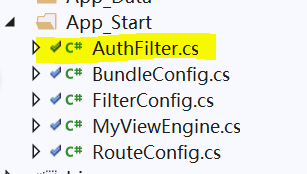
1. 在 App_Start 下新增一个 AuthFilter.cs
    public class AuthFilter : ActionFilterAttribute
    {
        public override void OnActionExecuting(ActionExecutingContext filterContext)
        {

            //如果用户未登录,且action未明确标识可跳过登录授权,则跳转到登录页面
            if (filterContext.HttpContext.Session["EmpCode"]==null && !filterContext.ActionDescriptor.IsDefined(typeof(AllowAnonymousAttribute), false))
            {
                const string loginUrl = "~/Home/LoginPage";
                filterContext.Result = new RedirectResult(loginUrl);
            }
            base.OnActionExecuting(filterContext);
        }
    }
2.在以下的方法 标注允许所有用户访问,跳过验证,否则就永远登录不了
   [AllowAnonymous]  //容许所有的用户访问
        public ActionResult LoginPage()
        {
            return View();
        }

 [AllowAnonymous]
        public string Login(string userCode, string passWord)
        {
            try
            {
                DAL.sys.UserInfo user = new DAL.sys.UserInfo();

                if (userCode == "admin" && passWord == "123456")
                {
                    DataTable admin_dt = user.GetAllMenu();
                    Session["EmpCode"] = "admin";
                    Common.CreateTree tree = new Common.CreateTree();
                    //DataTable dtMenu = user.GetMenuByUser(userCode);
                    string jsonData = JsonConvert.SerializeObject(tree.BindTree(admin_dt, null, "0"));
                    return "{"success":true,"data":" + jsonData + "} ";
                }
                else
                {
                    DataTable dt = user.GetUserInfoByuserCode(userCode);
                    if (dt.Rows.Count == 0)
                    {
                        return "{"success":false,"msg":" 该用户不存在!"}";
                    }
                    else
                    {
                        if (dt.Rows[0]["PassWord"].ToString() != passWord)
                        {
                            return "{"success":false,"msg":" 密码错误!"}";
                        }
                        else
                        {
                            Session["EmpCode"] = dt.Rows[0]["EmpCode"].ToString();
                            Common.CreateTree tree = new Common.CreateTree();
                            DataTable dtMenu = user.GetMenuByUser(userCode);
                            string jsonData = JsonConvert.SerializeObject(tree.BindTree(dtMenu, null, "0"));
                            return "{"success":true,"data":" + jsonData + "} ";
                        }
                    }
                }
            }
           catch(Exception ex)
            {
                return ex.Message;
            }

        }