转载:https://blog.csdn.net/weixin_38912024/article/details/82383312
1、安装git https://git-scm.com/downloads

2、新建工程
3、创建密钥
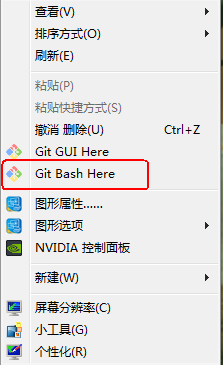
a、桌面右键
b、cd ~/.ssh/
如果提示 “ No such file or directory”,你可以手动的创建一个 .ssh文件夹即可
mkdir ~/.ssh
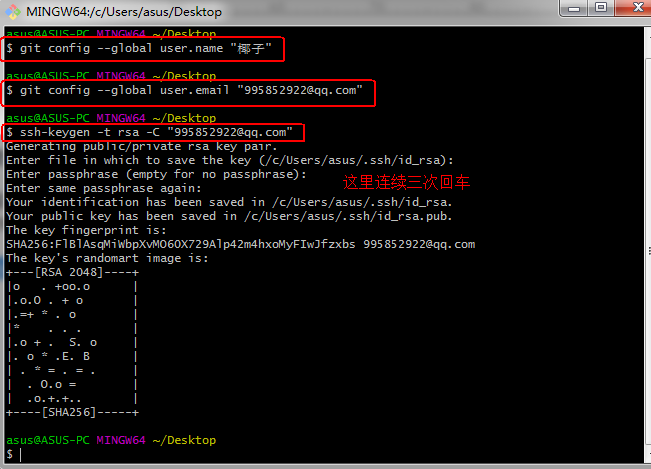
c、配置全局的name和email,参照你创建的工程Git global setup
git config --global user.name "走走走"
git config --global user.email "11@qq.com"
d、生成key
ssh-keygen -t rsa -C "11@qq.com"
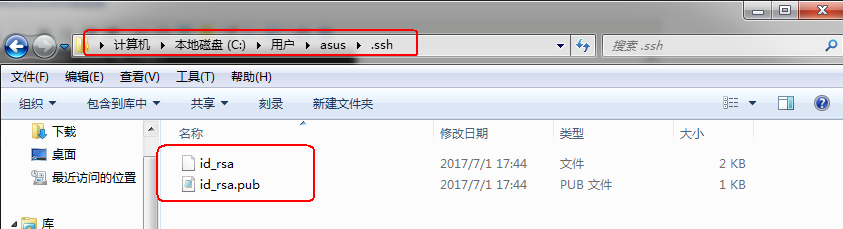
e、最后生成两个文件:id_rsa和id_rsa.pub
f、把id_rsa.pub里的内容粘贴到gitlab密钥中

我这边有点不一样

g、密钥创建成功
4、上传项目
a、右键要上传的项目,选择Git Bash Here
b、输入下面的命令
git config --global user.name ""
git config --global user.email ""
git init
git remote add origin 项目地址
git add .
git commit -m "程序源代码"
git push -u origin master
如果有:failed to push some refs to git问题
git pull --rebase origin master
git push -u origin master