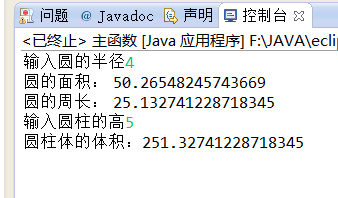
 实验结果
实验结果
package 类的抽象与封装;
public class yuan {//定义构造函数
private double Radius;//成员变量
public double circle() {
return Radius;
}
public void circle(double r) {//创建时将半径初始化为r
Radius = r;
}
public yuan( ){
System.out.println("圆!");
}
public yuan(double r){
this.Radius = r;
}
public double getArea(double r){//成员方法
return Math.PI * r * r;
}
public double getPerimeter(double r){//成员方法
return 2 * Math.PI * r;
}
public void show( ){//成员方法
System.out.println("圆的面积: " + this.getArea(Radius));
System.out.println("圆的周长: " + this.getPerimeter(Radius));
}
}
package 类的抽象与封装;
public class yuanzhu extends yuan {
private double hight;
public yuanzhu (double r, double h )
{
super(r);//成员变量
this.hight = h;
}
public double getVolume(){//get方法存取对象 跟set相比 它不能重载 方法名必须不相同
return Math.PI * this.circle() * this.circle() * hight;
}
public void showVolume( ){
System.out.println("圆柱体的体积:" + this.getVolume());
}
}
package 类的抽象与封装;
import java.util.Scanner;//输入函数的要定义的
public class 主函数 {
public static void main(String[] args){
double r,h;
Scanner in=new Scanner(System.in);
System.out.print("输入圆的半径");
r=in.nextInt();
yuan c1=new yuan(r);
c1.show( );
Scanner i=new Scanner(System.in);
System.out.print("输入圆柱的高");
h=i.nextInt();
yuanzhu c2=new yuanzhu(r,h);
c2.showVolume( );
}
}