是在ubuntu下出现的需求 现笔记记录
apt-get update
更新源命令
apt-get install openssh-server
安装ssh服务
容易出现无法定位软件包。出现此问题是因为软件源没有更新 可以尝试更新命令一试。或编辑etc/apt/source.list或sources.list ,添加源地址
如:
阿里云Ubuntu 18.04源
deb http://mirrors.aliyun.com/ubuntu/ bionic main restricted universe multiverse
deb http://mirrors.aliyun.com/ubuntu/ bionic-security main restricted universe multiverse
deb http://mirrors.aliyun.com/ubuntu/ bionic-updates main restricted universe multiverse
deb http://mirrors.aliyun.com/ubuntu/ bionic-proposed main restricted universe multiverse
deb http://mirrors.aliyun.com/ubuntu/ bionic-backports main restricted universe multiverse
deb-src http://mirrors.aliyun.com/ubuntu/ bionic main restricted universe multiverse
deb-src http://mirrors.aliyun.com/ubuntu/ bionic-security main restricted universe multiverse
deb-src http://mirrors.aliyun.com/ubuntu/ bionic-updates main restricted universe multiverse
deb-src http://mirrors.aliyun.com/ubuntu/ bionic-proposed main restricted universe multiverse
deb-src http://mirrors.aliyun.com/ubuntu/ bionic-backports main restricted universe multiverse
还可以百度一下,查找源
然后apt-get update
更新
ps -e | grep ssh
检测ssh服务是否启动
看到有ssh字样就是启动了
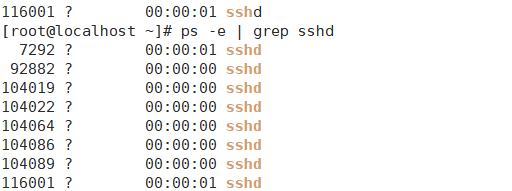
如未启动就要手动启动服务
/etc/init.d/ssh start
直接find查找ssh找到路径,或到etc下手动搜索
配置ssh-server,配置文件位于/etc/ssh/sshd_config,默认端口为22,为了安全,一般自定义为其他端口,然后重启

/etc/init.d/ssh resart
然后用xshll或putty连接