AOP (Aspect Oriented Programming) 面向切面编程。
业务有核心业务和边缘业务。
比如用户管理,菜单管理,权限管理,这些都属于核心业务。
比如日志管理,操作记录管理,这些都是边缘业务,可以统一的提出来。
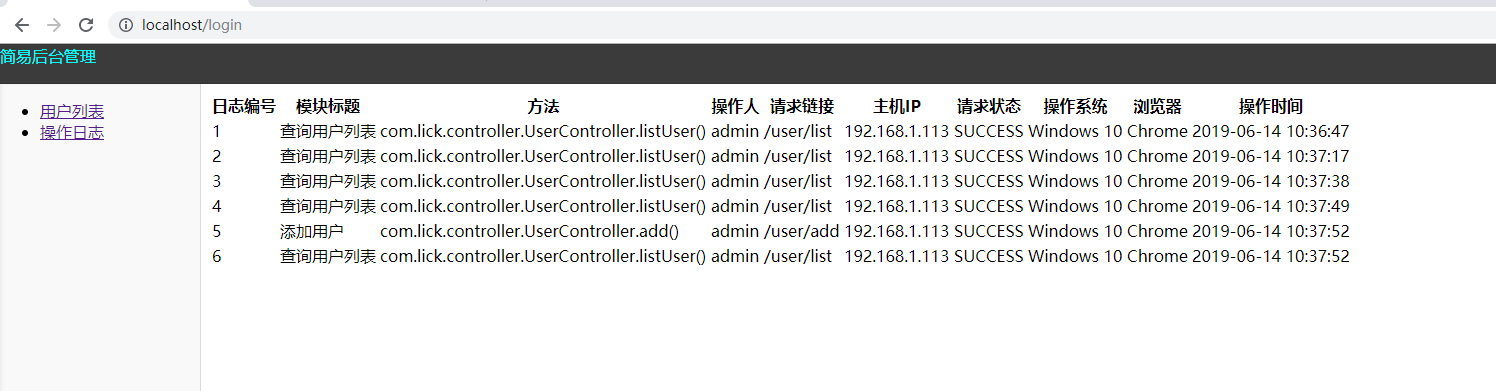
尝试使用SpringBoot +AOP 提出操作记录业务。
github aop_demo

package com.lick.aspect.lang.annotation;

import com.lick.aspect.lang.enums.BusinessType;

import java.lang.annotation.*;

/**
 * 自定义操作记录注解
 */
@Target({ElementType.PARAMETER,ElementType.METHOD})
@Retention(RetentionPolicy.RUNTIME)
@Documented
public @interface Log {
    /**
     * 模块
     */
    public String title() default "";

    /**
     * 功能
     */
    public BusinessType businessType() default BusinessType.OTHER;

}
package com.lick.aspect.lang.enums;

/**
 * 操作状态
 *
 */
public enum BusinessStatus {
    /**
     * 成功
     */
    SUCCESS,

    /**
     * 失败
     */
    FAIL,
}
package com.lick.aspect.lang.enums;

/**
 * 业务操作类型
 */
public enum BusinessType {
    /**
     * 其它
     */
    OTHER,

    /**
     * 新增
     */
    INSERT,

    /**
     * 修改
     */
    UPDATE,

    /**
     * 删除
     */
    DELETE,

    /**
     * 查询列表
     */
    LIST,

    /**
     * 登录
     */
    LOGIN,

    /**
     * 登出
     */
    LOGOUT,
}
package com.lick.aspect.lang;

import com.lick.aspect.lang.annotation.Log;
import com.lick.aspect.lang.enums.BusinessStatus;
import com.lick.domain.OperateLog;
import com.lick.domain.User;
import com.lick.service.OperateLogService;
import com.lick.utils.IpUtils;
import com.lick.utils.ServletUtils;
import com.lick.utils.StringUtils;
import eu.bitwalker.useragentutils.UserAgent;
import org.aspectj.lang.JoinPoint;
import org.aspectj.lang.Signature;
import org.aspectj.lang.annotation.AfterReturning;
import org.aspectj.lang.annotation.AfterThrowing;
import org.aspectj.lang.annotation.Aspect;
import org.aspectj.lang.annotation.Pointcut;
import org.aspectj.lang.reflect.MethodSignature;
import org.slf4j.Logger;
import org.slf4j.LoggerFactory;
import org.springframework.beans.factory.annotation.Autowired;
import org.springframework.stereotype.Component;

import javax.servlet.http.HttpServletRequest;
import javax.servlet.http.HttpSession;
import java.lang.reflect.Method;
import java.util.Date;

/**
 * 操作记录处理
 */
@Aspect
@Component
public class LogAspect {

    @Autowired
    private OperateLogService operateLogService;

    private static final Logger log = LoggerFactory.getLogger(LogAspect.class);


    //配置织入点
    @Pointcut("@annotation(com.lick.aspect.lang.annotation.Log)")
    public void logPointCut() {
    }

    /**
     * 处理玩请求后执行
     * @param joinPoint 切点
     */
    @AfterReturning(pointcut = "logPointCut()")
    public void doAfterReturning(JoinPoint joinPoint){
        handleLog(joinPoint,null);
    }

    /**
     * 拦截异常操作
     * @param joinPoint 切点
     * @param e 异常
     */
    @AfterThrowing(value = "logPointCut()",throwing = "e")
    public void doAfterThrowing(JoinPoint joinPoint,Exception e){
        handleLog(joinPoint,e);
    }
    protected void handleLog(final JoinPoint joinPoint,final Exception e) {
        try{
            //获得注解
            Log controllerLog = getAnnotation(joinPoint);
            if(controllerLog == null) {
                return;
            }
            UserAgent userAgent = UserAgent.parseUserAgentString(ServletUtils.getRequest().getHeader("User-Agent"));
            String hostIp = IpUtils.getHostIp();
            String os = userAgent.getOperatingSystem().getName();
            String browser = userAgent.getBrowser().getName();

            OperateLog operateLog = new OperateLog();
            //主机地址
            operateLog.setOperIP(hostIp);
            //事务状态
            operateLog.setStatus(BusinessStatus.SUCCESS.name());
            //浏览器类型
            operateLog.setBrowser(browser);
            //操作系统类型
            operateLog.setOs(os);

            HttpServletRequest request = ServletUtils.getRequest();
            //请求地址
            operateLog.setOperURL(request.getRequestURI());

            HttpSession session = ServletUtils.getSession();
            try {
                User currentUser = (User)session.getAttribute("currentUser");
                //操作人
                operateLog.setOperator(currentUser.getUsername());
            }
            catch(Exception exp) {
                exp.printStackTrace();
            }


            if (e != null)
            {   //事务状态 错误的情况
                operateLog.setStatus(BusinessStatus.FAIL.name());
                //错误消息
                operateLog.setErrorMSG(StringUtils.substring(e.getMessage(), 0, 2000));
            }
           //设置方法名称
            String className = joinPoint.getTarget().getClass().getName();
            String methodName = joinPoint.getSignature().getName();
            //操作的方法
            operateLog.setMethod(className + "." + methodName + "()");

            //处理设置注解上的参数
            getControllerMethosDescription(controllerLog,operateLog);

            operateLog.setOperTime(new Date());
            //保存数据库
            operateLogService.insertOperateLog(operateLog);

        }catch (Exception exp){
            //记录本地异常日志
            log.error("==前置通知异常==");
            log.error("异常消息{}",exp.getMessage());
            exp.printStackTrace();
        }
    }
    public void getControllerMethosDescription(Log log, OperateLog operateLog) throws Exception {
        //设置action 动作
        //业务类型
        operateLog.setOperAction(log.businessType().name());
        //设置标题
        //模块标题
        operateLog.setTitle(log.title());

    }

    private Log getAnnotation(JoinPoint joinPoint) throws Exception {
        Signature signature = joinPoint.getSignature();
        MethodSignature methodSignature = (MethodSignature) signature;
        Method method = methodSignature.getMethod();
        if(method != null) {
            return method.getAnnotation(Log.class);
        }
        return null;
    }

}
package com.lick.config;


import org.mybatis.spring.annotation.MapperScan;
import org.springframework.context.annotation.Configuration;
import org.springframework.context.annotation.EnableAspectJAutoProxy;


/**
 * 配置
 */
@Configuration
// 表示通过aop框架暴露该代理对象,AopContext能够访问
@EnableAspectJAutoProxy(exposeProxy = true)
// 指定要扫描的Mapper类的包的路径
@MapperScan(basePackages = "com.lick.mapper")
public class ApplicationConfig {
}
<?xml version="1.0" encoding="UTF-8"?>
<configuration scan="true" scanPeriod="60 seconds" debug="false">

    <contextName>Aop</contextName>

    <!-- 日志存放路径 -->
    <property name="log.path" value="C:\aop\logs" />

    <!--输出到控制台-->
    <appender name="console" class="ch.qos.logback.core.ConsoleAppender">
        <encoder>
            <pattern>%black(%contextName-) %red(%d{yyyy-MM-dd HH:mm:ss}) %green([%thread]) %highlight(%-5level) %boldMagenta(%logger{36}) - %gray(%msg%n)</pattern>
            <charset>utf-8</charset>
        </encoder>
    </appender>

    <!-- 系统模块日志级别控制  -->
    <logger name="com.lick" level="debug" />

    <!-- Spring日志级别控制  -->
    <logger name="org.springframework" level="warn" />

    <!--普通日志输出到控制台-->
    <root level="info">
        <appender-ref ref="console" />
    </root>

</configuration>
package com.lick.controller;

import com.lick.aspect.lang.annotation.Log;
import com.lick.aspect.lang.enums.BusinessType;
import com.lick.domain.User;
import com.lick.service.UserService;
import org.springframework.beans.factory.annotation.Autowired;
import org.springframework.stereotype.Controller;
import org.springframework.ui.ModelMap;
import org.springframework.web.bind.annotation.GetMapping;
import org.springframework.web.bind.annotation.PostMapping;
import org.springframework.web.bind.annotation.RequestMapping;


import java.util.Date;
import java.util.List;

@Controller
@RequestMapping(value = "/user/")
public class UserController {

    @Autowired
    private UserService userService;

    @GetMapping(value = "/add")
    public String add() {
        return "addUser";
    }

    @Log(title="添加用户",businessType = BusinessType.INSERT)
    @PostMapping(value = "/add")
    public String add(User user) {
        user.setCreatedTime(new Date());
        user.setUpdatedTime(new Date());
        userService.insertUser(user);
        return "redirect:/user/list";
    }
    @Log(title="查询用户列表",businessType = BusinessType.LIST)
    @GetMapping(value = "/list")
    public String listUser(ModelMap map) {
        List<User> allUser = userService.findAllUser();
        map.put("userList",allUser);
        return "userList";
    }
}