之前在前一篇的《Netty自娱自乐之协议栈设计》,菜鸟我已经自娱自乐了设计协议栈,gitHub地址为https://github.com/vOoT/ncustomer-protocal。先这一篇中,准备接着自娱去实现一个RPC框架,现在公司共的是Dubbo,那么先不看其代码,先自行实现一下吧。
dubbo 包括 注册和服务调用,细节我们先不管,然后,我先先实现一个如下的简单模型

哈哈哈,第一个版本就是这么简单,粗暴。说到自定义配置,首先想到的是Spring 自定义标签,利用标签进行配置服务。而我设计的标签页非常的简单,使用如下:
    <rpc:provider id="helloServiceImpl" class="com.qee.rpc.HelloServiceImpl"/>

    <rpc:cumsumer id="helloService" interface="com.qee.rpc.HelloService"/>
看到了没,非常像dubbo,那么如何实现一个自定义标签呢,从网上可以了解搜索的到,现在我就简单说明一下,如何编写和测试自己自定义的Spring 标签。
一、 定义xsd 文件,该文件是xml文件的 schema 定义。从上面的例子中,我们知道xsd文件里面应该有2个节点,1个provider节点和1个cumsumer节点定义。然后制定provider节点有id 和classs属性,而cumsumer节点有 id和 interface属性。定义文件如下(该文件名为light-weight-rpc.xsd):
<?xml version="1.0" encoding="UTF-8"?>
<xsd:schema xmlns="http://www.qee.com/schema/rpc"
            xmlns:xsd="http://www.w3.org/2001/XMLSchema"
            xmlns:beans="http://www.springframework.org/schema/beans"
            targetNamespace="http://www.qee.com/schema/rpc"
            elementFormDefault="qualified"
            attributeFormDefault="unqualified">

    <xsd:import namespace="http://www.springframework.org/schema/beans"/>

    <xsd:element name="provider" type="rpc-provider-type"></xsd:element>

    <xsd:element name="cumsumer" type="rpc-cumsumer-type"></xsd:element>

    <xsd:complexType name="rpc-provider-type">
        <xsd:attribute name="id" type="xsd:string" use="required"></xsd:attribute>
        <xsd:attribute name="class" type="xsd:string" use="required"></xsd:attribute>
    </xsd:complexType>

    <xsd:complexType name="rpc-cumsumer-type">
        <xsd:attribute name="id" type="xsd:string" use="required"></xsd:attribute>
        <xsd:attribute name="interface" type="xsd:string" use="required"></xsd:attribute>
    </xsd:complexType>

</xsd:schema>
上面,画上红线的地方需要注意和主要的关注点,首先需要说明这个文件的name space 为 xmlns="http://www.qee.com/schema/rpc 。其他的具体如何写可以到网上搜索。有了这个文件,我们需要在xml的文件引入他,比如如下test.xml文件如何引用该文件
<?xml version="1.0" encoding="UTF-8"?>
<beans xmlns="http://www.springframework.org/schema/beans"
       xmlns:xsi="http://www.w3.org/2001/XMLSchema-instance"
       xmlns:rpc="http://www.qee.com/schema/rpc"
       xsi:schemaLocation="http://www.springframework.org/schema/beans http://www.springframework.org/schema/beans/spring-beans.xsd
        http://www.qee.com/schema/rpc http://www.qee.com/schema/rpc/light-weight-rpc.xsd">

    <rpc:provider id="helloServiceImpl" class="com.qee.rpc.HelloServiceImpl"/>

    <rpc:cumsumer id="helloService" interface="com.qee.rpc.HelloService"/>

</beans>
上面就是一个spring xml 文件,主要关注的是花黄线的部分,这样就可以使用<rpc:provider> 和<rpc:cumsumer>。
二、组织文件,即要把文件放到合适的地方,让Spring能够识别。第一步,需要把light-weight-rpc.xsd文件放到META-INF的文件夹下,然后在META-INF文件创建2个新的文件,名字固定。
文件1:spring.schemes ,该文件里面直有一行数据,如下
http://www.qee.com/schema/rpc/light-weight-rpc.xsd=META-INF/light-weight-rpc.xsd
该行告诉Spring容器,http://www.qee.com/schema/rpc/light-weight-rpc.xsd ,之前定义命名空间的light-weight-rpc.xsd文件是META-INF下的light-weight-rpc.xsd
文件2:spring.handlers,该文件里面也只有一行数据,如下
http://www.qee.com/schema/rpc=com.qee.rpc.config.support.LightWeightRpcNamespaceHandlerSupport
该行告诉Spring容器,命名空间http://www.qee.com/schema/rpc的解析处理器是 com.qee.rpc.config.support.LightWeightRpcNamespaceHandlerSupport。这个例子的目录如下

好了到现在我们基本把文件的位置放置正确了。之后就是需要编写com.qee.rpc.config.support.LightWeightRpcNamespaceHandlerSupport。
三、编写com.qee.rpc.config.support.LightWeightRpcNamespaceHandlerSupport,该类需要继承NamespaceHandlerSupport,重写init()方法。主要的目的就是注册,节点解析处理器。
代码如下:
public class LightWeightRpcNamespaceHandlerSupport extends NamespaceHandlerSupport {

    @Override
    public void init() {
        //注册用于解析<rpc>的解析器
        registerBeanDefinitionParser("provider", new LightWeightRpcBeanDefinitionParser());
        registerBeanDefinitionParser("cumsumer", new LightWeightRpcBeanDefinitionParser());
    }
}
从代码上我们只要,就是把解析xml文件provider和cumsumer节点进行BeanDefinition转化解析。
因为这2个节点非常的类型。所以我就只想用痛一个解析处理器,LightWeightRpcBeanDefinitionParser,该转化器继承org.springframework.beans.factory.xml.AbstractSingleBeanDefinitionParser。具体代码如下:
public class LightWeightRpcBeanDefinitionParser extends AbstractSingleBeanDefinitionParser {


    protected Class getBeanClass(Element element) {
        return LightWeightRPCElement.class;
    }

    protected void doParse(Element element, BeanDefinitionBuilder bean) {
        String interfaces = element.getAttribute("interface");
        String clazz = element.getAttribute("class");
        String id = element.getAttribute("id");
        bean.addPropertyValue("id", id + "Config");
        if (StringUtils.hasText(id)) {
            bean.addPropertyValue("beanName", id);
        }
        if (StringUtils.hasText(clazz)) {
            bean.addPropertyValue("clazz", clazz);
        }
        if (StringUtils.hasText(interfaces)) {
            bean.addPropertyValue("interfaces", interfaces);
        }
    }

}
我们把xml的id 放到 bean 的beanName,把id+"Config"放到 id上,因为这个 BeanDefinitionBuilder 最终生成的对象是 LightWeightRPCElement,不是我们需要的代码对象。
@Data
@ToString
public class LightWeightRPCElement {
  private String id;

  private String beanName;

  private String clazz;

  private String interfaces;
}
是不是非常的简单,到目前为止,我们已经完成了所有的自定义标签工作,下一步当然就是测试一下啦,代码如下:
public class RPCTest {
    public static void main(String[] args) {
        ApplicationContext ctx = new ClassPathXmlApplicationContext("test.xml");
        LightWeightRPCElement p1= (LightWeightRPCElement)ctx.getBean("helloServiceImplConfig");
        LightWeightRPCElement p2= (LightWeightRPCElement)ctx.getBean("helloServiceConfig");
        System.out.println(p1);
        System.out.println(p2);

    }
}
执行结果是:

四、这一步的话,我们需要处理之前已经注册到Spring的 LightWeightRPCElement 的对象,在上面的例子中,这两个的Bean Id分别是helloServiceImplConfig、helloServiceConfig,之后我们需要通过这2个对象来产生我们需要代理对象。首先我们来看一下JDK的生成代理对象的方法:
public static Object newProxyInstance(ClassLoader loader, Class<?>[] interfaces,InvocationHandler invocationHandler);

从上面的代码中,我们知道生产一个代理对象需要一个类加载器loader,和代理接口的字节码interfaces,和代理处理具柄invocationHandler。那么我程序定义了一个名为InterfaceProxyHandler的代理处理具柄,它继承InvocationHandler。代码如下:
@Data
public class InterfaceProxyHandler implements InvocationHandler {


    private CallBackExcuteHandler excuteHandler;


    public InterfaceProxyHandler(CallBackExcuteHandler excuteHandler) {
        this.excuteHandler = excuteHandler;
    }


    @Override
    public Object invoke(Object proxy, Method method, Object[] args) throws Throwable {

        MessageCallback callback = ExcuteManager.invoke(excuteHandler);
        .......//这里代码还没写,其实就是处理返回结果,准备下章解决。
    }


}
从上面的代码,我们知道,它具体的执行逻辑是invoke方法。具体内容就是通过一个ExcuteManager来处理逻辑,该ExcuteManager就是一个封装了ExecutorService的线程池管理类。其意思是每个代理对象去执行方法时,都是通过线程池的一个线程去执行,而这个线程池管理类的执行方法invoke需要一个Callable任务,所以程序自定义了一个CallBackExcuteHandler类。代码如下:
public class CallBackExcuteHandler implements Callable<MessageCallback> {


    private String beanName;

    private List<InetSocketAddress> remoteAddresses;


    private LoadBalancedStrategy loadBalancedStrategy;


    public CallBackExcuteHandler(String beanName) {
        this.beanName = beanName;
    }

    public CallBackExcuteHandler(String beanName, List<InetSocketAddress> remoteAddresses) {
        this.beanName = beanName;
        this.remoteAddresses = remoteAddresses;
    }

    public CallBackExcuteHandler(String beanName, List<InetSocketAddress> remoteAddresses, LoadBalancedStrategy loadBalancedStrategy) {
        this.beanName = beanName;
        this.remoteAddresses = remoteAddresses;
        this.loadBalancedStrategy = loadBalancedStrategy;
    }

    public CallBackExcuteHandler() {

    }

    /**
     * 线程执行
     *
     * @return
     * @throws Exception
     */
    @Override
    public MessageCallback call() throws Exception {
        if (CollectionUtils.isEmpty(remoteAddresses)) {
            List<ServiceAddressConfig> remoteUrls = ServiceRemoteUrlContext.getInstance().getRemoteUrls(beanName);
            if (CollectionUtils.isEmpty(remoteUrls)) {
                throw new RuntimeException("服务 [" + beanName + " ]远程地址错误");
            }
        }

        int size = remoteAddresses.size();

        int idx = loadBalancedStrategy.strategy(size);


        InetSocketAddress inetSocketAddress = remoteAddresses.get(idx);
        System.out.println("返回的地址" + inetSocketAddress + "  idx=" + idx);

        MessageCallback messageCallback = new MessageCallback();

        return messageCallback;
    }
}
具体逻辑就是看call,这里就是处理的具体逻辑,这个逻辑其实就是处理Netty网络通信的内容,等下章开始讲解,这一章主要通过搭建具体的框架,之后补充细节。这里远程地址为空的话,去远程地址管理上下文获取,接着通过一个负载均衡策略对象,返回其中一个地址的index。通过这种方式实现负载均衡调用。
远程地址管理上下文对象代码如下:
public class ServiceRemoteUrlContext {

    private Map<String, List<ServiceAddressConfig>> remoteUrls;

    private volatile static ServiceRemoteUrlContext context;


    private ServiceRemoteUrlContext() {

    }

    public static ServiceRemoteUrlContext getInstance() {
        if (context == null) {
            synchronized (ServiceRemoteUrlContext.class) {
                if (context == null) {
                    context = new ServiceRemoteUrlContext();
                    context.remoteUrls = new HashMap<>();
                }
            }
        }
        return context;
    }


    /**
     * 添加一个远程地址,地址从service-url.properties 获取
     *
     * @param beanName
     * @param serviceAddressConfig
     * @return
     */
    public boolean addServiceAddress(String beanName, ServiceAddressConfig serviceAddressConfig) {
        if (StringUtils.isEmpty(beanName) || serviceAddressConfig == null) {
            return false;
        }
        synchronized (remoteUrls) {
            if (remoteUrls.get(beanName) == null) {
                List<ServiceAddressConfig> remoteAddress = new ArrayList<>();
                remoteAddress.add(serviceAddressConfig);
                remoteUrls.put(beanName, remoteAddress);
            } else {
                List<ServiceAddressConfig> serviceAddressConfigs = remoteUrls.get(beanName);
                if (serviceAddressConfigs.contains(serviceAddressConfig)) {
                    return false;
                }
                serviceAddressConfigs.add(serviceAddressConfig);
                return true;
            }
        }
        return false;
    }

    /**
     * 获取一个服务的远程地址 ,beanName like "com.qee.rpc.config.test.HelloService"
     *
     * @param beanName
     * @return
     */
    public List<ServiceAddressConfig> getRemoteUrls(String beanName) {
        return remoteUrls.get(beanName);
    }


}
负载均衡的接口,代码如下:
public interface LoadBalancedStrategy {

    /**
     * 从 0 -size-1 获取一个值
     *
     * @param size
     * @return
     */
    int strategy(int size);
}
现在只实现了1中,轮询方法,之后可以写成可配置,代码如下:
public class RollPolingStrategy implements LoadBalancedStrategy {

    private int currentValue = 0;

    private Class<?> clazz;

    public RollPolingStrategy(Class<?> clazz) {
        this.clazz = clazz;
    }

    @Override
    public int strategy(int size) {
        synchronized (clazz) {
            int nextValue = (currentValue + 1) % size;
            currentValue = nextValue;
            if (currentValue > size) {
                nextValue = 0;
            }
            return currentValue;
        }
    }
}
接着,我们需要看一下简单的ExcuteManager类,代码如下:
public class ExcuteManager {

    /**
     * 默认是200个线程
     */
    private static final int DEFAULT_THRED_NUM = 200;

    /**
     * 超时时间为1秒
     */
    private static final int DEFAULT_TIME_OUT_TIME = 1000;

    private static ExecutorService executorService = Executors.newFixedThreadPool(DEFAULT_THRED_NUM);

    public static MessageCallback invoke(Callable<MessageCallback> call) {
        Future<MessageCallback> submit = executorService.submit(call);
        try {
            return submit.get(DEFAULT_TIME_OUT_TIME, TimeUnit.MILLISECONDS);
        } catch (InterruptedException e) {
            submit.cancel(true);
            throw new RuntimeException("the method is interupted ", e);
        } catch (ExecutionException e) {
            submit.cancel(true);
            throw new RuntimeException("the method cal excute exception", e);
        } catch (TimeoutException e) {
            System.out.println(Thread.currentThread().getName());
            submit.cancel(true);
            throw new RuntimeException("the method call is time out  ", e);
        }
    }

    public static void shutdown() {
        executorService.shutdown();
    }

    public static void shutdownNow() {
        executorService.shutdownNow();
    }

}
这些参数,在后面都做成可配置的。
最后一步了,就是需要生产一个代理对象,并把代理对象注册到Spring容器里面。那么Spring的 BeanPostProcessor可以为我们解决问题,看代码如下:
@Component
public class RegisterRpcProxyBeanProcessor implements BeanPostProcessor, BeanFactoryAware {


    private BeanFactory beanFactory;

    @Override
    public Object postProcessBeforeInitialization(Object bean, String beanName) throws BeansException {
        return bean;
    }

    @Override
    public Object postProcessAfterInitialization(Object bean, String beanName) throws BeansException {

        Object target = bean;
        if (bean instanceof LightWeightRPCElement) {
        //如果是LightWeightRPCElement,则强转,否则不处理
            LightWeightRPCElement rpcElement = (LightWeightRPCElement) bean;

           // 接着就是获取 之前XML 的属性值
            Class<?> clazz = null;
            if (!StringUtils.isEmpty(rpcElement.getInterfaces())) {
                try {
                    clazz = Class.forName(rpcElement.getInterfaces());
                } catch (ClassNotFoundException e) {
                    throw new RuntimeException("获取 [" + rpcElement.getInterfaces() + " ] class字节码失败");
                }
            }
             //通过ServiceRemoteUrlContext得到这个接口的远程端口和地址
            List<ServiceAddressConfig> remoteUrls = ServiceRemoteUrlContext.getInstance().getRemoteUrls(rpcElement.getInterfaces());
            List<InetSocketAddress> remoteAddressList = ExtractUtil.extractList(remoteUrls, "remoteAddress", ServiceAddressConfig.class);
            CallBackExcuteHandler callBackExcuteHandler = new CallBackExcuteHandler(rpcElement.getInterfaces(), remoteAddressList,new RollPolingStrategy(clazz));

            InterfaceProxyHandler interfaceProxyHandler = new InterfaceProxyHandler(callBackExcuteHandler);
            //这里之后可以优化为各种方式产生动态代理,如cglib等
            target = Proxy.newProxyInstance(bean.getClass().getClassLoader(), new Class[]{clazz}, interfaceProxyHandler);
            if (beanFactory instanceof DefaultListableBeanFactory) {
                //这里就是动态注册对象,把动态代理对象注册到Spring上
                DefaultListableBeanFactory defaultFactory = (DefaultListableBeanFactory) beanFactory;
                defaultFactory.registerSingleton(rpcElement.getBeanName(), target);
            }
        }
        return target;
    }


    @Override
    public void setBeanFactory(BeanFactory beanFactory) throws BeansException {
        this.beanFactory = beanFactory;
    }
从上面的注释大家应该也非常的清楚了,现在只剩下最后一步了,如何获取该接口的远程服务地址和端口,dubbo是通过注册中心zookeeper,而这里的简单的采用配置,例子如下:
com.qee.rpc.config.test.HelloService 127.0.0.1:8888,127.0.0.1:7777,127.0.0.1:9999
对,就是在一个properties文件上 通过服务接口全称 和指定远程服务主机和端口。之后可以改为有注册中心的方式。现在我们来看一下读取这个配置的类,代码如下:
@Component
public class ServiceRemoteUrlsInit implements InitializingBean {

    /**
     * 远程服务配置地址路径,默认
     */
    @Value("${remote-urls-path:classpath:service-urls.properties}")
    private String remoteUrlsPropertyPath;

    @Override
    public void afterPropertiesSet() throws Exception {
        Properties pps = new Properties();
        if (!remoteUrlsPropertyPath.startsWith("classpath")) {
            throw new RuntimeException(remoteUrlsPropertyPath + "不存在");
        }
        String[] filePath = remoteUrlsPropertyPath.split(":");
        if (filePath == null || filePath.length != 2) {
            throw new RuntimeException(remoteUrlsPropertyPath + "内容配置错误");
        }
        ClassPathResource resource = new ClassPathResource(filePath[1]);
        InputStream in = new BufferedInputStream(resource.getInputStream());
        pps.load(in);
        Enumeration en = pps.propertyNames();

        while (en.hasMoreElements()) {
            String beanName = (String) en.nextElement();
            String strRemoteUrls = pps.getProperty(beanName);
            String[] remoteUrls = strRemoteUrls.split(",");
            if (remoteUrls == null || remoteUrls.length == 0) {
                break;
            }
            for (String remoteUrl : remoteUrls) {
                String[] hostPort = remoteUrl.split(":");
                if (hostPort == null || hostPort.length != 2) {
                    throw new RuntimeException(remoteUrlsPropertyPath + " 配置内容错误");
                }
                ServiceAddressConfig serviceAddressConfig = new ServiceAddressConfig();
                serviceAddressConfig.setBeanName(beanName);
                serviceAddressConfig.setHostName(hostPort[0]);
                serviceAddressConfig.setRemotePort(Integer.valueOf(hostPort[1]));
                InetSocketAddress socketAddress = new InetSocketAddress(serviceAddressConfig.getHostName(), serviceAddressConfig.getRemotePort());
                serviceAddressConfig.setRemoteAddress(socketAddress);
                ServiceRemoteUrlContext.getInstance().addServiceAddress(beanName, serviceAddressConfig);
            }

        }

    }
}
代码比较简单,就是实现 InitializingBean这个Spring接口,Spring启动在Bean创建后,初始化 afterPropertiesSet()这个配置,在这个方法里面读取类路径的配置文件。最后我们来运行一个例子。还是HelloService.我们有一个Invoker类,需要注入HelloService 对象调用。代码如下:
@Component
public class Invoker {

    @Autowired
    private HelloService helloService;

    @Resource(name = "helloService")
    private HelloService helloService2;

    public void print() {
        helloService.hello("123");
        helloService2.hello("122344");

    }
}
然后通过SpringBoot 启动测试:
@ComponentScan(basePackages = "com.qee.rpc")
@EnableAutoConfiguration
public class App {

    private static ExecutorService executorService = Executors.newCachedThreadPool();


    private static final CountDownLatch cd = new CountDownLatch(1);


    public static void main(String[] args) {

        try {
            SpringApplication.run(App.class, args);
            System.out.println("the main Thread :" + Thread.currentThread().getName());
            final Invoker invoker = (Invoker) ApplicationContextUtils.getBean("invoker");
            for (int i = 0; i < 300; i++) {
                executorService.execute(new Runnable() {
                    @Override
                    public void run() {
                        try {
                            cd.await();
                        } catch (InterruptedException e) {
                            e.printStackTrace();
                        }
                        invoker.print();
                    }
                });
            }


            cd.countDown();

            Thread.sleep(100000);

        } catch (InterruptedException e) {
            e.printStackTrace();
        } finally {
            ExcuteManager.shutdown();
            executorService.shutdown();
        }

    }
有300个线程去调这个 invoker.print();修改一下 InterfaceProxyHandler的invoke方法,因为我们底层的通信还没完成。所以以
System.out.println("在InterfaceProxyHandler上调用invoke方法,参数是=" + args[0]);
以这个语句来测试一下代码,其中这个大致框架已经上传到gitHub:https://github.com/vOoT/light-weight-rpc, 有什么建议和问题,大家一起讨论吧。最后贴一下执行结果:
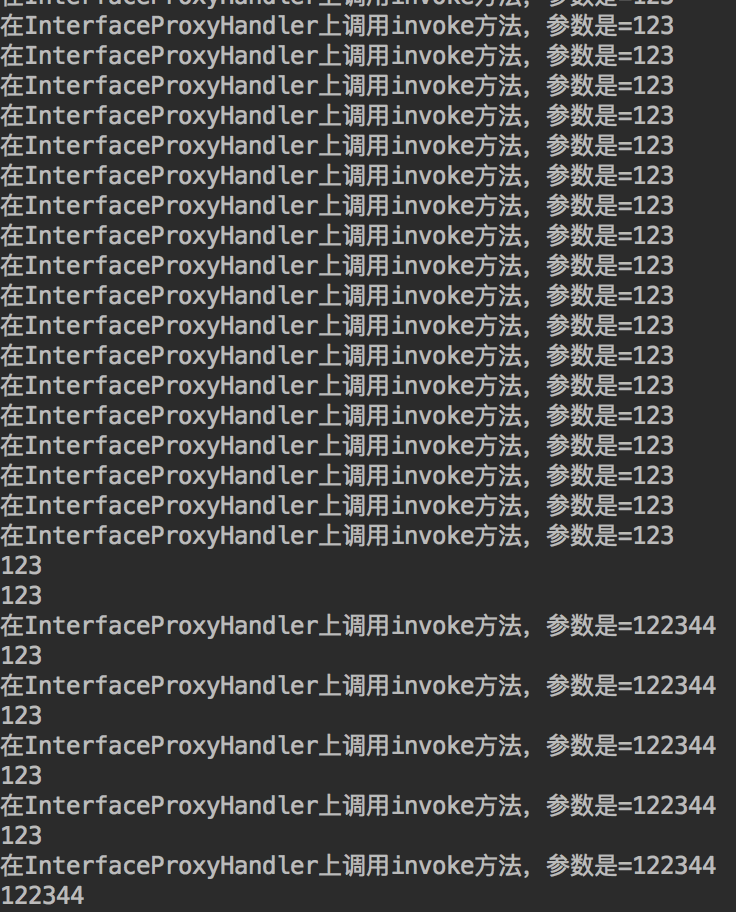
哈哈哈,这样我们是不是就是可以通过Spring注解 @Autowired 和 @Resource 来注入动态对象。