两年多的时间没有在博客园写文了,今日重返博客园,在此从一名看客变回一名时常分享所见所闻技术的小白。还请大家多多指教。
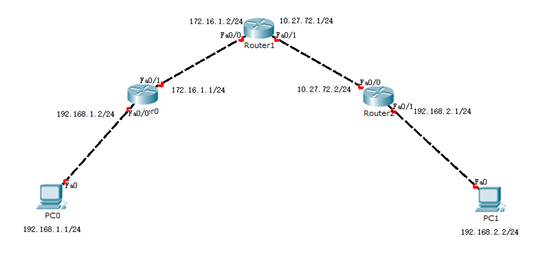
今日在学校学习了静态路由,发现班上的同学们对于三路由组成的静态路由不太熟练,为此特地将拓扑和详细配置打上来,供大家参考。
拓扑:
知识补充:
静态路由的三要素:目标网络的网络号、子网掩码、下一跳。
发现同学们对下一跳的概念不是很理解,这里来着重解释一下“下一跳”是什么意思
所为下一跳,是指路由的下一个点。如果路由器没有直接连接到目的地网络,它会有一个提供下一跳路由的邻居路由器,用来传递数据到目的地。
是不是有点难以理解?那么我们换一个比较通俗的讲法?
你一个人要去出国旅行,例如到日本的东京
但是你的经济实力比较拮据,只能购买要转机的机票(例如先转机到大阪,再从大阪转机到东京)
那么,你完整的行程就是:上海→大阪(日本)→东京(日本)
那么按照上面的飞行轨迹,大阪就是我们从上海飞向东京的“下一跳”。无论你怎么变化,飞机必定要经过大阪走一遭(除非你打破上述经济实力的问题,你可以买张直达票= _=)
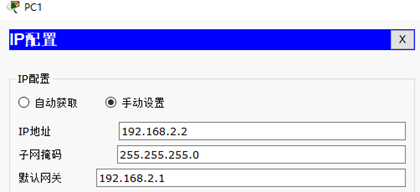
理解了比较搞的下一跳后,我们就可以较为轻松的配置路由了。下面给出PC和路由的详细配置。
PC0:

PC1:
路由器R1:
R1#show running-config
Building configuration...
Current configuration : 623 bytes
!
version 12.4
no service timestamps log datetime msec
no service timestamps debug datetime msec
no service password-encryption
!
hostname R1
!
!
!
!
!
!
!
!
!
!
!
!
no ip domain-lookup
!
!
spanning-tree mode pvst
!
!
!
!
interface FastEthernet0/0
ip address 192.168.1.2 255.255.255.0
duplex auto
speed auto
!
interface FastEthernet0/1
ip address 172.16.1.1 255.255.255.0
duplex auto
speed auto
!
interface Vlan1
no ip address
shutdown
!
ip classless
ip route 10.27.72.0 255.255.255.0 172.16.1.2
ip route 192.168.2.0 255.255.255.0 172.16.1.2
!
!
!
!
!
!
!
line con 0
!
line aux 0
!
line vty 0 4
login
!
!
!
end
路由器R2:
R2#show running-config
Building configuration...
Current configuration : 623 bytes
!
version 12.4
no service timestamps log datetime msec
no service timestamps debug datetime msec
no service password-encryption
!
hostname R2
!
!
!
!
!
!
!
!
!
!
!
!
no ip domain-lookup
!
!
spanning-tree mode pvst
!
!
!
!
interface FastEthernet0/0
ip address 172.16.1.2 255.255.255.0
duplex auto
speed auto
!
interface FastEthernet0/1
ip address 10.27.72.1 255.255.255.0
duplex auto
speed auto
!
interface Vlan1
no ip address
shutdown
!
ip classless
ip route 192.168.1.0 255.255.255.0 172.16.1.1
ip route 192.168.2.0 255.255.255.0 10.27.72.2
!
!
!
!
!
!
!
line con 0
!
line aux 0
!
line vty 0 4
login
!
!
!
end
路由器R3:
R3#show running-config
Building configuration...
Current configuration : 623 bytes
!
version 12.4
no service timestamps log datetime msec
no service timestamps debug datetime msec
no service password-encryption
!
hostname R3
!
!
!
!
!
!
!
!
!
!
!
!
no ip domain-lookup
!
!
spanning-tree mode pvst
!
!
!
!
interface FastEthernet0/0
ip address 10.27.72.2 255.255.255.0
duplex auto
speed auto
!
interface FastEthernet0/1
ip address 192.168.2.1 255.255.255.0
duplex auto
speed auto
!
interface Vlan1
no ip address
shutdown
!
ip classless
ip route 192.168.1.0 255.255.255.0 10.27.72.1
ip route 172.16.1.0 255.255.255.0 10.27.72.1
!
!
!
!
!
!
!
line con 0
!
line aux 0
!
line vty 0 4
login
!
!
!
end
tips:
如果大家懒得看每台路由器的详细配置,那么大家针对本文直接看详细配置中红色加粗字体即可
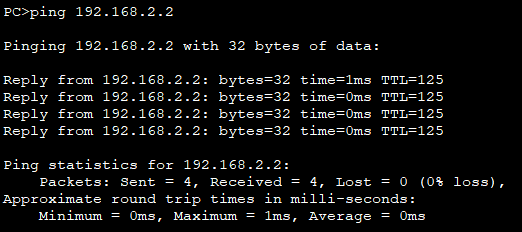
实际验证效果:
PC0
PC1
