Java 8
spring boot 2.5.2
spring cloud 2020.0.3
---
目录
建立 Eureka Server项目,仅添加 spring-cloud-starter-netflix-eureka-server 依赖包:
		<dependency>
			<groupId>org.springframework.cloud</groupId>
			<artifactId>spring-cloud-starter-netflix-eureka-server</artifactId>
		</dependency>
给应用添加注解 @EnableEurekaServer:
1 @EnableEurekaServer
2 @SpringBootApplication
3 public class ServiceRegistrationAndDiscoveryServiceApplication {
4
5     public static void main(String[] args) {
6         SpringApplication.run(ServiceRegistrationAndDiscoveryServiceApplication.class, args);
7     }
8
9 }
添加配置:
server.port=8761
启动应用:出现了一些异常信息,服务在8761端口启动
o.s.b.w.embedded.tomcat.TomcatWebServer  : Tomcat initialized with port(s): 8761 (http)

iguration$LoadBalancerCaffeineWarnLogger : Spring Cloud LoadBalancer is currently working with the default cache.
You can switch to using Caffeine cache, by adding it and org.springframework.cache.caffeine.CaffeineCacheManager to the classpath.

c.n.d.s.t.d.RedirectingEurekaHttpClient  : Request execution error. endpoint=DefaultEndpoint{ serviceUrl='http://localhost:8761/eureka/},
exception=java.net.ConnectException: Connection refused: no further information stacktrace=com.sun.jersey.api.client.ClientHandlerException:
java.net.ConnectException: Connection refused: no further information
...
Caused by: java.net.ConnectException: Connection refused: no further information

c.n.d.s.t.d.RetryableEurekaHttpClient    : Request execution failed with message: java.net.ConnectException: Connection refused: no further information
com.netflix.discovery.DiscoveryClient    : DiscoveryClient_UNKNOWN/DESKTOP-BDNTQQ3:8761 - was unable to refresh its cache!
This periodic background refresh will be retried in 30 seconds. status = Cannot execute request on any known server stacktrace =
com.netflix.discovery.shared.transport.TransportException: Cannot execute request on any known server

com.netflix.discovery.DiscoveryClient    : Initial registry fetch from primary servers failed
com.netflix.discovery.DiscoveryClient    : Using default backup registry implementation which does not do anything.

c.n.eureka.cluster.PeerEurekaNodes       : Adding new peer nodes [http://localhost:8761/eureka/]
c.n.eureka.cluster.PeerEurekaNodes       : Replica node URL:  http://localhost:8761/eureka/

c.n.eureka.DefaultEurekaServerContext    : Initialized

com.netflix.discovery.DiscoveryClient    : DiscoveryClient_UNKNOWN/DESKTOP-BDNTQQ3:8761: registering service...

o.s.b.w.embedded.tomcat.TomcatWebServer  : Tomcat started on port(s): 8761 (http) with context path ''

.s.c.n.e.s.EurekaAutoServiceRegistration : Updating port to 8761
可以访问 http://localhost:8761/ :

发现注册了一个 UNKNOWN 应用,点击 Status下的超链接,返回:
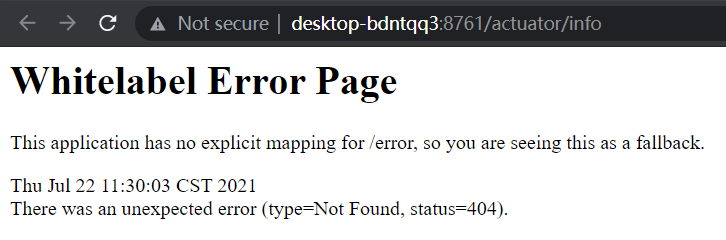
将链接 desktop-bdntqq3改为 localhost,仍然如此。
根据官网指南,Eureka Server会 注册其本身,因此,添加下面的配置 1)禁止其注册自身 和 2)禁止获取配置:
eureka.client.register-with-eureka=false
eureka.client.fetch-registry=false
启动成功,没有报错,访问 http://localhost:8761/ ,没有发现注册服务:

检查 spring-cloud-starter-netflix-eureka-server 包的结构:原来,它已经包含了 spring-boot-starter-web/actuator、还包含了 spring-cloud-netflix-eureka-client 等包,难怪它会提供Web接口,也会注册自己呢。
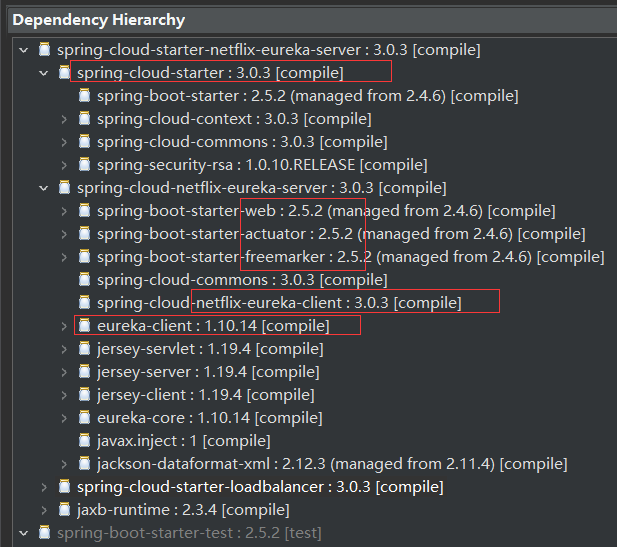
不过,其中 actuator 的 info接口 不能正常访问,需要添加下面的配置:
management.endpoints.web.exposure.include=info,health
这样,/actuator/info 端点 就会暴露出来了。
Eureka Server建立好了,接下来,通过Eureka Client注册服务。
在 https://start.spring.io/ 建立项目——web-first,依赖包:
		<dependency>
			<groupId>org.springframework.boot</groupId>
			<artifactId>spring-boot-starter-web</artifactId>
		</dependency>
		<dependency>
			<groupId>org.springframework.cloud</groupId>
			<artifactId>spring-cloud-starter-netflix-eureka-client</artifactId>
		</dependency>
上面建立了一个 Web服务。
导入Eclipse,启动(启动前,,Eureka Server已经启动)。部分日志如下:
iguration$LoadBalancerCaffeineWarnLogger : Spring Cloud LoadBalancer is currently working with the default cache. You can switch to using
Caffeine cache, by adding it and org.springframework.cache.caffeine.CaffeineCacheManager to the classpath.

com.netflix.discovery.DiscoveryClient    : Initializing Eureka in region us-east-1
c.n.d.s.r.aws.ConfigClusterResolver      : Resolving eureka endpoints via configuration
...
com.netflix.discovery.DiscoveryClient    : Discovery Client initialized at timestamp 1626934699656 with initial instances count: 1
o.s.c.n.e.s.EurekaServiceRegistry        : Registering application UNKNOWN with eureka with status UP
com.netflix.discovery.DiscoveryClient    : Saw local status change event StatusChangeEvent [timestamp=1626934699658, current=UP, previous=STARTING]
com.netflix.discovery.DiscoveryClient    : DiscoveryClient_UNKNOWN/DESKTOP-BDNTQQ3: registering service...

com.netflix.discovery.DiscoveryClient    : DiscoveryClient_UNKNOWN/DESKTOP-BDNTQQ3 - registration status: 204
访问Eureka Server的 http://localhost:8761/ :

注册成功,但是,Application 为 UNKNOWN。在Status中,超链接的名字为 电脑的 计算机名,地址为 http://desktop-bdntqq3:8080/actuator/info ,但是,访问失败——需要配置hosts才可以,
其中的 /actuator/info 像是 actuator的端点,但是,项目没有引入 actuator,因此无法访问。
疑问:
1)没有任何配置,怎么就注册成功了呢?一定是 依赖包spring-cloud-starter-netflix-eureka-client 自动做了一些事情;
2)注册中心,Status下的超链接怎么不能访问,要怎么配置?
解决Application为UNKNOWN的问题
在web-first项目中添加配置:
spring.application.name=web-first
再次启动,部分日志:
com.netflix.discovery.DiscoveryClient    : DiscoveryClient_WEB-FIRST/DESKTOP-BDNTQQ3:web-first: registering service...

com.netflix.discovery.DiscoveryClient    : DiscoveryClient_WEB-FIRST/DESKTOP-BDNTQQ3:web-first - registration status: 204
注册中心显示:

解决注册中心下Status超链接地址为主机名称的问题
在web-first项目中添加下面的配置:
eureka.instance.prefer-ip-address=true
再次启动项目,此时,注册中心下Status的超链接现实为IP地址:
http://192.168.125.197:8080/actuator/info
但这个接口 还是无法访问。
更改注册中心的端口
更改Eureka Server注册服务地址为 8769,再次启动 服务器、客户端两个服务,此时,客户端 web-first项目 无法注册成功,启动时报错:
c.n.d.s.t.d.RedirectingEurekaHttpClient  : Request execution error. endpoint=DefaultEndpoint{ serviceUrl='http://localhost:8761/eureka/},
exception=I/O error on GET request for "http://localhost:8761/eureka/apps/": Connect to localhost:8761 [localhost/127.0.0.1,
localhost/0:0:0:0:0:0:0:1] failed: Connection refused: connect; nested exception is org.apache.http.conn.HttpHostConnectException:
Connect to localhost:8761 [localhost/127.0.0.1, localhost/0:0:0:0:0:0:0:1] failed: Connection refused: connect
stacktrace=org.springframework.web.client.ResourceAccessException: I/O error on GET request for "http://localhost:8761/eureka/apps/":
Connect to localhost:8761 [localhost/127.0.0.1, localhost/0:0:0:0:0:0:0:1] failed: Connection refused: connect; nested exception is
org.apache.http.conn.HttpHostConnectException: Connect to localhost:8761 [localhost/127.0.0.1, localhost/0:0:0:0:0:0:0:1]
failed: Connection refused: connect
web-first项目 启动了,但是,注册失败。启动后,仍然会 每隔30秒 执行一次注册:
[nfoReplicator-0] c.n.d.s.t.d.RedirectingEurekaHttpClient  : Request execution error. endpoint=DefaultEndpoint{ serviceUrl='http://localhost:8761/eureka/},
exception=I/O error on POST request for "http://localhost:8761/eureka/apps/WEB-FIRST": Connect to localhost:8761 [localhost/127.0.0.1, localhost/0:0:0:0:0:0:0:1]
failed: Connection refused: connect; nested exception is org.apache.http.conn.HttpHostConnectException: Connect to localhost:8761
[localhost/127.0.0.1, localhost/0:0:0:0:0:0:0:1] failed: Connection refused: connect stacktrace=org.springframework.web.client.ResourceAccessException:
I/O error on POST request for "http://localhost:8761/eureka/apps/WEB-FIRST": Connect to localhost:8761 [localhost/127.0.0.1, localhost/0:0:0:0:0:0:0:1] failed:
Connection refused: connect; nested exception is org.apache.http.conn.HttpHostConnectException: Connect to localhost:8761 [localhost/127.0.0.1,
localhost/0:0:0:0:0:0:0:1] failed: Connection refused: connect

[nfoReplicator-0] com.netflix.discovery.DiscoveryClient    : DiscoveryClient_WEB-FIRST/DESKTOP-BDNTQQ3:web-first - registration failed Cannot execute
request on any known server

[freshExecutor-0] com.netflix.discovery.DiscoveryClient    : DiscoveryClient_WEB-FIRST/DESKTOP-BDNTQQ3:web-first - was unable to refresh its cache!
This periodic background refresh will be retried in 30 seconds. status = Cannot execute request on any known server stacktrace =
com.netflix.discovery.shared.transport.TransportException: Cannot execute request on any known server
启动期间的线程时 main,项目启动后,使用异步线程执行注册了。
解决这个问题的方法是,添加下面的配置:
eureka.client.service-url.defaultZone=http://localhost:8769/eureka/
再次启动web-first项目,没有报错,注册成功。
注:在注册中心中,有一个 DS Replicas 项目,其下为 localhost 超链接,其仍然指向 8761端口:http://localhost:8761/eureka/
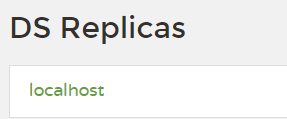
页面上还有其它现实 8761端口的地方。
因此,此时需要修改Eureka Server的配置,同 web-first的 新增配置:
eureka.client.service-url.defaultZone=http://localhost:8769/eureka/
再次启动 Eureka Server,服务启动成功:,上面的 DS Replicas 下 超链接正常了:
http://localhost:8769/eureka/
特别提醒:
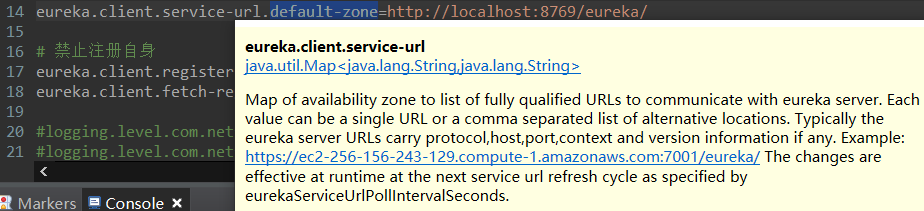
配置中的 defaultZone 必须是 驼峰格式,不能写成 default-zone,否则,无效。
因为,eureka.client.service-url 是一个 Map类型。
更多细节还需 深挖。
服务器的 /eureka 端点 不能访问
虽然配置了 /eureka 端点,但是,其不能访问。
可以通过 /eureka/apps 来访问 注册到注册中心的 应用:
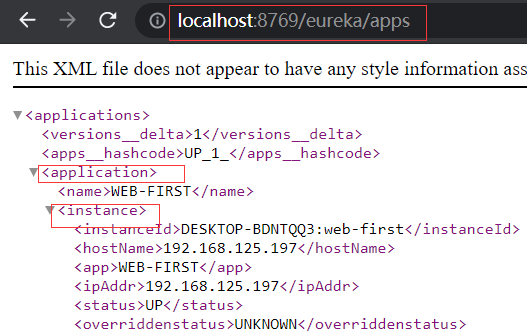
/eureka/apps/ + 服务名称 还可以访问 服务的信息:

更进一步:
/eureka/apps/ + 服务名称 + / + instance名称 还可以访问实例详情,略。
启动两个同名的服务
上面注册 WEB-FIRST 服务的一个实例,接下来使用 端口9090 启动一个 web-first服务。
-Dserver.port=9090
启动后的注册中心页面:
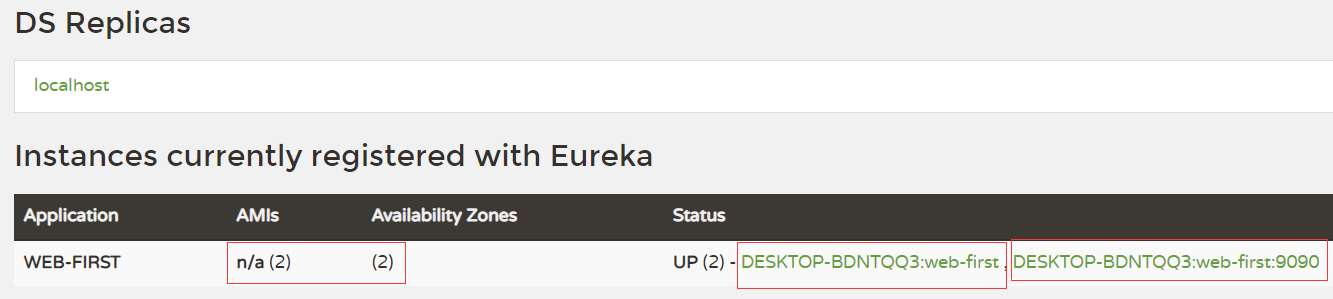
注:同一台主机,端口需要不同;如果是不同主机运行,则无妨。一般来说,同一个 application 的多个实例 是 运行在不同主机上。
更多配置,TODO
在web-first新建接口:
 1 @RestController
 2 class HelloController {
 3     // GET请求
 4     @GetMapping(path="getTime")
 5     public String getTime() {
 6         return new Date().toGMTString();
 7     }
 8     // POST请求
 9     @PostMapping(path="updateUser")
10     public String updateUser(@RequestBody User u) {
11         System.out.println("参数 User u = " + u);
12         return "OK";
13     }
14
15 }
16
17 class User {
18     private String name;
19     private Integer age;
20     // getter, setter, toString...
21
22 }
新建Web项目 web-second,注册到注册中心,pom.xml同 web-first。
修改 web-second 的配置:端口为 10000
server.port=10000

spring.application.name=web-second

eureka.instance.prefer-ip-address=true
eureka.client.service-url.defaultZone=http://localhost:8769/eureka/
启动 web-second。注册中心页面现实多了 WEB-SECOND 服务:

接下来,通过 WEB-SECOND 项目调用 WEB-FIRST 的两个接口。
 1 @Configuration
 2 class MyConfiguration {
 3
 4     @LoadBalanced
 5     @Bean
 6     RestTemplate restTemplate() {
 7         return new RestTemplate();
 8     }
 9
10 }
11
12 @Component
13 class MyRunner implements CommandLineRunner {
14
15     @Autowired
16     private RestTemplate restTemplate;
17
18     @Override
19     public void run(String... args) throws Exception {
20         String results = restTemplate.getForObject("http://web-first/getTime",
21                 String.class);
22         System.out.println("GET请求 results=" + results);
23
24         User user = new User();
25         user.setName("web-second");
26         user.setAge(1);
27         ResponseEntity<String> rt = restTemplate.postForEntity("http://web-first/updateUser", user, String.class);
28         System.out.println("POST请求 rt=" + rt + ", rt.body=" + rt.getBody());
29     }
30
31 }
32
33 class User {
34     private String name;
35     private Integer age;
36     // getter, setter, toString...
37 }
测试结果:调用成功。
GET请求 results=22 Jul 2021 08:27:11 GMT
POST请求 rt=<200,OK,[Content-Type:"text/plain;charset=UTF-8", Content-Length:"2", Date:"Thu, 22 Jul 2021 08:27:11 GMT", Keep-Alive:"timeout=60",
Connection:"keep-alive"]>, boty=OK
增加一个 WEB-FIRST 服务——端口9090,再多次执行 WEB-SECOND 中的调用,检查是否有 负载均衡:

修改 WEB-SECOND 的代码:每隔2秒执行一轮,共10轮。
 1     @Override
 2     public void run(String... args) throws Exception {
 3
 4         for (int i=0; i<10; i++) {
 5             String results = restTemplate.getForObject("http://web-first/getTime",
 6                     String.class);
 7             System.out.println("GET请求 results=" + results);
 8
 9             User user = new User();
10             user.setName("web-second");
11             user.setAge(i);
12             ResponseEntity<String> rt = restTemplate.postForEntity("http://web-first/updateUser", user, String.class);
13             System.out.println("POST请求 rt=" + rt + ", rt.body=" + rt.getBody());
14
15             System.out.println();
16
17             // 每隔2秒执行一轮
18             TimeUnit.SECONDS.sleep(2);
19         }
20     }
检查 两个WEB-FIRST 服务的日志,是否 均衡地 收到了请求?NO!所有请求由一个服务器处理了。
更正WEB-FIRST的测试程序:GET、POST都输出日志(之前只有 updateUser输出了信息,误判 没有做负载均衡)
@RestController
class HelloController {

    @Autowired
    private HttpServletRequest req;

    @GetMapping(path="getTime")
    public String getTime(Integer i) {
        System.out.println("GET url=" + req.getRequestURL());
        System.out.println("GET 参数i=" + i + ", url=" + req.getRequestURL());
        return new Date().toGMTString();
    }

    @PostMapping(path="updateUser")
    public String updateUser(@RequestBody User u) {
        System.out.println("POST url=" + req.getRequestURL());
        System.out.println("POST 参数 User u = " + u);
        return "OK";
    }

}
启动两个WEB-FIRST服务,启动后,再启动WEB-SECOND服务。检查 WEB-FIRST服务 的日志,有做负载均衡了:其中的GET、POST请求分别由 两个 WEB-FIRST服务 处理。
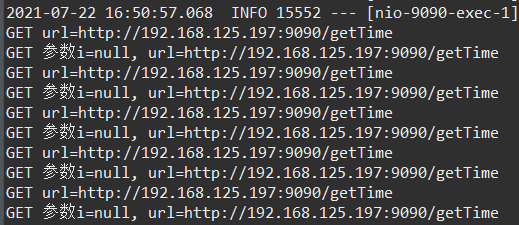

在启动一台WEB-FIRST服务,就可以看到明显的负载均衡现象了:

注:
参考 SPRING CLOUD文档的 “Spring RestTemplate as a Load Balancer Client” 一节实现。
“Spring WebClient as a Load Balancer Client” 一节还介绍了 使用 WebClient 访问,类似 RestTemplate。
feign 翻译:
vt.  假装,伪装; 捏造(借口、理由等); 装作; 创造或虚构;
vi.  假装; 装作; 作假; 佯作;

变形 过去分词: feigned 过去式: feigned 现在分词: feigning 第三人称单数: feigns
Feign是一个 Web服务客户端,它让Web服务客户端的编写变得很容易。
注:本节参考 spring cloud文档的 “Spring Cloud OpenFeign” 一章。
添加依赖包:
		<!-- openfeign -->
		<dependency>
			<groupId>org.springframework.cloud</groupId>
			<artifactId>spring-cloud-starter-openfeign</artifactId>
		</dependency>
启动类添加注解:
1 @EnableFeignClients
2 @SpringBootApplication
3 public class WebSecondApplication {
4 ...
5 }
定义FeignClient访问 WEB-FIRST 的接口:
 1 @FeignClient(value="web-first") // WEB-FIRST 服务名
 2 public interface WebFirstFeignClient {
 3
 4     @GetMapping(value="/getTime")
 5     public String getTime(@RequestParam Integer i); // @RequestParam 必须!
 6
 7     @PostMapping(value="/updateUser")
 8     public String updateUser(User user);
 9
10 }
11
12 @Component
13 class MyRunner2 implements CommandLineRunner {
14
15     @Autowired
16     private WebFirstFeignClient client;
17
18     @Override
19     public void run(String... args) throws Exception {
20
21         for (int i=0; i<10; i++) {
22             System.out.println("GET 返回:" + client.getTime(i));
23
24             User user = new User();
25             user.setName("lib");
26             user.setAge(i);
27             System.out.println("POST 返回:" + client.updateUser(user));
28         }
29
30     }
31
32 }
启动WEB-SECOND服务,调用成功。
WEB-FIRST 服务 挂了,此时,执行WEB-SECOND会怎样呢?启动失败,报错:
Caused by: feign.FeignException$ServiceUnavailable: [503] during [GET] to [http://web-first/getTime?i=0]
[WebFirstFeignClient#getTime(Integer)]: [Load balancer does not contain an instance for the service web-first]
WEB-SECOND服务没有成功启动。
怎么避免 WEB-FIRST 挂掉 导致 消费方 WEB-SECOND 启动不了的情况呢?
进一步配置 @FeignClient ,添加断路器:
feign.circuitbreaker.enabled=true
导入依赖包spring-cloud-starter-circuitbreaker-resilience4j:
<!-- resilience4j -->
<dependency>
    <groupId>org.springframework.cloud</groupId>
    <artifactId>spring-cloud-starter-circuitbreaker-resilience4j</artifactId>
</dependency>
添加resilience4j 的 Customize bean配置:
@Bean
public Customizer<Resilience4JCircuitBreakerFactory> defaultCustomizer() {
	return factory -> factory.configureDefault(id -> new
			Resilience4JConfigBuilder(id)
			.timeLimiterConfig(TimeLimiterConfig.custom().timeoutDuration(Duration.ofSeconds(4
					)).build())
			.circuitBreakerConfig(CircuitBreakerConfig.ofDefaults())
			.build());
}
添加 WebFirstFeignFallback:
@Component
public class WebFirstFeignFallback implements WebFirstFeignClient {

    @Override
    public String getTime(Integer i) {
        return "getTime熔断";
    }

    @Override
    public String updateUser(User user) {
        return "updateUser熔断";
    }
}
配置 @FeignClient :
1 @FeignClient(value="web-first", fallback = WebFirstFeignFallback.class)
2 public interface WebFirstFeignClient {
3 ...
4 }
此时,启动 WEB-SECOND 服务:服务启动成功,日志输出如下,调用接口返回 WebFirstFeignFallback 中的内容。
2021-07-22 18:34:41.167  WARN 19484 --- [oundedElastic-1] o.s.c.l.core.RoundRobinLoadBalancer      : No servers available for service: web-first
2021-07-22 18:34:41.167  WARN 19484 --- [pool-1-thread-1] .s.c.o.l.FeignBlockingLoadBalancerClient :
Load balancer does not contain an instance for the service web-first
GET 返回:getTime熔断
2021-07-22 18:34:41.169  WARN 19484 --- [oundedElastic-1] o.s.c.l.core.RoundRobinLoadBalancer      : No servers available for service: web-first
2021-07-22 18:34:41.169  WARN 19484 --- [pool-1-thread-1] .s.c.o.l.FeignBlockingLoadBalancerClient :
Load balancer does not contain an instance for the service web-first
POST 返回:updateUser熔断
为什么 不使用spring-cloud-starter-hystrix 呢?因为版本啊!
本文的spring boot是2.5.2,而在 2.5.0之后就不支持 spring-cloud-starter-hystrix,需要使用 resilience4j 的断路器。
除了resilience4j,还有 Sentinel、Spring Retry 两种。
更多详情,请看 spring cloud官方文档之 “ Spring Cloud Circuit Breaker -> Configuring Resilience4J Circuit Breakers”一章。
注:Alibaba Sentinel 是面向云原生微服务的流量控制,熔断降级组件,监控保护你的微服务。
参考资料:
1、官方-Service Registration and Discovery
2、SpringCloud之Eureka注册中心原理及其搭建
4、Resilience4j+Feign实现熔断,fallback
5、Spring Cloud Feign(第四篇)之Fallback
6、