在Spring MVC的基础框架搭建起来后,我们测试了spring mvc中的返回值类型,如果你还没有搭建好springmvc的架构请参考博文->http://www.cnblogs.com/qixiaoyizhan/p/5819392.html
今天我们来讲讲spring mvc中的文件上传和下载的几种方法。
首先附上文件目录->我们需要配置的我做了记号->
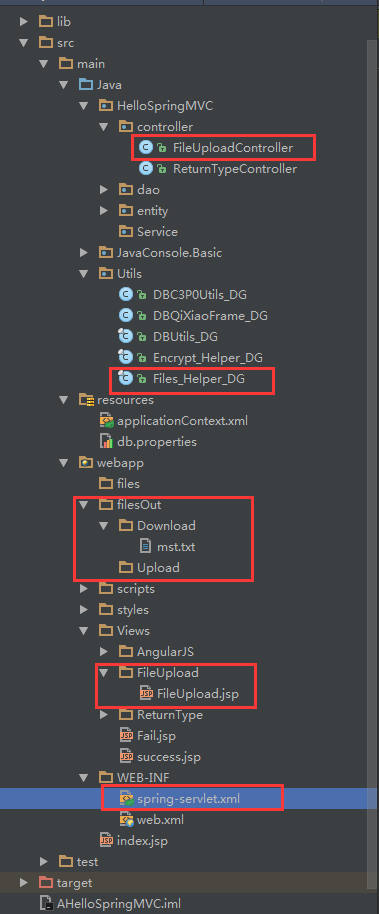
一、文件上传
首先为了方便后续的操作,以及精简代码,我们在Utils包下封装一个文件上传下载的帮助类:Files_Helper_DG
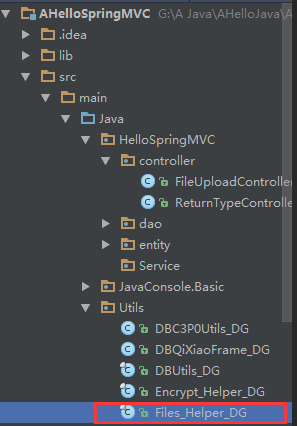
Files_Helper_DG 代码
package Utils;
  2
  3 import org.springframework.web.multipart.MultipartFile;
  4
  5 import javax.servlet.http.HttpServletRequest;
  6 import javax.servlet.http.HttpServletResponse;
  7 import java.io.*;
  8 import java.text.SimpleDateFormat;
  9 import java.util.Date;
 10 import java.util.UUID;
 11
 12 /**
 13  * Author:qixiao
 14  * Time:2016-9-2 23:47:51
 15  */
 16 public final class Files_Utils_DG {
 17     /**
 18      * private constructor method that make class can not be instantiation
 19      */
 20     private Files_Utils_DG() {
 21         throw new Error("The class Cannot be instance !");
 22     }
 23
 24     /**
 25      * spring mvc files Upload method (transferTo method)
 26      * MultipartFile use TransferTo method upload
 27      *
 28      * @param request       HttpServletRequest
 29      * @param multipartFile MultipartFile(spring)
 30      * @param filePath      filePath example "/files/Upload"
 31      * @return
 32      */
 33     public static String FilesUpload_transferTo_spring(HttpServletRequest request, MultipartFile multipartFile, String filePath) {
 34         if (multipartFile != null) {
 35             //get files suffix
 36             String suffix = multipartFile.getOriginalFilename().substring(multipartFile.getOriginalFilename().lastIndexOf("."));
 37             //filePath+fileName the complex file Name
 38             String absolutePath = getAndSetAbsolutePath(request, filePath, suffix);
 39             //return relative Path
 40             String relativePath = getRelativePath(filePath, suffix);
 41             try {
 42                 //save file
 43                 multipartFile.transferTo(new File(absolutePath));
 44                 //return relative Path
 45                 return relativePath;
 46             } catch (IOException e) {
 47                 e.printStackTrace();
 48                 return null;
 49             }
 50         } else
 51             return null;
 52     }
 53
 54     /**
 55      * user stream type save files
 56      * @param request       HttpServletRequest
 57      * @param multipartFile MultipartFile  support CommonsMultipartFile file
 58      * @param filePath      filePath example "/files/Upload"
 59      * @return
 60      */
 61     public static String FilesUpload_stream(HttpServletRequest request,MultipartFile multipartFile,String filePath) {
 62         if (multipartFile != null) {
 63             //get files suffix
 64             String suffix = multipartFile.getOriginalFilename().substring(multipartFile.getOriginalFilename().lastIndexOf("."));
 65             //filePath+fileName the complex file Name
 66             String absolutePath = getAndSetAbsolutePath(request, filePath, suffix);
 67             //return relative Path
 68             String relativePath = getRelativePath(filePath, suffix);
 69             try{
 70                 InputStream inputStream = multipartFile.getInputStream();
 71                 FileOutputStream fileOutputStream = new FileOutputStream(absolutePath);
 72                 byte buffer[] = new byte[4096]; //create a buffer
 73                 long fileSize = multipartFile.getSize();
 74                 if(fileSize<=buffer.length){//if fileSize < buffer
 75                     buffer = new byte[(int)fileSize];
 76                 }
 77                 int line =0;
 78                 while((line = inputStream.read(buffer)) >0 )
 79                 {
 80                     fileOutputStream.write(buffer,0,line);
 81                 }
 82                 fileOutputStream.close();
 83                 inputStream.close();
 84                 return relativePath;
 85             }catch (Exception e){
 86                 e.printStackTrace();
 87             }
 88         } else
 89             return null;
 90         return null;
 91     }
 92
 93     /**
 94      * @param request  HttpServletRequest
 95      * @param response HttpServletResponse
 96      * @param filePath example "/filesOut/Download/mst.txt"
 97      * @return
 98      */
 99     public static void FilesDownload_stream(HttpServletRequest request, HttpServletResponse response, String filePath) {
100         //get server path (real path)
101         String realPath = request.getSession().getServletContext().getRealPath(filePath);
102         File file = new File(realPath);
103         String filenames = file.getName();
104         InputStream inputStream;
105         try {
106             inputStream = new BufferedInputStream(new FileInputStream(file));
107             byte[] buffer = new byte[inputStream.available()];
108             inputStream.read(buffer);
109             inputStream.close();
110             response.reset();
111             // 先去掉文件名称中的空格,然后转换编码格式为utf-8,保证不出现乱码,这个文件名称用于浏览器的下载框中自动显示的文件名
112             response.addHeader("Content-Disposition", "attachment;filename=" + new String(filenames.replaceAll(" ", "").getBytes("utf-8"), "iso8859-1"));
113             response.addHeader("Content-Length", "" + file.length());
114             OutputStream os = new BufferedOutputStream(response.getOutputStream());
115             response.setContentType("application/octet-stream");
116             os.write(buffer);// 输出文件
117             os.flush();
118             os.close();
119         } catch (Exception e) {
120             e.printStackTrace();
121         }
122     }
123
124
125     //-------------------------------------------------------------------------------
126     //return server absolute path(real path)
127     public static String getServerPath(HttpServletRequest request, String filePath) {
128         return request.getSession().getServletContext().getRealPath(filePath);
129     }
130
131     //return a dir that named date of today ; example:20160912
132     public static String getDataPath() {
133         return new SimpleDateFormat("yyyyMMdd").format(new Date());
134     }
135
136     //check if the path has exist if not create it
137     public static void checkDir(String savePath) {
138         File dir = new File(savePath);
139         if (!dir.exists() || !dir.isDirectory()) {
140             dir.mkdir();
141         }
142     }
143
144     //return an UUID Name parameter (suffix cover '.') example: ".jpg"、".txt"
145     public static String getUUIDName(String suffix) {
146         return UUID.randomUUID().toString() + suffix;// make new file name
147     }
148
149     //return server absolute path(real path) the style is  “server absolute path/DataPath/UUIDName”filePath example "/files/Upload"
150     public static String getAndSetAbsolutePath(HttpServletRequest request, String filePath, String suffix) {
151         String savePath = getServerPath(request, filePath) + File.separator + getDataPath() + File.separator;//example:F:/qixiao/files/Upload/20160912/
152         checkDir(savePath);//check if the path has exist if not create it
153         return savePath + getUUIDName(suffix);
154     }
155
156     //get the relative path of files style is “/filePath/DataPath/UUIDName”filePath example "/files/Upload"
157     public static String getRelativePath(String filePath, String suffix) {
158         return filePath + File.separator + getDataPath() + File.separator + getUUIDName(suffix);//example:/files/Upload/20160912/
159     }
160 }
然后我们新建一个控制器类 FileUploadController
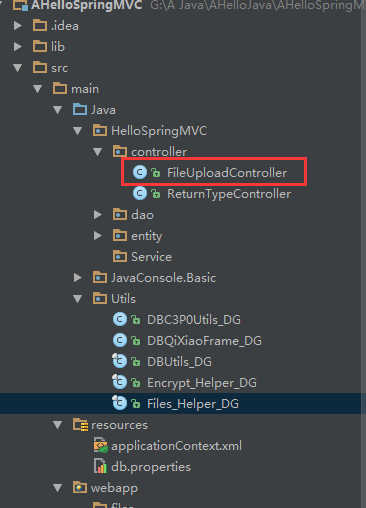
首先我们先展示出全部的代码,然后我们进行分步说明--->
1 package HelloSpringMVC.controller;
  2
  3
  4 import Utils.Files_Utils_DG;
  5 import org.springframework.stereotype.Controller;
  6 import org.springframework.web.bind.annotation.RequestMapping;
  7 import org.springframework.web.bind.annotation.RequestMethod;
  8 import org.springframework.web.bind.annotation.RequestParam;
  9 import org.springframework.web.bind.annotation.ResponseBody;
 10 import org.springframework.web.multipart.MultipartFile;
 11 import org.springframework.web.multipart.MultipartHttpServletRequest;
 12 import org.springframework.web.multipart.commons.CommonsMultipartResolver;
 13
 14 import javax.servlet.http.HttpServletRequest;
 15 import javax.servlet.http.HttpServletResponse;
 16 import java.util.Iterator;
 17
 18 /**
 19  * Created by qixiao on 2016/8/30.
 20  */
 21 @Controller
 22 @RequestMapping(value = "/FileUpload/*")
 23 public class FileUploadController {
 24
 25     /*
 26      * 方式一
 27      * 采用 fileUpload_multipartFile , file.transferTo 来保存上传的文件
 28      */
 29     @RequestMapping(value = "fileUpload_multipartFile")
 30     @ResponseBody
 31     public String fileUpload_multipartFile(HttpServletRequest request, @RequestParam("file_upload") MultipartFile multipartFile) {
 32         //调用保存文件的帮助类进行保存文件,并返回文件的相对路径
 33         String filePath = Files_Utils_DG.FilesUpload_transferTo_spring(request, multipartFile, "/files/upload");
 34         return "{'TFMark':'true','Msg':'upload success !','filePath':'" + filePath + "'}";
 35     }
 36
 37     /*
 38      * 方式二
 39      * 采用 fileUpload_multipartRequest file.transferTo 来保存上传文件
 40      * 参数不写 MultipartFile multipartFile 在request请求里面直接转成multipartRequest,从multipartRequest中获取到文件流
 41      */
 42     @RequestMapping(value = "fileUpload_multipartRequest")
 43     @ResponseBody
 44     public String fileUpload_multipartRequest(HttpServletRequest request) {
 45         //将request转成MultipartHttpServletRequest
 46         MultipartHttpServletRequest multipartRequest = (MultipartHttpServletRequest) request;
 47         //页面控件的文件流,对应页面控件 input file_upload
 48         MultipartFile multipartFile = multipartRequest.getFile("file_upload");
 49         //调用保存文件的帮助类进行保存文件,并返回文件的相对路径
 50         String filePath = Files_Utils_DG.FilesUpload_transferTo_spring(request, multipartFile, "/files/upload");
 51         return "{'TFMark':'true','Msg':'upload success !','filePath':'" + filePath + "'}";
 52     }
 53
 54     /*
 55      * 方式三
 56      * 采用 CommonsMultipartResolver file.transferTo 来保存上传文件
 57      * 自动扫描全部的input表单
 58      */
 59     @RequestMapping(value = "fileUpload_CommonsMultipartResolver")
 60     @ResponseBody
 61     public String fileUpload_CommonsMultipartResolver(HttpServletRequest request) {
 62         //将当前上下文初始化给  CommonsMultipartResolver (多部分解析器)
 63         CommonsMultipartResolver multipartResolver = new CommonsMultipartResolver(request.getSession().getServletContext());
 64         //检查form中是否有enctype="multipart/form-data"
 65         if (multipartResolver.isMultipart(request)) {
 66             //将request变成多部分request
 67             MultipartHttpServletRequest multipartRequest = (MultipartHttpServletRequest) request;
 68             //获取multiRequest 中所有的文件名
 69             Iterator iter = multipartRequest.getFileNames();
 70             while (iter.hasNext()) {
 71                 //一次遍历所有文件
 72                 MultipartFile multipartFile = multipartRequest.getFile(iter.next().toString());
 73                 //调用保存文件的帮助类进行保存文件,并返回文件的相对路径
 74                 String fileName = Files_Utils_DG.FilesUpload_transferTo_spring(request, multipartFile, "/files/upload");
 75                 System.out.println(fileName);
 76             }
 77         }
 78         return "upload success ! ";
 79     }
 80
 81     /*
 82      * 方式四
 83      * 通过流的方式上传文件
 84      */
 85     @RequestMapping("fileUpload_stream")
 86     @ResponseBody
 87     public String upFile(HttpServletRequest request, @RequestParam("file_upload") MultipartFile multipartFile){
 88         String filePath= Files_Utils_DG.FilesUpload_stream(request,multipartFile,"/files/upload");
 89         return "{'TFMark':'true','Msg':'upload success !','filePath':'" + filePath + "'}";
 90     }
 91
 92     /*
 93      * 方式五
 94      * 采用 fileUpload_ajax , file.transferTo 来保存上传的文件 异步
 95      */
 96     @RequestMapping(value = "fileUpload_ajax",method = RequestMethod.POST,produces = {"application/json;charset=UTF-8"})
 97     @ResponseBody
 98     public String fileUpload_ajax(HttpServletRequest request, @RequestParam("file_AjaxFile") MultipartFile  multipartFile) {
 99         //调用保存文件的帮助类进行保存文件,并返回文件的相对路径
100         String filePath = Files_Utils_DG.FilesUpload_transferTo_spring(request, multipartFile, "/files/upload");
101         return "{'TFMark':'true','Msg':'upload success !','filePath':'" + filePath + "'}";
102     }
103
104     /*
105      * 多文件上传
106      * 采用 MultipartFile[] multipartFile 上传文件方法
107      */
108     @RequestMapping(value = "fileUpload_spring_list")
109     @ResponseBody
110     public String fileUpload_spring_list(HttpServletRequest request, @RequestParam("file_upload") MultipartFile[] multipartFile) {
111         //判断file数组不能为空并且长度大于0
112         if (multipartFile != null && multipartFile.length > 0) {
113             //循环获取file数组中得文件
114             try {
115                 for (int i = 0; i < multipartFile.length; i++) {
116                     MultipartFile file = multipartFile[i];
117                     //保存文件
118                     String fileName = Files_Utils_DG.FilesUpload_transferTo_spring(request, file, "/files/upload");
119                     System.out.println(fileName);
120                 }
121                 return "{'TFMark':'true','Msg':'upload success !'}";
122             } catch (Exception ee) {
123                 return "{'TFMark':'false','Msg':'参数传递有误!'}";
124             }
125         }
126         return "{'TFMark':'false','Msg':'参数传递有误!'}";
127     }
128
129     /**
130      * 文件下载
131      *
132      * @param response
133      */
134     @RequestMapping(value = "fileDownload_servlet")
135     public void fileDownload_servlet(HttpServletRequest request, HttpServletResponse response) {
136         Files_Utils_DG.FilesDownload_stream(request,response,"/files/download/mst.txt");
137     }
138 }
复制代码


 方式一:采用 fileUpload_multipartFile , file.transferTo 来保存上传的文件

复制代码
 1 /*
 2      * 方式一
 3      * 采用 fileUpload_multipartFile , file.transferTo 来保存上传的文件
 4      */
 5     @RequestMapping(value = "fileUpload_multipartFile")
 6     @ResponseBody
 7     public String fileUpload_multipartFile(HttpServletRequest request, @RequestParam("file_upload") MultipartFile multipartFile) {
 8         //调用保存文件的帮助类进行保存文件,并返回文件的相对路径
 9         String filePath = Files_Helper_DG.FilesUpload_transferTo_spring(request, multipartFile, "/filesOut/Upload");
10         return "{"TFMark":"true","Msg":"upload success !","filePath":"" + filePath + ""}";
11     }
复制代码
方式二:采用 fileUpload_multipartRequest file.transferTo 来保存上传文件

复制代码
 1  @RequestMapping(value = "fileUpload_multipartRequest")
 2     @ResponseBody
 3     public String fileUpload_multipartRequest(HttpServletRequest request) {
 4         //将request转成MultipartHttpServletRequest
 5         MultipartHttpServletRequest multipartRequest = (MultipartHttpServletRequest) request;
 6         //页面控件的文件流,对应页面控件 input file_upload
 7         MultipartFile multipartFile = multipartRequest.getFile("file_upload");
 8         //调用保存文件的帮助类进行保存文件,并返回文件的相对路径
 9         String filePath = Files_Helper_DG.FilesUpload_transferTo_spring(request, multipartFile, "/filesOut/Upload");
10         return "{"TFMark":"true","Msg":"upload success !","filePath":"" + filePath + ""}";
11     }
复制代码
 方式三:采用 CommonsMultipartResolver file.transferTo 来保存上传文件---自动扫描全部的input表单

复制代码
 1  @RequestMapping(value = "fileUpload_CommonsMultipartResolver")
 2     @ResponseBody
 3     public String fileUpload_CommonsMultipartResolver(HttpServletRequest request) {
 4         //将当前上下文初始化给  CommonsMultipartResolver (多部分解析器)
 5         CommonsMultipartResolver multipartResolver = new CommonsMultipartResolver(request.getSession().getServletContext());
 6         //检查form中是否有enctype="multipart/form-data"
 7         if (multipartResolver.isMultipart(request)) {
 8             //将request变成多部分request
 9             MultipartHttpServletRequest multipartRequest = (MultipartHttpServletRequest) request;
10             //获取multiRequest 中所有的文件名
11             Iterator iter = multipartRequest.getFileNames();
12             while (iter.hasNext()) {
13                 //一次遍历所有文件
14                 MultipartFile multipartFile = multipartRequest.getFile(iter.next().toString());
15                 //调用保存文件的帮助类进行保存文件,并返回文件的相对路径
16                 String fileName = Files_Helper_DG.FilesUpload_transferTo_spring(request, multipartFile, "/filesOut/Upload");
17                 System.out.println(fileName);
18             }
19         }
20         return "upload success ! ";
21     }
方式四:通过流的方式上传文件
1 @RequestMapping("fileUpload_stream")
2     @ResponseBody
3     public String upFile(HttpServletRequest request, @RequestParam("file_upload") MultipartFile multipartFile){
4         String filePath=Files_Helper_DG.FilesUpload_stream(request,multipartFile,"/filesOut/Upload");
5         return "{"TFMark":"true","Msg":"upload success !","filePath":"" + filePath + ""}";
6     }
方式五:采用ajaxFileUpload.js插件与异步上传的方式上传文件
1 @RequestMapping(value = "fileUpload_ajax",method = RequestMethod.POST,produces = {"application/json;charset=UTF-8"})
2     @ResponseBody
3     public String fileUpload_ajax(HttpServletRequest request, @RequestParam("file_AjaxFile") MultipartFile  multipartFile) {
4         //调用保存文件的帮助类进行保存文件,并返回文件的相对路径
5         String filePath = Files_Utils_DG.FilesUpload_transferTo_spring(request, multipartFile, "/files/upload");
6         return "{'TFMark':'true','Msg':'upload success !','filePath':'" + filePath + "'}";
7     }
上述方法需要 ajaxfileupload.js 插件的支持,该插件

多文件上传(其实是将上面的 MultipartFile 写成数组形式)
 1 @RequestMapping(value = "fileUpload_spring_list")
 2     @ResponseBody
 3     public String fileUpload_spring_list(HttpServletRequest request, @RequestParam("file_upload") MultipartFile[] multipartFile) {
 4         //判断file数组不能为空并且长度大于0
 5         if (multipartFile != null && multipartFile.length > 0) {
 6             //循环获取file数组中得文件
 7             try {
 8                 for (int i = 0; i < multipartFile.length; i++) {
 9                     MultipartFile file = multipartFile[i];
10                     //保存文件
11                     String fileName = Files_Helper_DG.FilesUpload_transferTo_spring(request, file, "/filesOut/Upload");
12                     System.out.println(fileName);
13                 }
14                 return "{"TFMark":"true","Msg":"upload success !"}";
15             } catch (Exception ee) {
16                 return "{"TFMark":"false","Msg":"参数传递有误!"}";
17             }
18         }
19         return "{"TFMark":"false","Msg":"参数传递有误!"}";
20     }
下面我们进行测试:
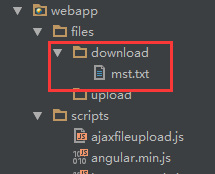
首先在webapp下新建文件夹目录/files/download,并且新建一个/Views/FileUpload/FileUpload.jsp
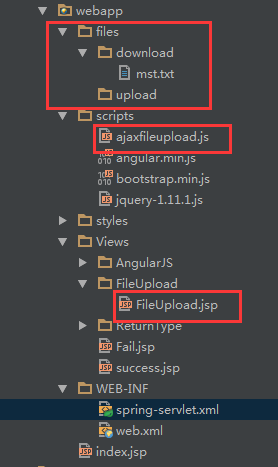
注意文件目录结构以及目录层次!!!
FileUpload.jsp代码如下

  1 <%@ page contentType="text/html;charset=UTF-8" language="java" %>
  2 <%
  3     String path = request.getContextPath();
  4     String basePath = request.getScheme() + "://" + request.getServerName() + ":" + request.getServerPort() + path + "/";
  5 %>
  6 <html>
  7 <head>
  8     <base href="<%=basePath%>">
  9     <title>fileUpload</title>
 10     <script src="<%=basePath%>scripts/jquery-1.11.1.js"></script>
 11     <script src="<%=basePath%>scripts/ajaxfileupload.js"></script>
 12 </head>
 13 <body>
 14 <h3>文件上传</h3><br>
 15
 16 <h3>采用 fileUpload_multipartFile , file.transferTo 来保存上传的文件</h3>
 17 <form name="form1" action="/FileUpload/fileUpload_multipartFile" method="post" enctype="multipart/form-data">
 18     <input type="file" name="file_upload">
 19     <input type="submit" value="upload"/>
 20 </form>
 21 <hr>
 22
 23 <h3>采用 fileUpload_multipartRequest file.transferTo 来保存上传文件</h3>
 24 <form name="form2" action="/FileUpload/fileUpload_multipartRequest" method="post" enctype="multipart/form-data">
 25     <input type="file" name="file_upload">
 26     <input type="submit" value="upload"/>
 27 </form>
 28 <hr>
 29
 30 <h3>采用 CommonsMultipartResolver file.transferTo 来保存上传文件</h3>
 31 <form name="form3" action="/FileUpload/fileUpload_CommonsMultipartResolver" method="post" enctype="multipart/form-data">
 32     <input type="file" name="file_upload">
 33     <input type="submit" value="upload"/>
 34 </form>
 35 <hr>
 36
 37 <h3>通过流的方式上传文件</h3>
 38 <form name="form4" action="/FileUpload/fileUpload_stream" method="post" enctype="multipart/form-data">
 39     <input type="file" name="file_upload">
 40     <input type="submit" value="upload"/>
 41 </form>
 42 <hr>
 43
 44 <h3>通过ajax插件 ajaxfileupload.js 来异步上传文件</h3>
 45 <form name="form5" action="/" method="post" enctype="multipart/form-data">
 46     <input type="file" id="file_AjaxFile" name="file_AjaxFile">
 47     <input type="button" value="upload" onclick="fileUploadAjax()"/><span id="sp_AjaxFile"></span><br><br>
 48     上传进度:<span id="sp_fileUploadProgress">0%</span>
 49 </form>
 50 <script type="text/javascript">
 51     function fileUploadAjax() {
 52         if ($("#file_AjaxFile").val().length > 0) {
 53             progressInterval=setInterval(getProgress,500);
 54             $.ajaxFileUpload({
 55                 url: '/FileUpload/fileUpload_ajax', //用于文件上传的服务器端请求地址
 56                 type: "post",
 57                 secureuri: false, //一般设置为false
 58                 fileElementId: 'file_AjaxFile', //文件上传空间的id属性  <input type="file" id="file1" name="file" />
 59                 dataType: 'application/json', //返回值类型 一般设置为json
 60                 success: function (data)  //服务器成功响应处理函数
 61                 {
 62                     var jsonObject = eval('(' + data + ')');
 63                     $("#sp_AjaxFile").html(" Upload Success ! filePath:" + jsonObject.filePath);
 64                 },
 65                 error: function (data, status, e)//服务器响应失败处理函数
 66                 {
 67                     alert(e);
 68                 }
 69             });//end ajaxfile
 70         }
 71         else {
 72             alert("请选择文件!");
 73         }
 74     }
 75     var progressInterval = null;
 76     var i=0;
 77     var getProgress=function (){
 78         $.get("/FileUpload/fileUploadprogress",
 79                 {},
 80         function (data) {
 81             $("#sp_fileUploadProgress").html(i+++data);
 82             if(data==100||i==100)
 83                 clearInterval(progressInterval);
 84         }
 85     );
 86     }
 87 </script>
 88 <hr>
 89
 90 <h3>多文件上传 采用 MultipartFile[] multipartFile 上传文件方法</h3>
 91 <form name="form5" action="/FileUpload/fileUpload_spring_list" method="post" enctype="multipart/form-data">
 92     <input type="file" name="file_upload">
 93     <input type="file" name="file_upload">
 94     <input type="file" name="file_upload">
 95     <input type="submit" value="upload"/>
 96 </form>
 97 <hr>
 98
 99 <h3>通过 a 标签的方式进行文件下载</h3><br>
100 <a href="<%=basePath%>filesOut/Download/mst.txt">通过 a 标签下载文件 mst.txt</a>
101 <hr>
102 <h3>通过 Response 文件流的方式下载文件</h3>
103 <a href="/FileUpload/fileDownload_servlet">通过 文件流 的方式下载文件 mst.txt</a>
104
105 </body>
106 </html>
这里一定要记得在spring-servlet.xml里面配置访问静态路径方法->下面我附上spring-servlet.xml
 1 <?xml version="1.0" encoding="UTF-8"?>
 2 <beans xmlns="http://www.springframework.org/schema/beans"
 3        xmlns:xsi="http://www.w3.org/2001/XMLSchema-instance"
 4        xmlns:context="http://www.springframework.org/schema/context"
 5        xmlns:mvc="http://www.springframework.org/schema/mvc"
 6        xsi:schemaLocation="http://www.springframework.org/schema/beans
 7 http://www.springframework.org/schema/beans/spring-beans-3.1.xsd
 8 http://www.springframework.org/schema/context
 9 http://www.springframework.org/schema/context/spring-context-3.1.xsd
10 http://www.springframework.org/schema/mvc
11 http://www.springframework.org/schema/mvc/spring-mvc-3.1.xsd">
12
13     <!-- 启动注解驱动的Spring MVC功能,注册请求url和注解POJO类方法的映射-->
14     <mvc:annotation-driven >
15
16     </mvc:annotation-driven>
17
18     <!-- 启动包扫描功能,以便注册带有@Controller、@service、@repository、@Component等注解的类成为spring的bean -->
19     <context:component-scan base-package="HelloSpringMVC.controller" />
20     <!-- 对模型视图名称的解析,在请求时模型视图名称添加前后缀 -->
21      <bean class="org.springframework.web.servlet.view.InternalResourceViewResolver">
22          <property name="viewClass" value="org.springframework.web.servlet.view.JstlView"/>
23          <property name="prefix" value="/"/>    <!-- 前缀 -->
24          <property name="suffix" value=".jsp"/>    <!-- 后缀 -->
25      </bean>
26     <!-- 访问静态文件(jpg,js,css)的方法 -->
27     <mvc:resources location="/files/" mapping="/files/**" />
28     <mvc:resources location="/scripts/" mapping="/scripts/**" />
29     <mvc:resources location="/styles/" mapping="/styles/**" />
30     <mvc:resources location="/Views/" mapping="/Views/**" />
31
32     <!-- 多部分文件上传 需配置MultipartResolver处理器-->
33     <bean id="multipartResolver" class="org.springframework.web.multipart.commons.CommonsMultipartResolver">
34         <property name="maxUploadSize" value="104857600" />
35         <property name="maxInMemorySize" value="4096" />
36         <property name="defaultEncoding" value="UTF-8"></property>
37     </bean>
38     <!-- SpringMVC在超出上传文件限制时,会抛出org.springframework.web.multipart.MaxUploadSizeExceededException -->
39     <!-- 该异常是SpringMVC在检查上传的文件信息时抛出来的,而且此时还没有进入到Controller方法中 -->
40     <bean id="exceptionResolver" class="org.springframework.web.servlet.handler.SimpleMappingExceptionResolver">
41         <property name="exceptionMappings">
42             <props>
43                 <!-- 遇到MaxUploadSizeExceededException异常时,自动跳转到/WEB-INF/jsp/error_fileupload.jsp页面 -->
44                 <prop key="org.springframework.web.multipart.MaxUploadSizeExceededException">error_fileupload</prop>
45             </props>
46         </property>
47     </bean>
48 </beans>
然后我们运行tomcat进入http://localhost:8080/Views/FileUpload/FileUpload.jsp
打开后,页面如下:
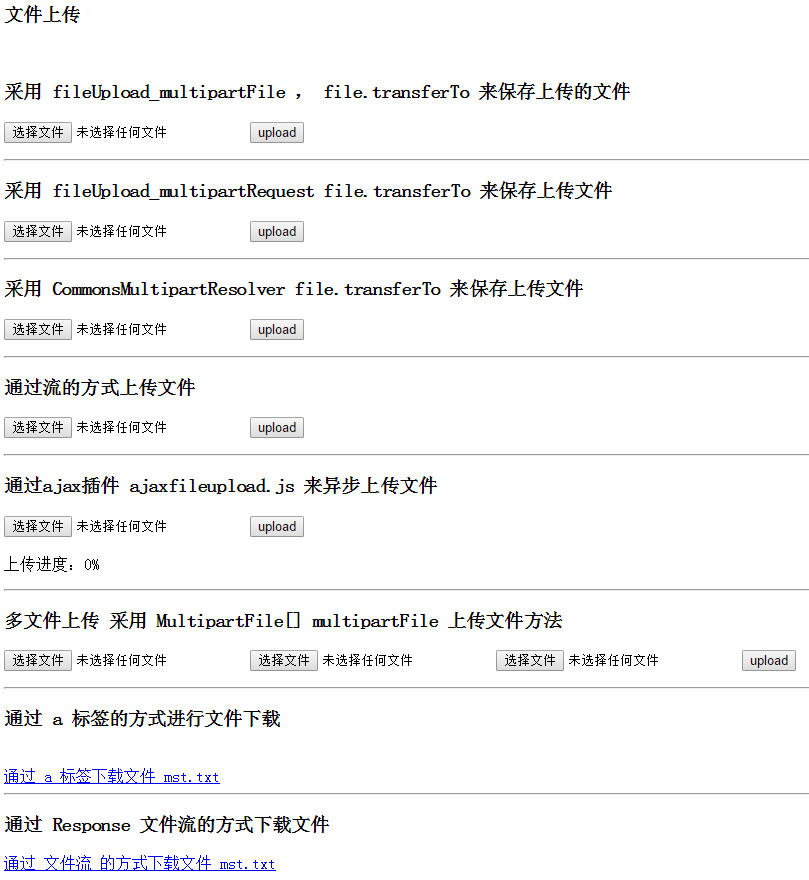
我们依次选择文件->

共八个文件!
然后依次点击upload按钮,进行文件的上传->






可见,六种上传都已经执行成功!下面我们打开文件目录查看一下上传的文件->
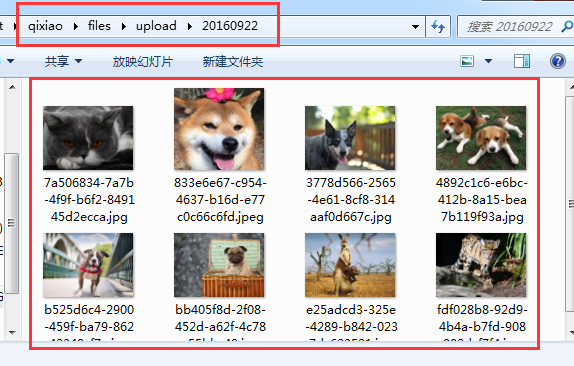
一共八个文件!证明所有文件都上传成功了!
二、文件下载
在控制器类 FileUploadController里面继续添加代码->
1 @RequestMapping(value = "fileDownload_servlet")
2     public void fileDownload_servlet(HttpServletRequest request, HttpServletResponse response) {
3         Files_Helper_DG.FilesDownload_servlet(request,response,"/filesOut/Download/mst.txt");
4     }
这里调用了帮助类 Files_Helper_DG.FilesDownload_servlet(request,response,"/filesOut/Download/mst.txt");
然后我们进行测试->
前面我们新建的文件夹/files/download,在里面放一个文件mst.txt,代码访问的就是这个文件!
然后是我们FileUpload.jsp,前面已经拷贝过了这段代码->
1 <h3>通过 a 标签的方式进行文件下载</h3><br>
2 <a href="<%=basePath%>filesOut/Download/mst.txt">通过 a 标签下载文件 mst.txt</a>
3 <hr>
4 <h3>通过 Response 文件流的方式下载文件</h3>
5 <a href="/FileUpload/fileDownload_servlet">通过 文件流 的方式下载文件 mst.txt</a>
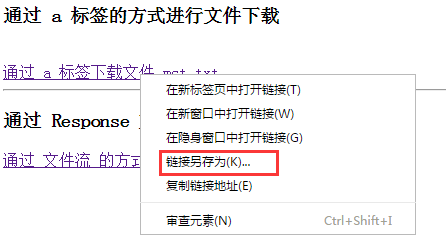
首先是第一种直接访问文件目录,此方式有缺陷,暴露了项目文件结构,造成安全隐患!

点击便可下载!(如果浏览器可以读取文件,则会直接浏览器打开,我们可以右键->链接另存为选择路径保存)
然后我们点击第二种下载方式->实际项目中,我们应该优先选择第二种方式,提高了安全性!
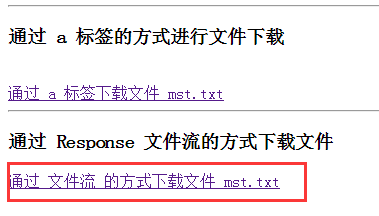
从服务器直接下载到浏览器默认的保存文件目录!(本人在F:)

到此,我们的 spring mvc 文件上传下载已经实现!
本文为七小站主原创作品,转载请注明出处:http://www.cnblogs.com/qixiaoyizhan/ 且在文章页面明显位置给出原文链接,否则保留追究法律责任的权利。
另外安利一个博主的个人网站http://qixiao123.cn/ 欢迎大家访问!