一、简介
Vundle(Vim bundle)是一个Vim的插件管理器。它是把git操作整合进去,用户需要做的只是去GitHub上找到自己想要的插件的名字,安装、更新和卸载都可有vundle来完成了。
相比Sublime、Text2等现代编辑器,Vim缺乏默认的插件管理器,所有插件的文件都散布在~/.vim下的几个文件夹中,配置Vim的过程, 就是在网上不停的搜插件,拷贝到~/.vim下,发现更新,要重新下载重新拷贝,想要删除某个不需要插件,更是要小心翼翼的不要删错。配置出顺手的 Vim, 需要极大的耐心和运气。
二、安装使用
执行如下命令,从GitHub上面下载安装Vundle
git clone https://github.com/gmarik/vundle.git ~/.vim/bundle/vundle
默认安装目录
~/.vim/bundle/vundle
三、配置说明
Vundle会自动下载和管理插件,所以,只需填上所需插件名称即可。对于不同类型的插件,有不同的地址填写方法,可分为三类,具体如下:
1、在Github vim-scripts 用户下的repos,只需要写出repos名称
2、在Github其他用户下的repos, 需要写出"用户名/repos名"
3、不在Github上的插件,需要写出git全路径
配置指令
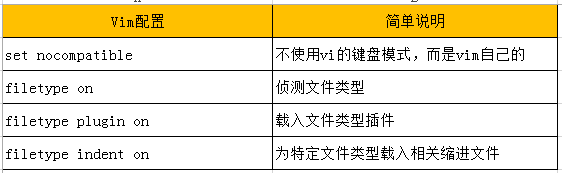
四、配置样例
使用vundle来管理vim插件,只需在".vimrc"文件中添加如下内容启用vundle管理,配置各种Bundle,即可,格式如下:

"开始使用Vundle的必须配置 set nocompatible filetype off set rtp+=~/.vim/bundle/vundle/ call vundle#rc()"使用Vundle来管理Vundle
Bundle 'gmarik/vundle'
"
" 定置个人插件,格式如下
" original repos on github (Github网站上非vim-scripts仓库的插件,按下面格式填写)
Bundle 'tpope/vim-fugitive'
Bundle 'Lokaltog/vim-easymotion'
Bundle 'rstacruz/sparkup', {'rtp': 'vim/'}
Bundle 'tpope/vim-rails.git'" vim-scripts repos (vim-scripts仓库里的,按下面格式填写)
Bundle 'L9'
Bundle 'FuzzyFinder'" non github repos (非上面两种情况的,按下面格式填写)
Bundle 'git://git.wincent.com/command-t.git'" Vundle配置结束,必须开启插件
filetype plugin indent on" /** vundle命令 **/
" Brief help
" :BundleList - list configured bundles
" :BundleInstall(!) - install(update) bundles
" :BundleSearch(!) foo - search(or refresh cache first) for foo
" :BundleClean(!) - confirm(or auto-approve) removal of unused bundles
"
" see :h vundle for more details or wiki for FAQ
" NOTE: comments after Bundle command are not allowed..
提示:Vim 插件名称可能存在重名的情况,这时候就需要在插件后面加上作者的姓氏, 比如Bundle 'Javascript-Indentation',而遇到插件名有空格和斜杠的话, 需要将空格和斜杠替换为-。
五、插件安装与卸载
安装:在.vimrc配置Bundle插件后,保存退出后,打开一个vim, 运行":BundleInstall"或者在命令行运行"vim +BundleInstall +qall",即可进行插件安装,安装完成后插件就可以使用了。
卸载:只需在出后,打开一个vim, 运行":BundleClean",即可。
更新:打开一个vim,然后在NORMAL模式下输入命令
:BundleInstall,即可。
六、Vundle常用命令