https://blog.csdn.net/u010962810/article/details/24066737
本文讨论下通过专辑名获取专辑的完整信息。包括歌曲列表,艺术家列表。发行时间和地区等。
由于是通过专辑名搜索专辑信息,所以搜索出来的结果可能较多,比如一个“Violin Concertos”就可能包括多个搜索结果,而本文仅仅是显示专辑的完整信息,并不进行进一步的匹配工作,因此以第一个搜索结果为例。
代码例如以下:
#import "AlbumViewController.h"
#import "MB.h"
#import "ResultViewController.h"

#define UnknownString @"未知"
#define UnknownInteger 0

@interface AlbumViewController ()

@property (strong, nonatomic) ResultViewController *resultController;

@property (copy, nonatomic) RequestFailureBlock failureBlock;

@end

@implementation AlbumViewController
@synthesize resultController = _resultController;

- (void)viewDidLoad
{
    [super viewDidLoad];

    self.resultController = [[UIStoryboard storyboardWithName:@"Main" bundle:nil] instantiateViewControllerWithIdentifier:@"ResultViewController"];

    self.failureBlock = ^(MBRequest *request, NSError *error, NSData *data) {
        NSString *message = [NSString stringWithFormat:@"错误:%@", [error localizedDescription]];
        UIAlertView *alertView = [[UIAlertView alloc] initWithTitle:@"警告"
                                                            message:message
                                                           delegate:nil
                                                  cancelButtonTitle:@"确定" otherButtonTitles:nil, nil];
        [alertView show];
    };
}

- (void)alertWithMessage:(NSString *)message {
    UIAlertView *alertView = [[UIAlertView alloc] initWithTitle:@"警告" message:message delegate:nil cancelButtonTitle:@"确定" otherButtonTitles:nil, nil];
    [alertView show];
}

- (IBAction)search:(id)sender {
    MBConnection *conn = [MBConnection connection];

    RequestSuccessBlock successBlock = ^(MBRequest *request, MBMetadata *metadata) {
        MBList    *list    = metadata.ReleaseList;
        MBRelease *release = [list elementAtIndex:0];

        // 专辑的mbid
        _resultController.mbid = (release.Id) ? release.Id : UnknownString;
        if (!release.Id) {
            [self alertWithMessage:@"搜索失败"];
            return;
        }

        // 专辑名
        _resultController.title = (release.Title) ? release.Title : UnknownString;

        // 专辑状态
        _resultController.status = (release.Status) ? release.Status : UnknownString;

        // 专辑音质
        _resultController.quality = (release.Quality) ? release.Quality : UnknownString;

        MBTextRepresentation *textRepresentation = release.TextRepresentation;

        // 专辑语言
        _resultController.language = (textRepresentation.Language) ? textRepresentation.Language : UnknownString;

        // 专辑剧本语言
        _resultController.script = (textRepresentation.Script) ? textRepresentation.Script : UnknownString;

        MBArtistCredit *artistCredit = release.ArtistCredit;
        NSUInteger nameCount = (artistCredit.elementCount) ? artistCredit.elementCount : UnknownInteger;

        // 专辑艺术家列表
        _resultController.artists = [NSMutableArray array];
        for (int i = 0; i < nameCount; i++) {
            MBNameCredit *nameCredit = [artistCredit elementAtIndex:i];
            [_resultController.artists addObject:nameCredit.Artist.Name];
        }

        MBReleaseGroup *group = release.ReleaseGroup;
        NSLog(@"发行组织类型 = %@", group.Type);
        NSLog(@"发行组织名称 = %@", group.Title);

        // 专辑发行日期
        _resultController.date = (release.Date) ? release.Date : UnknownString;

        // 专辑发行国家
        _resultController.country = (release.Country) ? release.Country : UnknownString;

        NSLog(@"专辑条形码 = %@", release.Barcode);
        NSLog(@"Asin 标准识别码,来自卓越亚马逊 = %@", release.Asin);

        MBList *mediumList = release.MediumList;
        MBMedium *medium = [mediumList elementAtIndex:1];

        // 专辑发行形式
        _resultController.format = medium.Format;

        NSLog(@"专辑中的音乐个数 = %d", medium.TrackList.Count.integerValue);

        // 用一个列表显示出专辑的具体信息
        [self showAllData:release.Id];
    };

    MBRequest *req = [MBRequest searchForEntity:MBEntityRelease
                                          query:@"Violin Concertos"
//                                          query:@"不想放手"
                                          limit:[NSNumber numberWithInteger:10]
                                         offset:[NSNumber numberWithInteger:0]];

    [conn enqueueRequest:req onSuccess:successBlock onFailure:self.failureBlock];
}

- (void)showAllData:(NSString *)mbid {
    MBConnection *conn = [MBConnection connection];

    MBRequest *req = [MBRequest lookupWithEntity:MBEntityRelease
                                            mbid:mbid
                                   incParameters:(MBIncParameterRecordings | MBIncParameterRecordingRels)];

    void (^successBlock)(MBRequest *, MBMetadata *) = ^(MBRequest *request, MBMetadata *metadata) {
        MBRelease *release = metadata.Release;
        if (release) {
            _resultController.tracks = [NSMutableArray array];
            MBList *mediumList = release.MediumList;
            MBMedium *medium = [mediumList elementAtIndex:0];
            MBList *trackList = medium.TrackList;
            for (MBTrack *track in trackList) {
                [_resultController.tracks addObject:track.Recording.Title];
            }
            [self.navigationController pushViewController:_resultController animated:YES];
            NSLog(@"Success");
        }
        else {
            [self alertWithMessage:@"搜索失败"];
        }
    };

    [conn enqueueRequest:req onSuccess:successBlock onFailure:self.failureBlock];
}

@end
其实,这和Use MusicBrainz in iOS(二)中的搜索方法是一样的,仅仅是搜索的类型是MBEntityRelease。在搜索并获取到列表中的第一个结果后,我们选取其mbid进行进一步的查询,由于仅仅有通过mbid的查询才干查找到该专辑中包括什么歌曲等信息。
在查询成功后。用一个表格来载入这些数据。ResultViewController类代码例如以下:
#import <UIKit/UIKit.h>

@interface ResultViewController : UITableViewController

@property (strong, nonatomic) NSMutableArray *tracks;

@property (strong, nonatomic) NSMutableArray *artists;

@property (copy, nonatomic) NSString *title;

@property (copy, nonatomic) NSString *mbid;

@property (copy, nonatomic) NSString *date;

@property (copy, nonatomic) NSString *country;

@property (copy, nonatomic) NSString *format;

@property (copy, nonatomic) NSString *language;

@property (copy, nonatomic) NSString *script;

@property (copy, nonatomic) NSString *quality;

@property (copy, nonatomic) NSString *status;

@end
#import "ResultViewController.h"
@interface ResultViewController ()
@end
@implementation ResultViewController
- (void)viewDidLoad {
[super viewDidLoad];
}
- (void)viewWillAppear:(BOOL)animated {
[super viewWillAppear:animated];
self.navigationItem.title = self.title;
}
#pragma mark - Table view data source
- (NSInteger)numberOfSectionsInTableView:(UITableView *)tableView {
return 4;
}
- (NSInteger)tableView:(UITableView *)tableView numberOfRowsInSection:(NSInteger)section {
switch (section) {
case 0:
return [self.tracks count];
case 1:
return [self.artists count];
case 2:
return 5;
case 3:
return 2;
default:
return 0;
}
}
- (NSString *)tableView:(UITableView *)tableView titleForHeaderInSection:(NSInteger)section {
switch (section) {
case 0:
return @"音乐列表";
case 1:
return @"艺术家";
case 2:
return @"基本信息";
case 3:
return @"附加信息";
default:
return @"";
}
}
- (UITableViewCell *)tableView:(UITableView *)tableView cellForRowAtIndexPath:(NSIndexPath *)indexPath
{
UITableViewCell *cell = [tableView dequeueReusableCellWithIdentifier:@"CellIdentifier" forIndexPath:indexPath];
if (indexPath.section == 0) {
cell.textLabel.text = self.tracks[indexPath.row];
}
else if (indexPath.section == 1) {
cell.textLabel.text = self.artists[indexPath.row];
}
else if (indexPath.section == 2) {
NSString *text;
switch (indexPath.row) {
case 0:
text = [NSString stringWithFormat:@"发行日期:%@", self.date];
break;
case 1:
text = [NSString stringWithFormat:@"发行地区:%@", self.country];
break;
case 2:
text = [NSString stringWithFormat:@"发行形式:%@", self.format];
break;
case 3:
text = [NSString stringWithFormat:@"语言:%@", self.language];
break;
case 4:
text = [NSString stringWithFormat:@"Script:%@", self.script];
break;
default:
break;
}
cell.textLabel.text = text;
}
else if (indexPath.section == 3) {
NSString *text;
switch (indexPath.row) {
case 0:
text = [NSString stringWithFormat:@"品质:%@", self.quality];
break;
case 1:
text = [NSString stringWithFormat:@"状态:%@", self.status];
break;
default:
break;
}
cell.textLabel.text = text;
}
return cell;
}
@end执行结果例如以下:
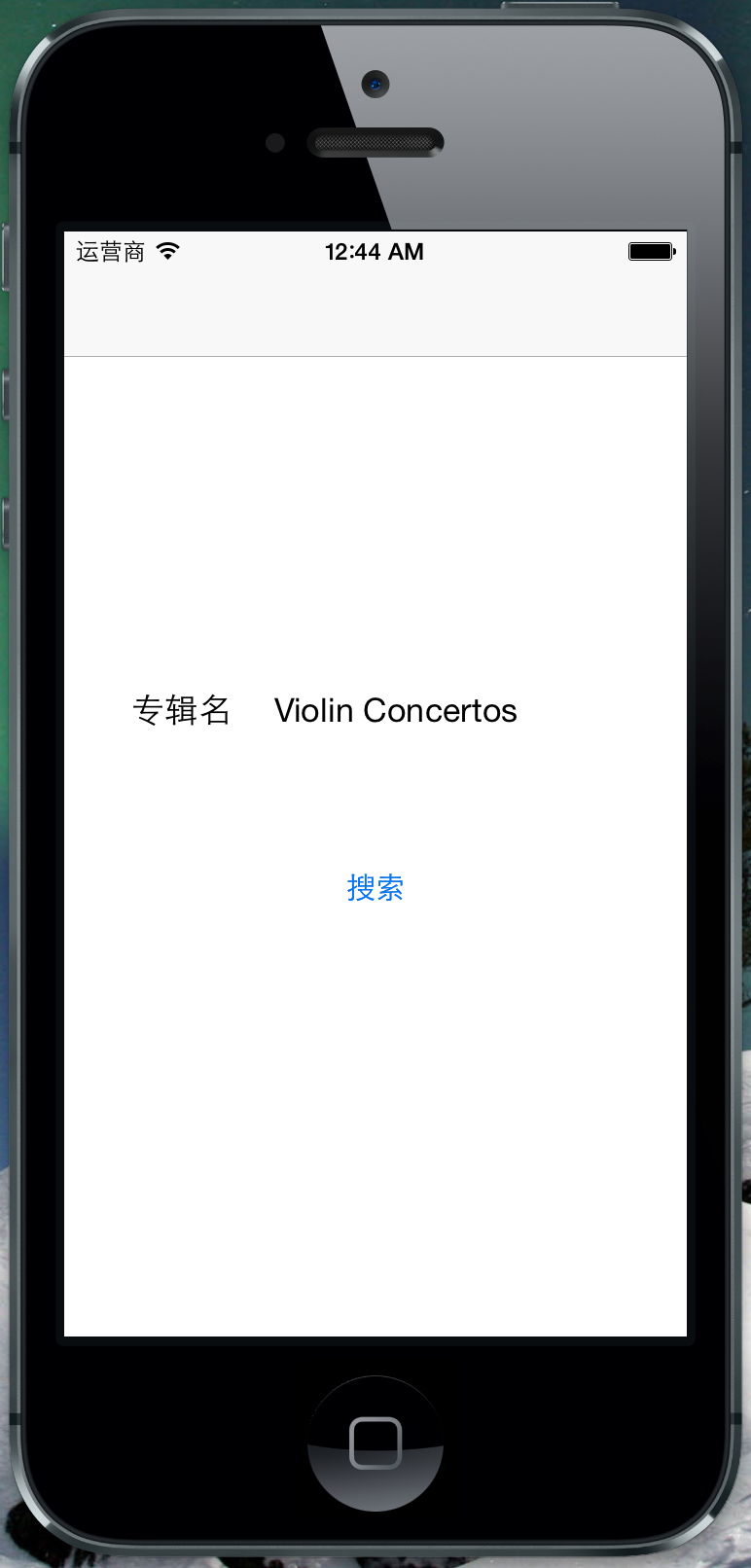
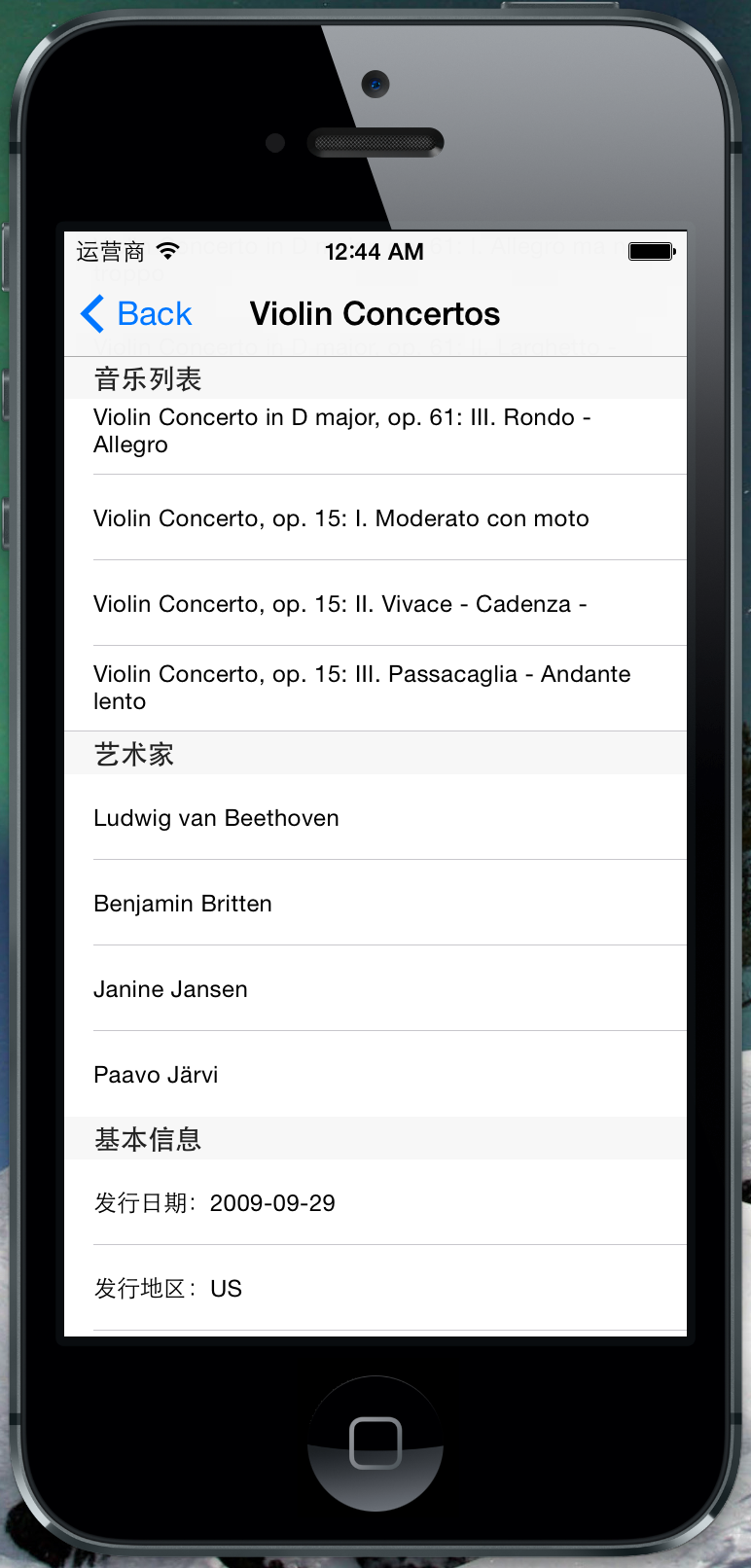
程序可能会继续改动,看看明天有什么进一步的需求提出来吧。