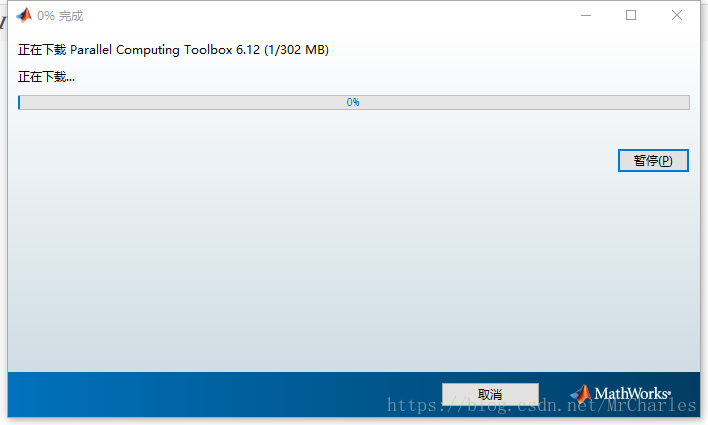
1. 首先,你要又并行计算的工具箱,在插件选项里面找到,安装即可
2. 下载训练的数据集,采用matlab演示的材料即可
https://matlabacademy-content.mathworks.com/3.3/R2017b/content/deeplearning_course_files.zip
3. 运行训练脚本:
trainflowers.mlx in the course example files. You can download the course example files from the help menu in the top-right corner. Note that this example can take some time to run if you run it on a computer that does not have a GPU.Get training images
flower_ds = imageDatastore('Flowers','IncludeSubfolders',true,'LabelSource','foldernames');
[trainImgs,testImgs] = splitEachLabel(flower_ds,0.6);
numClasses = numel(categories(flower_ds.Labels));
Create a network by modifying AlexNet
net = alexnet;
layers = net.Layers;
layers(end-2) = fullyConnectedLayer(numClasses);
layers(end) = classificationLayer;
Set training algorithm options
options = trainingOptions('sgdm','InitialLearnRate', 0.001);
Perform training
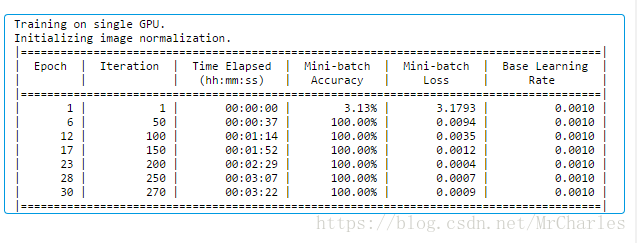
[flowernet,info] = trainNetwork(trainImgs, layers, options);
Use trained network to classify test images
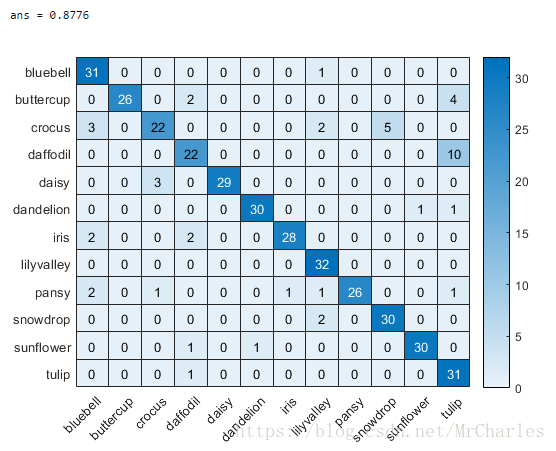
testpreds = classify(flowernet,testImgs);
4. 运行报错,GPU内存不够
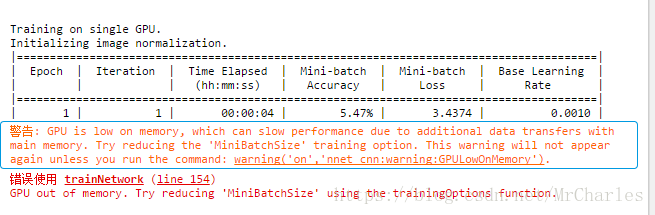
设置小一点:options = trainingOptions('sgdm','InitialLearnRate', 0.001,'MiniBatchSize', 64);
options =
TrainingOptionsSGDM - 属性:
Momentum: 0.9000
InitialLearnRate: 1.0000e-03
LearnRateScheduleSettings: [1×1 struct]
L2Regularization: 1.0000e-04
GradientThresholdMethod: 'l2norm'
GradientThreshold: Inf
MaxEpochs: 30
MiniBatchSize: 128
Verbose: 1
VerboseFrequency: 50
ValidationData: []
ValidationFrequency: 50
ValidationPatience: 5
Shuffle: 'once'
CheckpointPath: ''
ExecutionEnvironment: 'auto'
WorkerLoad: []
OutputFcn: []
Plots: 'none'
SequenceLength: 'longest'
SequencePaddingValue: 0
5. 结果