Database-style DataFrame or named Series joining/merging
1 summary
pandas provides a single function, merge(), as the entry point for all standard database join operations between DataFrame or named Series objects:
pd.merge(
    left,
    right,
    how="inner",
    on=None,
    left_on=None,
    right_on=None,
    left_index=False,
    right_index=False,
    sort=True,
    suffixes=("_x", "_y"),
    copy=True,
    indicator=False,
    validate=None,
)
-
left: A DataFrame or named Series object. -
right: Another DataFrame or named Series object. -
on: Column or index level names to join on. Must be found in both the left and right DataFrame and/or Series objects. If not passed andleft_indexandright_indexareFalse, the intersection of the columns in the DataFrames and/or Series will be inferred to be the join keys. -
left_on: Columns or index levels from the left DataFrame or Series to use as keys. Can either be column names, index level names, or arrays with length equal to the length of the DataFrame or Series. -
right_on: Columns or index levels from the right DataFrame or Series to use as keys. Can either be column names, index level names, or arrays with length equal to the length of the DataFrame or Series. -
left_index: IfTrue, use the index (row labels) from the left DataFrame or Series as its join key(s). In the case of a DataFrame or Series with a MultiIndex (hierarchical), the number of levels must match the number of join keys from the right DataFrame or Series. -
right_index: Same usage asleft_indexfor the right DataFrame or Series -
how: One of'left','right','outer','inner'. Defaults toinner. See below for more detailed description of each method. -
sort: Sort the result DataFrame by the join keys in lexicographical order. Defaults toTrue, setting toFalsewill improve performance substantially in many cases. -
suffixes: A tuple of string suffixes to apply to overlapping columns. Defaults to('_x', '_y'). -
copy: Always copy data (defaultTrue) from the passed DataFrame or named Series objects, even when reindexing is not necessary. Cannot be avoided in many cases but may improve performance / memory usage. The cases where copying can be avoided are somewhat pathological but this option is provided nonetheless. -
indicator: Add a column to the output DataFrame called_mergewith information on the source of each row._mergeis Categorical-type and takes on a value ofleft_onlyfor observations whose merge key only appears in'left'DataFrame or Series,right_onlyfor observations whose merge key only appears in'right'DataFrame or Series, andbothif the observation’s merge key is found in both. -
validate: string, default None. If specified, checks if merge is of specified type.-
“one_to_one” or “1:1”: checks if merge keys are unique in both left and right datasets.
-
“one_to_many” or “1:m”: checks if merge keys are unique in left dataset.
-
“many_to_one” or “m:1”: checks if merge keys are unique in right dataset.
-
“many_to_many” or “m:m”: allowed, but does not result in checks.
-
Support for specifying index levels as the on, left_on, and right_on parameters was added in version 0.23.0.
Support for merging named Series objects was added in version 0.24.0.
The return type will be the same as left. If left is a DataFrame or named Series and right is a subclass of DataFrame, the return type will still be DataFrame.
merge is a function in the pandas namespace, and it is also available as a DataFrame instance method merge(), with the calling DataFrame being implicitly considered the left object in the join.
The related join() method, uses merge internally for the index-on-index (by default) and column(s)-on-index join. If you are joining on index only, you may wish to use DataFrame.join to save yourself some typing.
2 Brief primer on merge methods (relational algebra)
Experienced users of relational databases like SQL will be familiar with the terminology used to describe join operations between two SQL-table like structures (DataFrame objects). There are several cases to consider which are very important to understand:
-
one-to-one joins: for example when joining two
DataFrameobjects on their indexes (which must contain unique values). -
many-to-one joins: for example when joining an index (unique) to one or more columns in a different
DataFrame. -
many-to-many joins: joining columns on columns.
When joining columns on columns (potentially a many-to-many join), any indexes on the passed DataFrame objects will be discarded.
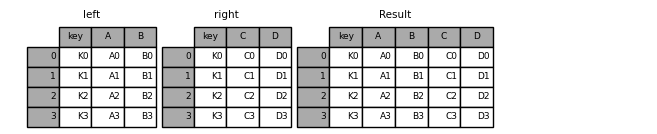
It is worth spending some time understanding the result of the many-to-many join case. In SQL / standard relational algebra, if a key combination appears more than once in both tables, the resulting table will have the Cartesian product of the associated data. Here is a very basic example with one unique key combination:
In [39]: left = pd.DataFrame(
   ....:     {
   ....:         "key": ["K0", "K1", "K2", "K3"],
   ....:         "A": ["A0", "A1", "A2", "A3"],
   ....:         "B": ["B0", "B1", "B2", "B3"],
   ....:     }
   ....: )
   ....:

In [40]: right = pd.DataFrame(
   ....:     {
   ....:         "key": ["K0", "K1", "K2", "K3"],
   ....:         "C": ["C0", "C1", "C2", "C3"],
   ....:         "D": ["D0", "D1", "D2", "D3"],
   ....:     }
   ....: )
   ....:

In [41]: result = pd.merge(left, right, on="key")
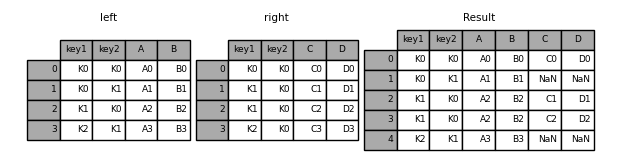
Here is a more complicated example with multiple join keys. Only the keys appearing in left and right are present (the intersection), since how='inner' by default.
In [42]: left = pd.DataFrame(
   ....:     {
   ....:         "key1": ["K0", "K0", "K1", "K2"],
   ....:         "key2": ["K0", "K1", "K0", "K1"],
   ....:         "A": ["A0", "A1", "A2", "A3"],
   ....:         "B": ["B0", "B1", "B2", "B3"],
   ....:     }
   ....: )
   ....:

In [43]: right = pd.DataFrame(
   ....:     {
   ....:         "key1": ["K0", "K1", "K1", "K2"],
   ....:         "key2": ["K0", "K0", "K0", "K0"],
   ....:         "C": ["C0", "C1", "C2", "C3"],
   ....:         "D": ["D0", "D1", "D2", "D3"],
   ....:     }
   ....: )
   ....:

In [44]: result = pd.merge(left, right, on=["key1", "key2"])

The how argument to merge specifies how to determine which keys are to be included in the resulting table. If a key combination does not appear in either the left or right tables, the values in the joined table will be NA. Here is a summary of the how options and their SQL equivalent names:
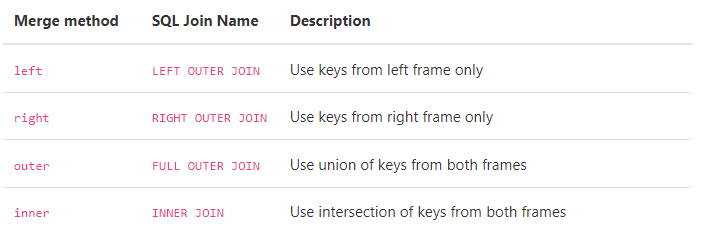
In [45]: result = pd.merge(left, right, how="left", on=["key1", "key2"])
In [46]: result = pd.merge(left, right, how="right", on=["key1", "key2"])

In [47]: result = pd.merge(left, right, how="outer", on=["key1", "key2"])
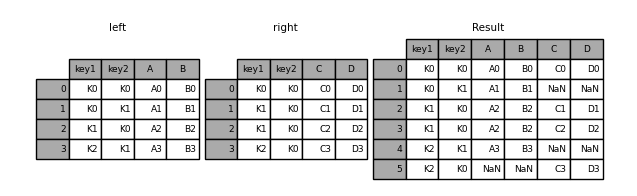
In [48]: result = pd.merge(left, right, how="inner", on=["key1", "key2"])

You can merge a mult-indexed Series and a DataFrame, if the names of the MultiIndex correspond to the columns from the DataFrame. Transform the Series to a DataFrame using Series.reset_index() before merging, as shown in the following example.
In [49]: df = pd.DataFrame({"Let": ["A", "B", "C"], "Num": [1, 2, 3]})

In [50]: df
Out[50]:
  Let  Num
0   A    1
1   B    2
2   C    3

In [51]: ser = pd.Series(
   ....:     ["a", "b", "c", "d", "e", "f"],
   ....:     index=pd.MultiIndex.from_arrays(
   ....:         [["A", "B", "C"] * 2, [1, 2, 3, 4, 5, 6]], names=["Let", "Num"]
   ....:     ),
   ....: )
   ....:

In [52]: ser
Out[52]:
Let  Num
A    1      a
B    2      b
C    3      c
A    4      d
B    5      e
C    6      f
dtype: object

In [53]: pd.merge(df, ser.reset_index(), on=["Let", "Num"])
Out[53]:
  Let  Num  0
0   A    1  a
1   B    2  b
2   C    3  c
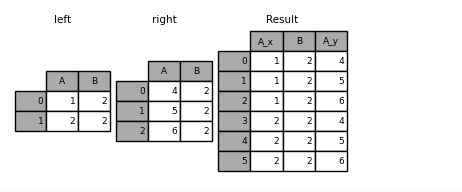
Here is another example with duplicate join keys in DataFrames:
In [54]: left = pd.DataFrame({"A": [1, 2], "B": [2, 2]})

In [55]: right = pd.DataFrame({"A": [4, 5, 6], "B": [2, 2, 2]})

In [56]: result = pd.merge(left, right, on="B", how="outer")
3 Checking for duplicate keys
Users can use the validate argument to automatically check whether there are unexpected duplicates in their merge keys. Key uniqueness is checked before merge operations and so should protect against memory overflows. Checking key uniqueness is also a good way to ensure user data structures are as expected.
In the following example, there are duplicate values of B in the right DataFrame. As this is not a one-to-one merge – as specified in the validate argument – an exception will be raised.
In [57]: left = pd.DataFrame({"A": [1, 2], "B": [1, 2]})

In [58]: right = pd.DataFrame({"A": [4, 5, 6], "B": [2, 2, 2]})
In [53]: result = pd.merge(left, right, on="B", how="outer", validate="one_to_one")
...
MergeError: Merge keys are not unique in right dataset; not a one-to-one merge
If the user is aware of the duplicates in the right DataFrame but wants to ensure there are no duplicates in the left DataFrame, one can use the validate='one_to_many' argument instead, which will not raise an exception.
In [59]: pd.merge(left, right, on="B", how="outer", validate="one_to_many")
Out[59]:
   A_x  B  A_y
0    1  1  NaN
1    2  2  4.0
2    2  2  5.0
3    2  2  6.0
4 The merge indicator
merge() accepts the argument indicator. If True, a Categorical-type column called _merge will be added to the output object that takes on values:

In [60]: df1 = pd.DataFrame({"col1": [0, 1], "col_left": ["a", "b"]})

In [61]: df2 = pd.DataFrame({"col1": [1, 2, 2], "col_right": [2, 2, 2]})

In [62]: pd.merge(df1, df2, on="col1", how="outer", indicator=True)
Out[62]:
   col1 col_left  col_right      _merge
0     0        a        NaN   left_only
1     1        b        2.0        both
2     2      NaN        2.0  right_only
3     2      NaN        2.0  right_only
The indicator argument will also accept string arguments, in which case the indicator function will use the value of the passed string as the name for the indicator column.
In [63]: pd.merge(df1, df2, on="col1", how="outer", indicator="indicator_column")
Out[63]:
   col1 col_left  col_right indicator_column
0     0        a        NaN        left_only
1     1        b        2.0             both
2     2      NaN        2.0       right_only
3     2      NaN        2.0       right_only
5 Merge dtypes
Merging will preserve the dtype of the join keys.
In [64]: left = pd.DataFrame({"key": [1], "v1": [10]})

In [65]: left
Out[65]:
   key  v1
0    1  10

In [66]: right = pd.DataFrame({"key": [1, 2], "v1": [20, 30]})

In [67]: right
Out[67]:
   key  v1
0    1  20
1    2  30
We are able to preserve the join keys:
In [68]: pd.merge(left, right, how="outer")
Out[68]:
   key  v1
0    1  10
1    1  20
2    2  30

In [69]: pd.merge(left, right, how="outer").dtypes
Out[69]:
key    int64
v1     int64
dtype: object
Of course if you have missing values that are introduced, then the resulting dtype will be upcast.
In [70]: pd.merge(left, right, how="outer", on="key")
Out[70]:
   key  v1_x  v1_y
0    1  10.0    20
1    2   NaN    30

In [71]: pd.merge(left, right, how="outer", on="key").dtypes
Out[71]:
key       int64
v1_x    float64
v1_y      int64
dtype: object
Merging will preserve category dtypes of the mergands. See also the section on categoricals.
The left frame.
In [72]: from pandas.api.types import CategoricalDtype

In [73]: X = pd.Series(np.random.choice(["foo", "bar"], size=(10,)))

In [74]: X = X.astype(CategoricalDtype(categories=["foo", "bar"]))

In [75]: left = pd.DataFrame(
   ....:     {"X": X, "Y": np.random.choice(["one", "two", "three"], size=(10,))}
   ....: )
   ....:

In [76]: left
Out[76]:
     X      Y
0  bar    one
1  foo    one
2  foo  three
3  bar  three
4  foo    one
5  bar    one
6  bar  three
7  bar  three
8  bar  three
9  foo  three

In [77]: left.dtypes
Out[77]:
X    category
Y      object
dtype: object
The right frame.
In [78]: right = pd.DataFrame(
   ....:     {
   ....:         "X": pd.Series(["foo", "bar"], dtype=CategoricalDtype(["foo", "bar"])),
   ....:         "Z": [1, 2],
   ....:     }
   ....: )
   ....:

In [79]: right
Out[79]:
     X  Z
0  foo  1
1  bar  2

In [80]: right.dtypes
Out[80]:
X    category
Z       int64
dtype: object
The merged result:
In [81]: result = pd.merge(left, right, how="outer")

In [82]: result
Out[82]:
     X      Y  Z
0  bar    one  2
1  bar  three  2
2  bar    one  2
3  bar  three  2
4  bar  three  2
5  bar  three  2
6  foo    one  1
7  foo  three  1
8  foo    one  1
9  foo  three  1

In [83]: result.dtypes
Out[83]:
X    category
Y      object
Z       int64
dtype: object
6 Joining on index
DataFrame.join() is a convenient method for combining the columns of two potentially differently-indexed DataFrames into a single result DataFrame. Here is a very basic example:
In [84]: left = pd.DataFrame(
   ....:     {"A": ["A0", "A1", "A2"], "B": ["B0", "B1", "B2"]}, index=["K0", "K1", "K2"]
   ....: )
   ....:

In [85]: right = pd.DataFrame(
   ....:     {"C": ["C0", "C2", "C3"], "D": ["D0", "D2", "D3"]}, index=["K0", "K2", "K3"]
   ....: )
   ....:

In [86]: result = left.join(right)

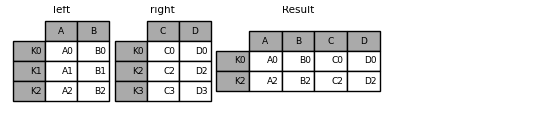
In [87]: result = left.join(right, how="outer")

The same as above, but with how='inner'.
In [88]: result = left.join(right, how="inner")

The data alignment here is on the indexes (row labels). This same behavior can be achieved using merge plus additional arguments instructing it to use the indexes:
In [89]: result = pd.merge(left, right, left_index=True, right_index=True, how="outer")
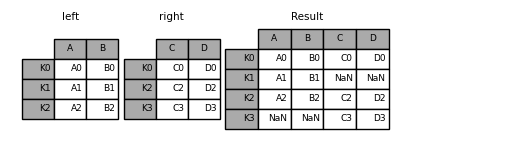
In [90]: result = pd.merge(left, right, left_index=True, right_index=True, how="inner")