
zoukankan      html  css  js  c++  java
  • Makefile简单操作示例

    首先创建以下4个文件:

    hello.h内容为:

    void hello();

    hello.cpp内容为:

    #include"hello.h"
    #include<iostream>

    using namespce std;

    void hello()
    {
      cout<<"Hello makefile"<<endl;
    }

    main.cpp内容为:

    #include "hello.h"

    int main()
    {
      hello();

      return 0;
    }

    makefile内容为:

    cc = g++                                       #定义一个变量cc,在下边引用cc变量的时候要加$符号

    all : main.o hello.o                        #目标文件 : 依赖文件
      $(cc) -o all main.o hello.o      #该指令说明如何由依赖文件生成目标文件,以tab键开头,
    main.o : main.cpp
      $(cc) -c -o main.o main.cpp
    hello.o : hello.cpp
      $(cc) -c -o hello.o hello.cpp


    PHONY : clean                     #伪目标文件,通过make clean指令执行

    clean :
      -rm -rf main.o hello.o all

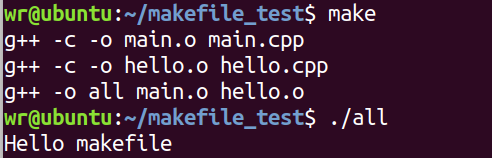
    执行过程及结果展示:
  • 相关阅读:
    文本分类的研究学习
    Python中的TfidfVectorizer参数解析
    Newsgroups数据集介绍
    鸢尾花数据读取的总结
    Knapsack Problems
    3.1.6 Stamps
    3.1.5 Contact
    3.1.4 Shaping Regions
    3.1.3 Humble Numbers
    3.1.2 Score Inflation
  • 原文地址:https://www.cnblogs.com/ruigelwang/p/12554124.html
Copyright © 2011-2022 走看看