0 ubantu 版本信息
songbin@songbin-virtual-machine:/$ cat /etc/issue
Ubuntu 20.04.1 LTS
 l
1 Install MicroStack from the beta channel:
songbin@songbin-virtual-machine:/$ sudo snap install microstack --devmode --beta
[sudo] songbin 的密码:
microstack (beta) ussuri from Canonical✓ installed
2 (此步骤 可省略,此命令只是查看是否安装了microstack)
songbin@songbin-virtual-machine:/$ snap list
Name               Version             Rev    Tracking         Publisher   Notes
core18             20201210            1944   latest/stable    canonical✓  base
core20             20201027            875    latest/stable    canonical✓  base
gnome-3-34-1804    0+git.3556cb3       60     latest/stable/…  canonical✓  -
gtk-common-themes  0.1-50-gf7627e4     1514   latest/stable/…  canonical✓  -
microstack         ussuri              222    latest/beta      canonical✓  devmode
snap-store         3.38.0-55-geb45541  498    latest/stable/…  canonical✓  -
snapd              2.48.1              10492  latest/stable    canonical✓  snapd
3 MicroStack needs to be initialised, so that networks and databases get configured. To do this, run:
songbin@songbin-virtual-machine:/$ sudo microstack init --auto --control
2020-12-17 17:55:26,405 - microstack_init - INFO - Configuring clustering ...
2020-12-17 17:55:26,492 - microstack_init - INFO - Setting up as a control node.
2020-12-17 17:55:29,456 - microstack_init - INFO - Configuring networking ...
2020-12-17 17:55:34,537 - microstack_init - INFO - Opening horizon dashboard up to *
2020-12-17 17:55:35,418 - microstack_init - INFO - Waiting for RabbitMQ to start ...
Waiting for 192.168.39.123:5672
2020-12-17 17:55:40,736 - microstack_init - INFO - RabbitMQ started!
2020-12-17 17:55:40,736 - microstack_init - INFO - Configuring RabbitMQ ...
2020-12-17 17:55:41,741 - microstack_init - INFO - RabbitMQ Configured!
2020-12-17 17:55:41,764 - microstack_init - INFO - Waiting for MySQL server to start ...
Waiting for 192.168.39.123:3306
2020-12-17 17:55:48,086 - microstack_init - INFO - Mysql server started! Creating databases ...
2020-12-17 17:55:49,636 - microstack_init - INFO - Configuring Keystone Fernet Keys ...
2020-12-17 17:56:01,606 - microstack_init - INFO - Bootstrapping Keystone ...
2020-12-17 17:56:14,852 - microstack_init - INFO - Creating service project ...
2020-12-17 17:56:20,764 - microstack_init - INFO - Keystone configured!
2020-12-17 17:56:20,788 - microstack_init - INFO - Configuring the Placement service...
2020-12-17 17:56:42,231 - microstack_init - INFO - Running Placement DB migrations...
2020-12-17 17:56:45,466 - microstack_init - INFO - Configuring nova control plane services ...
2020-12-17 17:56:58,858 - microstack_init - INFO - Running Nova API DB migrations (this may take a lot of time)...
2020-12-17 17:57:22,238 - microstack_init - INFO - Running Nova DB migrations (this may take a lot of time)...
Waiting for 192.168.39.123:8774
2020-12-17 17:58:18,207 - microstack_init - INFO - Creating default flavors...
2020-12-17 17:58:45,375 - microstack_init - INFO - Configuring nova compute hypervisor ...
2020-12-17 17:58:46,361 - microstack_init - INFO - Configuring the Spice HTML5 console service...
2020-12-17 17:58:46,754 - microstack_init - INFO - Configuring Neutron
Waiting for 192.168.39.123:9696
2020-12-17 18:00:20,058 - microstack_init - INFO - Configuring Glance ...
Waiting for 192.168.39.123:9292
2020-12-17 18:01:01,150 - microstack_init - INFO - Adding cirros image ...
2020-12-17 18:01:04,837 - microstack_init - INFO - Creating security group rules ...
2020-12-17 18:01:15,428 - microstack_init - INFO - Configuring the Cinder services...
2020-12-17 18:02:17,251 - microstack_init - INFO - Running Cinder DB migrations...
2020-12-17 18:02:26,617 - microstack_init - INFO - restarting libvirt and virtlogd ...
2020-12-17 18:02:41,913 - microstack_init - INFO - Complete. Marked microstack as initialized!
4 (此步骤 可省略,此命令只是查看网络情况)
songbin@songbin-virtual-machine:/$ microstack.openstack network list
+--------------------------------------+----------+--------------------------------------+
| ID                                   | Name     | Subnets                              |
+--------------------------------------+----------+--------------------------------------+
| 87621a92-218d-400e-9ddb-e7135d99ef1e | test     | 5cab57dd-4f70-4e4d-aa0e-239c7caa5584 |
| e0442c18-4f76-4e66-879c-ce5056890ad1 | external | 342da9b8-ef87-46bd-bbc3-b90518fdee41 |
+--------------------------------------+----------+--------------------------------------+
5 To launch your first OpenStack instance (VM) called “test” based on the CirrOS image, run the following:
songbin@songbin-virtual-machine:/$ microstack launch cirros --name test
Creating local "microstack" ssh key at /home/songbin/snap/microstack/common/.ssh/id_microstack
Launching server ...
Allocating floating ip ...
Server test launched! (status is BUILD)

Access it with `ssh -i /home/songbin/snap/microstack/common/.ssh/id_microstack cirros@10.20.20.72`
You can also visit the OpenStack dashboard at http://10.20.20.1:80
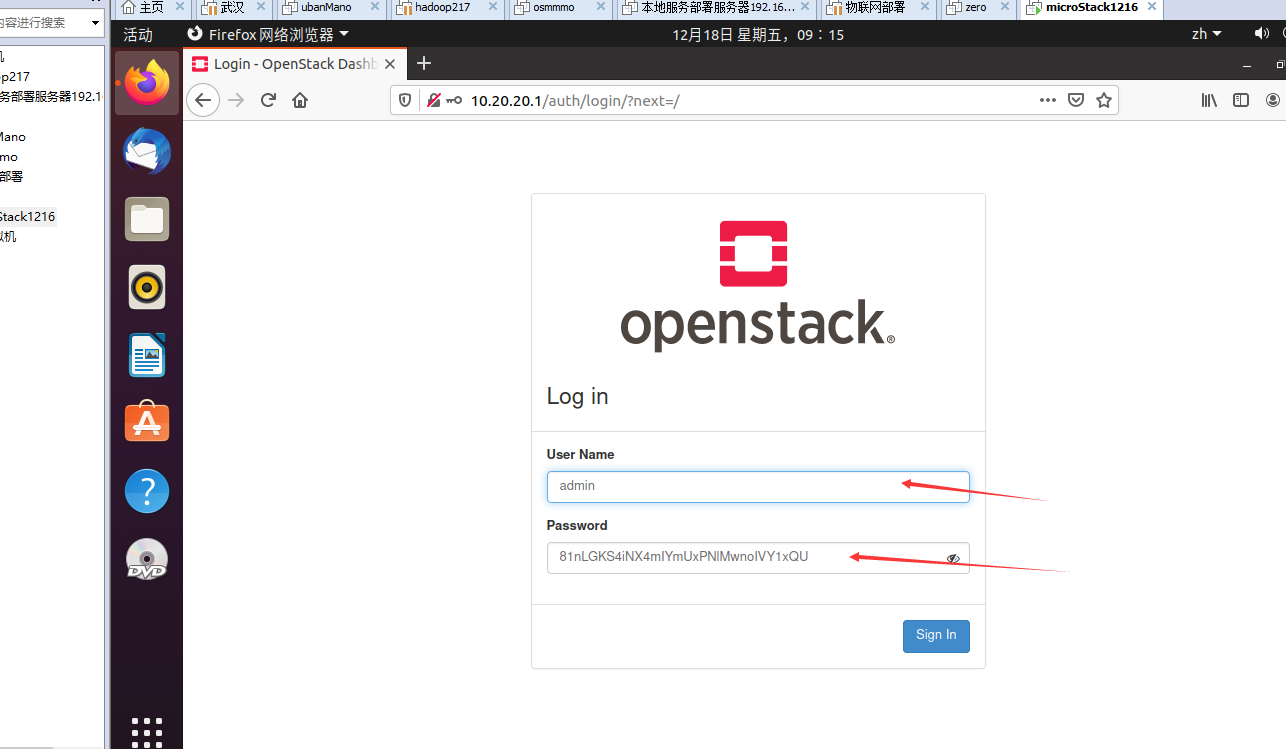
6 The password for the admin user can be obtained in this way:
songbin@songbin-virtual-machine:/$ sudo snap get microstack config.credentials.keystone-password
81nLGKS4iNX4mIYmUxPNlMwnoIVY1xQU
7 Note that the IP address of the instance may be different in your environment. In order to connect to the instance run the command from the output:
songbin@songbin-virtual-machine:/$ ssh -i /home/songbin/snap/microstack/common/.ssh/id_microstack cirros@10.20.20.72
The authenticity of host '10.20.20.72 (10.20.20.72)' can't be established.
ECDSA key fingerprint is SHA256:q8HUYn/uZHnWMUEMRlKQexOAT8xHbhrMaNpznAWZGTQ.
Are you sure you want to continue connecting (yes/no/[fingerprint])? yes
Warning: Permanently added '10.20.20.72' (ECDSA) to the list of known hosts.
$ uptime
 10:25:00 up 11 min,  1 users,  load average: 0.00, 0.00, 0.00
$
$exit
Connection to 10.20.20.72 closed.
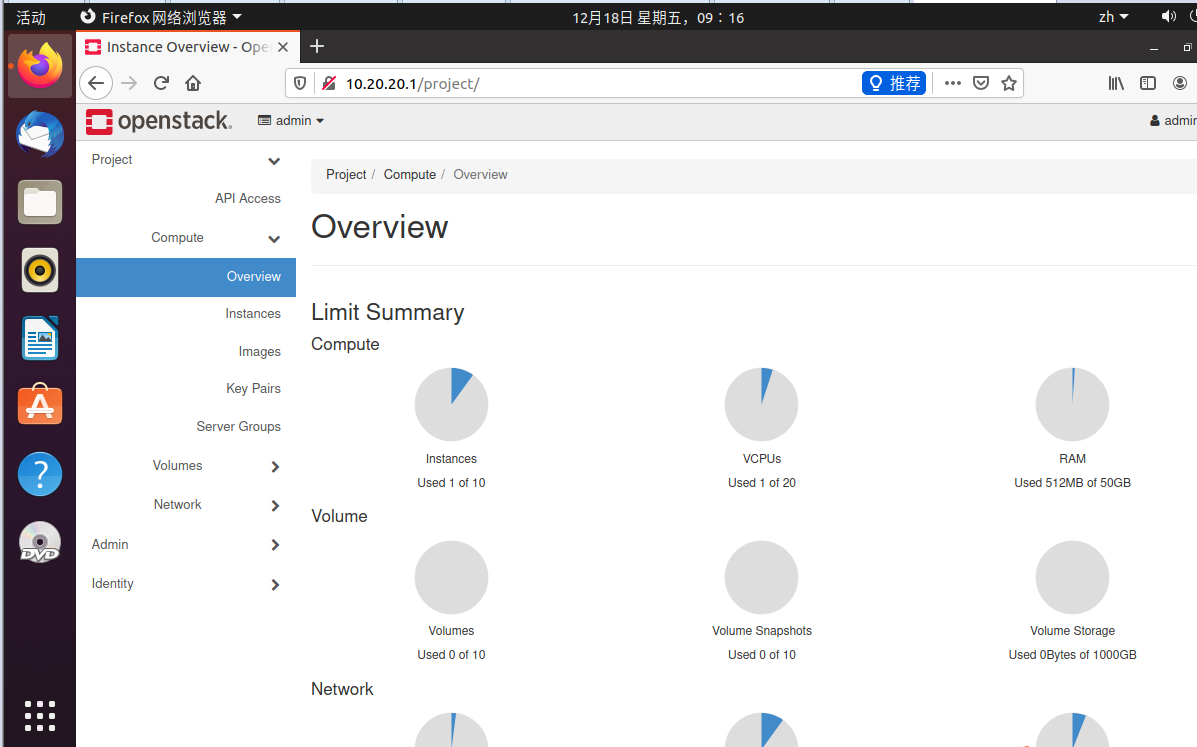
8 web UI 访问
To interact with your cloud via the web UI visit http://10.20.20.1/
访问地址10.20.20.1 只能在虚拟机的浏览器中访问,在主机的浏览器访问不到
9 重新启用
songbin@songbin-virtual-machine:/$ sudo snap enable microstack
[sudo] songbin 的密码:
error: cannot enable "microstack": snap "microstack" already enabled
10 遇到的问题 (这个问题解决了好久)
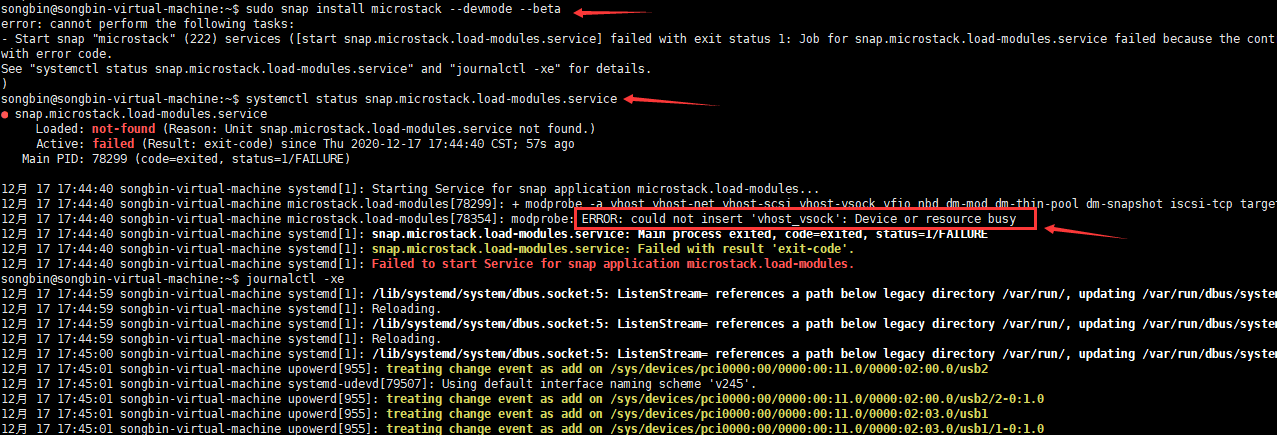
解决方案
参考解决链接 https://blog.csdn.net/kunyus/article/details/106986621
sudo touch /etc/modprobe.d/blacklist-vmware.conf
sudo tee /etc/modprobe.d/blacklist-vmware.conf << EOF
blacklist vmw_vsock_virtio_transport_common
blacklist vmw_vsock_vmci_transport
EOF
sudo reboot