前言:
最近公司领导要统计技术部门在各个业务条线花费的工时百分比,而 jira 当前的 Tempo 插件只能统计个人工时。于是就写了个报表工具,将 jira 中导出的个人工时excel表格 导入数据库,在后端处理各个业务工时占比。后来研究了 jira 的 API 文档 ,放弃了之前的思路,直接调用 jira API 处理数据 ,这个先不谈。这篇博客主要介绍 Django 上传文件,然后解析 excel 导入数据库。
一、上传文件:
将文件上传到服务器指定路径,其实很简单,一共有三个步骤:
1.配置 setting.py
# 文件上传配置
UPLOAD_ROOT = os.path.join(BASE_DIR,'upload')
2.前端代码如下,使用 <form> 表单提交,"/upload/" 路由配置在 urls 中,这个就不再多说了。
{% extends 'base.html' %}

{% block content %}
<body>
     <form id="form"  enctype="multipart/form-data" action="/upload/" method="post">
      <p><input type="file"  name="file"></p>
         <input type="submit" name="提交">
    </form>
</body>
{% endblock %}
3.后端代码如下,这段代码可以上传任意格式的文件,没有校验文件类型。
@csrf_exempt
def upload(request):
    # 根name取 file 的值
    file = request.FILES.get('file')
    logger.log().info('uplaod:%s'% file)
    # 创建upload文件夹
    if not os.path.exists(settings.UPLOAD_ROOT):
        os.makedirs(settings.UPLOAD_ROOT)
    try:
        if file is None:
            return HttpResponse('请选择要上传的文件')
        # 循环二进制写入
        with open(settings.UPLOAD_ROOT + "/" + file.name, 'wb') as f:
            for i in file.readlines():
                f.write(i)
    except Exception as e:
        return HttpResponse(e)


    return HttpResponse('上传成功')
二、解析 excel 导入数据库
1.文件上传结束后,接下来读取刚上传到服务器的 excel 表格,然后写入数据库。所以整个后端代码是这样的:
# 将excel数据写入mysql
def wrdb(filename):
    # 打开上传 excel 表格
    readboot = xlrd.open_workbook(settings.UPLOAD_ROOT + "/" + filename)
    sheet = readboot.sheet_by_index(0)
    #获取excel的行和列
    nrows = sheet.nrows
    ncols = sheet.ncols
    print(ncols,nrows)
    sql = "insert into working_hours (jobnum,name,workingtime,category,project,date,createtime) VALUES"
    for i in range(1,nrows):
        row = sheet.row_values(i)
        jobnum = row[4]
        name = row[5]
        workingtime = row[2]
        category = row[8]
        project = row[1]
        date = xldate_as_datetime(row[3],0).strftime('%Y/%m/%d')
        values = "('%s','%s','%s','%s','%s','%s','%s')"%(jobnum,name,workingtime,category,project,date,datetime.datetime.now())
        sql = sql + values +","
    # 为了提高运行效率,一次性把数据 insert 进数据库
    sql = sql[:-1]
    # 写入数据库
    # DataConnection 是自定义的公共模块,用的是第三方库,用来操作数据库。没有用 ORM ,后续有 group by 等复杂 sql 不好操作。
    DataConnection.MysqlConnection().insert('work',sql)


@csrf_exempt
def upload(request):
    # 根name取 file 的值
    file = request.FILES.get('file')
    print('uplaod:%s'% file)
    # 创建upload文件夹
    if not os.path.exists(settings.UPLOAD_ROOT):
        os.makedirs(settings.UPLOAD_ROOT)
    try:
        if file is None:
            return HttpResponse('请选择要上传的文件')
        # 循环二进制写入
        with open(settings.UPLOAD_ROOT + "/" + file.name, 'wb') as f:
            for i in file.readlines():
                f.write(i)

        # 写入 mysql
        wrdb(file.name)
    except Exception as e:
        return HttpResponse(e)

    return HttpResponse('导入成功')
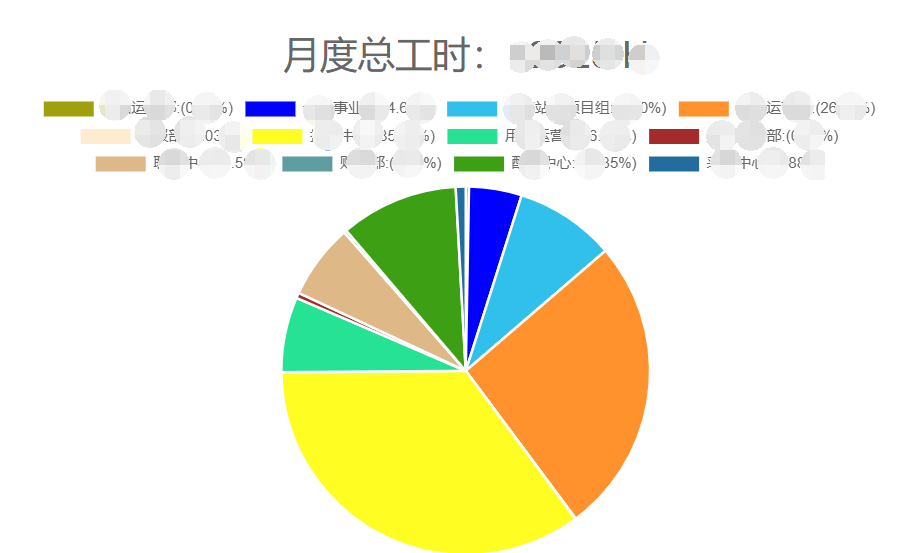
2.数据导入后,通过一些处理就得到了我们想要的数据。报表其中之一的饼图: