验证码这样的功能可以说是无处不在了,接下来使用php来实现验证码这样的功能,这里我是将验证码实现抽取到一个类中独立开来,那么后面如果再使用到验证码功能,直接引入该类文件并创建该类的实例,就可以使用验证码了,代码如下:
验证码类文件vcode.class.php
<?php
/**
  *验证码类
  */
  class Vcode{
    private $width;//图片宽度
    private $height;//图片高度
    private $num;//验证码个数
    private $img;//图片资源
    private $code;//验证码
    private $pointNum;//干扰点个数
    private $lineNum;//干扰线个数
    private $fontFile;//字体文件

    //构造函数初始化相关数据
    function __construct($width=85,$height=34,$num=4){
        $this->width=$width;
        $this->height=$height;
        $this->num=$num;
        $this->code=$this->createCode();
        $this->pointNum=100;
        $this->lineNum=10;
        $this->fontFile="STLITI.TTF";
    }

    /**
      *用于设置成员属性
      *@param string $key 成员属性名
      *@param mixed $value 成员属性值
      *@return object 返回自己对象$this,可用于连贯操作
      */
    public function set($key,$val){
        //get_class_vars() 获取类中的属性组成的数组
        //get_class() 返回对象的类名
        if(array_key_exists($key,get_class_vars(get_class($this)))){
            $this->setOption($key,$val);
        }
        return $this;
    }
    //设置参数
    private function setOption($key,$value){
        $this->$key=$value;
    }

    //获取验证码
    public function getCode(){
        return $this->code;
    }

    //输出图像
    public function outImg(){
        //创建图像
        $this->createImage();
        //画验证码
        $this->drawCode();
        //画干扰元素
        $this->drawDisturbColor();
        //输出图像
        $this->printImg();
    }

    //画验证码
    private function drawCode(){
        $this->fontFile="font/".$this->fontFile;
        for($i=0;$i<$this->num;$i++){
            //设置随机颜色
            $randColor=imagecolorallocate($this->img,rand(0,128),rand(0,128),rand(0,128));
            //字体大小
            $fontSize=rand(20,23);
            //字体水平位置
            $x=($this->width/$this->num)*$i;
            //水平方向的位置
            $y=rand($fontSize,imagefontheight($fontSize)+3);
            //画字体
            imagettftext($this->img,$fontSize,0,$x,$y,$randColor,$this->fontFile,$this->code{$i});
        }
    }
    //画干扰元素
    private function drawDisturbColor(){
        //画干扰点
        for($i=0;$i<$this->pointNum;$i++){
            //设置随机颜色
            $randColor=imagecolorallocate($this->img,rand(0,255),rand(0,255),rand(0,255));
            //画点
            imagesetpixel($this->img,rand(1,$this->width-2),rand(1,$this->height-2),$randColor);
        }

        //画干扰线
        for($i=0;$i<$this->lineNum;$i++){
            //设置随机颜色
            $randColor=imagecolorallocate($this->img,rand(0,200),rand(0,200),rand(0,200));
            //画线
            imageline($this->img,rand(1,$this->width-2),rand(1,$this->height-2),rand(1,$this->height-2),rand(1,$this->width-2),$randColor);
        }
    }

    //创建图像
    private function createImage(){
        //创建一个真彩色图像
        $this->img=imagecreatetruecolor($this->width,$this->height);
        //设置背景色
        $bgColor=imagecolorallocate($this->img,rand(200,255),rand(200,255),rand(200,255));
        //填充背景色
        imagefill($this->img,0,0,$bgColor);
        //设置边框颜色
        $borderColor=imagecolorallocate($this->img,0,0,0);
        //画一个边框
        imagerectangle($this->img,0,0,$this->width-1,$this->height-1,$borderColor);
    }

    //输出图像
    private function printImg(){
        if(imagetypes() & IMG_PNG){
            //针对png
            header("Content-Type:image/png");
            imagepng($this->img);
        }else if(imagetypes() & IMG_JPG){
            //针对jpg
            header("Content-Type:image/jpeg");
            imagejpeg($this->img,null,100);
        }else if(imagetypes() & IMG_GIF){
            //针对Gif
            header("Content-Type:image/gif");
            imagegif($this->img);
        }else if(imagetypes() & IMG_WBMP){
            // 针对 WBMP
            header('Content-Type: image/vnd.wap.wbmp');
            imagewbmp($this->img);
        }else{
            die('No image support in this PHP server');
        }
    }

    //创建验证码
    private function createCode(){
        //默认字符串
        $codes="123456789abcdefghijkmnpqrstuvwxyABCDEFGHIJKLMNOPQRSTUVWXY";
        //生成验证码
        $code="";
        for($i=0;$i<$this->num;$i++){
            $code.=$codes{rand(0,strlen($codes)-1)};
        }
        return $code;
    }

    //析构函数用于销毁图像资源
    function __destruct(){
        imagedestroy($this->img);
    }
  }
这里我使用的画字体的函数是imagettftext(),因为这个函数可以自定义字体样式,从代码中也能看出来,传入的参数有个字体文件属性,如果不喜欢用这个函数可以使用imagestring()函数也行,只不过个人觉得这个函数的默认字体大小,也不好看。还是自定义字体看着舒服点。接下来是调用验证码类checkcode.php
<?php
    //开启Session
    session_start();
    //引入验证码类
    include("vcode.class.php");
    //创建验证码类
    $vcode=new Vcode();
    //将获取的验证码存入到session中
    $_SESSION['code']=$vcode->getCode();
    //$vcode->set("pointNum",10);//自定义干扰点个数
    //$vcode->set("lineNum",10);//自定义干扰线个数
    //$vcode->set("fontFile","wawa.ttf");//自定义字体文件
    //输出图像
    $vcode->outImg();
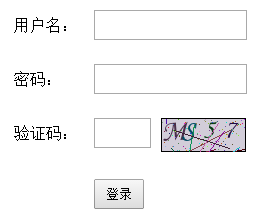
代码到这里验证码就实现了,直接调用该文件也能看到验证码,下面使用一个简单的登录表单使用该验证码
    <?php
        //开启Session
        session_start();
        //判断是否提交
        if(isset($_POST['dosubmit'])){
            //获取session中的验证码并转为小写
            $sessionCode=strtolower($_SESSION['code']);
            //获取输入的验证码
            $code=strtolower($_POST['code']);
            //判断是否相等
            if($sessionCode==$code){
                echo "<script type='text/javascript'>alert('验证码正确!');</script>";
            }else{
                echo "<script type='text/javascript'>alert('验证码错误!');</script>";
            }
        }
    ?>
    <!DOCTYPE html>
    <html>
        <head>
            <title></title>
            <meta http-equiv="Content-Type" content="text/html;charset=UTF-8"/>
            <style type="text/css">
                *{margin:0px;padding:0px;}
                ul{
                    400px;
                    list-style:none;
                    margin:50px auto;
                }

                li{
                    padding:12px;
                    position:relative;
                }

                label{
                    80px;
                    display:inline-block;
                    float:left;
                    line-height:30px;
                }

                input[type='text'],input[type='password']{
                    height:30px;
                }

                img{
                    margin-left:10px;
                }

                input[type="submit"]{
                    margin-left:80px;
                    padding:5px 10px;
                }
            </style>
        </head>
        <body>
            <form action="login.php" method="post">
                <ul>
                    <li>
                        <label>用户名:</label>
                        <input type="text" name="username"/>
                    </li>
                    <li>
                        <label>密码:</label>
                        <input type="password" name="password"/>
                    </li>
                    <li>
                        <label>验证码:</label>
                        <input type="text" name="code" size="4" style="float:left"/>
                        <img src="image_002.php" onclick="this.src='image_002.php?Math.random()'"/>
                    </li>
                    <li>
                        <input type="submit" value="登录" name="dosubmit"/>
                    </li>
                </ul>
            </form>
        </body>
    </html>
实现的效果: