本实例演示了实现一个滚动条基本功能的制作方法,没有添加改变皮肤,修改滚动条视框大小等功能,有兴趣的朋友可根据自己要求自行添加。使用时只需要通过以下一行代码创建滚动条组件:
var myScrollbar:Scrollbar=new Scrollbar(mc);
addChild(myScrollbar);
其中mc为需要添加滚动条功能的元件,如影片剪辑,文本等。
一、制作元件
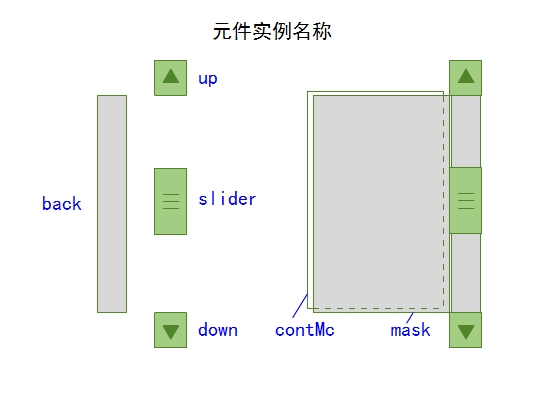
滚动条由滑块slider,向上向下滚动的按钮,滚动条背景,遮挡内容的遮罩及存储内容的contMc元素组成。当拖动滑块slider或单击上下按钮时,contMc会上下滚动。制作元件并命名如下:
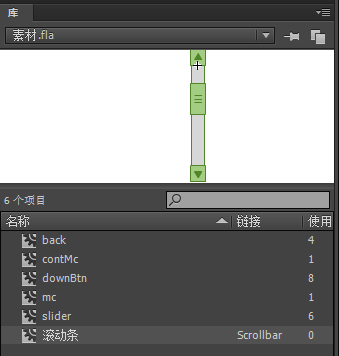
二、为滚动条的库元件添加链接(如下图所示)
三、链接的类代码
全局变量说明:step为滚动步数,top为slider滑块在最顶端的位置,buttom为滑块在最低端的位置。
 1 package  {
 2
 3     import flash.display.MovieClip;
 4     import flash.display.DisplayObject;
 5     import flash.events.Event;
 6     import flash.events.MouseEvent;
 7
 8     public class Scrollbar extends MovieClip {
 9
10         private var step:int=5;
11         private var top:Number;
12         private var buttom:Number;
13
14         public function Scrollbar(mc:DisplayObject) {
15             this.contMc.addChild(mc);
16             mc.x=0;
17             mc.y=0;
18             this.addEventListener(Event.ADDED_TO_STAGE,init);
19         }
20
21         private function init(e:Event):void {
22             top=this.slider.height/2;
23             buttom=this.back.height-this.slider.height/2;
24             this.downBtn.addEventListener(MouseEvent.CLICK,downHandler);
25             this.upBtn.addEventListener(MouseEvent.CLICK,upHandler);
26             this.slider.addEventListener(MouseEvent.MOUSE_DOWN,sliderDrag);
27         }
28
29         private function downHandler(e:MouseEvent):void {
30             if(this.slider.y<buttom){
31                 this.slider.y+=step;
32             }
33             if(this.slider.y>buttom){
34                 this.slider.y=buttom;
35             }
36             moveContMc();
37         }
38
39         private function upHandler(e:MouseEvent):void {
40             if(this.slider.y>top){
41                 this.slider.y-=step;
42             }
43             if(this.slider.y<top){
44                 this.slider.y=top;
45             }
46             moveContMc()
47         }
48
49         private function sliderDrag(e:MouseEvent):void {
50             this.stage.addEventListener(MouseEvent.MOUSE_UP,mouseUpHandler);
51             this.addEventListener(Event.ENTER_FRAME,enterFrameHandler);
52
53         }
54
55         private function mouseUpHandler(e:MouseEvent):void {
56             this.removeEventListener(Event.ENTER_FRAME,enterFrameHandler);
57         }
58
59         private function enterFrameHandler(e:Event):void {
60             this.slider.y=Math.min(buttom,Math.max(top,this.mouseY));
61             moveContMc();
62         }
63
64         private function moveContMc():void {
65             this.contMc.y=-(this.contMc.height-this.back.height)*(this.slider.y-top)/buttom;
66         }
67
68     }
69 }
四、moveContMc函数解析:
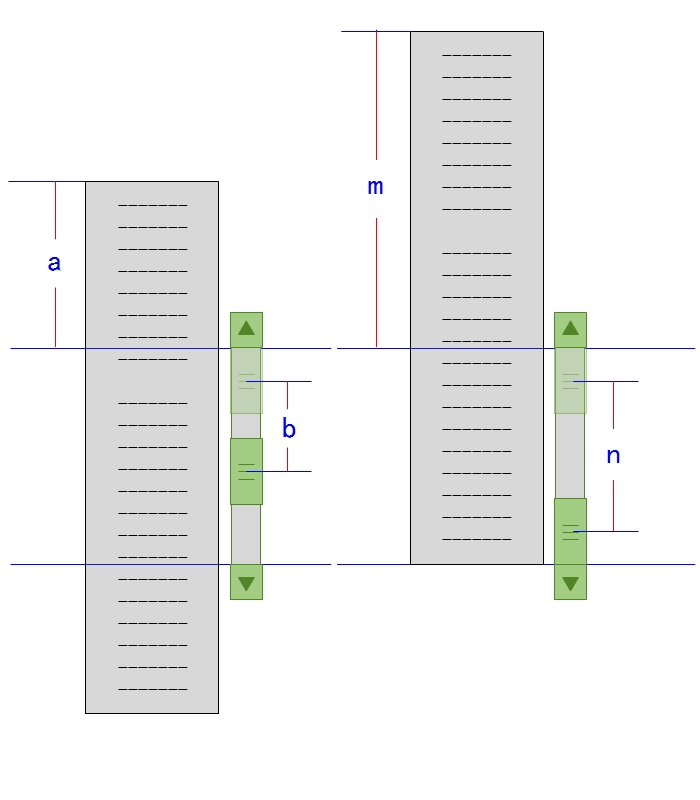
如下图左示意,当slider滑块由最顶端(top位置)向下移动距离b时,contMc会向上移动距离a。如下图右,当滑块移动到最低端(buttom位置)时,contMc会移动到最顶端,距离为m(值为contMc的高度-遮罩层的高度),由a/b=m/n,可算出a值为m*b/n,即:
this.contMc.y=-(this.contMc.height-this.back.height)*(this.slider.y-top)/buttom;