用VS建立了一个SetUp类型的项目,build以后将生成的setup文件在机器上安装,然后再rebuild,再安装新生成的setup文件,会出现如下的提示信息:
Another version of this product is already installed. Installation of this version cannot continue. To configure or remove the existing version of this product, use Add/Remove Programs on the Control Panel. |
解决方法:
将setup项目的版本改成高一个版本,这时会提示是否需要更改Product code,选择是。
并且将RemovePreviousVersion设置成true。
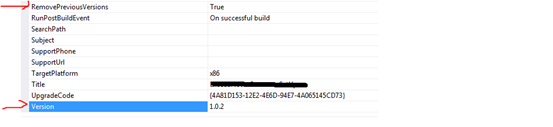
这样再安装新生成的setup文件就可以直接安装,并且能将老版本替换掉。
-------------------------------------
This message usually appears only during development phases, not on the end-user machine. The message appears because you modify only the resources from the package and rebuild it, without increasing the version number, so Windows Installer sees there is a package with the same product code and name on the machine, but with a different package code.
Your users will never get this message because I assume you will increase the version number when releasing the package. This is also based on the name of your function i.e. "CheckPreviousVersion".