【软件使用】GitHub使用教程for Eclipse
1.下载egit插件
打开Eclipse,git需要eclipse授权,通过网页是无法下载egit的安装包的。在菜单栏依次打开eclipse→help→install new software→add,Name栏中输入egit,location栏中输入 http://download.eclipse.org/egit/updates/ ,点击ok进行下载。下载完成后会提示重启eclipse;如果已经有了就不需要了。

2、在Eclipse中生public key, 并添加到GitHub Repository中。
在菜单栏依次打开window → preference → general → network connection → SSH2 → Key Management → generate RSA Key... → apply → save private key...
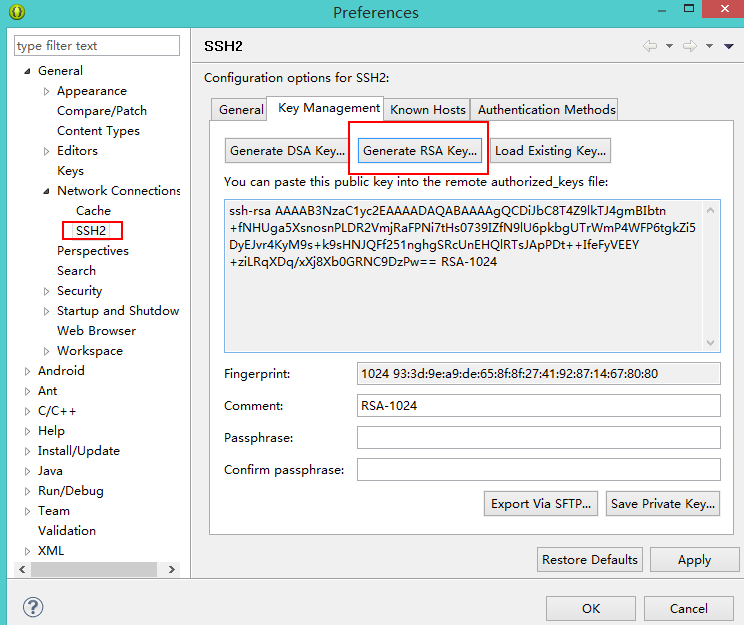
生成 SSH 的 public key在GitHub中通过:edit your profile -> ssh key -> Add SSH Key 添加SSH Key, 把上面生成的 public key 拷贝到这里,保存。

3、导入现有工程
打开一个工程,在工程名上右键,点击team→share project,将你的工程另外导入到一个git文件夹。


4、提交
在项目上点右键–>team–>commit。commit是commit到本机的git库,而push才是同步到github。

在弹出窗口输入你的GitHub 用户名和邮箱
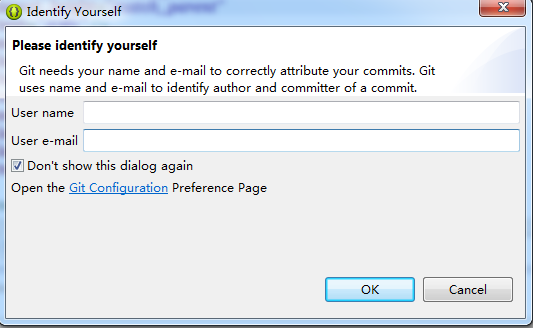
提交文件到本地,并推送到服务器

然后需要输入你GitHub上项目的仓库地址,没有的话需要新建项目,步骤如下:


输入上面的URL地址,以及你的用户名和密码


然后等待Eclipse帮你把项目提交就行了

5、提交时可能会出现不能连接的错误,请参考
使用命令行生成一个本地的ssh,建立连接后再用eclipse提交代码。