当我们实现一个Web应用(application)的时候,通常不会考虑如何接受HTTP请求、解析HTTP请求、发送HTTP响应等等,我们只关心处理逻辑,而不用去关心HTTP规范的细节。
之所以有这层透明,是因为Web Server和Web Application之间有一套规范的接口,这套接口帮我们隐藏了很多HTTP相关的细节。这套接口规范就是WSGI(Web Server Gateway Interface)。
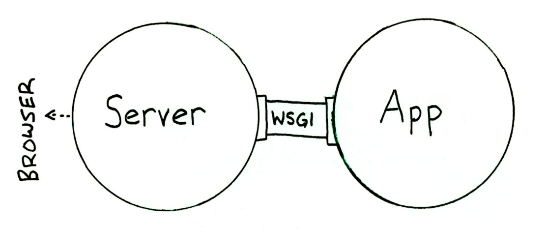
Web Server和Web Application都实现WSGI规范,然后各司其职:
- Web Server:接收来自客户端的HTTP,然后将请求交给Web Application
- Web Application:根据请求来调用相应的处理逻辑,生成response;通过Web Server把response发送给客户端
下面就一步步看下WSGI规范的更多内容。
Application Interface
上面了解到,Web Server和Web Application端都要遵守WSGI规范。对于实现WSGI的Web Application端,必须是一个callable的对象(类,函数,方法等等,实现__call__魔术方法的对象),这个callable对象需要满足下面两个条件:
-
包含两个参数
- 一个dict对象,Web Server会将HTTP请求相关的信息添加到这个字典中,供Web application使用
- 一个callback函数,Web application通过这个函数将HTTP status code和headers发送给Web Server
- 以字符串的形式返回response,并且包含在可迭代的list中
下面就是一个实现Application Interface的一个application函数:
# This is an application object. It could have any name, except when using mod_wsgi where it must be "application"
# The application object accepts two arguments
# This is an application object. It could have any name, except when using mod_wsgi where it must be "application"
# The application object accepts two arguments
def application(
        # environ points to a dictionary containing CGI like environment variables
        # which is filled by the server for each received request from the client
        environ,
        # start_response is a callback function supplied by the server
        # which will be used to send the HTTP status and headers to the server
        start_response):

    # build the response body possibly using the environ dictionary
    response_body = 'The request method was %s' % environ['REQUEST_METHOD']

    # HTTP response code and message
    status = '200 OK'

    # These are HTTP headers expected by the client.
    # They must be wrapped as a list of tupled pairs:
    # [(Header name, Header value)].
    response_headers = [('Content-Type', 'text/plain'), ('Content-Length', str(len(response_body)))]

    # Send them to the server using the supplied function
    start_response(status, response_headers)

    # Return the response body.
    # Notice it is wrapped in a list although it could be any iterable.
    return [response_body]
看看Environment dict
在Python中就有一个WSGI server,我们可以直接使用。
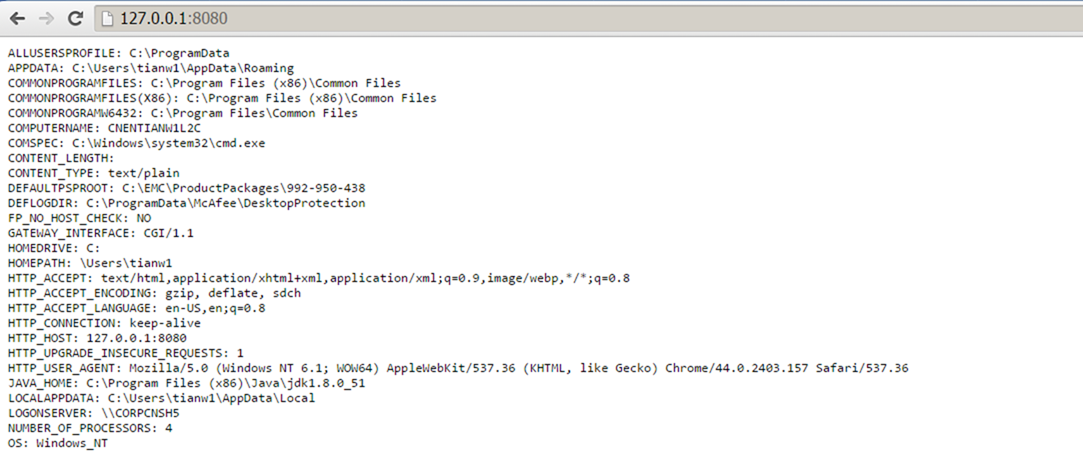
在下面的这个例子中,WSGI server监听了"localhost:8080",并绑定了一个支持WSGI规范的application对象;application对象就会处理来自8080端口,并将"Environment dict"的内容生产response传给WSGI server。
# WSGI server in Python
from wsgiref.simple_server import make_server

def application(environ, start_response):

    # Sorting and stringifying the environment key, value pairs
    response_body = ['%s: %s' % (key, value)
                    for key, value in sorted(environ.items())]
    response_body = '
'.join(response_body)

    status = '200 OK'
    response_headers = [('Content-Type', 'text/plain'),
                ('Content-Length', str(len(response_body)))]
    start_response(status, response_headers)

    return [response_body]

# Instantiate the WSGI server.
# It will receive the request, pass it to the application
# and send the application's response to the client
httpd = make_server(
    'localhost', # The host name.
    8080, # A port number where to wait for the request.
    application # Our application object name, in this case a function.
    )

# Wait for a single request, serve it and quit.
httpd.handle_request()

# Keep the server always alive with serve_forever()
# httpd.serve_forever()
注意,在application对象返回的时候,我们使用的是"return [response_body]",当我们改成"return response_body"之后,一样可以工作,但是效率会很低,因为返回的时候会去迭代response字符串中的每一个字符。所以,当处理response字符串的时候,最好是将它包在一个可迭代对象中,例如list。
通过浏览器访问后,就可以得到"Environment dict"的内容,这些都是WSGI server提供的信息,包括了HTTP请求的相关信息。
处理GET请求
当我们执行一个如下的GET请求:
http://127.0.0.1:8080/?name=wilber&hobbies=software
QUERY_STRING(URL中"?"之后的部分)和REQUEST_METHOD这些信息会包含在"Environment dict",从application中可以很方便的得到这些信息。
在application中,可以使用cgi模块中的parse_qs函数得到一个由QUERY_STRING生成的字典,方便我们取出请求的变量信息。
同时,为了避免客户端的输入可能存在的脚本注入,可以使用cgi模块中的escape函数对输入进行一次过滤。
下面直接看例子:
from wsgiref.simple_server import make_server
from cgi import parse_qs, escape

html = """
<html>
<body>
   <form method="get" action="/">
      <p>
         Name: <input type="text" name="name">
         </p>
      <p>
         Hobbies:
         <input name="hobbies" type="checkbox" value="running"> running
         <input name="hobbies" type="checkbox" value="swimming"> swimming
         <input name="hobbies" type="checkbox" value="reading"> reading
         </p>
      <p>
         <input type="submit" value="Submit">
         </p>
      </form>
   <p>
      Name: %s<br>
      Hobbies: %s
      </p>
   </body>
</html>"""

def application(environ, start_response):
    print "QUERY_STRING: %s" %environ['QUERY_STRING']
    print "REQUEST_METHOD: %s" %environ['REQUEST_METHOD']

    # Returns a dictionary containing lists as values.
    d = parse_qs(environ['QUERY_STRING'])

    # In this idiom you must issue a list containing a default value.
    name = d.get('name', [''])[0] # Returns the first name value.
    hobbies = d.get('hobbies', []) # Returns a list of hobbies.

    # Always escape user input to avoid script injection
    name = escape(name)
    hobbies = [escape(hobby) for hobby in hobbies]

    response_body = html % (name or 'Empty',
                ', '.join(hobbies or ['No Hobbies']))

    status = '200 OK'

    # Now content type is text/html
    response_headers = [('Content-Type', 'text/html'),
                ('Content-Length', str(len(response_body)))]
    start_response(status, response_headers)

    return [response_body]

httpd = make_server('localhost', 8080, application)
# Now it is serve_forever() in instead of handle_request().
# In Windows you can kill it in the Task Manager (python.exe).
# In Linux a Ctrl-C will do it.
httpd.serve_forever()
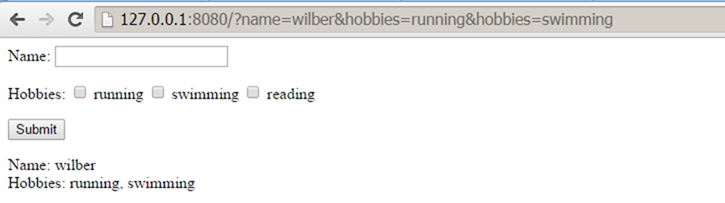
从结果中可以看到,请求URL中的QUERY_STRING被WSGI server填入了"Environment dict"中。

处理POST请求
当执行一个POST请求的时候,query string是不会出现在URL里面的,而是会包含在request body中。
对于WSGI server,request body存放在"Environment dict"中(environ['wsgi.input']),environ['wsgi.input']对应的是一个file object,可以通过读取文件的方式读取request body。同时,environ.get('CONTENT_LENGTH', 0)中存放着request body的size,我们可以根据这个值来读取适当长度的request body。
看下面的例子:
from wsgiref.simple_server import make_server
from cgi import parse_qs, escape

html = """
<html>
<body>
   <form method="post" action="parsing_post.wsgi">
      <p>
         Name: <input type="text" name="name">
         </p>
      <p>
         Hobbies:
         <input name="hobbies" type="checkbox" value="running"> running
         <input name="hobbies" type="checkbox" value="swimming"> swimming
         <input name="hobbies" type="checkbox" value="reading"> reading
         </p>
      <p>
         <input type="submit" value="Submit">
         </p>
      </form>
   <p>
      Name: %s<br>
      Hobbies: %s
      </p>
   </body>
</html>
"""

def application(environ, start_response):
    # the environment variable CONTENT_LENGTH may be empty or missing
    try:
        request_body_size = int(environ.get('CONTENT_LENGTH', 0))
    except (ValueError):
        request_body_size = 0

    # When the method is POST the query string will be sent
    # in the HTTP request body which is passed by the WSGI server
    # in the file like wsgi.input environment variable.
    request_body = environ['wsgi.input'].read(request_body_size)
    d = parse_qs(request_body)

    print "wsgi.input %s" %environ['wsgi.input']
    print "request_body_size %s" %environ.get('CONTENT_LENGTH', 0)
    print "request_body %s" %request_body


    name = d.get('name', [''])[0] # Returns the first name value.
    hobbies = d.get('hobbies', []) # Returns a list of hobbies.

    # Always escape user input to avoid script injection
    name = escape(name)
    hobbies = [escape(hobby) for hobby in hobbies]

    response_body = html % (name or 'Empty',
                ', '.join(hobbies or ['No Hobbies']))

    status = '200 OK'

    response_headers = [('Content-Type', 'text/html'),
                ('Content-Length', str(len(response_body)))]
    start_response(status, response_headers)

    return [response_body]

httpd = make_server('localhost', 8080, application)
httpd.serve_forever()
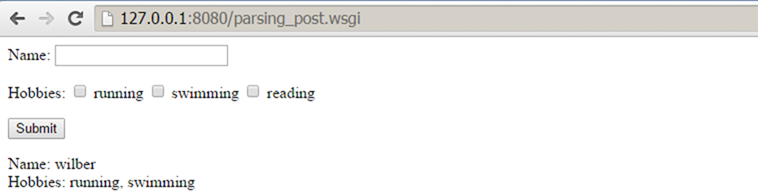
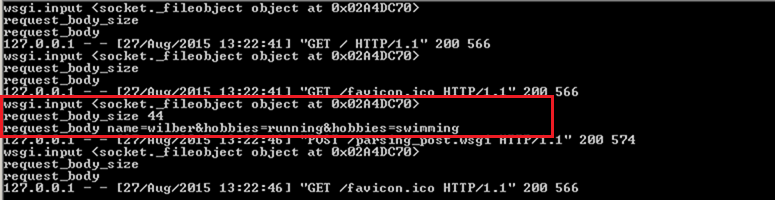
通过结果,我们可以看到environ字典中对应的"wsgi.input"和"CONTENT_LENGTH",以及读取出来的"request body"。
总结
本文介绍了WSGI的一些基本内容,以及如何解析GET和POST请求中的参数。
通过WSGI这个规范,Web application的开发人员可以不用关心HTTP协议中的细节问题。