1、System Function
You can use the system built-in function to execute system commands. Please note that there is a difference between two way communication and system command.
In "|&", you can pass the output of any awk command as input to an external command, and you can receive the output from the external command in your awk program (basically it is two way communication).
Using the system command, you can pass any string as a parameter, which will get executed exactly as given in the OS command line, and the output will be returned (which is not same as the two way communication).
The following are some simple examples of calling pwd and date command from awk:
$ awk 'BEGIN { system("pwd") }'
/home/ramesh
When you are executing a long awk program, you might want it to send an email when the program starts and when it ends. The following example shows how you can use system command in the BEGIN and END block to send you an email when it starts and
completes.
$ cat system.awk
BEGIN {
  system("echo 'Started' | mail -s 'Program system.awk started..' ramesh@thegeekstuff.com");
}
{
split($2,quantity,",");
total=0;
for (x in quantity)
  total=total+quantity[x];
  print "Item", $1, ":", total, "quantities sold";
}
END {
  system("echo 'Completed' | mail -s 'Program system.awk
  completed..' ramesh@thegeekstuff.com");
}

$ awk -f system.awk items-sold.txt
Item 101 : 2 quantities sold
Item 102 : 0 quantities sold
Item 103 : 10 quantities sold
Item 104 : 2 quantities sold
Item 105 : 10 quantities sold
2、Timestamp Functions
These are available only in GAWK.
As you see from the example below, systime() returns the time in POSIX epoch time, i.e. the number of seconds elapsed since January 1, 1970.
$ awk 'BEGIN { print systime() }'
1299345651
strftime can be used to function to convert the epoch time to a readable format.
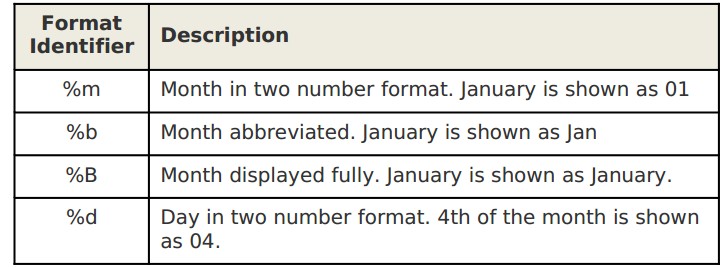
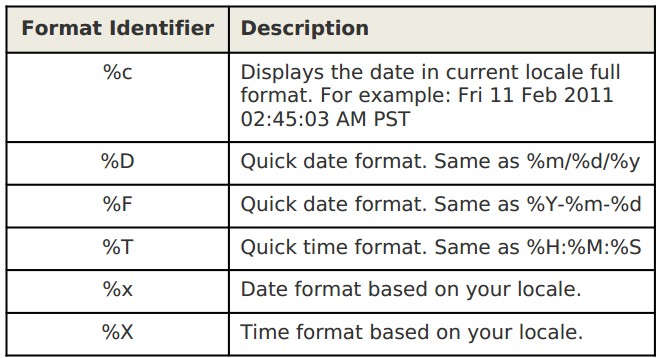
The following awk script shows various possible date formats.
$ cat strftime.awk
BEGIN {
  print "--- basic formats --"
  print strftime("Format 1: %m/%d/%Y %H:%M:%S",systime())
  print strftime("Format 2: %m/%d/%y %I:%M:%S%p",systime())
  print strftime("Format 3: %m-%b-%Y %H:%M:%S",systime())
  print strftime("Format 4: %m-%b-%Y %H:%M:%S%Z",systime())
  print strftime("Format 5: %a %b %d %H:%M:%S %Z%Y",systime())
  print strftime("Format 6: %A %B %d %H:%M:%S %Z%Y",systime())
  print "--- quick formats --"
  print strftime("Format 7: %c",systime())
  print strftime("Format 8: %D",systime())
  print strftime("Format 8: %F",systime())
  print strftime("Format 9: %T",systime())
  print strftime("Format 10: %x",systime())
  print strftime("Format 11: %X",systime())
  print "--- single line format with %t--"
  print strftime("%Y %t%B %t%d",systime())
  print "--- multi line format with %n --"
  print strftime("%Y%n%B%n%d",systime())
}
$ awk -f strftime.awk
--- basic formats --
Format 1: 03/05/2011 09:26:03
Format 2: 03/05/11 09:26:03 AM
Format 3: 03-Mar-2011 09:26:03
Format 4: 03-Mar-2011 09:26:03 PST
Format 5: Sat Mar 05 09:26:03 PST 2011
Format 6: Saturday March 05 09:26:03 PST 2011
--- quick formats --
Format 7: Sat 05 Mar 2011 09:26:03 AM PST
Format 8: 03/05/11
Format 8: 2011-03-05
Format 9: 09:26:03
Format 10: 03/05/2011
Format 11: 09:26:03 AM
--- single line format with %t--
2011
March
05
--- multi line format with %n --
2011
March
05
Basic Time Formats:

Quick Time Formats:
3、getline Command
Using the getline command, you can control the reading of lines from the input-file (or from some other file). Note that after getline is executed, the awk script sets the value of NF, NR, FNR, and $0 built-in variables appropriately.
Simple getline
$ awk -F"," '{getline; print $0;}' items.txt
102,Refrigerator,Appliance,850,2
104,Tennis Racket,Sports,190,20
105,Laser Printer,Office,475,5
Here is how it works:
• At the beginning of the body block, before executing any statement, awk reads the 1st line of the items.txt and stores it in $0
• getline - we are forcing awk to read the next line from the input file and store it in the built-in $0 variable.
• print $0 - since the 2nd line is read into $0, print $0 will print the 2nd line (And not the 1st line).
• The body block continues in the same way for rest of the lines in the items.txt and prints only the even numbered lines.
getline to a variable
You can also get the next line from the input file into a variable (instead of reading it to $0).
The following example prints only the odd numbered lines.
$ awk -F"," '{getline tmp; print $0;}' items.txt
101,HD Camcorder,Video,210,10
103,MP3 Player,Audio,270,15
105,Laser Printer,Office,475,5
getline from a different file
Using getline you can also read lines from a different file (than the current input-file) as shown below.
Switch back and forth between two files, printing lines from each.
$ awk -F"," '{print $0; getline < "items-sold.txt";
print $0;}' items.txt
101,HD Camcorder,Video,210,10
101 2 10 5 8 10 12
102,Refrigerator,Appliance,850,2
102 0 1 4 3 0 2
103,MP3 Player,Audio,270,15
103 10 6 11 20 5 13
104,Tennis Racket,Sports,190,20
104 2 3 4 0 6 5
105,Laser Printer,Office,475,5
105 10 2 5 7 12 6
getline from a different file to a variable
Rather than reading both files into $0, you can also use the "getline var" format to read lines from a different file into a variable.
$ awk -F"," '{print $0; getline tmp < "items-sold.txt"; print tmp;}' items.txt
101,HD Camcorder,Video,210,10
101 2 10 5 8 10 12
102,Refrigerator,Appliance,850,2
102 0 1 4 3 0 2
103,MP3 Player,Audio,270,15
103 10 6 11 20 5 13
104,Tennis Racket,Sports,190,20
104 2 3 4 0 6 5
105,Laser Printer,Office,475,5
105 10 2 5 7 12 6
getline to execute external command
You can also use getline to execute a UNIX command and get its output.
The following example gets the output of the date command and prints it. Please note that you should also close the command that you just executed as shown below. The output of the date command is stored in the $0 variable.
$ cat getline1.awk
BEGIN {
  FS=",";
  "date" | getline
  close("date")
  print "Timestamp:" $0
}
{
if ( $5 <= 5 )
  print "Buy More: Order", $2, "immediately!"
else
  print "Sell More: Give discount on", $2,"immediately!"
}

$ awk -f getline1.awk items.txt
Timestamp:Sat Mar 5 09:29:22 PST 2011
Sell More: Give discount on HD Camcorder immediately!
Buy More: Order Refrigerator immediately!
Sell More: Give discount on MP3 Player immediately!
Sell More: Give discount on Tennis Racket immediately!
Buy More: Order Laser Printer immediately!
Instead of storing the output in the $0 variable, you can also store it in any awk variable (for example: timestamp) as shown below.
$ cat getline2.awk
BEGIN {
  FS=",";
  "date" | getline timestamp
  close("date")
  print "Timestamp:" timestamp
}
{
if ( $5 <= 5 )
  print "Buy More: Order", $2, "immediately!"
else
  print "Sell More: Give discount on", $2,"immediately!"
}


$ awk -f getline2.awk items.txt
Timestamp:Sat Mar 5 09:38:22 PST 2011
Sell More: Give discount on HD Camcorder immediately!
Buy More: Order Refrigerator immediately!
Sell More: Give discount on MP3 Player immediately!
Sell More: Give discount on Tennis Racket immediately!
Buy More: Order Laser Printer immediately!