Influx-proxy的使用指南
来源:https://www.cnblogs.com/enobear/p/13595712.html
Influx Proxy 是一个基于高可用、一致性哈希的 InfluxDB 集群代理服务,实现了 InfluxDB 高可用集群的部署方案,具有动态扩/缩容、故障恢复、数据同步等能力。
相关文档:https://github.com/chengshiwen/influx-proxy
下载地址:https://golang.org/dl/
1.安装
安装依赖
Influx-proxy编译时需要go语言环境。
服务器
系统:centos 7.x
网络:支持访问公网
服务器:两台
架构
        ┌──────────────────┐
        │ writes & queries │
        └──────────────────┘
                 │
                 ▼
        ┌──────────────────┐
        │                  │
        │  InfluxDB Proxy  │
        │   (only http)    │
        │                  │
        └──────────────────┘
                 │
                 ▼
        ┌──────────────────┐
        │  db,measurement  │
        │ consistent hash  │
        └──────────────────┘
          |              |
        ┌─┼──────────────┘
        │ └────────────────┐
        ▼                  ▼
     Circle 1          Circle 2
  ┌────────────┐    ┌────────────┐
  │            │    │            │
  │ InfluxDB 1 │    │ InfluxDB 3 │
  │ InfluxDB 2 │    │ InfluxDB 4 │
  │            │    │            │
  └────────────┘    └────────────┘
配置示例
# 配置文件
/opt/influx-proxy/proxy.json
{
    "circles": [
        {
            "name": "circle-1",
            "backends": [
                {
                    "name": "influxdb-1-1",
                    "url": "http://192.168.1.11:8086",
                    "username": "root",
                    "password": "123456",
                    "auth_secure": false
                },
                {
                    "name": "influxdb-1-2",
                    "url": "http://192.168.1.11:8087",
                    "username": "root",
                    "password": "123456",
                    "auth_secure": false
                }
            ]
        },
        {
            "name": "circle-2",
            "backends": [
                {
                    "name": "influxdb-2-1",
                    "url": "http://192.168.1.12:8086",
                    "username": "root",
                    "password": "123456",
                    "auth_secure": false
                },
                {
                    "name": "influxdb-2-2",
                    "url": "http://192.168.1.12:8087",
                    "username": "root",
                    "password": "123456",
                    "auth_secure": false
                }
            ]
        }
    ],
    "listen_addr": ":7076",
    "db_list": [],
    "data_dir": "/mnt/data/influx-pr/data",
    "tlog_dir": "/mnt/data/influx-pr/log",
    "hash_key": "idx",
    "flush_size": 10000,
    "flush_time": 1,
    "check_interval": 1,
    "rewrite_interval": 10,
    "conn_pool_size": 20,
    "write_timeout": 10,
    "idle_timeout": 10,
    "username": "root",
    "password": "123456",
    "auth_secure": false,
    "write_tracing": false,
    "query_tracing": false,
    "https_enabled": false,
    "https_cert": "",
    "https_key": ""
}
# 配置文件
/etc/influxdb/influxdb.conf.1

reporting-disabled = true         # 禁用报告,默认为 false
bind-address = ":8088"
[meta]
dir = "/mnt/data/influxdb/meta"    # 元信息目录
[data]
dir = "/mnt/data/influxdb/data"    # 数据目录
wal-dir = "/mnt/data/influxdb/wal" # 预写目录
wal-fsync-delay = "10ms"          # SSD 设置为 0s,非 SSD 推荐设置为 0ms-100ms
index-version = "tsi1"            # tsi1 磁盘索引,inmem 内存索引需要大量内存
query-log-enabled = true          # 查询的日志,默认是 true
[coordinator]
write-timeout = "20s"             # 写入请求超时时间,默认为 10s
[http]
enabled = true
bind-address = ":8086"
auth-enabled = true
log-enabled = true                 # http 请求日志,默认是 true
[logging]
level = "info"                    # 日志等级,error、warn、info(默认)、debug
# 配置文件
/etc/influxdb/influxdb.conf.2

reporting-disabled = true         # 禁用报告,默认为 false
bind-address = ":8089"
[meta]
dir = "/mnt/data/influxdb/meta"    # 元信息目录
[data]
dir = "/mnt/data/influxdb/data"    # 数据目录
wal-dir = "/mnt/data/influxdb/wal" # 预写目录
wal-fsync-delay = "10ms"          # SSD 设置为 0s,非 SSD 推荐设置为 0ms-100ms
index-version = "tsi1"            # tsi1 磁盘索引,inmem 内存索引需要大量内存
query-log-enabled = true          # 查询的日志,默认是 true
[coordinator]
write-timeout = "20s"             # 写入请求超时时间,默认为 10s
[http]
enabled = true
bind-address = ":8087"
auth-enabled = true
log-enabled = true                 # http 请求日志,默认是 true
[logging]
level = "info"                    # 日志等级,error、warn、info(默认)、debug
# 系统服务文件
/etc/systemd/system/influxd-cluster@.service

[Unit]
Description=influx-cluster
After=network.target

[Service]
Type=simple
ExecStart=/usr/bin/influxd -config /etc/influxdb/influxdb.conf.%i
Restart=on-failure

[Install]
WantedBy=multi-user.target
# 系统服务文件
/etc/systemd/system/influx-proxy.service

[Unit]
Description=influx-proxy
After=network.target

[Service]
Type=simple
ExecStart=/usr/local/bin/influx-proxy -config /opt/influx-proxy/proxy.json
KillSignal=SIGTERM

[Install]
WantedBy=multi-user.target
Influx-proxy 版本安装
服务器1:Circle 1 、influx-proxy
服务器2:Circle 2
# 下载influx-proxy(服务器1)
cd /opt
git clone https://github.com/chengshiwen/influx-proxy.git
# 安装go环境(服务器1)
tar -zxvf go1.15.linux-amd64.tar.gz -C /usr/local
echo "export PATH=$PATH:/usr/local/go/bin" >> /etc/profile
echo "export GOPROXY=https://goproxy.io" >> /etc/profile
source /etc/profile
# 编译influx-proxy(服务器1)
cd influx-proxy
make

cp /opt/influx-proxy/bin/influx-proxy /usr/local/bin/
# 配置influx-proxy(服务器1)
vim /opt/influx-proxy/proxy.json
vim /etc/systemd/system/influx-proxy.service
# 安装influxdb(多实例)(服务器1)(服务器2)
wget https://dl.influxdata.com/influxdb/releases/influxdb-1.8.2.x86_64.rpm
yum -y localinstall influxdb-1.8.2.x86_64.rpm
vim /etc/influxdb/influxdb.conf.1
vim /etc/influxdb/influxdb.conf.2
vim /etc/systemd/system/influxd-cluster@.service
# 设置权限(服务器1)(服务器2)
mkdir -p /mnt/data/influxdb
chown influxdb:influxdb /mnt/data/influxdb

mkdir -p /mnt/data/influx-pr
chown influxdb:influxdb /mnt/data/influx-pr
# 启动influxDB、influx-proxy(服务器1)(服务器2)
systemctl start influxd-cluster@1
systemctl start influxd-cluster@2
systemctl start influx-proxy
# 设置用户、密码(两台服务器4个实例都需要设置)(服务器1)(服务器2)
influx -port 8086
create user 'username' with password 'password' with all privileges
exit

influx -port 8087
create user 'username' with password 'password' with all privileges
exit
2.使用
基本命令
# 启动集群(三种都可以)
① influx-proxy -config /opt/influx-proxy/proxy.json
② systemctl start influx-proxy
③ nohup influx-proxy -config /opt/influx-proxy/proxy.json > /dev/null 2>&1 &
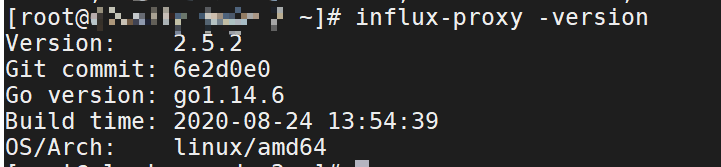
# 查看版本
influx-proxy -version
# 查看集群状态
curl http://127.0.0.1:7076/health -u root:123456
