本篇文章来源于几天前一个朋友向我咨询的问题。问题是这样的,他说他采用ASP.NET应用程序的方式对定义的WCF服务进行寄宿(Hosting),并使用配置的方式对服务的BaseAddress进行了设置,但是在创建ServiceHost的时候却抛出InvalidOperationException,并提示相应Address Scheme的BaseAddress找不到。我意识到这可能和WCF中用于判断服务寄宿方式的逻辑有关,于是我让这位朋友将相同的服务寄宿代码和配置迁移到GUI程序或者Console应用中,看看是否正常。结果如我所想,一切正常,个人觉得这应该是WCF的一个Bug。今天撰文与大家讨论,看看大家对这个问题有何见解。
一、问题重现
问题很容易重现,假设我们通过ASP.NET应用对服务CalculatorService进行寄宿,为了简单起见,我将服务契约和服务实现定义在一起。CalculatorService的定义如下面的代码片断所示:
1: using System.ServiceModel;
2: namespace Artech.AspnetHostingDemo
3: {
4: [ServiceContract(Namespace = "urn:artech.com")]
5: public class CalculatorService
6: {
7: [OperationContract]
8: public double Add(double x, double y) { return x + y; }
9: }
10: }
下面是服务寄宿相关的配置,在<host>/<baseAddresses>配置节中为服务添加了一个Scheme为http的BaseAddress:http://127.0.0.1:3721/services,那么终结点的地址就可以定义为基于该BaseAddress的相对地址了:calculatorservice。
1: <?xml version="1.0"?>
2: <configuration>
3: <system.serviceModel>
4: <services>
5: <service name="Artech.AspnetHostingDemo.CalculatorService">
6: <host>
7: <baseAddresses>
8: <add baseAddress="http://127.0.0.1:3721/services"/>
9: </baseAddresses>
10: </host>
11: <endpoint address="calculatorservice" binding="wsHttpBinding" contract="Artech.AspnetHostingDemo.CalculatorService"/>
12: </service>
13: </services>
14: </system.serviceModel>
15: <system.web>
16: <compilation debug="true"/>
17: </system.web>
18: </configuration>
我们把服务寄宿的代码定义在一个Web Page的Load事件中。但程序执行到到创建ServiceHost的时候,抛出如下图所示的InvalidOperationException异常。
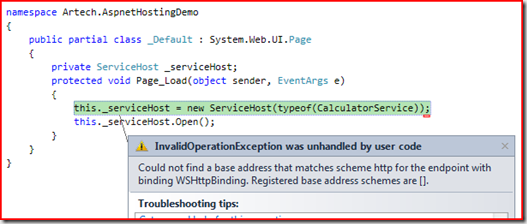
下面是错误信息和异常的StackTrace:
1: Could not find a base address that matches scheme http for the endpoint with binding WSHttpBinding. Registered base address schemes are [].
1: at System.ServiceModel.ServiceHostBase.MakeAbsoluteUri(Uri relativeOrAbsoluteUri, Binding binding, UriSchemeKeyedCollection baseAddresses)
2: at System.ServiceModel.Description.ConfigLoader.LoadServiceDescription(ServiceHostBase host, ServiceDescription description, ServiceElement serviceElement, Action`1 addBaseAddress)
3: at System.ServiceModel.ServiceHostBase.LoadConfigurationSectionInternal(ConfigLoader configLoader, ServiceDescription description, ServiceElement serviceSection)
4: at System.ServiceModel.ServiceHostBase.LoadConfigurationSectionInternal(ConfigLoader configLoader, ServiceDescription description, String configurationName)
5: at System.ServiceModel.ServiceHostBase.ApplyConfiguration()
6: at System.ServiceModel.ServiceHostBase.InitializeDescription(UriSchemeKeyedCollection baseAddresses)
7: at System.ServiceModel.ServiceHost.InitializeDescription(Type serviceType, UriSchemeKeyedCollection baseAddresses)
8: at System.ServiceModel.ServiceHost..ctor(Type serviceType, Uri[] baseAddresses)
9: at Artech.AspnetHostingDemo._Default.Page_Load(Object sender, EventArgs e) in e:\WCF Projects\AspnetHostingDemo\AspnetHostingDemo\Default.aspx.cs:line 16
10: at System.Web.Util.CalliHelper.EventArgFunctionCaller(IntPtr fp, Object o, Object t, EventArgs e)
11: at System.Web.Util.CalliEventHandlerDelegateProxy.Callback(Object sender, EventArgs e)
12: at System.Web.UI.Control.OnLoad(EventArgs e) at System.Web.UI.Control.LoadRecursive()
13: at System.Web.UI.Page.ProcessRequestMain(Boolean includeStagesBeforeAsyncPoint, Boolean includeStagesAfterAsyncPoint)
二、问题分析
通过上面提供StackTrace,我们可以看到错误发生在WCF试图将BaseAddress和RelativeAddress进行组合生成AbsoluteAddress的时候。从错误消息可以看出,在进行地址的组合时,由于没有找到适合绑定类型(WsHttpBinding)Scheme(http)的BaseAddress,导致了异常的抛出。
要解答这个问题,首先要解释一下WCF的BaseAddress在不同服务寄宿(Service Hosting)方式下的定义方式。对于WCF服务的自我寄宿(Self Hosting)或者采用Windows Service进行服务寄宿,我们可以通过代码或者形如上面的配置为服务指定一系列的BaseAddress(对于一个既定的URI Scheme,只能由唯一的BaseAddress)。但是对于采用IIS或者WAS进行服务寄宿,我们需要为相应的服务定义一个.svc文件,我们通过访问.svc文件的方式来调用相应的服务。对于后者,.svc文件得地址就是WCF服务的BaseAddress,所以WCF会忽略BaseAddress的配置。
那么WCF采用怎样的方式来判断当前服务寄宿的方式是基于IIS呢,还是其他呢?答案是通过System.Web.Hosting.HostingEnvironment的静态属性IsHosted。对于ASP.NET有一定了解的人应该很清楚,在一个ASP.NET应用下,该属性永远返回为True。也就是说,WCF会把基于ASP.NET应用的服务寄宿,看成是基于IIS的服务寄宿,这显然是不对的。
1: public sealed class HostingEnvironment : MarshalByRefObject
2: { //其他成员
3: public static bool IsHosted { get; }
4: }
WCF对BaseAddress配置的加载和添加的逻辑定义在ServiceHostBase的LoadHostConfig方法中,大致的逻辑如下面的代码所示:
1: public abstract class ServiceHostBase : CommunicationObject, IExtensibleObject<ServiceHostBase>, IDisposable
2: {
3: [SecurityTreatAsSafe, SecurityCritical]
4: private void LoadHostConfig(ServiceElement serviceElement, ServiceHostBase host, Action<Uri> addBaseAddress)
5: {
6: HostElement element = serviceElement.Host; if (element != null)
7: {
8: if (!ServiceHostingEnvironment.IsHosted)
9: { //BaseAddress配置加载与添加
10: }
11: }
12: }
13: }
1: public static class ServiceHostingEnvironment
2: {
3: private static bool isHosted; internal static bool IsHosted { get { return isHosted; } }
4: internal static void EnsureInitialized()
5: {
6: if (hostingManager == null)
7: {
8: lock (ThisLock)
9: {
10: if (hostingManager == null)
11: {
12: if (!HostingEnvironmentWrapper.IsHosted)
13: {
14: throw DiagnosticUtility.ExceptionUtility.ThrowHelperError(new InvalidOperationException(SR.GetString("Hosting_ProcessNotExecutingUnderHostedContext", new object[] { "ServiceHostingEnvironment.EnsureServiceAvailable" })));
15: }
16: HostingManager manager = new HostingManager();
17: HookADUnhandledExceptionEvent();
18: Thread.MemoryBarrier();
19: isSimpleApplicationHost = GetIsSimpleApplicationHost();
20: hostingManager = manager;
21: isHosted = true;
22: }
23: }
24: }
25: }
26: }
27:
1: internal static class HostingEnvironmentWrapper
2: {
3: public static bool IsHosted
4: {
5: get { return HostingEnvironment.IsHosted; }
6: }
7: }
三、解决方式
其实这种情况也没有什么好的解决方案,不外乎就是避免通过配置的方式设置服务的BaseAddress,可以通过代码的方式来设置。如下面的代码所示:
1: namespace Artech.AspnetHostingDemo
2: {
3: public partial class _Default : System.Web.UI.Page
4: {
5: private ServiceHost _serviceHost;
6: protected void Page_Load(object sender, EventArgs e)
7: {
8: this._serviceHost = new ServiceHost(typeof(CalculatorService), new Uri("http://127.0.0.1:3721/services"));
9: this._serviceHost.Open();
10: }
11: }
12: }
另一种方式就是采用绝对地址的方式定义终结点:
1: <?xml version="1.0"?>
2: <configuration>
3: <system.serviceModel>
4: <services>
5: <service name="Artech.AspnetHostingDemo.CalculatorService">
6: <endpoint address="http://127.0.0.1:3721/services/calculatorservice" binding="wsHttpBinding" contract="Artech.AspnetHostingDemo.CalculatorService"/>
7: </service>
8: </services>
9: </system.serviceModel>
10: <system.web>
11: <compilation debug="true"/>
12: </system.web>
13: </configuration>
出处:http://artech.cnblogs.com
本文版权归作者和博客园共有,欢迎转载,但未经作者同意必须保留此段声明,且在文章页面明显位置给出原文连接,否则保留追究法律责任的权利。