How to prevent user to login second time when its already logged in.
If you are using Forms Authentication, it should already be storing your Authentication Cookie / token within the browser, so you shouldn't need to use the Session at all.
You would just likely want to place the following logic within your Login.aspx Page_Load event to check if the user is authenticated and if so, redirect them to the appropriate page :
// Check if the current user is authenticated
if(User.Identity.IsAuthenticated)
{
      // Redirect to Home (since the user is already authenticated)
      Response.Redirect("Home.aspx");
}
Additionally, you might want to consider posting the code for how you are currently using the Forms Authentication token as it sounds like it might not be being properly added to your Response. You might want to just use the Forms.Authentication.SetAuthCookie() method instead of storing it in a variable :
// Use this to actually add the Authentication Cookie to your Response
FormsAuthentication.SetAuthCookie(TxtUsername.Text,true);
HttpContext.Current.User lost after external hyperlink clicked
Here is the code. After the hyperlink click, the next call is caught at the first if statement and I set an Anonymous user.
提问的人的做法是没问题的,问题是其他地方导致的
public static void ProcessAuthenticationTicket()
{

 if (HttpContext.Current.User != null) /// After the hyperlink click this set to null somehow????????
{

// Rebuild the principal object from the authentication ticket

FormsIdentity id = (FormsIdentity)HttpContext.Current.User.Identity;
FormsAuthenticationTicket ticket = id.Ticket;

string userData = ticket.UserData.Trim();if (userData.Length == 0)
{

// set as anonymous

userData = MyGetAnonymousUserData();
}

// Extract out the list of roles from the user data

string[] roleList = MyGetRolesFromUserData(userData);
// Create a new principle object

GenericPrincipal newPrincipal = new GenericPrincipal(id, roleList);
SetPrincipal(newPrincipal);

}

else
{

// The user is a new user to the sight with a new session so set the anonymous ticket

MySetAnonymousAuthenticationTicket();

}

}
System.Web.HttpContext.Current is static between requests
This is a very intelligent question!
HttpContext.Current is implemented as a thread-local variable. Actually, it is implemented using LogicalCallContext but that behaves like a thread-local.
Think of it like this:
[ThreadLocal]
public static HttpContext Current;
And yes, this means that only the primary request thread can access it. It will be null on additional threads that you start.
When Can We Use HttpContext.Current.Items to Store Data in ASP.NET?
To answer this question in a single statement, you can use HttpContext.Current.Items for very short term storage. By Short term storage, we mean that this data is valid for a single HTTP Request. There is a lot of confusion around regarding storing data in HttpContext.Current.Items and storing data in Session variable. In this blog post, I am going to describe what are the different scenarios where we can use HttpContext.Current.Items and what is the exact difference with session variable.
Items collections of HttpContext is and IDictionary key-value collections and those are shared across a single HTTPRequest. Yes, HttpContext.Current.Items is valid for a single HTTPRequest. Once after processing, server information is sent back to the browser, the variables that were set in the Items[] collection will be lost. Whereas for Session variable, the information is valid for multiple requests as this is user specific. The session variable only expires either on Session Time Out or explicitly clears the values.
Let’s have a quick look at how we can store information in HttpContext.Current.Items:
HttpContext.Current.Items["ModuleInfo"] = "Custom Module Info"
And retrieve it like:
string contextData = (string)(HttpContext.Current.Items["ModuleInfo"]);
As I said, HttpContext.Current.Items stores data for a very limited time period, then when can we use this? Yes, this is extremely useful when we want to share content between HttpModule and HTTPHandler.
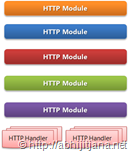
Because each and every client request passes through the HTTP Pipeline and HTTP Pipeline consists of HTTP Module and HTTP Handler. So If you are writing one custom HTTP Module by Implementing IHttpModule and you want pass some information from this module to the current requested page or any other module, you can use the HttpContext.Current.Items to store the data.
Similarly, you use HTTPContext Items collection when you are sharing the same information across the different instance based on the user request and that request could be changed for a different request.
While using Context Items collections you need to keep one things that, Items collections holds the objects, so you need to do proper type casting while retrieving it.
To summarize, in ASP.NET, HttpContext.Current.Items allows us to hold information for a single request. We can use it to store short term information. Storing such kind of information is extremely helpful to send information across different custom modules or to requested pages. You have to make sure that the data you are using in HttpContext.Current.Items is only valid for that current request and data should be flushed out automatically when request is sent to a browser for any new request you have to store the data again. Whereas session variable is valid for every request unless session timeout is not reached or we explicitly clear the session.