一、第一种Js动态计算中间内容的高度。
二、第二种给底部上面写个<div style="底部的高度"></div>
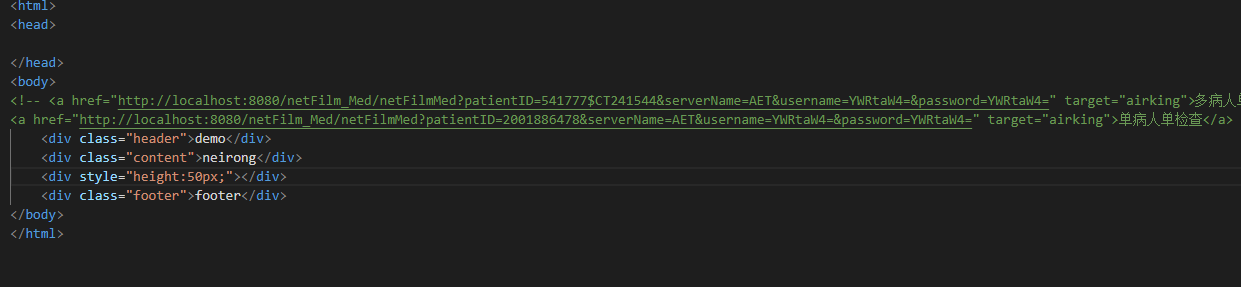
三、第三种给中间部分写一个margin-bottom:底部的高度。
四、第二种实现。
<!DOCTYPE html> <html lang="en"> <head> <title>H5页面通用配置</title> <!-- meta信息,可维护 --> <meta name="apple-mobile-web-app-capable" content="yes" /> <meta name="apple-mobile-web-app-status-bar-style" content="black" /> <meta content="telephone=no" name="format-detection" /> <!-- ====必须设置 Start==== --> <!-- 页面编码 --> <meta charset="UTF-8" /> <!-- http-equiv常见还有其它如下等(合理使用可增加 SEO 收录)。 Content-Language : 设置网页语言 Refresh : 指定时间刷新页面 set-cookie : 设定页面 cookie 过期时间 last-modified : 页面最后生成时间 expires : 设置 cache 过期时间 cache-control : 设置文档的缓存机制 ... --> <!-- 缓存与过期时间设置 --> <meta http-equiv="Pragma" content="no-cache"> <meta http-equiv="Cache-Control" content="no-cache"> <meta http-equiv="x-dns-prefetch-control" content="on"> <meta http-equiv="Expires" content="0"> <!-- dns预加载(SEO优化) --> <link rel="dns-prefetch" href="//css.cdn.com" /> <link rel="dns-prefetch" href="//js.cdn.com" /> <!-- 宽度默认100%全屏宽度,禁止手指缩放,初始缩放值1.0 --> <meta name="viewport" content="width=device-width,initial-scale=1.0,minimum-scale=1.0,maximum-scale=1.0,user-scalable=no" /> <!-- ====必须设置 End==== --> <!-- ====根据使用配置Start==== --> <meta content="yes" name="apple-mobile-web-app-capable"> <meta content="black" name="apple-mobile-web-app-status-bar-style"> <!-- 不自动识别手机号,邮箱地址 --> <meta name="format-detection" content="telephone=no,email=no"> <!-- 页面关键字优化 --> <meta name="keywords" content="H5页面通用配置"> <!-- 页面标签icon配置 --> <link rel="icon" href="//icon.img.com/favicon.ico" type="image/x-icon"> <!-- 一些国内webkit内核浏览器默认使用极速模式 --> <meta name="renderer" content="webkit"> <!-- 避免IE使用兼容模式 --> <meta http-equiv="X-UA-Compatible" content="IE=edge"> <!-- 针对手持设备优化,主要是针对一些老的不识别viewport的浏览器,比如黑莓 --> <meta name="HandheldFriendly" content="true"> <!-- 微软的老式浏览器 --> <meta name="MobileOptimized" content="320"> <!-- uc强制竖屏 --> <meta name="screen-orientation" content="portrait"> <!-- QQ强制竖屏 --> <meta name="x5-orientation" content="portrait"> <!-- UC强制全屏 --> <meta name="full-screen" content="yes"> <!-- QQ强制全屏 --> <meta name="x5-fullscreen" content="true"> <!-- UC应用模式 --> <meta name="browsermode" content="application"> <!-- QQ应用模式 --> <meta name="x5-page-mode" content="app"> <!-- windows phone 点击无高光 --> <meta name="msapplication-tap-highlight" content="no"> <!-- apple-touch-icon:在webapp下,指定放置主屏幕上 icon 文件路径 --> <link rel="apple-touch-icon" href="touch-icon-iphone.png"> <link rel="apple-touch-icon" sizes="76x76" href="touch-icon-ipad.png"> <link rel="apple-touch-icon" sizes="120x120" href="touch-icon-iphone-retina.png"> <link rel="apple-touch-icon" sizes="152x152" href="touch-icon-ipad-retina.png"> <!-- apple-touch-startup-image:在 webapp 下,设置启动时候的界面 --> <link rel="apple-touch-startup-image" href="/startup.png" /> <!-- ====根据使用配置End==== --> <!-- ====几乎用不到 Start ==== --> <!--禁用IE8兼容模式(IE8兼容模式使用的是IE7的渲染方式)--> <meta http-equiv="X-UA-Compatible" content="IE=8" /> <!--//设置内核为IE8,这里改变时,下面会自动改变--> <meta http-equiv="X-UA-Compatible" content="IE=EmulateIE8" /> <!--//设置渲染文档模式为IE8--> <!--使用IE8兼容模式--> <meta http-equiv="X-UA-Compatible" content="IE=7" /> <!--//设置内核为IE7,这里改变时,下面会自动改变--> <meta http-equiv="X-UA-Compatible" content="IE=EmulateIE7"> <!--//设置渲染文档模式为IE7--> <!-- 从左向右依次查询使用内核,左侧优先级高 --> <meta http-equiv="X-UA-Compatible" content="IE=11;IE=10;IE=9; IE=8;" /> <meta http-equiv="X-UA-Compatible" content="IE=EmulateIE11;IE=EmulateIE10;IE=EmulateIE9;IE=EmulateIE8" /> <!--chrome --> <meta http-equiv="X-UA-Compatible" content="IE=edge,chrome=1"> <!-- ====几乎用不到 End ==== --> <link rel="stylesheet" type="text/css" href="https://www.jq22.com/jquery/font-awesome.4.7.0.css"> <style type="text/css"> /*初始化设置*/ * { padding: 0; margin: 0; box-sizing: border-box; list-style: none; text-decoration: none; /*告诉浏览器最终展示的布局容器设置的边框和内边距的值是包含在width内的-即width和height等于真实大小*/ } html, body { width: 100%; height: 100%; background: url(./img/miku_bg.png) no-repeat fixed; background-size: 100% 100%; } .footer { /*随着滑动固定底部*/ position: fixed; bottom: 0; left: 0; width: 100%; /*设置底部菜单固定高度*/ height: 60px; line-height: 60px; background-color: red; } .sidebar { height: 60px; line-height: 60px; } </style> </head> <body> <div class="header"></div> <div class="main"> <div class="content"> <!----> <iframe src="//player.bilibili.com/player.html?aid=8690100&cid=14316259&page=1" scrolling="no" border="0" frameborder="no" framespacing="0" allowfullscreen="true" width="100%" height="450"> </iframe> <!----> <embed frameborder="no" border="0" marginwidth="0" marginheight="0" width="100%" height="450" src="//music.163.com/outchain/player?type=0&id=865331941&auto=0&height=430"> </div> <div class="sidebar"></div> </div> <div class="footer"></div> </body> </html>
继续
    <div class="footer">
        <ul><!--底部多个菜单我喜欢用ul  里面多个li 然后里面是单个菜单 用a包含把方便跳转和其他操作(然后i放图标 span来放菜单文字的)-->
            <li><a><i class="fa fa-eercast" aria-hidden="true"></i><span>页面1</span></a></li>
            <li><a><i class="fa fa-eercast" aria-hidden="true"></i><span>页面1</span></a></li>
            <li><a><i class="fa fa-eercast" aria-hidden="true"></i><span>页面1</span></a></li>
        </ul>
    </div>
这里需要设置样式了
footer 已经固定在底部了,然后我设置 footer ul 为盒子,li为弹性的 10%,a 继承外部li单独设置 height 100 width 100,然后 就是li 元素 和span 要根据内容 还是 怎么样 设置 行元素还是列元素呢?
测试
<!DOCTYPE html> <html lang="en"> <head> <title>H5页面通用配置</title> <!-- meta信息,可维护 --> <meta name="apple-mobile-web-app-capable" content="yes" /> <meta name="apple-mobile-web-app-status-bar-style" content="black" /> <meta content="telephone=no" name="format-detection" /> <!-- ====必须设置 Start==== --> <!-- 页面编码 --> <meta charset="UTF-8" /> <!-- http-equiv常见还有其它如下等(合理使用可增加 SEO 收录)。 Content-Language : 设置网页语言 Refresh : 指定时间刷新页面 set-cookie : 设定页面 cookie 过期时间 last-modified : 页面最后生成时间 expires : 设置 cache 过期时间 cache-control : 设置文档的缓存机制 ... --> <!-- 缓存与过期时间设置 --> <meta http-equiv="Pragma" content="no-cache"> <meta http-equiv="Cache-Control" content="no-cache"> <meta http-equiv="x-dns-prefetch-control" content="on"> <meta http-equiv="Expires" content="0"> <!-- dns预加载(SEO优化) --> <link rel="dns-prefetch" href="//css.cdn.com" /> <link rel="dns-prefetch" href="//js.cdn.com" /> <!-- 宽度默认100%全屏宽度,禁止手指缩放,初始缩放值1.0 --> <meta name="viewport" content="width=device-width,initial-scale=1.0,minimum-scale=1.0,maximum-scale=1.0,user-scalable=no" /> <!-- ====必须设置 End==== --> <!-- ====根据使用配置Start==== --> <meta content="yes" name="apple-mobile-web-app-capable"> <meta content="black" name="apple-mobile-web-app-status-bar-style"> <!-- 不自动识别手机号,邮箱地址 --> <meta name="format-detection" content="telephone=no,email=no"> <!-- 页面关键字优化 --> <meta name="keywords" content="H5页面通用配置"> <!-- 页面标签icon配置 --> <link rel="icon" href="//icon.img.com/favicon.ico" type="image/x-icon"> <!-- 一些国内webkit内核浏览器默认使用极速模式 --> <meta name="renderer" content="webkit"> <!-- 避免IE使用兼容模式 --> <meta http-equiv="X-UA-Compatible" content="IE=edge"> <!-- 针对手持设备优化,主要是针对一些老的不识别viewport的浏览器,比如黑莓 --> <meta name="HandheldFriendly" content="true"> <!-- 微软的老式浏览器 --> <meta name="MobileOptimized" content="320"> <!-- uc强制竖屏 --> <meta name="screen-orientation" content="portrait"> <!-- QQ强制竖屏 --> <meta name="x5-orientation" content="portrait"> <!-- UC强制全屏 --> <meta name="full-screen" content="yes"> <!-- QQ强制全屏 --> <meta name="x5-fullscreen" content="true"> <!-- UC应用模式 --> <meta name="browsermode" content="application"> <!-- QQ应用模式 --> <meta name="x5-page-mode" content="app"> <!-- windows phone 点击无高光 --> <meta name="msapplication-tap-highlight" content="no"> <!-- apple-touch-icon:在webapp下,指定放置主屏幕上 icon 文件路径 --> <link rel="apple-touch-icon" href="touch-icon-iphone.png"> <link rel="apple-touch-icon" sizes="76x76" href="touch-icon-ipad.png"> <link rel="apple-touch-icon" sizes="120x120" href="touch-icon-iphone-retina.png"> <link rel="apple-touch-icon" sizes="152x152" href="touch-icon-ipad-retina.png"> <!-- apple-touch-startup-image:在 webapp 下,设置启动时候的界面 --> <link rel="apple-touch-startup-image" href="/startup.png" /> <!-- ====根据使用配置End==== --> <!-- ====几乎用不到 Start ==== --> <!--禁用IE8兼容模式(IE8兼容模式使用的是IE7的渲染方式)--> <meta http-equiv="X-UA-Compatible" content="IE=8" /> <!--//设置内核为IE8,这里改变时,下面会自动改变--> <meta http-equiv="X-UA-Compatible" content="IE=EmulateIE8" /> <!--//设置渲染文档模式为IE8--> <!--使用IE8兼容模式--> <meta http-equiv="X-UA-Compatible" content="IE=7" /> <!--//设置内核为IE7,这里改变时,下面会自动改变--> <meta http-equiv="X-UA-Compatible" content="IE=EmulateIE7"> <!--//设置渲染文档模式为IE7--> <!-- 从左向右依次查询使用内核,左侧优先级高 --> <meta http-equiv="X-UA-Compatible" content="IE=11;IE=10;IE=9; IE=8;" /> <meta http-equiv="X-UA-Compatible" content="IE=EmulateIE11;IE=EmulateIE10;IE=EmulateIE9;IE=EmulateIE8" /> <!--chrome --> <meta http-equiv="X-UA-Compatible" content="IE=edge,chrome=1"> <!-- ====几乎用不到 End ==== --> <link rel="stylesheet" type="text/css" href="https://www.jq22.com/jquery/font-awesome.4.7.0.css"> <style type="text/css"> /*初始化设置*/ * { padding: 0; margin: 0; box-sizing: border-box; list-style: none; text-decoration: none; /*告诉浏览器最终展示的布局容器设置的边框和内边距的值是包含在width内的-即width和height等于真实大小*/ } html, body { width: 100%; height: 100%; background: url(./img/miku_bg.png) no-repeat fixed; background-size: 100% 100%; } .footer { /*随着滑动固定底部*/ position: fixed; bottom: 0; left: 0; width: 100%; /*设置底部菜单固定高度*/ height: 60px; background-color: red; } .sidebar { height: 60px; line-height: 60px; } .footer ul { /*只给父容器添加了display: flex;属性,就可以让容器内部打破原有文档流模式,展现为弹性布局*/ display: -webkit-flex; display: flex; text-align: center; width: 100%; } .footer ul li{ width: 100%; /*浏览器的百分之百*/ } /*a标签也设置填充宽高*/ .footer ul li a{ display: block; width: 100%; height: 100%; } .footer ul li i,span{ display: block; line-height: 30px; height: 30px; } </style> </head> <body> <div class="header"></div> <div class="main"> <div class="content"> <!----> <iframe src="//player.bilibili.com/player.html?aid=8690100&cid=14316259&page=1" scrolling="no" border="0" frameborder="no" framespacing="0" allowfullscreen="true" width="100%" height="450"> </iframe> <!----> <embed frameborder="no" border="0" marginwidth="0" marginheight="0" width="100%" height="450" src="//music.163.com/outchain/player?type=0&id=865331941&auto=0&height=430"> </div> <div class="sidebar"></div> </div> <div class="footer"> <ul><!--底部多个菜单我喜欢用ul 里面多个li 然后里面是单个菜单 用a包含把方便跳转和其他操作(然后i放图标 span来放菜单文字的)--> <li><a><i class="fa fa-eercast" aria-hidden="true"></i><span>页面1</span></a></li> <li><a><i class="fa fa-eercast" aria-hidden="true"></i><span>页面2</span></a></li> <li><a><i class="fa fa-eercast" aria-hidden="true"></i><span>页面3</span></a></li> </ul> </div> </body> </html>