实验要求:熟练掌握静态路由配置方法
拓扑如下
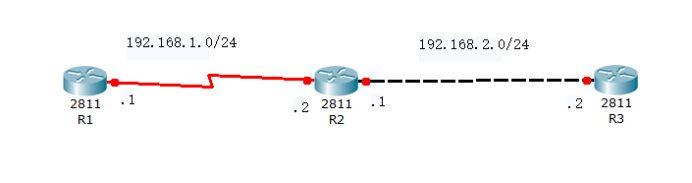
R1
enable 进入特权模式
config 进入全局模式
hostname R1 修改名称
interface s0/1 进入端口
physical-layer speed 64000 设置同步时钟
ip address 192.168.1.1 255.255.255.0 设置IP 地址
encapsulation ppp 设置封装协议
no shutdown 开启端口
exit 返回上一级
ip route 192.168.2.0 255.255.255.0 192.168.1.2 添加静态路由
R2
enable 进入特权模式
config 进入全局模式
hostname R2 修改名称
interface s0/2 进入端口
physical-layer speed 64000 设置同步时钟
ip address 192.168.1.2 255.255.255.0 设置IP地址
encapsulation ppp 设置封装协议
no shutdown 开启端口
interface g0/6 进入端口
ip address 192.168.2.1 255.255.255.0 设置IP地址
no shutdown 开启端口
R3
enable 进入特权模式
config 进入全局模式
hostname R3 修改名称
interface g0/6 进入端口
ip address 192.168.2.2 255.255.255.0 设置IP地址
no shutdown 开启端口
exit 返回上一级
ip route 192.168.1.0 255.255.255.0 192.168.2.1 添加静态路由
相关命令
ip route [目标网段] [子网掩码] [下一跳地址] 设置静态路由
ip route 0.0.0.0 0.0.0.0 [下一跳地址] 设置缺省路由