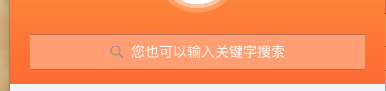
查了不少资料,都不太全,自己查看了apple文档,写了一份代码: 如下(只是界面):
1. 声明属性 @property (nonatomic, strong) UISearchController *searchController;
2. 调用方法: [self searchController];
3. 实现: - (UISearchController *)searchController {
if (!_searchController) {
_searchController = [[UISearchController alloc] initWithSearchResultsController:nil];
// searchBar
_searchController.searchBar.frame = CGRectMake(0, 0, kWidth - 40, 36);
_searchController.searchBar.placeholder = @"搜索";
_searchController.searchBar.barTintColor = [UIColor colorWithRed:1.00f green:0.62f blue:0.45f alpha:1.00f];
// searchBarTextField
UITextField *searchField = nil;
searchField = [[_searchController.searchBar.subviews objectAtIndex:0].subviews lastObject];
searchField.backgroundColor = [UIColor colorWithRed:1.00f green:0.62f blue:0.45f alpha:1.00f];
UIColor *color = [UIColor whiteColor];
searchField.attributedPlaceholder = [[NSAttributedString alloc] initWithString:@"您也可以输入关键字搜索" attributes:@{NSForegroundColorAttributeName:color}];
_searchController.view = [[UIView alloc] initWithFrame:CGRectMake(20, 352/2, kWidth - 40, 36)];
[_searchController.view addSubview:_searchController.searchBar];
_searchController.view.backgroundColor = [UIColor colorWithRed:1.00f green:0.62f blue:0.45f alpha:1.00f];
[self.tableHeaderView addSubview:self.searchController.view];
}
return _searchController;
}
4. 查看效果: